Conversi WordPress Theme
by Ninetheme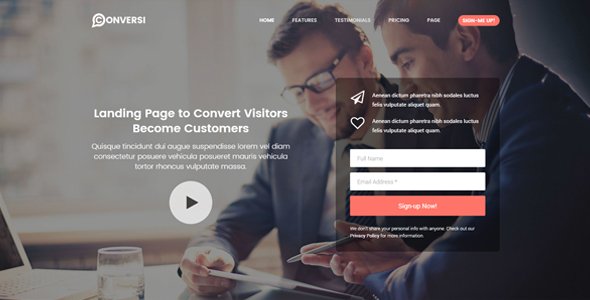
Stuck on your Conversi WordPress theme? Let's fix it.
No endless back-and-forth. Just send us the details and we'll get it done.
No obligation · Replies within 1 hour · Quote within 1 day
Setup · Customization · Bug fixes · WooCommerce integration
About Conversi WP Theme
Conversi is a WordPress theme built by Ninetheme, designed primarily for chatbot landing pages, SaaS products, and AI-driven tools. It ships with a clean, conversion-focused layout that suits startups and tech companies looking to present a digital product without heavy customisation out of the box.
The theme is built on Elementor, so page editing is visual and relatively accessible. It includes pre-built demo sections for features, pricing tables, testimonials, and call-to-action blocks. Typography and colour schemes are modern and minimal, keeping the focus on the product rather than decorative elements.
Ninetheme has a solid track record on ThemeForest, and Conversi reflects that experience. Documentation is included, and the theme follows standard WordPress conventions, making it straightforward to extend or hand off to a developer if needed.
Get matched with a Conversi developer in under one day
Tell us about your Conversi project. Small fixes, Conversi theme customization, or a full website build, whatever you need, we've got it covered.
We'll connect you to the right Conversi developers, define the scope, and get everything 100% clear.
You'll get one estimate, hire your preferred developer, and start collaborating.
Getting Conversi set up correctly from the start avoids a lot of rework later. A developer who knows the theme can configure Elementor efficiently, avoid bloated widget libraries, and build sections that actually perform on mobile and in search.
Through Codeable, you get matched with vetted WordPress developers who have proven experience with themes like Conversi. There is no bidding, no guesswork, and no obligation after the estimate. Projects are scoped clearly before any work begins, so you know exactly what you are paying for and what you will get.
Pros
- Built specifically for SaaS and AI tool landing pages, so the demo content maps closely to real product use cases
- Elementor-based editing means no shortcode dependency and a visual workflow most clients can manage themselves after handoff
- Includes a pricing table section with toggle support for monthly and annual billing out of the box
- Ninetheme provides documentation and ongoing theme updates through ThemeForest
- Clean, minimal design with good typographic defaults that do not require heavy overrides to look professional
Cons
- Elementor dependency means the theme is not useful without the page builder installed and active
- Demo import can bring in placeholder media and dummy content that takes time to strip and replace
- Limited layout variation compared to multipurpose themes, so non-SaaS use cases may feel like a stretch
- Some sections use absolute positioning that can behave unpredictably on mid-range screen widths without manual adjustment
- Theme options panel is functional but sparse, meaning more advanced global changes require custom CSS or child theme work
Who is Conversi for?
AI Chatbot Product Landing Page
Conversi was designed with AI and chatbot products in mind. The demo layout includes feature highlights, a hero section with app preview, and social proof blocks. A developer can wire this up to a real product demo, video, or live chat integration without restructuring the page from scratch.
SaaS Startup Homepage
SaaS startups need a fast, credible online presence. Conversi covers the standard SaaS page structure: headline, features grid, pricing, FAQs, and a CTA. With some copy and brand work, it reads as a polished product site. A developer can add gated trials, email capture, or CRM connections.
Digital Agency Service Page
Digital agencies offering automation, AI tooling, or chatbot builds can use Conversi as a service page template. The layout communicates technical credibility without looking overly corporate. Sections can be repurposed for case studies, service tiers, and team introductions with minimal Elementor work.
Tech Product Pre-Launch Page
Pre-launch pages need a single clear message and one action. Conversi’s hero and CTA sections work well for this. A developer can strip the layout back to a focused waitlist or beta signup page, connect it to an email platform, and have it live quickly without custom theme development.
Subscription Tool Marketing Site
Subscription-based tools need clear pricing communication. Conversi’s pricing table section supports toggle billing, feature comparisons, and highlighted tiers. Paired with WooCommerce or a payment gateway plugin, a developer can turn the marketing page into a functional sign-up flow.

Customizing Conversi
Conversi uses Elementor as its primary page builder, which means most visual changes happen directly on the canvas. You can adjust colours, fonts, section layouts, and spacing without touching code. The theme also includes its own options panel for global settings like logo, header style, and footer configuration.
Beyond the basics, a Conversi expert can help you restructure demo content to match your actual product, set up custom post types, integrate third-party tools like CRMs or email platforms, and fine-tune mobile responsiveness across all sections.
If you want a layout that goes beyond the demo or need custom functionality added, working with a developer familiar with both Ninetheme themes and Elementor will save time and avoid common pitfalls around widget conflicts and performance hits from over-stacked elements.
Recommended plugins for Conversi
Conversi pairs well with several common WordPress extensions. WooCommerce can be added if you need to sell subscriptions or digital products directly. For lead generation, plugins like WPForms or Gravity Forms slot in cleanly with Elementor widgets.
If you are running paid ads, connecting a caching plugin and optimising Core Web Vitals matters. See our WordPress performance services for help there. For organic traffic, structured on-page SEO is worth setting up early. Our WordPress SEO service covers that from the ground up.
Avoid stacking too many Elementor add-on packs. One focused plugin set keeps load times low and the site maintainable.
Not sure which plugins to use? This WordPress plugins directory covers the most popular options with reviews and setup guides.
Conversi common issues
Conversi demo import not working in WordPress
Demo import failures in Conversi usually come down to server memory limits, missing required plugins, or a PHP timeout. First, confirm Elementor and any required plugins listed in the theme documentation are installed and activated before importing. Increase max_execution_time and memory_limit in your php.ini or wp-config.php. If the import still fails, try importing via the WordPress importer rather than the one-click method. Our bug fixing service can handle this directly.
Conversi theme header not displaying correctly on mobile
Mobile header issues in Conversi often trace back to Elementor’s responsive controls overriding the theme’s own mobile styles. Check the hamburger menu settings in the theme options panel and confirm no custom CSS is conflicting. Use Elementor’s responsive preview to check each breakpoint. If the header layout collapses incorrectly on specific devices, padding and z-index values on the header wrapper usually need manual adjustment in the Elementor header template.
Elementor sections broken after Conversi update
After a Conversi or Elementor update, sections can lose styling or break layout if widget structures have changed. Start by regenerating the Elementor CSS from Dashboard > Elementor > Tools > Regenerate Files. Then clear all caches. If specific widgets are visually broken, check whether the Conversi-specific Elementor add-on is also up to date. Rolling back the update via a staging copy is a safe first step before applying fixes to a live site.
Conversi pricing table toggle not working
The pricing table toggle in Conversi relies on a small JavaScript function. If it stops working, the most common causes are a JavaScript conflict with another plugin, a caching plugin serving an old script version, or a jQuery version mismatch after a WordPress update. Open the browser console, check for JS errors, and identify the conflicting script. Disabling plugins one at a time in a staging environment usually isolates the cause quickly.
Conversi FAQ
Ninetheme updates Conversi periodically to maintain compatibility with current WordPress releases. Check the changelog on ThemeForest before updating to confirm the version you are running is tested against your WordPress version. It is always worth testing updates on a staging site before applying them to production.
Conversi works with the free version of Elementor for most page-building tasks. However, certain features like custom header or footer templates, popups, and form styling may benefit from Elementor Pro. The theme itself does not require a Pro licence, but some demo elements may use Pro widgets that will not display without it.
Conversi can be adapted for non-SaaS use cases, but the demo is clearly built around tech and AI products. Using it for, say, a service business or ecommerce store will require more structural rework. It is usable, but you would be working against the default layout rather than with it.
After purchasing and installing Conversi, navigate to Appearance > Import Demo Data inside your WordPress dashboard. Make sure all required plugins are active first. The importer will pull in pages, media, and settings from the demo. Server memory limits sometimes cause partial imports, so check your PHP configuration if anything looks incomplete.
Yes, you can migrate an existing site and apply the Conversi theme, but this is not a simple theme swap. Your existing content will not automatically match Conversi’s layout. A developer would need to rebuild pages using Conversi’s Elementor templates. Our WordPress migration service can handle the technical side of moving the site safely.
Hire a Conversi Developer
Need a Conversi developer to build, fix, or extend your site? Post your project and get a free estimate from a vetted WordPress specialist within 24 hours. No commitment required.
Whether you need a full build from the demo, a custom section added, or a specific integration set up, a developer matched through our process will have the relevant experience to do it properly. Get a free estimate and see what is possible.
You'll need a free Codeable account so developers can ask questions and send their quotes.