Coppola WordPress Theme
by Select-Themes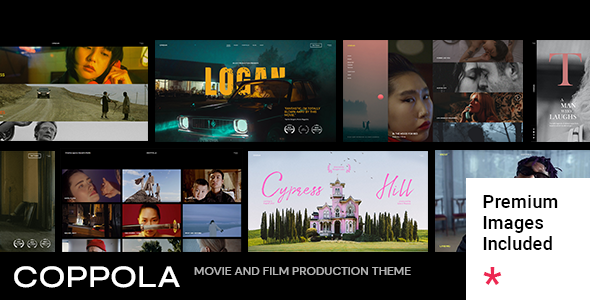
Stuck on your Coppola WordPress theme? Let's fix it.
No endless back-and-forth. Just send us the details and we'll get it done.
No obligation · Replies within 1 hour · Quote within 1 day
Setup · Customization · Bug fixes · WooCommerce integration
About Coppola WP Theme
Coppola is a WordPress theme built by Select-Themes, aimed at creative professionals who need a clean, portfolio-focused layout without a lot of setup overhead. It ships with a grid-based portfolio system, smooth transitions, and a minimal design language that lets the work speak for itself.
The theme is suited to photographers, designers, architects, and agencies that want a polished online presence without building from scratch. It supports custom post types for portfolio items, widgetized areas, and basic WooCommerce compatibility for selling prints or services.
Built on a solid foundation, Coppola keeps page structure simple. The options panel covers typography, colours, and layout settings. It is not a page builder theme, which is both a strength and a limitation depending on your workflow.
Get matched with a Coppola developer in under one day
Tell us about your Coppola project. Small fixes, Coppola theme customization, or a full website build, whatever you need, we've got it covered.
We'll connect you to the right Coppola developers, define the scope, and get everything 100% clear.
You'll get one estimate, hire your preferred developer, and start collaborating.
Coppola looks straightforward until you need it to do something specific. Custom grid layouts, filtered portfolio categories, multilingual support, or WooCommerce integration all require real WordPress knowledge. Guessing through theme files wastes time and creates problems down the line.
Through Codeable, you get access to vetted developers who have worked with themes like Coppola before. You post your project, get a clear estimate, and only move forward if the scope and price make sense. No risk, no obligation. Find the right developer through our WordPress development services.
Pros
- Clean, minimal design that works well for visual portfolios without heavy styling overrides
- Grid-based portfolio system with adjustable column counts built directly into the theme
- Customizer-based options make basic colour and font changes accessible without code
- Outputs semantic, well-structured HTML that is easier to work with for SEO and accessibility
- No page builder dependency keeps the theme lightweight and avoids plugin lock-in
Cons
- Template modifications require PHP knowledge since there is no drag-and-drop builder included
- WooCommerce styling is functional but needs manual CSS work to match the theme design closely
- The options panel is limited compared to multi-purpose themes, so advanced layouts need custom code
- Update frequency from Select-Themes has been inconsistent, which can create compatibility gaps with newer WordPress versions
- Mobile menu behaviour on some devices requires CSS adjustments that are not covered in the documentation
Who is Coppola for?
Photography Portfolio
Coppola’s full-width image support and grid layout make it a strong choice for photographers. Portfolio items display large, transitions stay clean, and the minimal chrome keeps the focus on the images. A developer can configure category filtering so visitors browse by project type, location, or style without reloading the page.
Architecture Firm Website
Architecture firms need a site that mirrors their attention to detail. Coppola’s structured grid and whitespace-heavy design match that expectation. Custom post types allow each project to carry its own data, floor plans, photography, and project description, while the overall layout stays consistent and professional.
Graphic Design Agency
Design agencies often need a portfolio that can group work by client, medium, or industry. Coppola handles this well with taxonomy-based filtering. A Coppola developer can extend this further, adding case study templates, client testimonials, or a services page that slots into the existing design without visual friction.
Interior Design Studio
Interior design studios rely on high-quality imagery and project storytelling. Coppola supports both. Individual project pages can showcase before-and-after photography, material specifications, and room-by-room breakdowns. The layout stays clean regardless of how much content each project carries, which keeps the site feeling consistent.
Freelance Illustrator
Illustrators need a fast, image-first portfolio with minimal distractions. Coppola delivers that. The grid can display work at different scales, and the hover states add interaction without being heavy. Adding a shop via WooCommerce to sell prints or digital downloads is possible with some developer configuration work.

Customizing Coppola
Out of the box, Coppola gives you control over fonts, colour schemes, header layout, and portfolio grid columns. These settings live in the WordPress Customizer, so changes preview in real time.
Beyond the basics, customisation gets more technical. Adjusting the portfolio item layout, modifying hover effects, or restructuring the homepage template usually means editing PHP templates or writing custom CSS. If you are not comfortable there, the work stalls fast.
A Coppola expert can handle these changes cleanly, without breaking the theme’s update path or introducing code that conflicts later. Whether you need a bespoke portfolio filter, a custom project detail page, or a specific grid behaviour, working with someone who knows the theme saves significant time and avoids common mistakes.
Recommended plugins for Coppola
Coppola works with most standard WordPress plugins. WooCommerce integration covers basic product listings, though the styling needs some adjustment to match the theme’s aesthetic. Contact Form 7 and Gravity Forms both work without issues.
For SEO, the theme outputs clean markup, but you will still want a dedicated plugin. Pairing it with proper WordPress SEO setup makes a real difference in search visibility. On the performance side, Coppola’s image-heavy portfolio layouts benefit from caching, a CDN, and image optimisation — all covered under a solid WordPress performance service.
Not sure which plugins to use? This WordPress plugins directory covers the most popular options with reviews and setup guides.
Coppola common issues
Coppola theme portfolio grid not displaying correctly
Grid display problems in Coppola are usually caused by a JavaScript conflict with another plugin, a missing image size, or a column setting that does not match the number of portfolio items published. Start by deactivating plugins one at a time to isolate a conflict. Check that WordPress has regenerated thumbnails after any image size changes using a plugin like Regenerate Thumbnails. If the issue persists, a developer can audit the theme’s portfolio template directly. Visit our WordPress bug fixing service for hands-on help.
Coppola WordPress theme not compatible with latest WordPress version
Select-Themes has not always kept pace with WordPress core updates, so compatibility issues do appear. Common symptoms include broken admin notices, deprecated function warnings, or layout shifts in the frontend. A temporary fix is to suppress errors in wp-config.php, but the real solution is updating or patching the theme files. A developer familiar with WordPress internals can update the affected functions without breaking your customisations. Check WordPress maintenance support if you need ongoing compatibility monitoring.
Coppola theme header logo not showing or too small
Logo display issues in Coppola are typically tied to the image dimensions set in the Customizer or a theme-specific logo size that conflicts with your uploaded file. Go to Appearance, then Customizer, then Site Identity and re-upload the logo at a higher resolution. If the theme crops it unexpectedly, you may need to adjust the logo dimensions defined in functions.php. A retina-ready logo at 2x the displayed size usually resolves sharpness problems on high-DPI screens.
Coppola theme slow loading on mobile
Coppola’s portfolio layouts load multiple large images, which hurts mobile performance if no optimisation is in place. Start by installing an image optimisation plugin and enabling lazy loading. A caching plugin with mobile-specific rules helps significantly. If you are serving the same full-resolution images to mobile visitors, that alone can double load time. A full audit covering image delivery, render-blocking scripts, and server response time is the most reliable fix. See our WordPress performance service for a structured approach.
Coppola FAQ
Yes, Coppola works well for photography. The grid layout handles image-heavy portfolios cleanly, and the minimal design keeps focus on the photos rather than the interface. Full-width featured images are supported on project pages. For professional photographers, the main additions you will likely need are a lightbox plugin and some performance optimisation to handle large image files efficiently.
Coppola has basic WooCommerce compatibility. Standard product pages, cart, and checkout function without errors. The visual styling of WooCommerce elements does not match the theme perfectly out of the box, so some custom CSS work is needed to align buttons, product grids, and form fields with Coppola’s design. A developer can handle this in a few hours depending on the scope of your shop.
Coppola supports portfolio categories through WordPress taxonomies, but the visual filter, the clickable tabs that sort work without a page reload, requires JavaScript and is not always enabled by default in every version of the theme. In some cases it needs to be configured in the theme options. If your version does not include it, a developer can implement isotope-based filtering that matches the existing design.
Moving an existing WordPress site to the Coppola theme is possible, but it involves more than switching the active theme. Your content stays intact, but page layouts, widget areas, and any custom post types from your previous theme will need to be rebuilt inside Coppola’s structure. A proper WordPress migration plan ensures nothing is lost and the transition does not break live content.
Support and update activity from Select-Themes has been inconsistent in recent years. The theme still functions on current WordPress versions for most use cases, but some users have reported minor compatibility issues with newer releases. If you are relying on Coppola for a live site, it is worth having a developer review the theme files and patch anything that conflicts with your current WordPress and PHP version.
Hire a Coppola WordPress Developer
If your Coppola site needs custom work, a fix, or a full build, you do not have to figure it out alone. Post your project and get matched with a developer who knows WordPress and has experience with portfolio themes like Coppola. The estimate is free and there is no obligation to hire.
Get a free estimate and have a developer review your project within 24 hours.
You'll need a free Codeable account so developers can ask questions and send their quotes.