Core WordPress Theme
by ThemeGoods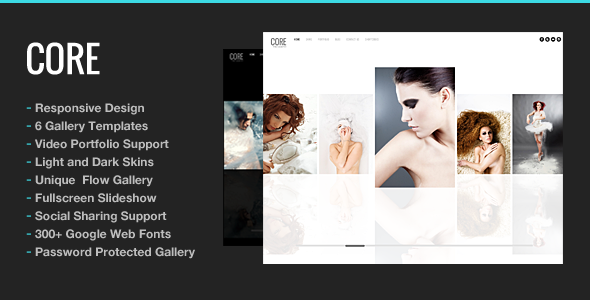
Stuck on your Core WordPress theme? Let's fix it.
No endless back-and-forth. Just send us the details and we'll get it done.
No obligation · Replies within 1 hour · Quote within 1 day
Setup · Customization · Bug fixes · WooCommerce integration
About Core WP Theme
Core is a multipurpose WordPress theme built by ThemeGoods. It ships with a drag-and-drop page builder, a library of pre-built demo sites, and a header/footer builder that gives you direct control over layout without touching code. The theme targets agencies, freelancers, and businesses that want a polished site without a long setup process.
Under the hood, Core uses a custom framework that handles typography, color schemes, and section spacing through a visual options panel. WooCommerce support is baked in, and the theme plays well with popular plugins like Yoast SEO and Contact Form 7. Page speed depends heavily on how you configure image loading and script management, but the base theme is reasonably lean. If you need a flexible starting point that covers most use cases without heavy plugin dependency, Core is a solid choice from ThemeGoods.
Get matched with a Core developer in under one day
Tell us about your Core project. Small fixes, Core theme customization, or a full website build, whatever you need, we've got it covered.
We'll connect you to the right Core developers, define the scope, and get everything 100% clear.
You'll get one estimate, hire your preferred developer, and start collaborating.
Getting Core set up is one thing. Getting it to perform exactly how your business needs is another. A vetted Core developer on Codeable can handle custom layouts, WooCommerce modifications, plugin conflicts, and performance tuning without the guesswork. Codeable only works with experienced WordPress specialists, so you’re not rolling the dice on who picks up your project. Every project starts with a free estimate and no obligation to proceed.
Pros
- Header and footer builder included with no extra plugin needed
- Multiple pre-built demo sites importable in one click
- Works with Elementor and the theme's own shortcode system
- WooCommerce templates are included and match the theme design
- Regular updates from ThemeGoods with active support documentation
Cons
- Options panel has a steep learning curve for non-technical users
- Demo content imports can overwrite existing settings without warning
- Some shortcodes are theme-specific, creating lock-in if you switch themes
- Page builder output can add excess markup that needs cleanup for performance
- Mobile customization options are more limited than desktop controls
Who is Core for?
Creative Agencies
Core’s demo library includes agency-specific layouts with case study sections, team grids, and service pages. A Core specialist can adapt these to match your brand identity quickly. The header builder handles the kind of transparent-over-hero navigation that agency sites commonly need, without requiring a separate plugin or custom CSS workaround.
WooCommerce Stores
Core includes WooCommerce-compatible templates for product pages, cart, and checkout. A Core developer can adjust these to match a specific brand style or add custom product fields. The theme handles both simple and variable products cleanly, and the layout options give store owners control over product grid density and sidebar placement.
Freelance Portfolios
The theme’s portfolio post type and filterable grid make it a practical choice for freelancers showcasing work. A Core expert can configure project categories, custom lightbox behavior, and single project layouts. Combined with a minimal header setup, the result is a clean portfolio site that loads fast and keeps focus on the work itself.
Corporate Business Sites
Core’s corporate demo layouts include services sections, testimonials, team pages, and contact forms. These work as a starting point that a Core developer can adapt to internal brand guidelines. The page builder allows section-level control over padding and background colors, which matters when matching strict corporate design systems.
Digital Marketing Consultants
Consultants who rely on lead generation benefit from Core’s flexible landing page layouts and call-to-action sections. A Core specialist can set up conversion-focused pages with custom form integrations, feature comparison tables, and pricing sections. The theme’s SEO-friendly structure also supports content marketing strategies built around organic traffic.

Customizing Core
Core gives you a visual customizer panel with controls for fonts, colors, spacing, and layout widths. The header builder handles sticky headers, transparent overlays, and mobile menus independently, which cuts down the need for separate header plugins.
For deeper changes, a Core expert would work directly with the theme’s custom CSS fields or create a child theme to override template files safely. ThemeGoods uses its own shortcode system alongside Elementor compatibility, so customization paths vary depending on which builder you’re using. A Core specialist can also wire up custom post types, adjust WooCommerce templates, or integrate third-party APIs without breaking theme update compatibility. If the out-of-the-box options aren’t enough, hiring a Core developer to extend the framework is straightforward given how the theme is structured.
Recommended plugins for Core
Core works well with caching plugins like WP Rocket and LiteSpeed Cache. Pairing these with proper image optimization makes a measurable difference in load times. For more structured speed improvements, see our WordPress performance services.
On the SEO side, Core outputs clean heading structures and supports schema markup through plugins like Rank Math. If you want a full technical SEO audit alongside your Core build, our WordPress SEO optimisation service covers site-wide improvements beyond what any theme handles on its own.
Not sure which plugins to use? This WordPress plugins directory covers the most popular options with reviews and setup guides.
Core common issues
Core theme demo import not working
Demo import failures in Core are usually caused by max upload size limits, PHP memory limits, or server timeout settings. Check your php.ini values for upload_max_filesize, post_max_size, and max_execution_time. Increasing these in your hosting control panel resolves the issue in most cases. If the import stalls mid-process, clear the database of partial content before retrying. For persistent failures, a developer can run the import manually via WP-CLI.
Core theme header builder not saving changes
If Core’s header builder saves visually but reverts on page reload, the most common cause is a JavaScript conflict with another plugin or a caching layer that’s serving a stale version. Disable caching plugins temporarily and test again. Also check the browser console for JS errors that might prevent the save request from completing. If the issue persists after clearing cache and disabling conflicting plugins, our WordPress bug fixing service can isolate the conflict.
Core theme Elementor sections not displaying correctly
Core and Elementor can conflict when the theme’s own layout system overlaps with Elementor’s container widths. This usually shows up as extra padding or sections that don’t stretch full-width. Set the Elementor page template to Canvas or Full Width in the page settings. If the issue is isolated to specific sections, check whether Core’s section settings are adding a fixed container width that overrides Elementor’s layout. A Core developer can adjust the theme’s CSS to align both systems.
Core theme WooCommerce product page layout broken
Broken WooCommerce product page layouts in Core are often caused by a missing or outdated WooCommerce template override. After a WooCommerce update, Core’s custom templates may no longer match the plugin’s expected structure. Go to WooCommerce > Status > Tools and run the template check. Outdated templates will be flagged. A Core specialist can update these template files to match the current WooCommerce version without losing your customizations.
Core theme mobile menu not opening
A mobile menu that won’t open in Core usually points to a JavaScript error or a conflict with a script loaded by another plugin. Open your browser’s developer console on mobile emulation and check for errors when tapping the menu icon. Also verify that Core’s mobile menu settings in the header builder are configured correctly, specifically the breakpoint setting. If the toggle element exists in the DOM but doesn’t respond, a JS conflict is the likely cause. Our WordPress bug fixing service can trace and resolve these conflicts.
Core theme custom CSS not applying
Custom CSS added through Core’s options panel or the WordPress Customizer can fail to apply if a caching plugin is serving a compiled stylesheet that doesn’t include your additions. Always clear all caching layers after adding CSS. Also confirm you’re adding CSS in the correct field. Core has both a global custom CSS field and page-level CSS options. If targeting a specific element, use your browser’s inspector to verify the selector specificity. Adding !important is a quick test, not a permanent fix.
Core theme page speed slow after demo import
Demo imports in Core pull in large image files, sliders, and sometimes unused page builder content, all of which add weight to your site. After import, audit and delete demo pages you’re not using, compress images with a plugin like ShortPixel, and configure a caching plugin. Disable any demo-specific plugins that came bundled. If Core’s page builder generated excessive inline styles or render-blocking scripts, a developer can clean up the output and configure script deferral to improve load time.
Core theme update broke my layout
Layout breaks after a Core theme update are almost always caused by changes to template files or CSS class names that conflict with customizations made directly to theme files. This is why child themes matter. If you modified the parent theme directly, those changes are gone after an update. Going forward, move all customizations to a child theme. To fix the current breakage, compare the previous theme version with the new one using a diff tool and re-apply your changes to the updated files or child theme. Our WordPress bug fixing service handles post-update repairs.
Core theme sticky header not working on scroll
Core’s sticky header requires the correct header style to be selected in the header builder. Not all header layouts support the sticky option. Check the header builder settings under the Sticky tab and confirm the sticky behavior is enabled and the offset is set correctly. Also check whether a CSS position or z-index property from another plugin is interfering with the fixed positioning. Test with plugins disabled one at a time if the header setting is correctly configured but the behavior still doesn’t trigger.
Core theme images not loading on homepage
Images failing to load on Core’s homepage are typically caused by incorrect image URLs after a site migration, a CDN misconfiguration, or broken lazy loading behavior. Open the browser console and check for 404 errors on image requests. If URLs contain the wrong domain, run a search-replace on the database using WP-CLI or a plugin like Better Search Replace. If lazy loading is skipping images in a slider or hero section, disable lazy load for above-the-fold images in your image optimization plugin settings.
Core FAQ
Core has a learning curve. The header builder, options panel, and demo import system are powerful but not immediately obvious to first-time users. Beginners can get a site up using a pre-built demo, but customizing beyond that requires time with the documentation. Non-technical users who need a specific result quickly are better off hiring a Core specialist rather than learning the framework from scratch.
Yes. Core has Elementor compatibility built in. You can use Elementor as your primary page builder on Core-based pages. Some of Core’s own shortcodes and layout options will still apply at the global level, such as the header and footer. For full-width Elementor layouts, set the page template to Full Width to remove Core’s default container constraints.
Create a new folder in wp-content/themes/ with a name like core-child. Add a style.css with the correct header referencing the parent theme using Template: core. Add a functions.php that enqueues the parent stylesheet. Activate the child theme in WordPress. All your customizations go in the child theme so updates to the Core parent theme don’t overwrite your changes.
Core includes WooCommerce template files that match the theme’s visual design. Shop pages, product grids, single product layouts, cart, and checkout pages are all covered. The theme handles both simple and variable products. Some advanced WooCommerce customizations, like custom checkout fields or subscription products, may require a Core developer to adjust the template files or add plugin-specific styling.
You can use Core with the WordPress block editor or write basic HTML in text widgets, but most of the demo layouts assume you’re using the built-in page builder or Elementor. If you avoid the page builder entirely, you’ll have less layout flexibility but also less bloat in your page output. For simple sites like blogs or single-service pages, Core works fine without relying on the builder.
Start by removing unused demo pages and compressing images. Install a caching plugin like WP Rocket and configure it to minify CSS and JavaScript. Defer non-critical scripts. Core’s page builder can generate inline styles, so a cleanup pass by a developer makes a noticeable difference. For structured performance improvements beyond basic caching, see our WordPress performance service.
ThemeGoods actively maintains Core and releases updates that address compatibility with new WordPress and WooCommerce versions. Update frequency varies but the theme has a track record of ongoing support. Always back up before updating and test updates on a staging environment first, especially if you’ve made template customizations. Using a child theme protects your changes from being overwritten during updates.
Migrating a Core theme site follows the standard WordPress migration process. Export the database, move the files, update the wp-config.php with new database credentials, and run a search-replace on the database to update URLs. Core doesn’t add any unusual migration complexity, but if your site uses absolute URLs in page builder content, the search-replace step is important. For a managed move, our WordPress migration service handles this reliably.
Core works well with WP Rocket for caching, Yoast or Rank Math for SEO, Contact Form 7 or WPForms for forms, and ShortPixel or Imagify for image compression. On the WooCommerce side, standard extensions like WooCommerce Subscriptions and WPML for multilingual support are compatible. Avoid stacking multiple page builders alongside Core’s own builder, as that increases conflict risk.
On Codeable, Core developer rates typically fall between $70 and $120 per hour depending on the scope and complexity of the work. Simple tasks like fixing a layout bug or adjusting styling cost less than building a custom feature from scratch. You can post your project and get a free estimate with no obligation to hire. The estimate gives you a clear picture of cost before committing.
Hire a Core WordPress Developer
Whether you need a full site built on Core, a specific feature added, or a bug tracked down, a dedicated Core expert can get it done properly. Projects are handled through Codeable, where developers are pre-vetted and estimates are free. Get a free estimate and describe what you need. You’ll hear back within 24 hours with no obligation to hire.
You'll need a free Codeable account so developers can ask questions and send their quotes.