Cosmetsy WordPress Theme
by KlbTheme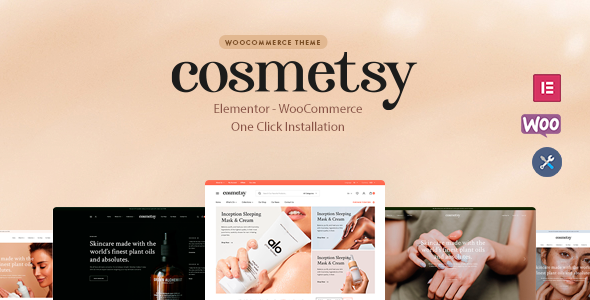
Stuck on your Cosmetsy WordPress theme? Let's fix it.
No endless back-and-forth. Just send us the details and we'll get it done.
No obligation · Replies within 1 hour · Quote within 1 day
Setup · Customization · Bug fixes · WooCommerce integration
About Cosmetsy WP Theme
Cosmetsy is a WooCommerce theme built by KlbTheme, designed specifically for beauty, cosmetics, and skincare stores. It ships with multiple pre-built homepage layouts, product page styles, and a clean visual language that suits high-end beauty brands.
The theme supports Ajax cart, wishlist functionality, product quick view, and a mega menu out of the box. It integrates tightly with WooCommerce and includes KlbTheme’s own plugin bundle for extended shop features like brand filters, product tabs, and promotional banners.
Cosmetsy is built on a custom framework rather than a page builder, which keeps page weight low but limits drag-and-drop flexibility. Setup requires some familiarity with WordPress and WooCommerce. It suits store owners who want a polished beauty aesthetic without building from scratch.
Get matched with a Cosmetsy developer in under one day
Tell us about your Cosmetsy project. Small fixes, Cosmetsy theme customization, or a full website build, whatever you need, we've got it covered.
We'll connect you to the right Cosmetsy developers, define the scope, and get everything 100% clear.
You'll get one estimate, hire your preferred developer, and start collaborating.
Cosmetsy has its own plugin ecosystem and a non-standard customization layer. That means generic WordPress advice often does not apply directly. A specialist who knows KlbTheme’s architecture will spot problems faster, build cleaner solutions, and keep your store stable through updates.
Through Codeable, you can connect with vetted developers who have hands-on experience with WooCommerce beauty stores and themes like Cosmetsy. Post your project, get a free estimate, and only move forward if the fit is right.
Pros
- Includes multiple pre-built beauty and cosmetics homepage layouts ready to import
- Built-in Ajax cart, wishlist, and quick view without needing extra plugins
- Product brand filter and mega menu included via KlbTheme's own plugin
- Clean design aesthetic suited to premium skincare and makeup brands
- Reasonably lightweight compared to page-builder-based WooCommerce themes
Cons
- Relies on KlbTheme's proprietary plugin bundle, creating dependency risks if support drops
- No native Elementor or Gutenberg block support, limiting no-code customization
- Documentation is thin and support response times on ThemeForest can be slow
- Demo import can be unreliable, sometimes requiring manual content setup
- Template overrides require PHP knowledge, making deep layout changes difficult for beginners
Who is Cosmetsy for?
Skincare Brand Store
Cosmetsy’s clean product card layouts and brand-filter support make it a strong fit for skincare brands with multiple product lines. You can organize serums, moisturizers, and treatments by ingredient or skin type using the built-in filter and category structure. The minimal design keeps product photography front and center.
Makeup and Cosmetics Retailer
For makeup retailers with large catalogs, Cosmetsy handles product variations well. Shade swatches, quick view, and the mega menu help customers browse without losing context. The theme’s promotional banner slots are useful for running seasonal sales or highlighting new color collections.
Beauty Subscription Box
Cosmetsy can support a subscription box model when paired with WooCommerce Subscriptions. The homepage layouts work well for showcasing box contents and past curation. You may need developer help to customize the subscription flow and the product detail page to match your brand story.
Hair Care Products Shop
Hair care stores with product lines segmented by hair type benefit from Cosmetsy’s filtering and category display options. The theme handles multi-image product galleries cleanly, which matters when customers need to see product texture and packaging detail before purchasing.
Salon and Spa Product Sales
Salons and spas selling retail products alongside services can use Cosmetsy for the product side of their business. The aesthetic matches high-end wellness branding. Adding a booking plugin alongside the WooCommerce store is possible but typically requires custom integration work from a developer.

Customizing Cosmetsy
Customizing Cosmetsy goes beyond changing colors and fonts. The theme uses a combination of WordPress Customizer options and its own KlbTheme plugin settings panel. Layout adjustments, header styles, footer columns, and product card designs are all controlled from these panels.
For more specific changes, such as custom checkout flows, modified product page layouts, or brand-specific typography, you will need to work with CSS or PHP template overrides. A Cosmetsy expert can handle these modifications cleanly, without breaking theme update compatibility.
If you need a homepage that looks nothing like the demo, custom category page designs, or specific WooCommerce behavior tailored to your products, hiring a Cosmetsy developer saves considerable time and prevents costly mistakes during build.
Recommended plugins for Cosmetsy
Cosmetsy works well with standard WooCommerce extensions. Popular additions include WooCommerce Subscriptions for beauty boxes, WooCommerce Product Bundles for gift sets, and YITH plugins for wishlists and comparison tables.
For store performance, caching plugins like WP Rocket pair well with Cosmetsy, though image optimization and script management need proper configuration to avoid conflicts with KlbTheme’s plugin bundle. Learn more about WordPress performance optimization and WordPress SEO to get the most from your Cosmetsy store.
Not sure which plugins to use? This WordPress plugins directory covers the most popular options with reviews and setup guides.
Cosmetsy common issues
Cosmetsy demo import not working
Demo import failures in Cosmetsy usually come from server memory or execution time limits. Check that your host allows at least 256MB of memory and a 300-second max execution time. If the import times out mid-process, you may end up with partial content. In that case, reset the site and try again, or import XML content manually. A WordPress bug fixing specialist can handle this cleanly if the import keeps failing.
Cosmetsy mega menu not showing on mobile
Cosmetsy’s mega menu relies on KlbTheme’s plugin and specific JavaScript initialization. On mobile, conflicts with caching plugins or minified JS are a common cause of the menu not rendering. Disable JS minification for KlbTheme assets first. If the issue persists, check whether a plugin is deferring scripts that the menu depends on. Clear all caches after any change and test across devices.
KlbTheme plugin conflict with WooCommerce update
KlbTheme’s plugin bundle sometimes lags behind WooCommerce core updates by a few versions. After a WooCommerce update, broken cart behavior, missing product tabs, or broken quick view are the most common symptoms. Check ThemeForest for a plugin update. If none is available, you may need a developer to patch the conflict manually until an official fix is released. Consider ongoing WordPress maintenance to catch these issues early.
Cosmetsy product page layout broken after update
Cosmetsy product page layout breaks after updates are usually caused by overridden WooCommerce template files falling out of sync. Go to WooCommerce, Status, System Status and look for outdated templates. Either update the override files manually to match the new WooCommerce version or remove the overrides if you no longer need them. If the layout is custom, a developer will need to reconcile the changes without losing your modifications.
Cosmetsy FAQ
KlbTheme generally updates Cosmetsy to maintain WooCommerce compatibility, but updates can lag by a few weeks after major WooCommerce releases. Before updating WooCommerce on a live store, check the Cosmetsy changelog on ThemeForest and test on a staging site first. Compatibility issues most often affect the cart, quick view, and product tabs.
Cosmetsy is not built for Elementor. It uses its own customization layer and template structure. You can technically install Elementor alongside it, but editing Cosmetsy-specific sections like the header, mega menu, and product pages through Elementor is not supported and will likely cause conflicts. For layout changes, a developer working directly with the theme files is the better path.
Technically yes, but the design language is built for beauty and wellness. Product card styles, banner layouts, and typography choices are all tuned for cosmetics stores. Using it for unrelated niches like electronics or services would require significant restyling. A general-purpose WooCommerce theme would be a more practical starting point for non-beauty products.
KlbTheme plugins bundled with Cosmetsy are typically updated through a token-based system linked to your ThemeForest purchase. Go to Appearance, Install Plugins, or check the theme’s settings panel for an update notification. If automatic updates are not working, you can download the latest plugin version from ThemeForest and upload it manually via Plugins, Add New, Upload.
Migrating an existing WooCommerce store to Cosmetsy is possible. Products, orders, and customer data transfer cleanly since they live in the database. The work involves rebuilding your homepage layouts, category pages, and product page structure within Cosmetsy’s framework. Learn more about WordPress migration services if you need help managing the full transition.
Hire a Cosmetsy Developer
Whether you need a full Cosmetsy store build, a specific feature added, or a layout that goes beyond the demo designs, working with a specialist makes the difference. Our developers on Codeable are vetted and experienced with WooCommerce beauty stores.
Get a free estimate with no obligation. Describe your project and get matched with a Cosmetsy expert within 24 hours. 100% risk-free.
You'll need a free Codeable account so developers can ask questions and send their quotes.