CouponXL WordPress Theme
by pebas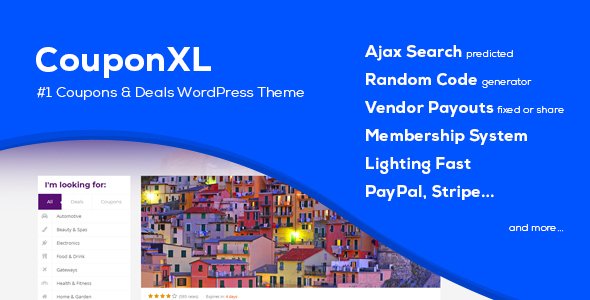
Stuck on your CouponXL WordPress theme? Let's fix it.
No endless back-and-forth. Just send us the details and we'll get it done.
No obligation · Replies within 1 hour · Quote within 1 day
Setup · Customization · Bug fixes · WooCommerce integration
About CouponXL WP Theme
CouponXL is a WordPress coupon and deals theme built by pebas. It ships with a front-end coupon submission system, user voting, category filtering, and a built-in affiliate link manager. The theme targets sites that aggregate discount codes, cashback offers, or deal listings across any niche.
The layout is optimised for coupon discovery. Visitors can search by store, category, or popularity. Expiry countdowns, click-to-reveal codes, and vote-up mechanics are all included out of the box. There is also a built-in points and rewards system to encourage repeat visits and user submissions.
CouponXL is sold on CodeCanyon and receives regular updates from pebas. It works with most standard WordPress setups and does not require page builders, keeping the codebase relatively lean compared to multipurpose themes.
Get matched with a CouponXL developer in under one day
Tell us about your CouponXL project. Small fixes, CouponXL theme customization, or a full website build, whatever you need, we've got it covered.
We'll connect you to the right CouponXL developers, define the scope, and get everything 100% clear.
You'll get one estimate, hire your preferred developer, and start collaborating.
CouponXL has its own options framework, custom database tables for coupon data, and a points system that sits outside standard WordPress conventions. Generic WordPress developers often spend hours just mapping the data structure before writing a single line of code.
A vetted CouponXL developer through Codeable already knows the theme. They can fix bugs, add features, or rebuild sections without the learning curve. Codeable screens every developer before approval, so you are not rolling the dice on quality.
Pros
- Front-end coupon submission with user accounts works out of the box, no third-party plugin needed
- Built-in points and rewards system encourages repeat visits and community submissions
- Click-to-reveal code mechanic tracks affiliate link clicks natively
- Expiry countdown timers and deal status labels require no extra setup
- Dedicated store and brand profile pages are included without additional plugins
Cons
- Options panel is not Customizer-based, which breaks live preview workflows
- Documentation is thin on advanced hooks and filter references
- Default mobile styles on coupon cards need CSS fixes for smaller screens
- Automated coupon imports require a separate paid plugin like WP All Import
- The built-in search does not support fuzzy matching, limiting discovery on large databases
Who is CouponXL for?
General Coupon Aggregator
CouponXL is built for sites that aggregate codes and deals from hundreds of retailers. The store directory, category filtering, and vote system handle large coupon volumes without custom development. A CouponXL developer can extend the import pipeline to pull live feeds from affiliate networks like CJ or Awin automatically.
Single-Niche Deal Site
Sites focused on a single vertical, such as travel, software, or fashion, benefit from CouponXL’s category and tag system. A CouponXL specialist can rework the homepage to highlight one niche, add custom meta fields for deal-specific data like discount percentage tiers, and build filtered archive pages that outperform default layouts.
Cashback and Affiliate Portal
The theme’s click-tracking and affiliate link manager make it a workable base for cashback portals. A CouponXL expert can add custom payout tracking fields, connect to affiliate network APIs, and build a user dashboard that shows pending and confirmed cashback balances without a full custom plugin build.
Local Business Discount Directory
Local deal sites can use CouponXL’s store profiles and geo-filtering to list discounts by city or region. A CouponXL developer can integrate location-based search using a plugin like WP Store Locator, add map embeds to store profiles, and adjust submission forms to capture business address data cleanly.
Brand or Store Loyalty Hub
Brands running their own loyalty or VIP discount program can use CouponXL’s points system as a foundation. A CouponXL specialist can lock premium coupon tiers behind point thresholds, build tiered membership levels, and customise the rewards dashboard to match brand identity without switching to a dedicated membership plugin.

Customizing CouponXL
CouponXL ships with a theme options panel where you can adjust colours, fonts, logo, homepage layout, and sidebar positions. Most changes are handled through the admin panel rather than the Customizer, which takes some getting used to if you are coming from other themes.
Deeper customisation, such as custom coupon card layouts, modified submission forms, or integration with external affiliate networks, requires PHP and CSS work. A CouponXL expert can also set up automated coupon imports via the WP All Import plugin or build custom post type extensions that extend the default listing structure.
If you need a CouponXL specialist to restyle category pages, add store profile sections, or wire up a WooCommerce cashback layer, hiring a developer familiar with pebas themes saves significant time compared to learning the theme’s custom hooks and filters from scratch.
Recommended plugins for CouponXL
CouponXL works well with a focused set of plugins. For performance, caching plugins like WP Rocket or LiteSpeed Cache pair cleanly with the theme, and image optimisation is worth adding early given the store logo and deal banner volume typical coupon sites carry. See our WordPress performance service for a full setup.
For coupon sites targeting organic search, structured data for offers and products matters. A CouponXL developer can implement schema markup for deals and integrate a plugin stack that improves crawlability. Our WordPress SEO optimisation service covers this in detail.
Not sure which plugins to use? This WordPress plugins directory covers the most popular options with reviews and setup guides.
CouponXL common issues
CouponXL coupon submission form not sending email notifications
CouponXL email notifications rely on WordPress’s wp_mail() function. If emails are not arriving, the most common cause is a missing SMTP configuration. Install an SMTP plugin like WP Mail SMTP and connect it to a transactional mail service. Also check that the admin email in Settings > General matches an active inbox. If the issue persists after SMTP setup, a developer can audit the theme’s notification hooks for conflicts.
CouponXL points not updating after coupon vote
The points system in CouponXL writes to a custom database table. If points are not updating after a vote, first check for JavaScript errors in the browser console as the vote action is AJAX-based. A plugin conflict or an overly aggressive caching rule that serves stale AJAX responses is a common culprit. Clear all caches and test in an incognito window. If the problem continues, our WordPress bug fixing service can trace the database write failure directly.
CouponXL click counter not recording affiliate link clicks
CouponXL’s click counter increments via an AJAX call tied to the affiliate link redirect. If counts are not recording, check whether a caching plugin is intercepting the redirect URL before the counter fires. Exclude the /go/ or redirect slug from your cache rules. Also confirm the couponxl_click action is not being blocked by a security plugin’s request filtering. A CouponXL developer can add server-side logging to isolate exactly where the count is being dropped.
CouponXL expiry date countdown showing wrong time
Countdown timers in CouponXL rely on the expiry date stored per coupon and the server timezone set in WordPress Settings > General. A mismatch between server timezone and the timezone set in the theme options panel causes the display offset. Align both to the same timezone, then resave the affected coupons to force a cache refresh. If countdowns still read incorrectly, check whether a caching layer is serving a stale page with an old timer value baked in.
CouponXL store logo not displaying on category page
Store logos in CouponXL are assigned per store post type. If a logo is not appearing on the category page, open the store profile in the WordPress admin and confirm the logo attachment is still linked. Image attachments can become detached after a media library migration or a plugin that cleans orphaned attachments. Also check that the category template is pulling the correct store meta key. A WordPress bug fix can restore broken attachment references in bulk if multiple logos are missing.
CouponXL search returning no results after update
CouponXL uses a custom search that queries coupon post types specifically. After a major update, the search rewrite rules sometimes need to be flushed. Go to Settings > Permalinks and click Save Changes without making any edits. This regenerates the rewrite rules. If search still returns nothing, check whether the update changed the post type slug and whether any indexed data still references the old slug.
CouponXL front-end submission showing blank page after submit
A blank page after front-end coupon submission usually points to a PHP error being suppressed. Enable WordPress debug mode by adding WP_DEBUG and WP_DEBUG_LOG to wp-config.php, then resubmit the form and check the debug log. Common causes include a nonce verification failure, a missing required field that causes a fatal error in the save routine, or a redirect to a page that no longer exists. Our WordPress bug fixing service handles this type of silent failure regularly.
CouponXL coupon code reveal button not working
The click-to-reveal button in CouponXL depends on a small JavaScript function. If the button does nothing when clicked, open the browser console and look for a JS error on that page. Common causes include a jQuery conflict from another plugin loading a second jQuery version, or a content security policy header blocking inline scripts. Switching to footer script loading for conflicting plugins usually resolves it. If the theme’s own JS file is minified incorrectly by an optimisation plugin, exclude it from JS minification in your caching plugin settings.
CouponXL homepage slider not loading on mobile
The homepage slider in CouponXL uses a JavaScript carousel library. On mobile, the most frequent issue is a CSS overflow rule hiding the slider container. Open browser dev tools, switch to a mobile viewport, and inspect the slider wrapper for overflow: hidden or a zero height being applied. Also check whether a lazy-load plugin is deferring the slider script past the DOM ready event, which causes initialisation to fail silently on slower mobile connections.
CouponXL custom CSS not applying after theme update
CouponXL has a custom CSS field in its options panel. After a theme update, this field should persist because it is stored in the database, not in theme files. However, if you were adding CSS directly to style.css, that file gets overwritten on every update. Always use the theme’s built-in custom CSS field or a child theme for any CSS changes. If custom CSS from the options panel has disappeared, check whether the update reset the options array and restore from a recent backup.
CouponXL FAQ
CouponXL handles large coupon volumes reasonably well, but performance degrades without proper caching and database optimisation as the coupon count grows into the thousands. A CouponXL developer can add query optimisations, index custom tables, and configure caching rules specific to the theme’s AJAX-heavy interactions to keep load times acceptable at scale.
CouponXL does not natively integrate with WooCommerce. They serve different purposes. However, a CouponXL developer can build a bridge that, for example, pulls WooCommerce product sale prices into coupon listings, or redirects coupon clicks to specific WooCommerce product pages with pre-applied discount codes.
CouponXL does not include a native bulk import tool. Most users combine it with WP All Import, which maps CSV or XML feed data to CouponXL’s custom post type fields. A CouponXL specialist can set up scheduled imports that pull fresh deal data from affiliate network feeds on a daily or hourly basis automatically.
There is no built-in affiliate network API connector in CouponXL. Integration with networks like CJ, Awin, or ShareASale requires custom development. A CouponXL developer can write an importer that authenticates with the network API, fetches active deals, and creates or updates coupon posts on a schedule without manual intervention.
In the WordPress admin, go to Stores and add a new store post. Fill in the store name, logo, description, and any affiliate URL fields. Once published, coupons can be assigned to that store using the store taxonomy. The store will then appear in the store directory and on individual coupon listing pages automatically.
CouponXL includes a responsive layout, but the default mobile styles for coupon cards and the homepage slider have known gaps that require CSS fixes. It passes basic responsiveness checks but is not polished on smaller screens without additional work. A CouponXL specialist can resolve these display issues and improve Core Web Vitals scores on mobile.
Yes. CouponXL includes a front-end submission form that registered users can access. Site owners can require admin approval before a submitted coupon goes live. The form captures coupon code, store, category, expiry date, and description fields. Additional custom fields can be added by a CouponXL developer if your submission workflow needs more data points.
CouponXL generates basic page titles and uses WordPress’s default SEO output. It does not include schema markup for offers or deals natively. For a coupon site competing in organic search, you need an SEO plugin like Rank Math or Yoast alongside custom schema implementation. Our WordPress SEO service can handle this setup end to end.
Before updating, back up both your database and files. CouponXL stores settings in the database, so theme file updates should not wipe options. Never add CSS or PHP directly to theme files without a child theme, as those changes will be lost. After updating, check the options panel to confirm settings are intact and test front-end submission and the coupon reveal function.
Yes. A vetted CouponXL developer is available through Codeable. Whether you need a small fix or a full feature build, you can post your project and receive a free estimate within 24 hours. Visit our free estimate page to get started with no obligation to hire.
Hire a CouponXL Developer
Whether you need a CouponXL expert to fix a broken submission form, customise the store directory, or extend the affiliate tracking system, we can match you with a vetted developer fast. Post your project, get a free estimate within 24 hours, and only pay if you decide to move forward. Get a Free Estimate with no obligation.
You'll need a free Codeable account so developers can ask questions and send their quotes.