Coworking Co. WordPress Theme
by HighSea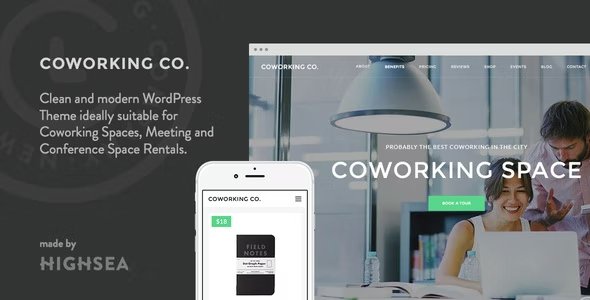
Stuck on your Coworking Co. WordPress theme? Let's fix it.
No endless back-and-forth. Just send us the details and we'll get it done.
No obligation · Replies within 1 hour · Quote within 1 day
Setup · Customization · Bug fixes · WooCommerce integration
About Coworking Co. WP Theme
Coworking Co. is a WordPress theme built by HighSea specifically for shared office spaces, coworking hubs, and flexible workspace businesses. It ships with a clean layout focused on membership plans, space listings, and booking functionality — exactly what operators need to convert visitors into members.
The theme includes pre-built sections for hot desks, private offices, meeting room rentals, and amenity highlights. It pairs well with WooCommerce for membership billing and supports common booking plugins out of the box. The design is minimal and professional, which suits the kind of clients coworking spaces are trying to attract — remote workers, startups, and small teams. If you run a coworking space or flex office and want a purpose-built starting point rather than a generic business theme, Coworking Co. is a solid option worth considering.
Get matched with a Coworking Co. developer in under one day
Tell us about your Coworking Co. project. Small fixes, Coworking Co. theme customization, or a full website build, whatever you need, we've got it covered.
We'll connect you to the right Coworking Co. developers, define the scope, and get everything 100% clear.
You'll get one estimate, hire your preferred developer, and start collaborating.
Coworking Co. has enough moving parts — bookings, memberships, space listings — that small configuration mistakes can cost you leads. A qualified developer knows where the theme has limitations and how to work around them cleanly.
FoxyConcept works through Codeable, a vetted network of WordPress specialists. Every developer is screened, so you are not rolling the dice on someone learning the theme at your expense. Post your project, get an estimate, and decide from there — no obligation.
Pros
- Purpose-built for coworking and flex office businesses — not a generic theme retrofitted with a coworking demo
- Pre-built sections for space listings, membership plans, and amenity highlights reduce initial setup time
- Clean, professional design that appeals to the startup and remote worker audience coworking spaces target
- Compatible with WooCommerce, making membership billing and product-based bookings straightforward to add
- Minimal codebase compared to multipurpose themes, which generally means faster load times and less bloat
Cons
- Limited built-in booking functionality — a third-party plugin is required for proper room reservation management
- Smaller developer community than major multipurpose themes, so finding theme-specific help can be harder
- Multi-location support is not native — operators running more than one space need custom work or additional plugins
- Theme updates from HighSea are infrequent, which can create compatibility issues as WordPress core evolves
- Customizing the membership plan layout beyond basic color and font changes requires CSS or PHP knowledge
Who is Coworking Co. for?
Independent Coworking Spaces
Single-location coworking operators get the most out of Coworking Co. The theme covers the core pages a standalone space needs — hot desk plans, private office listings, meeting room details, and a contact or tour booking form. Pair it with a membership plugin and you have a functional site without building from scratch.
Virtual Office Providers
Virtual office businesses offering business addresses, mail handling, and call answering services can use Coworking Co.’s pricing table structure to display service tiers clearly. The clean layout works well for communicating plan differences without overwhelming visitors. WooCommerce integration handles online sign-ups and recurring billing.
Creative Studio Rentals
Photography studios, recording spaces, and maker spaces with hourly or daily rentals fit the Coworking Co. structure well. Space listing pages showcase individual rooms with photos, specs, and pricing. A booking plugin layered on top handles scheduling. The minimal design keeps the focus on the spaces rather than the website itself.
Corporate Flex Office Programs
Companies running internal flex office programs or satellite workspace networks can use Coworking Co. to build an employee-facing booking portal. With some custom development, the theme supports restricted access areas, internal membership tiers, and desk or room reservation workflows tied to employee credentials.
University and Campus Innovation Hubs
University entrepreneurship centers and campus innovation labs often need a simple, professional site to display available workspace, showcase resident startups, and accept applications. Coworking Co.’s listing and membership structure maps well to this use case with minimal customization required.

Customizing Coworking Co.
Coworking Co. works well out of the box, but most coworking businesses need adjustments before going live — custom pricing tables, branded color schemes, modified booking flows, or integration with a specific membership or CRM platform.
A Coworking Co. expert can handle all of that without you digging through theme files or fighting with page builders. Common customization requests include adding custom post types for space listings, adjusting the membership plan layouts, connecting payment gateways, and building out location-specific pages for multi-site operators.
If the default templates do not match your brand or the built-in features fall short of what your business requires, working with someone who knows this theme saves time and avoids breaking things. FoxyConcept connects you with developers who have hands-on experience with Coworking Co. and understand what coworking operators actually need from their website.
Recommended plugins for Coworking Co.
Coworking Co. pairs naturally with several plugins that extend what the theme does on its own. WooCommerce Memberships handles tiered access and recurring billing. Amelia or Bookly add proper meeting room reservation systems. WPForms or Gravity Forms work well for membership inquiry and tour booking forms.
For performance, image optimization and caching matter — especially if you are running space galleries. Check our WordPress performance service if pages feel slow. If you want your space to rank locally, our WordPress SEO service covers local search optimization, which is critical for coworking businesses targeting city-specific searches.
Not sure which plugins to use? This WordPress plugins directory covers the most popular options with reviews and setup guides.
Coworking Co. common issues
Coworking Co. booking form not working
Booking form failures in Coworking Co. are usually caused by a plugin conflict, a JavaScript error, or a misconfigured form plugin. Start by checking the browser console for JS errors. Deactivate plugins one at a time to isolate conflicts. If you are using Amelia or Bookly, verify the API keys and calendar settings are correctly configured. Persistent issues are worth handing to a developer — see our WordPress bug fixing service for faster resolution.
Coworking Co. membership plans not displaying correctly
Membership plan display issues in Coworking Co. are often caused by CSS conflicts with a child theme or a plugin injecting styles that override the theme defaults. Check whether the issue appears with all plugins deactivated. If the layout breaks only on certain screen sizes, the problem is likely in the responsive CSS. Custom pricing table layouts beyond the theme defaults require direct template edits, which a developer can handle cleanly without touching core files.
Coworking Co. theme slow to load on mobile
Mobile slowness with Coworking Co. usually comes from unoptimized images in space gallery sections and unminified scripts. Run the page through Google PageSpeed Insights to identify the specific assets causing delays. Compress images before upload, enable a caching plugin, and consider a CDN if you are serving users across multiple regions. Our WordPress performance service can handle a full audit and fix if you want this done properly.
Coworking Co. WooCommerce integration broken after update
WooCommerce compatibility issues with Coworking Co. after an update are common when either the theme or WooCommerce introduces a breaking change in template structure. Check if the theme has a pending update first. If not, the issue may require overriding WooCommerce templates in the theme’s WooCommerce folder. Avoid editing plugin files directly. If the checkout or membership billing is broken in production, treat this as urgent and get a developer involved through our bug fixing service.
Coworking Co. FAQ
Yes, Coworking Co. is compatible with WooCommerce and works alongside WooCommerce Memberships for handling tiered plans and restricted content. Some styling adjustments may be needed to make WooCommerce pages match the theme design. If the integration requires custom membership flows or specific access rules, a developer can configure that without breaking the theme layout.
Not natively. Coworking Co. is built around a single-location model. Running multiple locations from one site requires custom post types, location taxonomy, and potentially a multisite setup depending on how different each location’s content is. This is achievable with development work, but it is not something you can configure through the theme settings panel alone.
Coworking Co. has limited official support for page builders. Elementor may work for editing standard pages, but the theme’s custom sections and templates are not built as Elementor widgets. You can use a page builder for content pages, but expect some friction when trying to edit theme-specific layouts like space listings or membership plan sections.
Coworking Co. does not include a built-in booking system. You need a third-party plugin — Amelia, Bookly, and Simply Schedule Appointments are common choices. Install the plugin, configure your rooms as bookable services, and embed the booking form on the relevant pages. Connecting the booking system to payment and calendar tools requires additional setup.
Yes, migrating content from an existing site to Coworking Co. is possible. You will need to move pages, images, and any membership or booking data carefully to avoid losing records. Our WordPress migration service handles this end to end — content transfer, plugin configuration, and testing before you switch the domain over.
Hire a Coworking Co. Developer
Need help setting up, customizing, or fixing your Coworking Co. website? FoxyConcept matches you with a developer who knows this theme and understands coworking business requirements. Bookings, memberships, space listings, payment integration — we handle it all.
Get a free estimate — no commitment required. You will hear back within 24 hours with a clear scope and price before any work begins.
You'll need a free Codeable account so developers can ask questions and send their quotes.