Creator WordPress Theme
by Elated-Themes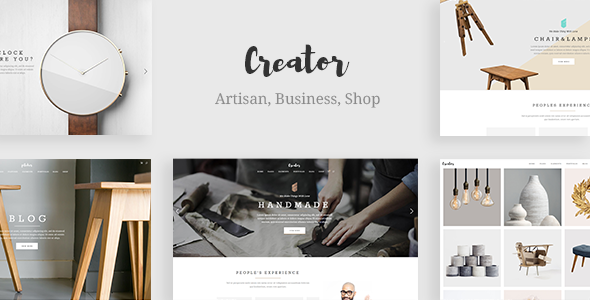
Stuck on your Creator WordPress theme? Let's fix it.
No endless back-and-forth. Just send us the details and we'll get it done.
No obligation · Replies within 1 hour · Quote within 1 day
Setup · Customization · Bug fixes · WooCommerce integration
About Creator WP Theme
Creator is a WordPress theme built by Elated-Themes, designed for bloggers, writers, and content creators who want a clean, editorial-style site without unnecessary clutter. It ships with a modern layout system, multiple homepage demos, and a visual approach that puts your content front and centre.
The theme integrates tightly with Elementor, giving you drag-and-drop control over page structure. It also includes the Elated Core plugin for extended functionality like custom post types and shortcodes. Typography controls are solid, with Google Fonts support and fine-grained sizing options across headings and body text.
Creator works well for personal blogs, niche publications, and portfolio sites. It is regularly updated by Elated-Themes, who have a strong track record on ThemeForest with consistent support and documentation.
Get matched with a Creator developer in under one day
Tell us about your Creator project. Small fixes, Creator theme customization, or a full website build, whatever you need, we've got it covered.
We'll connect you to the right Creator developers, define the scope, and get everything 100% clear.
You'll get one estimate, hire your preferred developer, and start collaborating.
Elated-Themes builds polished products, but every theme has limits when your requirements go beyond the demos. A developer who has worked inside Creator and the Elated Core plugin knows where those limits are and how to extend the theme cleanly.
Through Codeable, you get access to vetted WordPress specialists. Post your project, receive a free estimate within 24 hours, and only move forward if the scope and price make sense. No obligation, no risk. Our WordPress development services cover everything from small fixes to full custom builds.
Pros
- Clean editorial layouts that suit blogs and content-heavy sites without heavy styling overhead
- Native Elementor compatibility gives full drag-and-drop control over page structure
- Elated-Themes provides regular updates and responsive ThemeForest support
- Multiple pre-built demo layouts available for one-click import to speed up initial setup
- Strong typography controls with Google Fonts and per-element sizing options built in
Cons
- Elated Core plugin dependency means some features break if the plugin is deactivated or conflicts arise
- Demo content import can be slow and occasionally incomplete depending on server configuration
- WooCommerce styling is basic and requires additional CSS work for a polished shop layout
- Archive and category page templates offer limited customisation without custom PHP overrides
- Heavy use of shortcodes in older demo content makes switching page builders more difficult later
Who is Creator for?
Personal Blog
Creator suits personal bloggers who want a minimal, readable layout. The typography system handles long-form writing well, and category layouts keep content organised without requiring custom development. A straightforward setup that focuses attention on the writing itself.
Digital Magazine
Multi-author blogs and editorial sites benefit from Creator’s post grid options and flexible header styles. With Elementor handling the homepage and Elated Core managing post formats, you can build a structured magazine layout without building from scratch.
Creative Portfolio
Photographers, illustrators, and designers can use Creator’s full-width templates and clean grid layouts for portfolio display. The theme handles large images well and keeps surrounding UI minimal so the work takes priority over the frame.
Online Course or Coaching Site
Course creators and coaches use Creator as a content-forward site that pairs with LMS plugins like LearnDash. The landing page templates and Elementor compatibility make it straightforward to build structured sales or intake pages alongside blog content.
Niche Content Publication
Niche publishers covering topics like food, travel, or finance get mileage from Creator’s category and tag archive layouts. Combined with a solid SEO setup, the theme supports the kind of content volume and internal linking structure that Google rewards over time.

Customizing Creator
Out of the box, Creator gives you decent control through the WordPress Customizer. You can adjust colors, fonts, header styles, sidebar layouts, and footer columns without touching code. The Elementor integration handles most page-level design work.
Where things get more complex is custom post layouts, conditional logic, or any deeper structural changes. That is where a Creator expert becomes valuable. A developer who knows the Elated-Themes ecosystem can work with the Elated Core plugin directly, modify theme templates properly, and avoid the brittle workarounds that cause problems later.
If you need custom widgets, unique archive templates, or a layout that goes beyond the demo designs, bringing in a specialist saves significant time and keeps your site maintainable long-term.
Recommended plugins for Creator
Creator pairs well with several tools that extend its core functionality. WooCommerce integration is supported, making it usable for digital product or course sales. Elementor Pro adds dynamic content, popups, and form builders that work within Creator’s layout structure.
For speed, combining Creator with a caching plugin and image optimisation is recommended. If you need WordPress performance improvements, the theme does not add excessive bloat but benefits from server-level caching. For publishers focused on organic traffic, pairing Creator with a proper WordPress SEO setup will make a real difference to visibility.
Not sure which plugins to use? This WordPress plugins directory covers the most popular options with reviews and setup guides.
Creator common issues
Creator theme Elementor layout not loading correctly
This usually comes down to a version mismatch between Elementor and the Creator theme or Elated Core plugin. Start by updating all three to their latest versions. If the layout still breaks, deactivate other plugins one at a time to find a conflict. Clearing your browser cache and Elementor’s own CSS cache often resolves display issues after an update. If problems persist, a WordPress bug fix may be needed.
Elated Core plugin conflict with Creator theme
Elated Core is a required companion plugin for Creator. Conflicts typically happen after a WordPress core update or when another plugin modifies the same hooks. Check the browser console for JavaScript errors and review the PHP error log for fatal conflicts. Disabling caching plugins temporarily during diagnosis helps isolate the issue. If you cannot identify the source, a developer familiar with the Elated-Themes codebase can trace it quickly.
Creator theme demo import stuck or incomplete
Demo imports fail due to server timeouts, low PHP memory limits, or file permission issues. Increase your PHP max execution time to at least 300 seconds and memory limit to 256MB before attempting the import again. If your host restricts this, try importing content in stages using the XML file manually through WordPress’s built-in importer rather than the one-click tool.
Creator theme custom fonts not applying on mobile
Custom fonts set in the Creator theme options sometimes do not propagate to mobile due to CSS specificity issues or a caching layer serving an old stylesheet. Clear all caches first. If the problem continues, inspect the element on mobile using browser dev tools to see which CSS rule is overriding the font. A small targeted CSS fix in the Customizer’s additional CSS field usually resolves it without touching theme files.
Creator FAQ
Elated-Themes updates Creator regularly to maintain compatibility with current WordPress releases. Always check the ThemeForest changelog before updating on a live site. Testing updates on a staging environment first is a good habit, particularly after major WordPress version jumps that change core behaviour.
Creator includes basic WooCommerce support. Standard shop, product, and cart pages are styled to match the theme. However, the default WooCommerce styling within Creator is minimal. A developer may be needed to match the shop pages closely to the rest of your site’s design.
Creator is built around Elementor for page editing. You can use the standard WordPress block editor for posts, but page templates and demo layouts are tied to Elementor. Using another page builder alongside Creator is not recommended and may produce layout conflicts.
Moving a Creator theme site follows the standard WordPress migration process: export the database, move files, update the site URL, and update the wp-config.php file. The Elated Core plugin and all theme settings migrate with the database. Our WordPress migration service handles this without downtime.
Yes. Elated Core is a required plugin for Creator and enables custom post types, shortcodes, and theme-specific widgets. Deactivating it will break parts of your site. Always keep it updated alongside the theme to avoid compatibility issues between the two.
Hire a Creator Theme Developer
Whether you need a Creator theme setup, a custom layout built in Elementor, or specific functionality added through the Elated Core plugin, we can help. Work is scoped clearly before anything starts. Get a free estimate and hear back within 24 hours. You only hire if the proposal fits your project. No upfront commitment required.
You'll need a free Codeable account so developers can ask questions and send their quotes.