Daisho WordPress Theme
by IKONIZE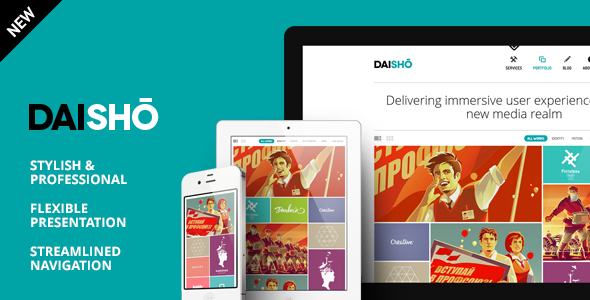
Stuck on your Daisho WordPress theme? Let's fix it.
No endless back-and-forth. Just send us the details and we'll get it done.
No obligation · Replies within 1 hour · Quote within 1 day
Setup · Customization · Bug fixes · WooCommerce integration
About Daisho WP Theme
Daisho is a multipurpose WordPress theme built by IKONIZE. It targets agencies, freelancers, and businesses that need a clean, professional site without months of custom development. The theme ships with a solid set of pre-built demos, Elementor support, and enough layout flexibility to cover most business use cases out of the box.
IKONIZE designed Daisho with speed and visual clarity in mind. It avoids the bloat that kills performance on many multipurpose themes. The demo library covers industries like creative agencies, portfolios, consulting, and corporate services. Import a demo, swap the content, and you have a working site in a day. For teams that want more control, the theme’s customizer options go deeper than most, covering typography, color schemes, header layouts, and footer builders without touching code.
Get matched with a Daisho developer in under one day
Tell us about your Daisho project. Small fixes, Daisho theme customization, or a full website build, whatever you need, we've got it covered.
We'll connect you to the right Daisho developers, define the scope, and get everything 100% clear.
You'll get one estimate, hire your preferred developer, and start collaborating.
Most Daisho setup issues come down to one thing: trying to make the theme do something it does not do natively. Custom header behaviour, dynamic content, WooCommerce layout overrides, multilingual setups, and performance issues all need developer input. FoxyConcept works through Codeable, a vetted network of WordPress specialists. Every developer has been screened and rated. You post your project, get a fixed estimate, and only pay if you move forward. No risk, no guesswork.
Pros
- Clean, minimal codebase that avoids the performance drag common in multipurpose themes
- Strong Elementor integration with pre-built sections that match the demo designs accurately
- Demo import is fast and reliable, giving you a working starting point within minutes
- Customizer controls are genuinely useful, covering header layouts, typography, and color without needing CSS
- WooCommerce compatibility is solid out of the box with styled product and cart pages included
Cons
- Demo content diversity is limited compared to themes with 50+ starter sites
- Advanced layout changes outside Elementor require custom CSS or PHP, no visual fallback
- Documentation is functional but sparse on advanced use cases and developer-level hooks
- Mega menu support requires extra configuration and is not immediately intuitive
- Theme update frequency has been inconsistent, which can cause concerns around long-term support
Who is Daisho for?
Creative Agency
Daisho’s agency demo gives creative studios a polished starting point. The layout supports case studies, team sections, and service breakdowns cleanly. Elementor makes it easy to build campaign landing pages that stay consistent with the main site design. Agencies that bill clients on finished sites find the demo-to-live workflow faster than building from scratch.
Freelance Portfolio
Freelancers use Daisho to build portfolio sites that look professional without a heavy development investment. The theme handles project grids, testimonials, and contact forms well. Typography controls in the customizer make it easy to establish a personal brand. For designers or developers who want a fast, clean online presence, Daisho covers the basics without getting in the way.
Business Consulting
Consulting firms need a site that communicates credibility immediately. Daisho’s corporate layouts handle service pages, team bios, and lead generation forms without looking cluttered. The theme’s clean heading structure also helps with on-page SEO, which matters for local and niche consulting searches. Pair it with a proper SEO setup and the site does real business work.
WooCommerce Store
Daisho’s WooCommerce support covers product pages, cart, checkout, and account pages with consistent styling. It works for small to mid-sized stores selling physical or digital products. Custom product layout needs, such as variable product displays or filtered archives, may require a developer. The theme handles standard store structures reliably without patching default WooCommerce output heavily.
Corporate Services
Large service businesses need a site that handles multiple departments, service categories, and clear calls to action. Daisho’s header builder and flexible page layouts cover most of these requirements. Multi-level navigation works with some configuration. For enterprises needing custom integrations or internal tools connected to the WordPress front end, a developer will be needed from the start.

Customizing Daisho
Daisho customization runs through the WordPress Customizer and Elementor’s visual editor. You can adjust site-wide typography, color palettes, header styles, and footer layouts without writing a line of CSS. Most design decisions are handled through point-and-click controls, which keeps things manageable for non-developers.
That said, real business sites quickly outgrow the defaults. Custom post types, advanced WooCommerce layouts, third-party API integrations, and performance tuning all require someone who knows the theme inside out. A Daisho expert can save you days of trial and error. They know where the theme’s native controls end and where custom code needs to take over. If your site needs something beyond the standard options, working with a Daisho developer is the faster and cleaner path.
Recommended plugins for Daisho
Daisho works well with the plugins most WordPress sites already rely on. WooCommerce support is built in, making it a practical choice for product or service-based stores. Elementor Pro unlocks additional widget and template options that pair cleanly with the theme’s styling system.
For SEO, pairing Daisho with Rank Math or Yoast keeps your markup clean and structured. If site speed matters to you, and it should, combining Daisho with a proper WordPress performance setup makes a measurable difference. Schema plugins, contact form tools like WS Form or Gravity Forms, and membership plugins like MemberPress all integrate without major conflicts. Check compatibility before adding heavy page builder stacks on top of Elementor.
Not sure which plugins to use? This WordPress plugins directory covers the most popular options with reviews and setup guides.
Daisho common issues
Daisho theme header not showing correctly after update
Header display issues after a Daisho update are usually caused by a conflict between the updated theme files and cached CSS. Start by clearing your caching plugin and server cache completely. If the issue persists, check whether a custom header template in Elementor is overriding the theme’s default. Deactivating plugins one by one helps isolate third-party conflicts. If the header was customized via child theme CSS, the update may have changed the selectors. A WordPress bug fixing service can trace the exact conflict quickly.
Daisho Elementor sections not loading on mobile
Elementor sections failing on mobile in Daisho are often caused by incorrect responsive breakpoint settings inside Elementor, not the theme itself. Open the affected section in Elementor, switch to mobile preview, and check whether column widths, padding, or visibility settings have been set incorrectly. Also check if Elementor’s CSS print method is set to internal embedding, as external files can fail to load on some hosting setups. If the issue appeared after a plugin update, roll back Elementor and test.
Daisho theme slow page speed on GTmetrix
Slow GTmetrix scores with Daisho usually come from unoptimised images loaded by the demo content, render-blocking scripts from Elementor, or missing server-level caching. Start with an image compression pass using Imagify or ShortPixel. Enable Elementor’s asset loading improvements under Experiments. Use a caching plugin like WP Rocket with CSS and JS minification active. A full WordPress performance audit will identify the specific bottlenecks your setup is producing.
Daisho WooCommerce product page layout broken
Broken WooCommerce product page layouts in Daisho typically happen after a WooCommerce major version update that changed template file hooks. Daisho’s bundled WooCommerce templates may be outdated. Check the WooCommerce status page in wp-admin for template override warnings. If outdated templates are flagged, they need to be updated manually or removed if the customization is no longer needed. Avoid editing WooCommerce template files inside the main theme folder as updates will overwrite them. Use a child theme instead.
Daisho FAQ
Daisho produces clean HTML output with a sensible heading structure, which is a solid SEO foundation. It does not load unnecessary schema or bloated scripts by default. For serious SEO results, pair the theme with a dedicated plugin like Rank Math or Yoast. Technical SEO, page speed, and content structure matter more than the theme alone. A proper WordPress SEO setup built on top of Daisho will outperform most out-of-the-box alternatives.
Yes, Daisho is designed to work with Elementor and is compatible with Elementor Pro. The theme’s styling system integrates with Elementor’s global fonts and colors. Elementor Pro widgets like forms, sliders, and dynamic content work without conflicts under normal conditions. Some advanced Pro features like Theme Builder may require testing against Daisho’s header and footer builder to avoid overlap. Test any new Elementor Pro update on a staging site before pushing live.
Daisho includes built-in WooCommerce support with styled templates for product pages, shop archives, cart, and checkout. It handles standard store setups without requiring additional plugins to fix the layout. Complex store requirements like custom product builders, subscription products, or heavily filtered catalogues may need custom development. For straightforward product or service stores, Daisho gives you a working WooCommerce setup from day one.
IKONIZE does not ship an official child theme with Daisho, but you can create one manually or use a plugin like Child Theme Configurator. A child theme is important if you plan to make any direct edits to theme files. Without one, your changes will be lost every time Daisho updates. If you are doing any custom CSS beyond the customizer, PHP template overrides, or function additions, always work inside a child theme.
Daisho’s demo import runs through the theme’s onboarding wizard inside the WordPress dashboard. After activating the theme, a setup prompt will guide you through installing required plugins and choosing a demo. The importer handles pages, media, menus, and customizer settings in one pass. Make sure your hosting meets WordPress’s recommended PHP and memory requirements before importing. On shared hosting with low memory limits, large demo imports can time out partway through.
Hire a Daisho WordPress Developer
Need help building, fixing, or extending a Daisho site? FoxyConcept connects you with experienced Daisho developers through Codeable. Tell us what you need, get a free estimate within 24 hours, and only hire if it makes sense. Whether it is a full site build, a tricky customization, or a bug that has been blocking you for days, we can help. Get your free estimate here and get matched with the right developer for your project.
You'll need a free Codeable account so developers can ask questions and send their quotes.