Dance Studio WordPress Theme
by cmsmasters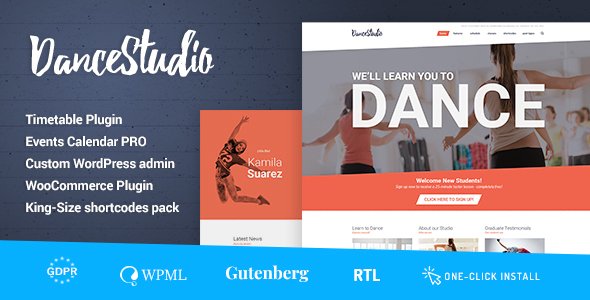
Stuck on your Dance Studio WordPress theme? Let's fix it.
No endless back-and-forth. Just send us the details and we'll get it done.
No obligation · Replies within 1 hour · Quote within 1 day
Setup · Customization · Bug fixes · WooCommerce integration
About Dance Studio WP Theme
Dance Studio is a WordPress theme built by cmsmasters, designed specifically for dance schools, performing arts studios, and movement-based businesses. It ships with a visual page builder, pre-built demo content, and layouts tailored to class schedules, instructor profiles, and event listings.
The theme supports WooCommerce for selling class packages or merchandise, and includes support for booking plugins. Typography and color controls let you match your studio’s brand without touching code. It is translation-ready and works with popular caching plugins out of the box.
cmsmasters is an established ThemeForest author with a track record of releasing well-documented, regularly updated themes. Dance Studio follows that pattern, with a detailed documentation site and an active support forum for buyers.
Get matched with a Dance Studio developer in under one day
Tell us about your Dance Studio project. Small fixes, Dance Studio theme customization, or a full website build, whatever you need, we've got it covered.
We'll connect you to the right Dance Studio developers, define the scope, and get everything 100% clear.
You'll get one estimate, hire your preferred developer, and start collaborating.
Dance Studio has enough flexibility to build a professional studio site, but getting the most out of it takes real WordPress experience. FoxyConcept works through Codeable, a vetted network of WordPress developers. Every developer is screened and rated, so you are not gambling on a freelancer. You get a free estimate, see the price before committing, and only pay when you are satisfied. For a Dance Studio build or customization, that process removes most of the risk.
Pros
- Pre-built demo content covers class pages, schedules, and instructor profiles out of the box
- Compatible with WooCommerce for selling memberships, class passes, and merchandise
- cmsmasters provides detailed documentation and an active ThemeForest support thread
- Drag-and-drop page builder included, no coding needed for basic layout changes
- Translation-ready with .pot file included, suitable for multilingual studio sites
Cons
- Demo import can be slow and sometimes requires a higher PHP memory limit than basic hosting allows
- The bundled page builder creates shortcode lock-in, making it harder to switch themes later
- No native booking or scheduling system; a third-party plugin is always required
- Some design sections feel dated compared to current studio website trends
- Support response times on ThemeForest can be slow during peak periods
Who is Dance Studio for?
Dance School
Dance schools with multiple class levels and age groups benefit from Dance Studio’s schedule and class listing layouts. A developer can connect a booking plugin so parents can register and pay for classes online. The instructor profile section handles large teaching teams cleanly.
Fitness and Movement Studio
Yoga studios, pilates centers, and barre studios can adapt the Dance Studio theme with minor restyling. The class timetable structure works directly for session-based fitness formats. WooCommerce integration supports drop-in rates, class packs, and monthly memberships.
Performing Arts Academy
Performing arts academies offering ballet, contemporary, and drama can use Dance Studio’s multi-category layout. Event pages work well for recitals and showcases. A developer can add ticketing via a plugin like Event Tickets or connect to an external box office system.
Private Dance Instructor
Solo instructors need a simpler setup. Dance Studio’s single-instructor layout with a contact form, bio section, and class listing covers the basics. A developer can strip back the demo to a lean one-person site and connect a simple booking calendar without the overhead of a full scheduling platform.
Dance Event and Competition Organizer
Studios that run competitions or large seasonal events can use Dance Studio’s event section alongside a plugin like The Events Calendar. Registration forms, sponsor logos, and schedule pages are all achievable within the theme’s structure with moderate customization work.

Customizing Dance Studio
Dance Studio gives you a solid starting point, but most studios need more than a demo swap. A Dance Studio expert can restructure the homepage to prioritize class bookings, wire up a scheduling plugin like Amelia or BooklyPro, and set up WooCommerce for membership or drop-in purchases.
Custom work often includes building out instructor profile templates, adding filtered class timetables, and connecting a payment gateway. If your branding needs custom fonts, animation effects, or mobile layout adjustments, a developer can handle those without breaking the theme’s update path.
Trying to make these changes through the theme options panel alone takes time and usually produces compromises. Hiring a Dance Studio expert means the final site reflects how your studio actually operates, not just how the demo looked.
Recommended plugins for Dance Studio
Dance Studio works well with several plugins that extend its core functionality. Amelia and BooklyPro handle class scheduling and online bookings. WooCommerce adds membership plans and product sales. Yoast SEO or Rank Math slot in cleanly for on-page optimization. If site speed is a concern, pairing the theme with a CDN and a caching plugin is straightforward. For studios running paid ads or tracking conversions, a developer can configure Google Tag Manager without conflicts. Need more? See our WordPress performance and WordPress SEO services.
Not sure which plugins to use? This WordPress plugins directory covers the most popular options with reviews and setup guides.
Dance Studio common issues
Dance Studio demo import not working
Failed demo imports on Dance Studio are usually caused by low PHP memory limits or upload size restrictions set by the host. Increase memory_limit to at least 256MB and upload_max_filesize to 64MB in your php.ini or wp-config.php. If the issue persists, try importing content and settings separately rather than using the one-click import. A developer can also import the demo manually via WP CLI. See our WordPress bug fixing service if the problem continues.
Dance Studio theme class schedule not displaying correctly
Class schedule display issues in Dance Studio are often caused by a plugin conflict with the bundled shortcodes, or a CSS override from a child theme. Open your browser’s developer tools and check for JavaScript errors on the schedule page. Deactivate plugins one by one to isolate the conflict. If the issue appeared after a theme update, compare the changelog and recheck any custom CSS you added to the Additional CSS field.
Dance Studio booking plugin conflict
Dance Studio does not include a native booking system, so conflicts depend entirely on which plugin you are using. Common issues arise with Amelia and Bookly when both share the same jQuery version or when the theme’s page builder loads scripts that block plugin assets. Test with the default WordPress theme to confirm the conflict is theme-related. A developer can enqueue scripts correctly and resolve the load order. Visit our bug fixing service for hands-on help.
Dance Studio theme slow on mobile
Mobile slowness on Dance Studio is usually tied to large unoptimized images in the slider or hero section, or the theme loading all page builder assets site-wide. Start by compressing images and enabling lazy loading. Check if unused shortcode scripts are being loaded on every page. A developer can conditionally load scripts, enable a caching layer, and configure a CDN. See our WordPress performance service for a full audit.
Dance Studio FAQ
Yes. Dance Studio works well for small schools. The demo includes class listing pages, instructor profiles, and a contact section that covers what most small studios need. You may want a developer to connect a booking plugin and simplify the layout, but the base theme is a solid starting point without a large budget.
Dance Studio and Amelia can work together, but integration is not automatic. Amelia handles bookings through its own shortcodes and pages. A developer needs to embed Amelia’s booking forms into the Dance Studio layouts and make sure the styles align with your site’s design. Conflicts are possible but usually fixable without major effort.
Basic changes, like colors, fonts, logo, and page content, are manageable through the theme options and page builder without coding. More specific work, like restructuring layouts, adding custom post types, or integrating third-party plugins, will need developer involvement to do cleanly and safely.
Dance Studio does not include a native timetable. You need a plugin like TimeTable Responsive Schedule or Amelia. Install the plugin, create your schedule, and embed it on a page using the plugin’s shortcode or block. A developer can style the output to match your theme and ensure it displays correctly on mobile devices.
Yes, migrating an existing site to Dance Studio is possible. Content like posts and pages transfers over, but your old layout will not carry across automatically. A developer rebuilds the pages using Dance Studio’s templates and page builder. If you need help with the technical side of migration, see our WordPress migration service.
Hire a Dance Studio WordPress Expert
Whether you need a full Dance Studio build from the demo, a booking system integration, or specific layout fixes, FoxyConcept can match you with the right developer. Work is handled through Codeable, so you get a screened professional, a fixed price, and no surprises. Get a free estimate and have a developer review your project within 24 hours. No obligation to hire.
You'll need a free Codeable account so developers can ask questions and send their quotes.