Dental Care WordPress Theme
by strongholdthemes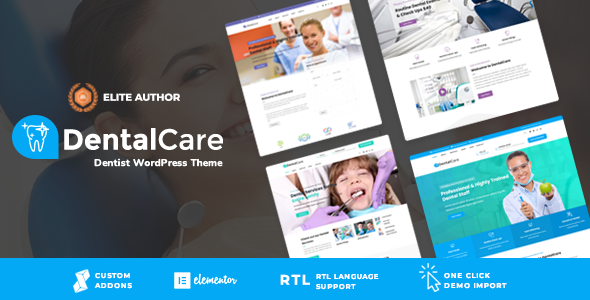
Stuck on your Dental Care WordPress theme? Let's fix it.
No endless back-and-forth. Just send us the details and we'll get it done.
No obligation · Replies within 1 hour · Quote within 1 day
Setup · Customization · Bug fixes · WooCommerce integration
About Dental Care WP Theme
Dental Care is a WordPress theme by Stronghold Themes built specifically for dental clinics, orthodontists, and oral health practices. It ships with a clean, professional layout that puts appointment booking and service listings front and center.
The theme includes pre-built page templates for services, staff profiles, patient testimonials, and contact forms. It works with popular page builders, making it accessible for practice owners who want to manage content without touching code.
Dental Care is built on a solid foundation with mobile-first design, meaning it displays correctly on phones and tablets out of the box. It also supports custom color schemes so your branding stays consistent across every page. For a dental practice that needs a site live quickly, it covers the basics well.
Get matched with a Dental Care developer in under one day
Tell us about your Dental Care project. Small fixes, Dental Care theme customization, or a full website build, whatever you need, we've got it covered.
We'll connect you to the right Dental Care developers, define the scope, and get everything 100% clear.
You'll get one estimate, hire your preferred developer, and start collaborating.
Dental Care looks straightforward until you need it to do something specific. A custom booking integration, a patient FAQ section with schema markup, or a staff directory that pulls from a custom post type all require developer knowledge.
Working through Codeable means you get a vetted WordPress developer who has worked on projects exactly like yours. No junior freelancers, no guessing. You describe the work, get an estimate, and decide if you want to proceed. There is no cost to ask.
Pros
- Purpose-built layouts for dental practices reduce setup time significantly
- Includes pre-designed templates for services, staff, and patient testimonials
- Mobile-first design works correctly on phones without additional configuration
- Compatible with major page builders including Elementor and WPBakery
- Custom color scheme support makes brand matching straightforward
Cons
- Online booking functionality requires a third-party plugin, nothing is built in
- Limited documentation makes advanced customization harder without developer support
- Default typography options are basic and may not match premium clinic branding
- No built-in schema markup for dental services or local business structured data
- Updates from Stronghold Themes can be infrequent, which creates compatibility risks over time
Who is Dental Care for?
General Dental Practice
Dental Care works well for general practices that need a clean, trustworthy site with service pages, a contact form, and an about section. The pre-built templates cover most of what a standard clinic needs. A developer can wire up an appointment request form and configure the layout to match the practice’s branding in a short turnaround.
Orthodontic Clinic
Orthodontic clinics often need before-and-after galleries, treatment timeline explainers, and patient age targeting. Dental Care’s flexible page templates can support this with some customization. A developer familiar with the theme can add custom gallery layouts and treatment comparison sections without rebuilding from scratch.
Cosmetic Dentistry Studio
Cosmetic dentistry practices need strong visual presentation. Dental Care’s layout structure supports high-quality image placement, but the default styling may feel too clinical. A developer can refine the typography, spacing, and colour scheme to create a more premium aesthetic while keeping the core theme intact.
Paediatric Dentist
Paediatric dental sites need friendly design, parent-focused content, and clear call-to-action paths for booking. Dental Care’s layout can be adjusted to support this tone. Custom colour palettes, illustrated banners, and simplified navigation all help. A developer can configure these without replacing the theme entirely.
Dental Group with Multiple Locations
Multi-location dental groups need location pages, individual team listings, and sometimes separate booking flows per branch. Dental Care can handle this with careful setup. A developer can build a location post type, configure per-location contact details, and ensure the site architecture supports local SEO across all branches.

Customizing Dental Care
Out of the box, Dental Care handles the standard setup fine. But most dental practices need more than the defaults. You might want a custom appointment booking flow, integration with practice management software, or a patient portal link. That requires real customization work.
A Dental Care expert can build on the theme’s structure without breaking it. That means modifying templates cleanly, adding custom post types for services or staff, and connecting third-party tools like online scheduling plugins or Google Maps.
Color schemes, typography, and layout adjustments are straightforward, but anything beyond the Customizer options needs a developer who understands how Stronghold Themes structures its code. Getting this wrong creates technical debt that causes problems later during updates.
Recommended plugins for Dental Care
Dental Care pairs well with several WordPress plugins. WooCommerce can handle product sales if you sell whitening kits or oral care products. WPForms or Gravity Forms work for appointment request forms. For SEO, plugins like Yoast or Rank Math slot in without conflict.
If your site is slow, caching plugins and image optimization tools make a measurable difference. Check our WordPress performance service for a full technical audit. For practices investing in local search visibility, our WordPress SEO service covers on-page and technical SEO tailored to your market.
Not sure which plugins to use? This WordPress plugins directory covers the most popular options with reviews and setup guides.
Dental Care common issues
Dental Care theme appointment form not sending emails
This is almost always an email delivery problem, not a form issue. WordPress uses the PHP mail function by default, which many hosts block. Install an SMTP plugin like WP Mail SMTP and connect it to a transactional email service such as SendGrid or Mailgun. Test the form after configuring the plugin. If the form still fails, check that the form plugin itself is up to date and compatible with the current WordPress version. Our WordPress bug fixing service can diagnose this quickly.
Dental Care WordPress theme not displaying correctly on mobile
Dental Care is built mobile-first, but custom CSS or page builder overrides can break the responsive layout. Open browser developer tools and check for fixed-width elements or conflicting styles. Inline styles added through a page builder are a common culprit. If you have added custom CSS, audit it for pixel-based widths that do not scale. If the issue appeared after a plugin update, deactivate plugins one at a time to isolate the cause. A developer can fix this in a single session.
Dental Care theme slow loading on shared hosting
Slow load times on shared hosting are usually caused by unoptimised images, no caching, and too many HTTP requests from loaded plugins. Start by compressing images with a plugin like ShortPixel. Add a caching plugin such as WP Super Cache or W3 Total Cache. Check how many plugins are active and remove anything unused. If performance is still poor after these steps, the hosting environment itself may be the limiting factor. Consider upgrading to a managed WordPress host. See our WordPress performance service for a full audit.
Dental Care theme broken after WordPress update
Theme breakage after a WordPress update usually means a template file is using a deprecated function or a plugin conflict has emerged. First, switch to a default WordPress theme temporarily to confirm the issue is theme-related. Check the error log for specific PHP errors. If Stronghold Themes has released an updated version, apply it to a staging environment first before pushing live. If the update is unavailable and the site is broken, a developer can patch the specific template files causing the error. Our WordPress maintenance service covers ongoing update management.
Dental Care FAQ
Yes, Dental Care works with Elementor. You can use Elementor to build and edit pages using the theme’s templates as a starting point. Some styling may need adjustment to match the theme’s default look, but there are no known hard conflicts. For complex builds mixing Elementor with custom theme templates, a developer can ensure everything stays consistent.
Dental Care does not include built-in booking. You need a plugin to handle this. Popular options include Simply Schedule Appointments, Bookly, and Amelia. Each integrates with WordPress contact forms and calendar tools. A developer can configure the booking plugin to match your site’s design and connect it to your preferred notification or calendar system.
Yes, Dental Care supports WooCommerce. This is useful if your practice sells oral care products, treatment packages, or gift vouchers online. Standard WooCommerce pages will inherit basic theme styling, but you may want a developer to refine the product and checkout pages to match the rest of your site’s design.
Go to Appearance, then Customise, then Site Identity. Upload your logo file from there. Dental Care follows the standard WordPress Customizer structure for logo management. If your logo is not displaying at the right size, you may need to adjust the image dimensions or add a small CSS rule to control the maximum width in the header.
Yes, migrating content from an existing site to Dental Care is possible. The complexity depends on how your current site is structured. Text and images transfer using WordPress export tools, but page layouts built on a different theme will need to be rebuilt. For a smooth transition without losing SEO rankings or data, our WordPress migration service handles the full process.
Hire a Dental Care WordPress Developer
If you need a Dental Care developer to build, customise, or fix your dental practice website, we can match you with the right person fast. Projects are handled through Codeable, so you get a vetted developer and a clear estimate before any work starts.
Whether it is a full build, a booking system integration, or a performance fix, get a free estimate and have a developer ready within 24 hours. No commitment required.
You'll need a free Codeable account so developers can ask questions and send their quotes.