DentiCare WordPress Theme
by BoldThemes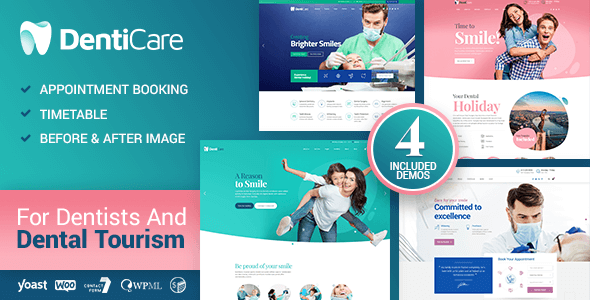
Stuck on your DentiCare WordPress theme? Let's fix it.
No endless back-and-forth. Just send us the details and we'll get it done.
No obligation · Replies within 1 hour · Quote within 1 day
Setup · Customization · Bug fixes · WooCommerce integration
About DentiCare WP Theme
DentiCare is a dental clinic WordPress theme built by BoldThemes. It ships with a clean, clinic-friendly design aimed at dentists, orthodontists, and oral surgery practices that need a professional online presence without hiring a designer from scratch.
The theme includes pre-built pages for services, staff profiles, appointment booking, and patient testimonials. It works with BoldThemes’ own Bold Page Builder, so you can rearrange sections without touching code. WooCommerce compatibility is built in, which suits practices selling dental products or whitening kits online.
DentiCare is a solid starting point for any dental practice. It’s not the most flexible theme on the market, but for its specific niche it covers the essentials well. Setup is straightforward, and the demo content imports cleanly on most hosts.
Get matched with a DentiCare developer in under one day
Tell us about your DentiCare project. Small fixes, DentiCare theme customization, or a full website build, whatever you need, we've got it covered.
We'll connect you to the right DentiCare developers, define the scope, and get everything 100% clear.
You'll get one estimate, hire your preferred developer, and start collaborating.
DentiCare works well when set up correctly. The problems come later: customizations that conflict with theme updates, booking forms that stop working, or layouts that break on mobile after a plugin update. A Codeable-vetted developer who knows DentiCare and the BoldThemes framework can fix these issues quickly and set things up so they stay fixed. Working through Codeable means you get a screened professional, a clear estimate upfront, and no risk if the work doesn’t meet your expectations.
Pros
- Purpose-built for dental and medical clinics with relevant pre-built page templates
- Includes a doctor/staff custom post type out of the box, saving setup time
- WooCommerce compatible for practices selling dental care products
- Bold Page Builder is included at no extra cost, unlike themes requiring Elementor Pro
- Demo content imports reliably and gives a complete starting structure for a dental site
Cons
- Bold Page Builder is proprietary, so switching themes later means rebuilding page layouts
- Appointment booking requires a third-party plugin since there is no native booking system
- Customizer options are limited compared to more flexible multi-purpose themes
- Builder scripts add page weight and need optimization work to hit good Core Web Vitals scores
- Documentation from BoldThemes is thin in places, making advanced customization harder without developer help
Who is DentiCare for?
General Dental Practice
DentiCare fits a standard dental practice well. The services page template covers fillings, extractions, and hygiene appointments without modification. Staff profiles help patients put a face to their dentist before their first visit. Add a contact form with an appointment request field and the site is functional from day one.
Orthodontic Clinic
Orthodontic clinics benefit from DentiCare’s before/after gallery support and treatment timeline layouts. Service pages can detail braces, aligners, and retainer options. The staff profiles work equally well for displaying orthodontists and treatment coordinators. A booking plugin layered on top handles consultation requests cleanly.
Oral and Maxillofacial Surgery
Oral surgery practices need to communicate clearly about procedures, recovery, and referrals. DentiCare’s clean layout keeps content readable. Dedicated service pages for wisdom tooth removal, implants, and jaw surgery are straightforward to build using the included page builder without custom development.
Pediatric Dentistry
Pediatric dental clinics need a friendly tone and approachable design. DentiCare’s color customization lets you shift the palette away from clinical white toward something warmer. Staff profile pages help parents see who will be treating their child, which reduces anxiety before appointments.
Cosmetic Dentistry Studio
Cosmetic dentistry studios focused on veneers, whitening, and smile makeovers can use DentiCare’s gallery and testimonial sections to show real patient results. WooCommerce integration allows the practice to sell take-home whitening kits or post-treatment care products directly from the site.

Customizing DentiCare
Out of the box, DentiCare gives you color controls, font selection, and layout options through the WordPress Customizer. You can swap the logo, adjust the header style, and configure the appointment form fields without writing a line of code.
Beyond the basics, things get more technical. Custom post types for doctors and services work well but need careful configuration to display correctly. If you want to restructure page templates, add custom functionality, or connect a third-party booking system, you need a DentiCare expert who knows both the BoldThemes framework and WordPress core well enough to extend without breaking the update path.
Child theme setup is strongly recommended before any serious customization begins.
Recommended plugins for DentiCare
DentiCare pairs well with several plugins that extend its core functionality. Contact Form 7 or WPForms handle appointment inquiries. WooCommerce adds a shop section for dental products. WPML makes multilingual setups possible for practices serving multiple language communities.
For SEO, the theme outputs clean markup, but you still need a dedicated SEO plugin. Check out our WordPress SEO service for hands-on help. Page speed is another area worth attention since BoldThemes’ builder adds some overhead. Our WordPress performance service can address that directly.
Not sure which plugins to use? This WordPress plugins directory covers the most popular options with reviews and setup guides.
DentiCare common issues
DentiCare demo import not working
Demo import failures in DentiCare are usually caused by low PHP memory limits or upload size restrictions on the host. Set memory_limit to at least 256MB and max_execution_time to 300 in your php.ini or wp-config. If the one-click importer still stalls, import the XML content manually through WordPress Tools, then import widgets separately. A WordPress bug fixing service can handle this if you’re not comfortable in server settings.
DentiCare appointment form not sending emails
If DentiCare’s appointment form submits but no email arrives, the problem is almost always server-side mail delivery, not the form itself. WordPress uses PHP mail by default, which most hosts block. Install an SMTP plugin like WP Mail SMTP, connect it to a transactional mail service such as Mailgun or SendGrid, and test delivery. Also check spam folders and confirm your From address matches your domain.
DentiCare mobile menu not opening on iPhone
Mobile menu issues in DentiCare often trace back to a JavaScript conflict introduced by a plugin. Open the browser console on an iPhone using Safari’s developer tools and look for JS errors. Disable plugins one at a time to isolate the conflict. If the issue appeared after a theme update, check whether the BoldThemes update changed any menu scripts and clear all caches before testing again.
DentiCare doctor profiles not showing on homepage
Doctor profiles not displaying on the DentiCare homepage usually means the staff widget or template tag is pointing to the wrong custom post type slug, or the homepage template was overwritten during an update. Check the Bold Page Builder element settings for the team section and confirm the post type is set to bold_staff. Republish the page after saving. If using a child theme, verify the template hierarchy hasn’t been disrupted. Our WordPress bug fixing service can resolve this quickly.
DentiCare FAQ
DentiCare is a practical choice for dental practices. It includes the page templates, staff profiles, and service layouts a clinic actually needs. It’s not the most flexible theme available, but for a dental-specific site it reduces setup time significantly compared to starting from a general-purpose theme. Configuration help from a developer speeds up the launch considerably.
DentiCare is built around the BoldThemes Bold Page Builder, not Elementor. You can technically use Elementor alongside it, but the two builders will conflict on the same page. Most developers recommend sticking with Bold Page Builder for DentiCare pages. If you specifically need Elementor, a different theme may be a better fit for your workflow.
Basic setup and content editing in DentiCare is manageable without coding. The Customizer handles colors, fonts, and logo. Bold Page Builder lets you drag and rearrange sections. Where things get harder is custom functionality, third-party integrations, and layout changes that go beyond the demo structure. Those tasks benefit from developer involvement.
DentiCare does not include a built-in booking calendar. It provides contact forms for appointment requests, but real-time booking needs a separate plugin. Bookly, Simply Schedule Appointments, and Amelia all integrate well with DentiCare. A developer can configure the plugin, style it to match the theme, and connect it to your calendar system.
Always use a child theme before customizing DentiCare. Changes made directly to the parent theme files get overwritten on every update. With a child theme in place, update the parent through the WordPress dashboard normally. After updating, check key pages visually and clear your cache. If something breaks post-update, our WordPress maintenance service includes exactly this kind of post-update check.
Hire a DentiCare Developer for Your Dental Practice Website
Whether you need DentiCare installed and configured from scratch, a custom feature added, or an existing site cleaned up, our vetted WordPress developers can help. Work is scoped and estimated before anything starts, so there are no surprises. Get a free estimate and have a developer matched to your project within 24 hours. No obligation to hire.
You'll need a free Codeable account so developers can ask questions and send their quotes.