Dentist WP WordPress Theme
by CurlyThemes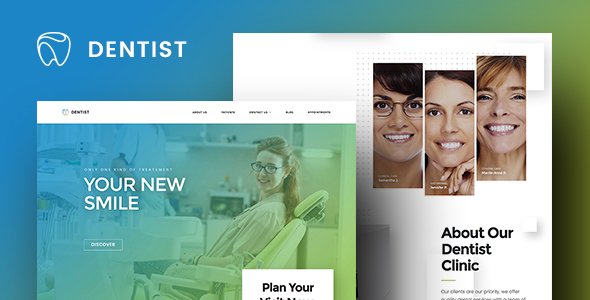
Stuck on your Dentist WP WordPress theme? Let's fix it.
No endless back-and-forth. Just send us the details and we'll get it done.
No obligation · Replies within 1 hour · Quote within 1 day
Setup · Customization · Bug fixes · WooCommerce integration
About Dentist WP WP Theme
Dentist WP is a WordPress theme built by CurlyThemes specifically for dental practices and oral health clinics. It ships with a clean, professional layout designed to convert visitors into booked appointments. The theme includes pre-built sections for services, team profiles, testimonials, and a contact form with appointment scheduling support.
Built on a solid page builder foundation, Dentist WP works with Elementor, making it accessible for non-technical clinic owners and developers alike. It includes multiple homepage variations, a blog layout, and WooCommerce compatibility for selling dental products or gift vouchers. Mobile responsiveness is baked in, which matters given that most dental appointment searches happen on phones. CurlyThemes provides documentation and support, but getting the most out of the theme often benefits from hands-on developer help.
Get matched with a Dentist WP developer in under one day
Tell us about your Dentist WP project. Small fixes, Dentist WP theme customization, or a full website build, whatever you need, we've got it covered.
We'll connect you to the right Dentist WP developers, define the scope, and get everything 100% clear.
You'll get one estimate, hire your preferred developer, and start collaborating.
Dentist WP is well-designed, but dental websites have specific requirements: HIPAA-aware contact forms, local SEO structure, appointment flows, and trust-building layouts. Getting these right takes more than editing a demo. Through Codeable, you get access to vetted WordPress developers who have worked with healthcare and clinic sites. No generalist freelancers, no guesswork. Just developers who know what a dental practice website actually needs to perform and convert.
Pros
- Purpose-built for dental and oral health clinics, so the default layouts match real clinic website needs without heavy restructuring
- Full Elementor compatibility makes visual editing straightforward for clinic staff who need to update content without a developer
- Includes multiple homepage demos covering different dental practice sizes and specialties, reducing initial setup time
- WooCommerce ready, which allows clinics to sell teeth whitening kits, electric toothbrushes, or appointment vouchers directly
- Built-in testimonial and team profile sections are styled to build patient trust without needing a custom block or plugin
Cons
- Relies heavily on Elementor, so sites can become slow without proper performance optimization, especially on shared hosting
- Limited native booking functionality — a third-party booking plugin is required for any real appointment scheduling
- The demo content import can be inconsistent, sometimes failing to pull in images or widgets correctly on certain hosting environments
- Deep customization beyond the demo layouts requires Elementor Pro or custom CSS, which adds cost or technical knowledge
- CurlyThemes support response times can be slow, which is frustrating if a critical issue appears close to a site launch
Who is Dentist WP for?
General Dental Practice
Dentist WP works well for standard general practices offering checkups, fillings, and hygiene appointments. The services grid, team section, and contact form give patients everything they need to choose and book a dentist. A developer can connect a booking plugin so patients never have to call to schedule.
Orthodontic Clinic
Orthodontic clinics benefit from the before-and-after gallery layouts and treatment timeline sections that Dentist WP supports through Elementor widgets. Clear service descriptions and a consultation request form make this a strong fit. Custom braces or aligner service pages can be added with minimal theme modification.
Cosmetic Dentistry Studio
Cosmetic dentistry relies heavily on visual trust signals. Dentist WP’s testimonial blocks and portfolio-style galleries suit smile makeover showcases well. A developer can refine the color palette and typography to match a premium aesthetic, helping the site reflect the quality of the treatments offered.
Pediatric Dentist Office
Pediatric dental offices need a warmer, more approachable look. Dentist WP’s flexible Elementor layouts allow color scheme changes, friendly typography, and illustrated or photo-heavy sections that appeal to parents and reduce anxiety for young patients visiting the site before their appointment.
Multi-Location Dental Group
Dental groups with multiple locations need per-location pages, a location finder, and unified brand consistency across the site. Dentist WP handles this well with custom page templates, and a developer can build location-specific landing pages optimized for local search to drive appointments at each clinic.

Customizing Dentist WP
Dentist WP gives you a solid starting point, but most dental practices need customization to match their brand, services, and booking workflow. The theme’s Elementor integration means you can drag and drop sections, but custom layouts, font pairing, color systems, and unique section types often require a developer who knows the theme inside out.
Common customization requests include custom appointment booking flows, integrated Google Maps for multiple locations, modified service card layouts, and branded color schemes that go beyond the default palette. A Dentist WP expert can also connect the theme to third-party booking systems like Calendly, Acuity, or dental practice management software. Getting these integrations right without breaking the layout or slowing the site down takes experience with both the theme structure and WordPress development.
Recommended plugins for Dentist WP
Dentist WP pairs well with several plugins that extend its core functionality. For booking, plugins like Bookly or Simply Schedule Appointments slot in cleanly. WooCommerce handles product or voucher sales. Yoast SEO or Rank Math handle on-page optimization, and if you want deeper search visibility for local dental searches, a proper WordPress SEO setup is worth investing in.
For site speed, the theme benefits from a caching layer, image optimization, and a CDN. A dedicated WordPress performance audit can identify bottlenecks specific to how Dentist WP loads assets, especially if you are running multiple Elementor widgets on a single page.
Not sure which plugins to use? This WordPress plugins directory covers the most popular options with reviews and setup guides.
Dentist WP common issues
Dentist WP demo content not importing correctly
Demo import failures in Dentist WP are usually caused by PHP memory limits, execution timeouts, or missing required plugins like Elementor or the theme’s companion plugin. Check that your server’s max_execution_time and memory_limit meet CurlyThemes’ requirements. Install all required plugins before importing. If images fail to import, try importing content without media first, then manually upload demo images. Persistent issues may need a WordPress bug fix from a developer.
Dentist WP appointment form not sending emails
Contact form email failures on Dentist WP are almost always a server mail configuration issue, not a theme bug. WordPress uses PHP mail by default, which many hosts block. Install an SMTP plugin like WP Mail SMTP and connect it to a transactional email service such as Mailgun, SendGrid, or Gmail. Verify your from address matches your domain. Test with the plugin’s built-in email tester before going live to confirm delivery is working.
Dentist WP site slow after adding Elementor widgets
Dentist WP with Elementor can load slowly if widgets are stacked without optimization. Start by enabling Elementor’s built-in asset optimization under Elementor Settings. Install a caching plugin like WP Rocket or LiteSpeed Cache. Compress images before upload using Imagify or ShortPixel. Reduce unused Google Fonts loaded by Elementor. If the site is still slow after these steps, a full WordPress performance audit will identify the specific bottlenecks.
Dentist WP mobile menu not opening on phone
A broken mobile menu on Dentist WP is often caused by a JavaScript conflict with another plugin, or a theme update that changed the menu toggle behavior. Open your browser’s console on mobile emulation and look for JS errors. Deactivate plugins one by one to isolate the conflict. If the issue appeared after a theme update, check CurlyThemes’ changelog or support forum. A CSS or JS fix from a developer usually resolves this quickly without touching the theme’s core files.
Dentist WP FAQ
Yes, Dentist WP works with both the free version of Elementor and Elementor Pro. Elementor Pro unlocks additional widgets like advanced forms, popups, and WooCommerce builders that pair well with the theme. Most of the demo content works with free Elementor, but Pro adds flexibility for custom appointment flows and marketing landing pages within the same site.
Dentist WP is manageable for non-developers if you stick close to the demo layouts and use Elementor’s visual editor for content changes. Updating text, images, team profiles, and service descriptions requires no coding. However, changing the overall layout structure, integrating a booking system, or modifying theme templates will likely need a developer to avoid breaking things.
Dentist WP does not include a built-in booking system. It provides a contact form for appointment requests, but actual scheduling requires a third-party plugin. Popular options include Bookly, Simply Schedule Appointments, or Amelia. A developer can integrate these plugins cleanly into the Dentist WP layout so the booking experience feels native to the site design.
Never edit Dentist WP’s core theme files directly. Use a child theme for any custom CSS or PHP changes. Elementor customizations are stored in the database and survive theme updates safely. Before updating, back up your site fully. After updating, check your homepage, mobile menu, and contact forms. If something breaks, a WordPress maintenance plan with regular backups makes recovery straightforward.
Yes, your existing content can be migrated to Dentist WP. The process involves exporting posts, pages, and media from your current site, then rebuilding key pages using Dentist WP’s Elementor layouts. Design elements like custom forms, booking integrations, and SEO settings need to be reconfigured. A WordPress migration specialist can handle this without downtime or lost content.
Hire a Dentist WP Expert
Whether you need help setting up Dentist WP from scratch, customizing the layout to match your clinic’s brand, or fixing something that broke after an update, a dedicated developer makes the difference. Work is matched through Codeable, so you only deal with vetted WordPress professionals. Get a free estimate with no obligation. Describe your project and get matched within 24 hours.
You'll need a free Codeable account so developers can ask questions and send their quotes.