Dimita – Electronics WordPress Theme for WooCommerce WordPress Theme
by wpbingo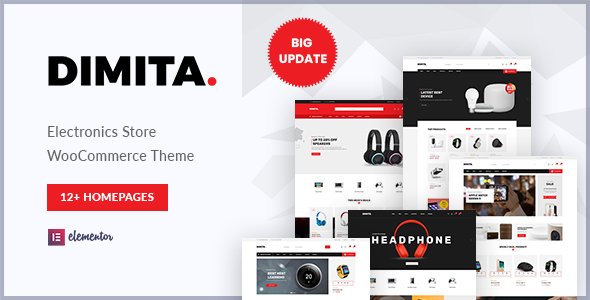
Stuck on your Dimita – Electronics WordPress Theme for WooCommerce WordPress theme? Let's fix it.
No endless back-and-forth. Just send us the details and we'll get it done.
No obligation · Replies within 1 hour · Quote within 1 day
Setup · Customization · Bug fixes · WooCommerce integration
About Dimita – Electronics WordPress Theme for WooCommerce WP Theme
Dimita is an electronics-focused WooCommerce theme built by wpbingo. It targets online stores selling phones, laptops, gadgets, and consumer electronics. The theme ships with multiple homepage layouts, a mega menu, product quick view, and AJAX cart functionality built in.
Built on a clean codebase, Dimita supports RTL languages and is translation-ready. It works with Elementor, giving store owners visual control over page layouts without touching code. WooCommerce features like product filtering, comparison tables, and wishlist integration make it practical for large product catalogues. If you run a store with hundreds of SKUs across multiple categories, Dimita gives you a solid foundation without requiring a custom build from scratch.
Get matched with a Dimita – Electronics WordPress Theme for WooCommerce developer in under one day
Tell us about your Dimita – Electronics WordPress Theme for WooCommerce project. Small fixes, Dimita – Electronics WordPress Theme for WooCommerce theme customization, or a full website build, whatever you need, we've got it covered.
We'll connect you to the right Dimita – Electronics WordPress Theme for WooCommerce developers, define the scope, and get everything 100% clear.
You'll get one estimate, hire your preferred developer, and start collaborating.
Dimita has a lot of moving parts. Mega menus, AJAX filters, product comparison, and multiple layout options all need to work together without slowing down your store. A developer who knows the theme’s structure can configure everything correctly the first time.
Through Codeable, you get matched with vetted WordPress developers experienced with WooCommerce themes like Dimita. Post your project, get an estimate within 24 hours, and hire only if you’re happy with the scope.
Pros
- Multiple pre-built homepage layouts designed specifically for electronics product categories
- Built-in product comparison, quick view, and wishlist features without extra plugins
- Elementor compatibility gives non-developers real layout control
- AJAX cart and product filtering reduce page reloads and improve shopping experience
- RTL support and translation-ready structure works for international electronics stores
Cons
- Demo import can be slow and occasionally fails without manual XML file adjustments
- Some design elements rely on wpbingo's custom shortcodes, making future theme switching difficult
- Theme options panel is dense and takes time to navigate without documentation
- Performance drops noticeably on shared hosting when product counts go above 500
- Child theme support exists but is not well documented, increasing risk during updates
Who is Dimita – Electronics WordPress Theme for WooCommerce for?
Consumer Electronics Retail
Dimita’s category page layouts and mega menu handle large product catalogues well. Stores selling TVs, audio equipment, and home appliances benefit from the built-in product filtering by attribute, letting customers narrow results by brand, price, or specifications without leaving the page.
Mobile Phone & Accessories Store
Product comparison and quick view are useful when shoppers evaluate phones side by side. The theme supports variation swatches, so colour and storage options display cleanly. Mobile phone stores can configure accessory upsell sections on product pages without custom development.
Computer & Laptop Shop
Laptop and computer stores often need detailed specification tables. Dimita’s product page templates accommodate long attribute lists without cluttering the layout. Combined with a configurable mega menu for processor type or brand, it handles technical product discovery well.
Smart Home Device Store
Smart home product stores benefit from Dimita’s visual homepage blocks for featured and new arrivals. Category banners can highlight product ecosystems like lighting, security cameras, or voice assistants. The theme handles cross-sell and bundle setups through standard WooCommerce functionality.
Electronics Wholesale Supplier
Wholesale suppliers need bulk pricing and account-based access. Dimita works with WooCommerce wholesale plugins to restrict pricing to logged-in users. The theme’s clean category structure scales to hundreds of product lines across different supplier brands.

Customizing Dimita – Electronics WordPress Theme for WooCommerce
Getting Dimita installed is straightforward. Customizing it to match your brand, handle complex pricing rules, or integrate third-party inventory systems is where things get technical fast.
A Dimita Electronics WordPress Theme for WooCommerce expert can handle homepage layout adjustments, custom product page templates, header and mega menu configuration, and checkout flow modifications. Beyond visual changes, custom work often includes setting up product attribute filtering, connecting payment gateways specific to your region, and optimizing category pages for high product volumes. wpbingo’s demo content gives you a starting point, but most serious stores need tailored modifications to stand out and convert. Working with a developer who knows both WooCommerce and Dimita’s template structure saves significant time and avoids breaking changes.
Recommended plugins for Dimita – Electronics WordPress Theme for WooCommerce
Dimita pairs well with several plugins that extend its default functionality. YITH WooCommerce Wishlist and Compare work with the theme’s built-in hooks. For search, SearchWP or FiboSearch improve product discovery significantly over the default WooCommerce search.
Adding review plugins like Trustpilot or Judge.me fits naturally into Dimita’s product page structure. For site speed, combining a caching plugin with image optimization is important given the volume of product images electronics stores carry. You can also explore our WordPress performance services or WordPress SEO optimisation to strengthen your store’s visibility and load times.
Not sure which plugins to use? This WordPress plugins directory covers the most popular options with reviews and setup guides.
Dimita – Electronics WordPress Theme for WooCommerce common issues
Dimita theme mega menu not working after update
Mega menu breakdowns after updates usually point to a JavaScript conflict or a cached version of the old menu script. Start by clearing all caches, then deactivate plugins one by one to identify conflicts. If the issue persists, check whether the theme’s menu walker class was overridden in a child theme. Our WordPress bug fixing service can isolate and resolve menu issues without disrupting your live store.
Dimita WooCommerce product filter AJAX not loading
AJAX filter failures often result from incorrect URL rewrite settings or a plugin overriding WooCommerce query variables. Go to Settings > Permalinks and re-save without changing anything. If that does not fix it, check whether a caching plugin is serving static pages that bypass AJAX calls. Server-level caching rules may also need exclusions for filtered URLs. A developer can audit query handling and fix the root cause without guesswork.
Dimita theme homepage layout broken after plugin conflict
Homepage layout breaks after plugin conflicts usually involve Elementor or wpbingo’s custom widgets losing their registered hooks. Deactivate recently added plugins first. If a page builder element is missing, check whether the plugin that registered it is still active. Rebuilding from a saved template or restoring a recent backup is faster than troubleshooting widget registration manually. Visit our bug fixing service for hands-on help.
Dimita theme slow loading on WooCommerce product pages
Slow product pages on Dimita often trace back to unoptimised product images, too many plugin requests on each page load, or missing server-side caching. Run a GTmetrix or PageSpeed Insights test to identify the heaviest assets. Compress images, enable object caching, and audit which scripts load on product pages. Check our WordPress performance services for a full technical audit and optimisation plan specific to WooCommerce stores.
Dimita – Electronics WordPress Theme for WooCommerce FAQ
wpbingo updates Dimita periodically, but compatibility with the latest WooCommerce release is not always immediate. Always check the theme’s changelog before updating WooCommerce on a live store. Test updates in a staging environment first. If you’re on an older Dimita version, consider whether upgrading the theme itself is needed before updating WooCommerce core.
Yes, Dimita supports Elementor. Most inner pages can be built using Elementor’s visual editor. Some homepage sections use wpbingo’s own widgets, which appear as Elementor elements once the theme is active. For complex layouts, a developer familiar with both Elementor and Dimita’s structure will get cleaner results faster than trial and error.
Dimita includes built-in support for product comparison, wishlist, and quick view. These features are activated through the theme options panel. They work without additional plugins, though some stores choose YITH plugins for more control over wishlist and comparison behaviour. Configuration is straightforward once you locate the relevant settings in the theme panel.
Dimita’s demo import works through the one-click importer included with the theme. Go to Appearance > Import Demo Data and select your preferred demo. Import times vary depending on your server. If the import fails or loads incompletely, try importing the XML file manually through Tools > Import using the WordPress importer plugin instead.
Migrating an existing WooCommerce store to Dimita involves transferring product data, reconfiguring menus, and rebuilding page templates to match the new theme structure. Product and order data migrates cleanly. Visual and layout work takes longer. Our WordPress migration service covers the full process including testing before go-live.
Hire a Dimita Electronics WordPress Theme for WooCommerce Expert
Whether you need a full Dimita store setup, custom product page templates, or specific WooCommerce integrations, our developers can handle it. Work is delivered through Codeable, so you get a vetted specialist, not a generalist. Get a free estimate with no obligation. Describe your project and receive a clear scope and cost within 24 hours.
You'll need a free Codeable account so developers can ask questions and send their quotes.