Discy WordPress Theme
by 2codeThemes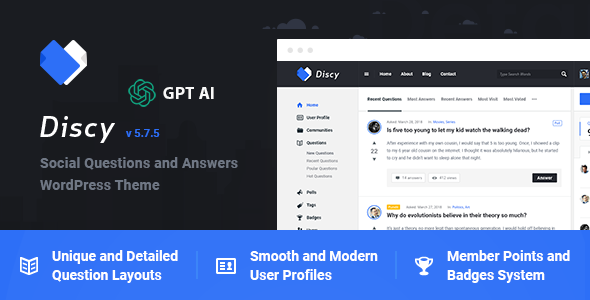
Stuck on your Discy WordPress theme? Let's fix it.
No endless back-and-forth. Just send us the details and we'll get it done.
No obligation · Replies within 1 hour · Quote within 1 day
Setup · Customization · Bug fixes · WooCommerce integration
About Discy WP Theme
Discy is a WordPress question-and-answer theme built by 2codeThemes. It replicates the Quora-style Q&A experience on self-hosted WordPress sites, powered by the DW Question & Answer plugin. Users can post questions, vote on answers, accept best answers, and earn points through a built-in reputation system.
The theme ships with multiple homepage layouts, a points and badges system, BuddyPress integration, and WooCommerce support for monetising your community. It handles user profiles, activity feeds, and notification systems out of the box. The design is clean and responsive, making it a practical starting point for community-driven sites, niche knowledge bases, and support forums. For teams that need something beyond the defaults, a Discy developer can extend and customise the theme significantly.
Get matched with a Discy developer in under one day
Tell us about your Discy project. Small fixes, Discy theme customization, or a full website build, whatever you need, we've got it covered.
We'll connect you to the right Discy developers, define the scope, and get everything 100% clear.
You'll get one estimate, hire your preferred developer, and start collaborating.
Most Discy issues come down to conflicts with plugins, customised vote logic, or membership integrations that the theme was not originally built to handle. Codeable connects you with vetted WordPress developers who have worked on community and Q&A sites before. You describe your project, get a fixed-price estimate, and only proceed if the scope and cost make sense. No bidding, no guessing on quality. If your Discy site needs real development work done properly, that is the straightforward way to get it done.
Pros
- Purpose-built for Q&A communities with voting, best answers, and reputation points out of the box
- BuddyPress integration adds social profiles, activity streams, and friend connections without extra development
- WooCommerce compatibility allows paid memberships or monetised question submissions
- Multiple pre-built homepage layouts make initial setup fast without custom design work
- Active ThemeForest sales history means documentation and peer support threads exist for most common issues
Cons
- Relies heavily on the DW Question & Answer plugin, so core Q&A functionality is tied to a third-party dependency
- Points and badges system lacks granular control without custom PHP modifications
- Redux framework-based options panel can conflict with certain page builders and admin plugins
- Schema markup for Q&A content is incomplete by default, requiring additional SEO configuration
- Heavy BuddyPress activation on shared hosting causes noticeable slowdowns without caching and database optimisation
Who is Discy for?
Niche Q&A Communities
Discy works well for building topic-specific Q&A communities around hobbies, professional fields, or local interests. The voting and reputation system keeps quality answers visible. A Discy developer can restrict posting by membership tier, enforce category rules, and add moderation workflows suited to your specific community niche.
Customer Support Portals
Companies can use Discy as a self-service support hub where customers post questions and support agents or community members answer. The best answer feature surfaces verified solutions quickly. A Discy specialist can integrate it with CRM tools, add agent role permissions, and connect ticket systems to the Q&A workflow.
Online Learning Platforms
Course platforms can use Discy to add a student Q&A layer alongside existing LMS content. Students ask questions tied to specific lessons, instructors provide verified answers, and peer support reduces direct support load. A Discy expert can link question categories to course content and restrict access by enrolment status.
Developer and Tech Forums
Developer communities, coding bootcamps, and SaaS products benefit from a Stack Overflow-style Q&A hub. Discy handles code-heavy discussions with proper formatting support. A Discy developer can add syntax highlighting, integrate GitHub profiles, and set up reputation gates that limit certain actions to trusted community members.
Health and Wellness Advisory Sites
Health platforms use Discy to let users ask questions answered by qualified contributors or verified professionals. The badge and reputation system signals credibility. A Discy specialist can add disclaimer workflows, restrict medical advice categories to verified accounts, and structure content to meet basic health information publishing standards.

Customizing Discy
Discy includes a Theme Options panel built on the Redux framework, giving you control over colours, typography, layout widths, and header styles without touching code. You can configure the points system, set reputation thresholds, and adjust badge rules directly from the admin panel.
That said, deeper changes require PHP and CSS knowledge. Customising the question feed, modifying vote logic, or integrating third-party membership plugins all need hands-on development work. A Discy expert can restructure templates, add custom post types alongside the Q&A system, or wire up payment gateways for paid question submissions. If you need Discy to behave differently from its defaults, working with an experienced Discy specialist saves significant trial and error.
Recommended plugins for Discy
Discy works well alongside caching plugins and image optimisation tools. Running a Q&A site with active voting and user queries puts real load on your database, so pairing Discy with proper WordPress performance optimisation is worth doing early, not after you hit traffic problems.
For communities targeting search traffic, structured data for Q&A content matters. Discy does not automatically output schema markup for all question and answer pairs, so adding an SEO plugin and configuring it correctly is necessary. A dedicated WordPress SEO setup ensures your questions rank for the queries your audience is actually searching.
Not sure which plugins to use? This WordPress plugins directory covers the most popular options with reviews and setup guides.
Discy common issues
Discy theme votes not working after update
Vote failures after a Discy update are usually caused by a version mismatch between the theme and the DW Question & Answer plugin. Update both together, then clear all caches. If votes still fail, check browser console for JavaScript errors, which often point to a jQuery conflict with another plugin. Deactivate plugins one by one to isolate the conflict. If the issue persists, a WordPress bug fixing service can trace the exact script collision.
Discy notifications not sending emails to users
Missing email notifications in Discy usually trace back to WordPress not sending mail at all rather than a theme-specific bug. Install an SMTP plugin like WP Mail SMTP and connect it to a transactional mail provider. Check Discy’s notification settings under Theme Options to confirm notifications are enabled. Also verify that the DWQA plugin notification options are turned on separately, as they have their own settings independent of the theme panel.
BuddyPress profile pages returning 404 on Discy
BuddyPress 404 errors on profile pages after activating Discy are almost always a permalink issue. Go to Settings > Permalinks and save without making any changes. This flushes rewrite rules and usually resolves it immediately. If the problem returns, check that BuddyPress page assignments are correct under Settings > BuddyPress > Pages. Theme template overrides that conflict with BuddyPress routing may also need inspection.
Discy points not updating when answers are accepted
When Discy points stop updating on accepted answers, the first step is checking the points configuration under Theme Options > Points System. Confirm that point values are set for the specific action. If settings look correct, the DWQA plugin’s database hooks may not be firing. Deactivate caching plugins temporarily to rule out cached point totals being served. Persistent issues often need direct database query inspection to find where the trigger is breaking.
Discy theme slow loading with many questions and answers
Discy can become slow on sites with thousands of questions because the voting, point tallying, and BuddyPress activity queries are database-heavy. Enable object caching with Redis or Memcached, add a page caching layer, and run database optimisation to remove post revision bloat. Review slow query logs to identify which Q&A queries need indexing. Proper WordPress performance optimisation makes a substantial difference on active Discy communities.
Discy login redirect not working correctly
Login redirect problems in Discy usually occur when the theme’s custom login page conflicts with a membership or security plugin that also controls redirects. Check Discy Theme Options for the login redirect URL setting and compare it against any redirect rules set in your security or membership plugin. Clear cookies and test in a private browser window. If users land on the wrong page post-login, a redirect hierarchy conflict between plugins is the most likely cause.
Question categories not displaying in Discy sidebar
Question categories missing from the Discy sidebar are typically a widget configuration issue. Go to Appearance > Widgets and confirm the DWQA category widget is placed in the correct sidebar. If the widget is present but showing nothing, check that questions exist in those categories and that the category is not set to private. A theme update that reset widget areas is another common cause worth checking in revision history.
Discy WooCommerce pages showing broken layout
WooCommerce layout breaks on Discy usually happen because the theme’s stylesheet does not fully account for all WooCommerce template updates. After a WooCommerce update, run the WooCommerce System Status tool to check for outdated template files. Override only the templates you need inside a child theme rather than modifying core files. For complex layout issues across multiple WooCommerce pages, a WordPress bug fixing service can audit and correct the template conflicts.
Discy theme custom CSS not applying after update
Custom CSS disappearing after a Discy update is a sign that custom code was added to the theme’s style.css directly rather than through the Additional CSS panel in the Customizer or via a child theme. Always store custom CSS in the Customizer’s Additional CSS field or in a child theme stylesheet. These persist through theme updates. If you lost custom styles in an update, check if your hosting provides file backups to recover what was written previously.
Discy search returning no results for questions
Discy search not returning question results is often a WordPress search configuration issue rather than a theme bug. By default, WordPress search may exclude custom post types registered by DWQA. Install a search plugin like SearchWP or use a filter to include the DWQA question post type in search results. Also check that questions are published and not in draft status. Relevanssi is a popular alternative that handles custom post type search well with Discy.
Discy FAQ
2codeThemes has maintained Discy through multiple major WordPress releases, and it remains one of the better-supported Q&A themes on ThemeForest. Check the theme’s changelog on ThemeForest for the most recent update date. Before purchasing or upgrading, confirm the last update aligns with the current WordPress version to avoid compatibility gaps.
Discy is generally kept compatible with current WordPress releases, but plugin dependencies like DW Question & Answer and BuddyPress also need to be current. Always update all three components together. Testing updates on a staging environment before pushing to production reduces the risk of breaking a live community site.
Yes. BuddyPress is optional in Discy. The core Q&A functionality runs through the DW Question & Answer plugin independently. Without BuddyPress you lose social profiles, activity streams, and friend connections, but the question posting, voting, and reputation system works fine. Many sites use Discy without BuddyPress to keep things lighter.
Create a folder in wp-content/themes with a name like discy-child. Add a style.css file with the correct Theme Name and Template headers pointing to discy. Create a functions.php that enqueues the parent theme stylesheet. Activate the child theme in Appearance > Themes. All customisations go into the child theme to survive updates safely.
Discy is translation-ready and works with WPML for multilingual Q&A sites. String translations for the theme can be managed through WPML’s String Translation module. The DWQA plugin also needs to be translated separately. For RTL language support, Discy includes basic RTL stylesheet support, though some layouts may need minor CSS adjustments.
Yes. Discy includes WooCommerce compatibility and can be combined with membership plugins like MemberPress or Paid Memberships Pro to gate question posting or answer visibility behind paid plans. A Discy developer can configure the access rules, payment flows, and content restriction logic to match your specific monetisation model.
Migrating to Discy depends on your current platform. If you are moving from another WordPress Q&A theme, the DWQA plugin data can sometimes be mapped with custom import scripts. Moving from external platforms like Quora or Discourse requires a custom migration. A WordPress migration specialist can assess your data structure and build the appropriate import process.
Discy is not built around Elementor and does not officially support page builder editing for Q&A templates. You can use Elementor for static pages like the homepage or about page, but the question and answer templates are standard PHP files. Forcing Elementor onto Q&A templates typically causes layout and functionality conflicts.
The most reliable way to hire a vetted Discy developer is through Codeable. Post your project, describe what you need, and receive a fixed-price estimate from a screened WordPress specialist. There is no obligation to proceed until the scope and price work for you. Get a Free Estimate to get started.
Discy is built on top of the DW Question & Answer plugin by Dave Jesch. This plugin handles all core Q&A functionality including question post types, answer submission, voting, and best answer selection. Discy provides the theme layer, styling, and extended features like the points system and BuddyPress integration on top of that plugin foundation.
Hire a Discy Developer for Your Q&A Community
Whether you need a Discy expert to set up your site from scratch, fix a specific bug, or build custom features on top of the theme, FoxyConcept delivers through Codeable’s vetted developer network. You get a free estimate before any work begins, with no obligation to proceed. Get a Free Estimate and describe exactly what your Discy project needs.
You'll need a free Codeable account so developers can ask questions and send their quotes.