Docly WordPress Theme
by CreativeGigs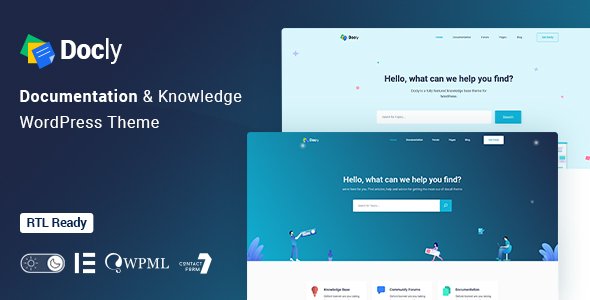
Stuck on your Docly WordPress theme? Let's fix it.
No endless back-and-forth. Just send us the details and we'll get it done.
No obligation · Replies within 1 hour · Quote within 1 day
Setup · Customization · Bug fixes · WooCommerce integration
About Docly WP Theme
Docly is a documentation and knowledge base WordPress theme built by CreativeGigs. It is designed specifically for product documentation, wikis, helpdesks, and self-service support portals. The theme ships with a clean reading layout, sticky sidebar navigation, instant Ajax search, and a dedicated documentation post type that keeps your content structured and easy to browse.
Docly works with Elementor for visual page building and includes built-in role-based access control, so you can restrict sections to logged-in users or specific membership tiers. It supports dark mode, multi-language setups via WPML, and comes with a rating and feedback system so readers can mark articles as helpful or not. If your product or service needs a professional self-hosted documentation site, Docly is one of the most purpose-built options available on ThemeForest.
Get matched with a Docly developer in under one day
Tell us about your Docly project. Small fixes, Docly theme customization, or a full website build, whatever you need, we've got it covered.
We'll connect you to the right Docly developers, define the scope, and get everything 100% clear.
You'll get one estimate, hire your preferred developer, and start collaborating.
Docly has a specific architecture built around its custom documentation post type, hierarchical categories, and role-based access system. Trying to extend it without understanding that structure leads to broken navigation and permission conflicts. A vetted developer through Codeable will know exactly how Docly organizes content under the hood. Whether you need a custom doc import, a private client portal, or a full redesign of the article layout, working with someone who has done it before saves a lot of time and avoids costly mistakes. Explore our WordPress development services to get started.
Pros
- Purpose-built documentation structure with a dedicated post type and hierarchical categories
- Built-in Ajax instant search that works across the entire doc library without extra plugins
- Role-based content access lets you restrict documentation to logged-in users or specific tiers
- Article feedback and rating system included out of the box, no third-party plugin needed
- Elementor compatibility gives you full visual control over landing pages and marketing sections
Cons
- The default search ranking is basic and needs manual tuning for large doc libraries
- Multi-product documentation under one installation requires custom development work
- Dark mode toggle styling occasionally conflicts with custom Elementor widget styles
- Theme updates from CreativeGigs can be infrequent, leaving compatibility gaps with newer WordPress versions
- The built-in feedback system stores data locally with no native export or analytics dashboard
Who is Docly for?
SaaS Product Documentation
Docly suits SaaS companies that need structured, searchable documentation for their product. You can organize docs by version, feature set, or user role. The Ajax search means users find answers without digging through menus, which reduces support ticket volume. Pair it with a changelog page and a feedback widget to keep users informed and your support team focused on real issues.
Internal Company Wiki
Companies use Docly to build private internal wikis for onboarding materials, process documentation, and HR policies. Role-based access keeps sensitive content away from the wrong users. The clean reading layout makes long-form process documents easier to follow than most alternatives. A developer can lock the entire site behind a login wall and integrate it with an existing SSO or HR system.
Customer Support Helpdesk
Docly works well as a self-service helpdesk where customers answer their own questions before raising a ticket. The article rating system shows which pages are actually helping people. You can connect it to a contact form or a live chat widget for cases where users still need human help. The result is fewer repetitive support requests and a better first-contact resolution rate.
Developer API Reference
Developer-facing API documentation needs a clear hierarchy and fast search. Docly handles both. You can structure content by endpoint group, authentication type, or SDK language. Code block styling is clean and readable. A Docly developer can extend this with tabbed code examples, a versioned doc archive, and syntax highlighting via a plugin like Prism.js integrated into the template files.
Online Course Knowledge Base
Online course creators use Docly to build supplementary knowledge bases alongside their course platform. Students get a searchable reference library separate from video content. You can gate sections by membership level using WooCommerce Memberships or MemberPress. This setup works especially well for technical courses where students frequently return to reference material between lessons.

Customizing Docly
Out of the box, Docly covers most documentation needs, but getting the theme to match your brand and workflow usually takes more than adjusting a color palette. A Docly expert can reconfigure the navigation hierarchy for deep content structures, set up custom user roles with restricted doc access, and wire up the Ajax search to surface results more accurately.
Custom work often includes integrating Docly with WooCommerce for paid documentation access, building changelogs or roadmap sections, and extending the feedback system with custom vote logic or export to a CRM. If you need multi-product documentation under one installation or want to pull in content from an external API, that requires developer-level customization. A Docly expert will handle those integrations cleanly without fighting the theme’s existing structure.
Recommended plugins for Docly
Docly pairs well with several plugins that extend what it does. BetterDocs adds extra doc management features if you want a hybrid setup. WPML or Polylang handles multilingual documentation. WooCommerce Memberships can gate premium content sections. For performance, a caching plugin like WP Rocket makes a measurable difference on large doc libraries. Learn more about WordPress performance optimization.
On the SEO side, Yoast or Rank Math integrates cleanly with Docly’s custom post type, but schema output for documentation articles needs manual configuration. See our WordPress SEO service for help with that.
Not sure which plugins to use? This WordPress plugins directory covers the most popular options with reviews and setup guides.
Docly common issues
Docly search not returning results for all documentation posts
This usually happens when the documentation custom post type is excluded from the default WordPress search index. Go to Settings > Reading and check if custom post types are included. If they are, the issue is often a caching layer serving stale search results. Clear all caches and flush your object cache. If Ajax search still misses posts, a developer can hook into Docly’s search query to explicitly include the docs post type. Our WordPress bug fixing service can resolve this quickly.
Docly dark mode breaking custom Elementor section styles
Docly’s dark mode applies global color overrides using CSS variables. Custom Elementor widgets that hardcode background or text colors in inline styles bypass these variables entirely. The fix is to replace hardcoded color values in your Elementor sections with theme-aware CSS variables or use conditional classes. If you have dozens of affected sections, a developer can write a small override stylesheet that respects both the light and dark mode states without touching each widget manually.
Docly sidebar navigation not showing nested doc categories correctly
Nested category display in the Docly sidebar depends on the documentation hierarchy being set correctly inside the custom post type taxonomy. If child categories show at the wrong level, check that parent-child relationships are assigned in the doc category settings, not just in the doc post itself. Also check that your menu depth setting in the theme options isn’t capped at one level. Clearing the permalink structure by saving it again under Settings > Permalinks resolves this in many cases.
Docly role-based access not restricting documentation pages for guest users
Docly’s access restriction relies on the correct user role being checked at the template level. If guest users are still seeing restricted content, the most common cause is a caching plugin serving logged-in page versions to logged-out users. Exclude restricted doc URLs from your cache. If the issue persists without caching involved, the role check in the Docly settings may not cover archive or category pages, only single doc posts. A developer can add the missing restriction check to cover all relevant templates. See also our WordPress maintenance service for ongoing security monitoring.
Docly FAQ
Docly handles large documentation sites reasonably well, but performance degrades on very large libraries if caching is not configured. The Ajax search can slow down with thousands of articles. For large-scale installs, it’s worth adding a proper caching layer, optimizing your database queries, and possibly replacing the built-in search with a more powerful solution like SearchWP. A developer can profile and tune the setup before it becomes a user-facing problem.
Yes. Docly includes Elementor compatibility for building landing pages, homepage layouts, and marketing sections. The documentation post type itself uses Docly’s own template system rather than Elementor, so the actual doc article pages are styled through the theme options and custom CSS rather than the visual builder. Most site owners use Elementor for the front-facing pages and Docly’s native system for the docs themselves.
Yes. Docly includes role-based access control that lets you restrict documentation sections to logged-in users or specific user roles. You can lock the entire doc library or restrict individual categories. For more advanced setups like team-specific access or SSO integration, you will need a developer to extend the built-in access system. It is a solid foundation for internal knowledge bases and private client portals.
Migrating to Docly involves importing your existing content into the documentation custom post type and rebuilding the category hierarchy to match Docly’s structure. If your current docs are in standard WordPress posts or pages, a developer can write an import script to map the content correctly. Redirects need to be set up to preserve any existing URLs. Our WordPress migration service covers exactly this type of structured content move.
Docly supports WPML and Polylang for multilingual documentation. The theme strings are translation-ready, and the documentation post type works within WPML’s content translation workflow. Setting up a multilingual Docly site correctly takes some configuration work, particularly around keeping the sidebar navigation language-aware and ensuring the search returns results only in the active language. A developer familiar with both Docly and WPML will save you several hours of trial and error.
Hire a Docly Developer
Need help building or customizing a Docly documentation site? FoxyConcept connects you with vetted Docly developers through Codeable. Post your project, get a free estimate within 24 hours, and only hire if you’re happy with what you see. No obligation, no risk. Whether it’s a small fix or a full build, there’s a developer ready for it. Get your free estimate today and have your documentation site running the way it should.
You'll need a free Codeable account so developers can ask questions and send their quotes.