Drone Media WordPress Theme
by AncoraThemes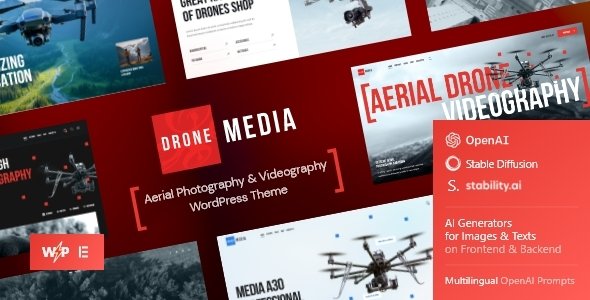
Stuck on your Drone Media WordPress theme? Let's fix it.
No endless back-and-forth. Just send us the details and we'll get it done.
No obligation · Replies within 1 hour · Quote within 1 day
Setup · Customization · Bug fixes · WooCommerce integration
About Drone Media WP Theme
Drone Media is a WordPress theme built by AncoraThemes, aimed at aerial photography businesses, videographers, and drone service providers. It ships with a bold, full-screen layout that puts visual content front and center, making it a practical choice for creatives who lead with imagery and video.
The theme includes multiple homepage layouts, a portfolio section, a services block, and a contact form setup. It is built on a responsive framework and works with Elementor, which gives you drag-and-drop control over page structure without touching code.
AncoraThemes maintains the theme with regular updates, and it integrates with popular plugins like WooCommerce and WPML. If you need a professional site that showcases aerial footage or drone photography packages, Drone Media gives you a usable starting point without heavy development overhead.
Get matched with a Drone Media developer in under one day
Tell us about your Drone Media project. Small fixes, Drone Media theme customization, or a full website build, whatever you need, we've got it covered.
We'll connect you to the right Drone Media developers, define the scope, and get everything 100% clear.
You'll get one estimate, hire your preferred developer, and start collaborating.
Finding a developer who knows Drone Media specifically saves time and avoids trial-and-error fixes. Through Codeable, every developer is vetted, rated, and reviewed, so you are not taking a chance on an unknown freelancer.
Post your project, describe what you need, and you will get a clear estimate from a specialist within 24 hours. No bidding wars, no hidden costs. A Drone Media developer matched through Codeable will already understand the theme’s architecture and can get to work without a long onboarding period.
Pros
- Full-screen video and image backgrounds work natively without extra plugins
- Elementor compatibility gives non-developers real layout control
- Built-in portfolio section with filtering suits aerial photography showcases well
- Multiple pre-built homepage layouts reduce initial setup time
- WPML compatibility makes multilingual drone service sites straightforward to build
Cons
- Heavy reliance on Elementor means the theme is not truly block-editor native
- Demo content import can be unreliable and may require manual cleanup
- Limited documentation for advanced customizations beyond basic Customizer settings
- Portfolio layout options are limited without custom development work
- WooCommerce integration works but lacks drone-specific product templates out of the box
Who is Drone Media for?
Aerial Photography Business
Aerial photographers need a portfolio that loads fast and displays images at full resolution without compression artifacts. Drone Media’s full-screen layout handles this well. A Drone Media specialist can set up a filterable gallery by shoot type, location, or client, giving visitors a clean browsing experience that converts into enquiries.
Drone Videography Studio
Videography studios need hero sections with background video, showreel embeds, and a clear service breakdown. Drone Media supports this structure natively. A Drone Media developer can integrate Vimeo or YouTube backgrounds properly, add chapter-based service pages, and configure a contact flow that captures project briefs from prospective clients.
Real Estate Drone Services
Real estate drone operators need landing pages that speak to agents and property developers directly. Drone Media’s service blocks can be customised to show packages by property type or geography. A Drone Media expert can also add local SEO structure and a booking form that syncs with your scheduling tool, reducing back-and-forth with clients.
Drone Training and Courses
Drone training providers need course listing pages, instructor profiles, and a checkout process for course registration. A Drone Media developer can extend the theme with WooCommerce or a dedicated LMS plugin, structure intake forms, and build a clear student journey from landing page through to enrolment without compromising the site’s visual design.
Inspection and Survey Companies
Infrastructure inspection and survey companies need a more corporate look and detailed service pages with technical specifications. A Drone Media specialist can reframe the theme’s layout for a B2B audience, add case study templates, and integrate a project enquiry form with file upload for site plans or location data.

Customizing Drone Media
Out of the box, Drone Media covers the basics, but most serious projects need changes that go beyond what the WordPress Customizer allows. Typography adjustments, custom post type layouts, unique service page structures, and branded color systems all require hands-on work.
A Drone Media expert can restructure homepage sections, build out a custom portfolio filtering system, or integrate a booking plugin that matches your workflow. If you need a client gallery with password protection, a pricing table tied to specific drone services, or a video background that loads efficiently, these are tasks that benefit from a developer who knows the theme’s code structure.
AncoraThemes provides a solid foundation, but making Drone Media look and function exactly the way your business needs it requires someone who has worked inside the theme before.
Recommended plugins for Drone Media
Drone Media works well with a range of plugins, but adding too many without proper configuration can create conflicts or slow your site down. A few areas are worth attention.
For site speed, image-heavy drone and aerial photography sites need careful optimization. A developer can configure caching, lazy loading, and CDN delivery to keep load times low. Visit our WordPress performance service for more on that.
For search visibility, drone businesses compete locally and by service type. Proper schema markup, meta structure, and keyword targeting require deliberate setup. Our WordPress SEO service covers the technical side of that.
Not sure which plugins to use? This WordPress plugins directory covers the most popular options with reviews and setup guides.
Drone Media common issues
Drone Media homepage not loading after update
This usually happens when an Elementor or theme update breaks a saved page template. Start by clearing your cache, then check the Elementor editor for any widget errors flagged in red. If the homepage is still blank, deactivate recently updated plugins one at a time to isolate the conflict. If you cannot find the source, a WordPress bug fixing specialist can diagnose and restore your layout without data loss.
Drone Media portfolio images not displaying correctly
Portfolio image issues in Drone Media are often caused by thumbnail regeneration not running after a theme switch or media settings change. Run a thumbnail regeneration plugin, then check your image sizes in Settings > Media. If images are cropped incorrectly or missing entirely, verify the upload folder permissions. Persistent display issues may point to a theme or Elementor template conflict that needs a closer look from a WordPress developer.
Drone Media video background not showing on mobile
Most mobile browsers block autoplay video for performance and data reasons. This is expected behaviour. Drone Media should fall back to a static image on mobile, but that fallback image needs to be set correctly in the Elementor section settings. Check the background settings for your hero section and assign a mobile-specific fallback image. If the section is still blank on mobile, inspect the section’s responsive visibility settings in Elementor.
Drone Media contact form not sending emails
Email delivery failures in Drone Media’s contact form are almost always a server-level issue, not a theme problem. WordPress uses PHP mail by default, which many hosting providers restrict. Install an SMTP plugin such as WP Mail SMTP and connect it to a transactional email service like SendGrid or Mailgun. Test delivery after configuring. If forms submit without errors but emails still do not arrive, check your spam folder and sender domain authentication settings.
Drone Media FAQ
Yes, Drone Media is built around Elementor and works with both the free and Pro versions. Most of the pre-built templates rely on Elementor’s page builder. Elementor Pro unlocks additional widgets like forms, sliders, and popup builders, which can be useful for drone service sites that need lead capture or booking functionality built into the page layout.
Technically yes, but the theme’s visual style is clearly designed around aerial and drone content. Using it for an unrelated business would require significant redesign work to remove drone-specific imagery, reframe the service sections, and adjust the overall tone. A Drone Media developer could handle that, but depending on how different your business is, starting with a different AncoraThemes product might be more efficient.
Drone Media includes basic WooCommerce compatibility. You can add a shop, list products, and run a standard checkout. It does not include drone-specific product templates or service booking layouts out of the box. If you need a shop that sells photography packages or drone accessories with custom layouts, a developer will need to build out those templates on top of the theme.
After purchasing and activating Drone Media, go to Appearance > Import Demo Data if the AncoraThemes importer plugin is active. Select your preferred demo layout and run the import. The process can take a few minutes. If images fail to import or the layout does not match the preview, try importing again with all recommended plugins active. Some hosting environments with low PHP memory limits can interrupt the import.
AncoraThemes has maintained Drone Media with updates through recent WordPress versions. You can check the changelog on ThemeForest to confirm the last update date before purchasing. If you need ongoing theme maintenance, security updates, and compatibility checks handled for you, a WordPress maintenance plan covers this without you needing to monitor it manually.
Hire a Drone Media Expert Developer
Whether you need a full custom build on Drone Media or a specific fix on an existing site, working with a vetted specialist makes the difference. Our developers have hands-on experience with AncoraThemes products and know where the common friction points are.
Describe your project and get a free estimate with no obligation to hire. The process takes a few minutes, and you will hear back within 24 hours.
You'll need a free Codeable account so developers can ask questions and send their quotes.