Dustrial WordPress Theme
by johanspond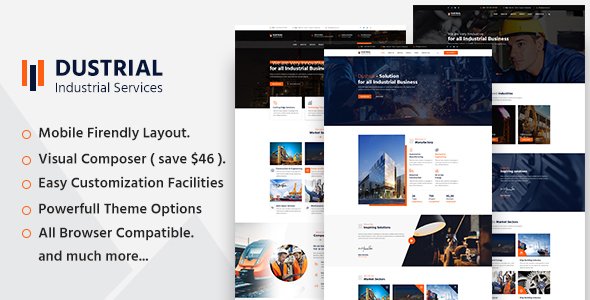
Stuck on your Dustrial WordPress theme? Let's fix it.
No endless back-and-forth. Just send us the details and we'll get it done.
No obligation · Replies within 1 hour · Quote within 1 day
Setup · Customization · Bug fixes · WooCommerce integration
About Dustrial WP Theme
Dustrial is a WordPress theme built by johanspond, designed for industrial, manufacturing, and construction businesses that need a bold, no-nonsense web presence. It ships with a dark, heavy aesthetic that suits sectors like engineering firms, fabrication shops, and heavy equipment suppliers.
The theme uses a page builder-compatible layout with pre-built sections for services, project portfolios, team profiles, and contact forms. It supports WooCommerce for businesses selling parts or equipment online.
Dustrial is built on a widgetized structure, which means most layout decisions happen through theme options and shortcodes rather than a full-site editor. It works best for businesses that want a polished industrial look without building from scratch.
Get matched with a Dustrial developer in under one day
Tell us about your Dustrial project. Small fixes, Dustrial theme customization, or a full website build, whatever you need, we've got it covered.
We'll connect you to the right Dustrial developers, define the scope, and get everything 100% clear.
You'll get one estimate, hire your preferred developer, and start collaborating.
Dustrial is not a theme you configure in an afternoon if you want it to look polished. The options panel has quirks, the portfolio module needs specific setup, and any layout changes below the surface require child theme work.
Through Codeable, you get matched with a vetted WordPress developer who has worked with themes like Dustrial before. No junior freelancers, no guesswork. You post your project, get a clear estimate within 24 hours, and decide whether to move forward. There is no obligation to hire.
Pros
- Strong out-of-the-box aesthetic for industrial and manufacturing businesses
- Includes a built-in portfolio module suited for showcasing projects and case studies
- WooCommerce compatible for selling parts, equipment, or service packages
- Widgetized homepage lets you reorder sections without touching code
- Dark, heavy visual style that stands out compared to generic business themes
Cons
- No full-site editor support — layout changes beyond the options panel require PHP edits
- Default slider relies on older jQuery-dependent code that can conflict with modern plugins
- Limited Google Fonts selection in the default typography panel
- No built-in demo importer, so initial setup requires manual configuration
- Mobile menu styling can feel dated and may need CSS overrides for modern UX expectations
Who is Dustrial for?
Manufacturing Companies
Dustrial’s dark palette and structured layout match what manufacturing businesses expect from a professional web presence. The services section and project portfolio work well for showcasing production capabilities, certifications, and past work. It gives the site the right visual weight without requiring a custom design from scratch.
Construction Firms
Construction firms need a site that looks serious and loads project photos well. Dustrial’s portfolio module handles that cleanly. You can organize projects by type, add descriptions, and display them in a filterable grid. Combined with a contact form for quote requests, it covers the main jobs a construction site needs to do.
Heavy Equipment Suppliers
For businesses selling or renting heavy equipment, Dustrial pairs with WooCommerce to create a product catalogue with the right visual tone. Equipment listings, pricing tables, and enquiry forms all fit within the theme’s layout. The bold style suits the category better than a generic white-background shop theme.
Engineering Consultancies
Engineering consultancies need a site that communicates expertise without looking like a marketing agency. Dustrial’s team section, services layout, and case study portfolio handle that well. It projects authority and industry knowledge rather than polish for its own sake, which is the right tone for B2B engineering clients.
Industrial Parts Retailers
Industrial parts retailers can use Dustrial’s WooCommerce integration to build a functional parts shop. The theme handles product grids, category pages, and checkout without needing heavy customization. For businesses with large catalogues, adding a filter plugin alongside the default WooCommerce setup improves usability significantly.

Customizing Dustrial
Customizing Dustrial goes beyond swapping colors and fonts. The theme has its own options panel where you control header layout, footer columns, typography, and section visibility. Getting those settings to match your brand without breaking the default layout takes some patience.
Portfolio filtering, service icon sets, and the homepage slider all need to be configured correctly for the site to look intentional. A Dustrial expert can handle these faster and avoid the common mistakes that come from guessing at undocumented settings.
If you need custom post types, modified page templates, or changes to the contact section, that work requires editing theme files directly. Always use a child theme for any code-level changes to avoid losing work during updates.
Recommended plugins for Dustrial
Dustrial works well with several popular plugins. WooCommerce adds an online store for parts, equipment, or service packages. Contact Form 7 or WPForms handle quote requests and enquiry forms. WPML adds multilingual support for international industrial clients.
For better speed scores and Core Web Vitals, pairing Dustrial with a caching plugin and an image optimization tool makes a real difference. See our WordPress performance service for that work.
If you need to rank for local or industry-specific keywords, structured SEO work alongside the theme setup is worth it. Our WordPress SEO service covers that.
Not sure which plugins to use? This WordPress plugins directory covers the most popular options with reviews and setup guides.
Dustrial common issues
Dustrial theme homepage slider not working
This is usually a JavaScript conflict. Dustrial’s slider depends on specific jQuery versions, and plugins that load their own scripts can break it. Start by deactivating plugins one at a time to find the conflict. If the slider code itself is outdated, replacing it with a standalone slider plugin like Smart Slider 3 and removing the default slider output is a cleaner long-term fix. Our WordPress bug fixing service can trace the conflict and resolve it properly.
Dustrial portfolio filter broken after plugin update
Portfolio filter issues after an update usually point to an Isotope or jQuery version mismatch. Dustrial uses Isotope for its filtering functionality, and if a plugin or WordPress core update changes how jQuery loads, the filter stops responding. Check your browser console for JavaScript errors first. If you see Isotope-related errors, the fix involves updating how the script is enqueued. A developer can patch this in a child theme without touching the core files.
Dustrial theme not showing correctly on mobile
Dustrial’s mobile menu and some section padding values were set for older viewport conventions. Common issues include the hamburger menu not triggering, text overflowing containers on small screens, and the slider scaling incorrectly. These are fixable with targeted CSS in a child theme stylesheet. Avoid editing the parent theme files directly. If the layout breaks badly across multiple breakpoints, a full mobile audit will be faster than chasing individual fixes one at a time.
Dustrial WooCommerce pages not styled correctly
Dustrial includes basic WooCommerce compatibility, but the styling is minimal. Shop pages, product cards, and the cart often inherit default WooCommerce styles that clash with the theme’s dark design. This requires custom CSS in a child theme to align colors, buttons, typography, and spacing with the rest of the site. If you also have issues with the checkout page layout, that usually needs template overrides rather than CSS alone. See our bug fixing service for scoped WooCommerce fixes.
Dustrial FAQ
Dustrial can run on WordPress 6, but it was built before the block editor era, so it does not support full-site editing or block-based templates. Some features may show deprecation warnings. It is worth testing your setup on a staging environment before updating WordPress core on a live Dustrial site. If you see issues after a WordPress update, a developer can patch them without replacing the theme entirely.
Dustrial was not built with Elementor or WPBakery in mind, but both plugins can technically work on its page templates. The friction comes from the theme’s own shortcode system and fixed-width containers conflicting with page builder rows. Using a page builder with Dustrial is possible but requires some layout adjustments. For a cleaner experience, most developers rebuild key pages using the builder and disable the theme’s conflicting shortcodes.
Yes, Dustrial includes WooCommerce support. You can run a product catalogue, manage cart and checkout, and use standard WooCommerce features. The default styling is basic and usually needs CSS work to match the theme’s visual style properly. For larger stores, additional plugins for filtering, search, and performance are recommended alongside the theme’s native WooCommerce integration.
Create a new folder in wp-content/themes/ named something like dustrial-child. Inside it, add a style.css file with the correct Template: dustrial header and a functions.php that enqueues the parent stylesheet. Activate the child theme from the WordPress dashboard. All your custom CSS and PHP changes go into the child theme so they survive parent theme updates without being overwritten.
Update frequency for Dustrial depends on johanspond’s current development activity. Before buying or building on this theme, check the ThemeForest listing for the last update date and read recent reviews. If the theme has not been updated in over a year, you may face compatibility issues with newer WordPress and WooCommerce versions. A developer can maintain compatibility through a child theme even if the parent theme itself stops receiving updates.
Hire a Dustrial WordPress Developer
Whether you need Dustrial set up from scratch, customized to match your brand, or fixed after something broke, a specialist developer can handle it properly. All work is delivered through Codeable, a vetted network of WordPress professionals. Post your project and get a free estimate within 24 hours, with no obligation to proceed. Get your free estimate here and see exactly what your Dustrial project will cost before committing to anything.
You'll need a free Codeable account so developers can ask questions and send their quotes.