eCademy WordPress Theme
by EnvyTheme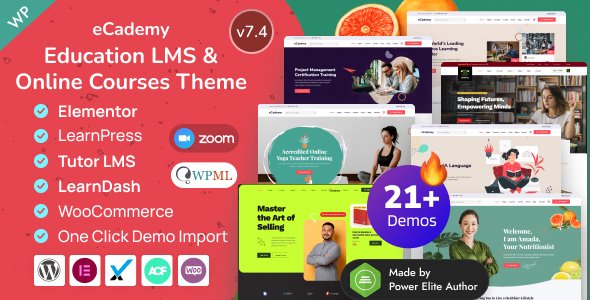
Stuck on your eCademy WordPress theme? Let's fix it.
No endless back-and-forth. Just send us the details and we'll get it done.
No obligation · Replies within 1 hour · Quote within 1 day
Setup · Customization · Bug fixes · WooCommerce integration
About eCademy WP Theme
eCademy is a WordPress theme by EnvyTheme built for online education platforms. It integrates directly with LearnDash, LifterLMS, and Tutor LMS, making it a practical choice for course creators, training businesses, and academic institutions that want a purpose-built design without starting from scratch.
The theme ships with a drag-and-drop page builder, pre-built demo layouts, and dedicated templates for course listings, instructor profiles, and pricing pages. It’s Elementor-compatible and responsive across devices. The codebase is reasonably clean for a commercial theme, and EnvyTheme maintains it with periodic updates. If you’re building a learning management site on WordPress, eCademy gives you a solid structural foundation to work from.
Get matched with a eCademy developer in under one day
Tell us about your eCademy project. Small fixes, eCademy theme customization, or a full website build, whatever you need, we've got it covered.
We'll connect you to the right eCademy developers, define the scope, and get everything 100% clear.
You'll get one estimate, hire your preferred developer, and start collaborating.
eCademy is straightforward to set up from a demo, but production-ready course sites usually need more than that. Custom templates, LMS plugin conflicts, checkout flow adjustments, and performance tuning all require hands-on WordPress knowledge. Codeable connects you with vetted developers who have worked on eCademy and similar education themes. You get a fixed-scope estimate before any work starts, no hourly billing surprises, and a developer who knows the theme’s structure rather than figuring it out on your budget.
Pros
- Native compatibility with LearnDash, LifterLMS, and Tutor LMS out of the box
- Multiple pre-built homepage and inner page demos that import in one click
- Elementor support means visual layout editing without custom code
- Dedicated course listing, single course, and instructor profile templates included
- Actively maintained by EnvyTheme with updates for major WordPress and LMS releases
Cons
- Heavy reliance on demo content means starting fresh requires more layout work than expected
- Customizer options are limited compared to more flexible framework-based themes
- Some styling conflicts appear when using LifterLMS alongside Elementor widgets
- Mobile menu behavior on course inner pages occasionally needs CSS corrections
- No built-in mega menu support, which limits navigation for large course catalogs
Who is eCademy for?
Online Course Marketplace
eCademy’s course grid templates and filtering options make it well suited for multi-instructor marketplaces. Pair it with LearnDash’s group and instructor management features, and an eCademy developer can set up a functional course marketplace with separate instructor dashboards and commission tracking through a plugin like Stripe Connect.
Corporate Training Portal
Companies delivering internal training benefit from eCademy’s clean course layout and progress tracking integration. The theme handles gated content and user role restrictions well when combined with LifterLMS memberships. An eCademy specialist can configure private course access, team enrollment, and reporting dashboards for HR use cases.
Academic Institution Website
Universities and schools using WordPress for department or program pages can use eCademy’s instructor profiles and course archive templates to present curriculum clearly. The theme’s structured layout supports program pages, faculty listings, and event integration. Custom post types can extend it further with help from an eCademy developer.
Solo Course Creator Site
Individual creators selling a handful of courses need speed and simplicity. eCademy’s single-product-style course pages with video previews, curriculum accordions, and WooCommerce checkout work well here. Setup is manageable without a developer, though an eCademy expert can tighten the design and add upsell flows quickly.
Coaching and Mentorship Platform
Coaches offering structured programs, group calls, and resource libraries can use eCademy with Tutor LMS or LifterLMS to deliver a membership-style experience. The theme supports video embeds, downloadable resources, and drip content schedules. An eCademy specialist can integrate booking plugins for one-on-one session scheduling alongside course access.

Customizing eCademy
Out of the box, eCademy covers the basics: color controls, typography settings, header layout options, and homepage section toggles through the WordPress Customizer. For most course sites, this is enough to get a polished result without touching code.
Where things get more involved is when you need to move beyond the demo layout. Custom course card designs, non-standard instructor archive pages, or LMS-specific checkout flows often require template overrides or targeted CSS. An eCademy expert can handle these adjustments properly, making sure changes don’t break on theme updates. If you want the theme to match a specific brand identity or integrate with third-party tools, working with an experienced eCademy developer saves significant time and avoids common pitfalls.
Recommended plugins for eCademy
eCademy works well with the major LMS plugins, but extending it further is where the real build happens. WooCommerce handles course payments cleanly with the theme’s existing styles. For email marketing, Mailchimp and ActiveCampaign integrations via dedicated plugins slot in without layout conflicts.
If your course site is growing, pay attention to caching and image optimization early. eCademy loads additional assets for LMS functionality, so a proper WordPress performance setup matters. For course discovery and organic traffic, pairing the theme with a structured WordPress SEO strategy ensures your course pages rank for the right terms.
Not sure which plugins to use? This WordPress plugins directory covers the most popular options with reviews and setup guides.
eCademy common issues
eCademy course page layout broken after update
Layout breaks after a theme update are usually caused by changes to template files conflicting with child theme overrides or plugin-injected HTML. Check your child theme’s template files against the updated parent theme versions. If you’re not using a child theme, any direct edits to theme files will have been overwritten. For a permanent fix, our WordPress bug fixing service can audit the conflict and restore the layout without losing your customizations.
eCademy not displaying LearnDash course grid correctly
When the LearnDash course grid shortcode or block doesn’t render correctly inside eCademy, the cause is usually a CSS conflict between the theme’s course listing styles and LearnDash’s own grid classes. Inspect the course grid container and look for conflicting width or float rules. Updating both eCademy and LearnDash to their latest versions often resolves it. If not, a targeted CSS override in the child theme’s stylesheet is the cleanest fix. Our WordPress bug fixing service handles this quickly.
eCademy homepage sections not showing on mobile
If eCademy homepage sections collapse or disappear on mobile, the issue is almost always a CSS media query conflict or a hidden element toggle set in the Customizer. Open Chrome DevTools on a mobile viewport and check whether the section has display: none applied at a specific breakpoint. Elementor sections also have their own mobile visibility settings that can override theme defaults. Correct the breakpoint rules in your child theme stylesheet.
eCademy checkout page styling conflicts with WooCommerce
WooCommerce checkout styling often conflicts with eCademy’s form and input styles, causing misaligned fields, broken button styles, or invisible validation messages. The fix requires scoping WooCommerce-specific CSS to avoid inheritance from the theme’s global form rules. Add corrective styles to the child theme targeting .woocommerce-checkout specifically. Avoid editing WooCommerce template files unless you need structural changes, and always use a child theme to keep updates clean.
eCademy FAQ
eCademy is designed to work with multiple LMS plugins, but running LearnDash and LifterLMS simultaneously on the same site is not recommended. The two plugins handle course post types differently and will conflict. Choose one LMS for your site. eCademy templates are designed around each plugin’s shortcodes and blocks individually, not in combination.
Yes, eCademy supports Elementor. Most of the pre-built demo pages are built with Elementor, and the theme’s sections work within the Elementor editor. Some theme-specific elements like the course grid and instructor widgets have their own shortcodes that can be dropped into Elementor text or HTML blocks without issues.
You can use eCademy without a page builder for inner pages and blog posts using the standard WordPress block editor. However, the homepage and key landing pages in the demo are Elementor-built. Recreating those layouts without Elementor requires either custom templates or significant block editor work, which an eCademy developer can set up for you.
eCademy includes a one-click demo importer accessible from the theme’s admin panel. Go to Appearance, then eCademy Options, and look for the demo importer section. Select your preferred demo and import. Make sure required plugins like Elementor and your chosen LMS are installed first, or some demo elements won’t render correctly after import.
eCademy works well with WooCommerce for course sales. The theme’s styles cover standard WooCommerce pages, and it handles single-product course pages cleanly. For complex setups like subscriptions, bundles, or upsell sequences, some additional CSS and plugin configuration is needed. An eCademy specialist can set up a full sales funnel without styling conflicts.
Hire an eCademy Developer
Whether you need a full eCademy site built from scratch, a customization that the Customizer can’t handle, or a fix for something that’s broken, working with a specialist is faster than troubleshooting alone. Our developers know eCademy’s template structure, its LMS integrations, and where the theme tends to need extra work. Get a Free Estimate and describe what you need. No obligation, no upfront payment.
You'll need a free Codeable account so developers can ask questions and send their quotes.