EduMall WordPress Theme
by ThemeMove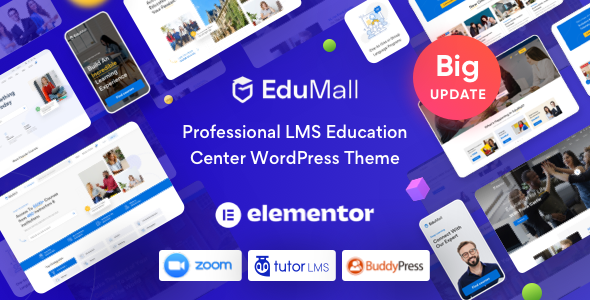
Stuck on your EduMall WordPress theme? Let's fix it.
No endless back-and-forth. Just send us the details and we'll get it done.
No obligation · Replies within 1 hour · Quote within 1 day
Setup · Customization · Bug fixes · WooCommerce integration
About EduMall WP Theme
EduMall is a WordPress LMS theme built by ThemeMove, designed specifically for online course marketplaces, training platforms, and e-learning sites. It integrates tightly with LearnPress, WooCommerce, and popular LMS plugins, giving you the tools to sell and manage courses without heavy custom development.
The theme ships with a visual drag-and-drop builder, pre-built demo sites for universities, online academies, and tutoring platforms, and a dedicated instructor dashboard. Course listings, certificates, quizzes, and payment gateways all work out of the box. ThemeMove maintains regular updates, which keeps EduMall compatible with current WordPress and WooCommerce releases. It is a solid starting point for anyone building a course-selling platform on WordPress.
Get matched with a EduMall developer in under one day
Tell us about your EduMall project. Small fixes, EduMall theme customization, or a full website build, whatever you need, we've got it covered.
We'll connect you to the right EduMall developers, define the scope, and get everything 100% clear.
You'll get one estimate, hire your preferred developer, and start collaborating.
EduMall is not a theme you fully configure in an afternoon. Between LearnPress integration, payment setup, instructor management, and mobile performance, there are real technical decisions to make. A vetted EduMall developer on Codeable has handled these setups before and knows where the common failure points are. You get a fixed estimate before any work starts, no hourly surprises. Whether you need a full build or targeted fixes, Codeable matches you with someone who knows the theme.
Pros
- Deep LearnPress integration with course management, quizzes, and certificates ready out of the box
- Multiple pre-built demo sites covering universities, bootcamps, and tutoring platforms with one-click import
- Instructor dashboard gives tutors control over their own courses without admin access
- WooCommerce compatibility allows course sales, coupons, and order management through a familiar interface
- Regular updates from ThemeMove keep the theme compatible with current WordPress and plugin versions
Cons
- Visual customization options are spread across too many panels, making the workflow confusing for new users
- Default page speed scores are poor without additional optimization due to heavy asset loading
- Multi-vendor or multi-instructor marketplace features require extra plugins and custom development
- Some demo layouts are difficult to replicate exactly without importing demo data first, risking overwrites
- LearnPress template overrides can conflict after theme updates if custom files are not maintained carefully
Who is EduMall for?
Online Course Marketplace
EduMall works well for course marketplaces where multiple instructors sell their own content. With LearnPress and a co-instructor add-on, each tutor manages their own courses while the platform owner handles payments and enrollment. An EduMall specialist can configure revenue splitting, instructor sign-up flows, and storefront layouts tailored to a multi-seller model.
Corporate Training Platform
Companies running internal training programs need user management, progress tracking, and certificate issuance. EduMall handles all three through LearnPress. An EduMall developer can restrict access by user role, integrate SSO, and create branded certificate templates that match corporate standards without requiring a separate LMS platform.
University or College Site
Universities and colleges need course catalogs, faculty profiles, and event listings alongside standard LMS features. EduMall ships with demo layouts built for this use case. A developer can extend these with custom post types for departments, degree programs, and application forms, giving the site a real institutional feel beyond what the base theme provides.
Tutoring and Coaching Business
Individual tutors and coaches selling one-on-one sessions or group courses can use EduMall with WooCommerce Bookings or a scheduling plugin. The theme’s instructor profile pages and course detail layouts suit personal brands well. An EduMall expert can streamline the booking and payment flow so clients can purchase and schedule without friction.
Coding Bootcamp or Tech Academy
Coding academies need structured course paths, assignment tracking, and community features. EduMall supports curriculum builders and prerequisite courses through LearnPress. Paired with a forum plugin and a drip content add-on, it becomes a functional bootcamp platform. A specialist can configure the full learning path logic and connect it to external tools like Slack or Discord.

Customizing EduMall
EduMall offers a lot of options in the Customizer and through its built-in page builder panels, but pushing beyond those defaults usually requires developer input. Customizing the course archive layout, adjusting instructor profile pages, or building a multi-vendor setup for multiple tutors are areas where the theme’s native settings fall short.
An EduMall expert can handle these gaps cleanly. That includes modifying LearnPress templates without breaking updates, adding custom enrollment logic, integrating third-party payment processors, or reworking the checkout flow for subscription-based courses. If you need the theme to behave like a proper marketplace rather than a basic course site, working with a specialist saves significant time and avoids the kind of template hacking that causes problems down the line.
Recommended plugins for EduMall
EduMall pairs well with several plugins that extend its core functionality. LearnPress add-ons for certificates, content drip, and co-instructors are the obvious starting points. WooCommerce Subscriptions handles recurring billing for membership-based academies. For speed, a dedicated caching layer and image optimization are essential since course pages with video thumbnails and user dashboards load slowly without them. See our WordPress performance optimization service for details.
On the visibility side, EduMall does not handle structured data for courses automatically. Pairing it with a proper SEO setup improves how course pages appear in search results. Our WordPress SEO service covers schema markup and technical SEO for LMS sites.
Not sure which plugins to use? This WordPress plugins directory covers the most popular options with reviews and setup guides.
EduMall common issues
EduMall course page not displaying correctly after update
This usually happens when a theme update overwrites customized LearnPress template files. Check your child theme’s learnpress template folder and compare file versions against the updated theme. Outdated template overrides cause layout breaks. Delete or update any files flagged as outdated in the LearnPress system status. If the issue persists after a template refresh, a developer can audit the override stack properly.
LearnPress checkout not working with EduMall theme
Checkout failures with LearnPress and EduMall typically trace back to a JavaScript conflict or a missing payment gateway configuration. Disable all plugins except LearnPress and test checkout in a default browser session. Check the browser console for JS errors. Also confirm that your LearnPress payment settings have a valid return URL. Our WordPress bug fixing service can isolate and resolve persistent checkout errors.
EduMall homepage layout broken after importing demo
Demo import issues in EduMall are common when server memory limits are too low or when the import times out mid-process. Set memory_limit to at least 256MB and increase max_execution_time to 300 seconds in your php.ini. If the layout still looks wrong after a successful import, clear all caches and check whether the required plugins listed in the demo requirements are all active and up to date.
EduMall slow loading speed on course listing pages
EduMall course listing pages load slowly because they pull course meta, instructor data, and thumbnails in a way that generates too many database queries. Enable a page caching plugin, use lazy loading for thumbnails, and consider a CDN for static assets. Disabling unused EduMall features in the theme options also reduces frontend asset bloat. Check server response time separately since shared hosting often amplifies these issues.
EduMall instructor dashboard showing blank page
A blank instructor dashboard is almost always a permissions issue or a plugin conflict. First, make sure the user account has the correct LearnPress instructor role assigned. Then deactivate plugins one by one to find a conflict. Also check whether any security plugin is blocking AJAX requests on the dashboard page. If the page loads but shows nothing, open the browser console and look for failed API calls or 403 errors.
WooCommerce cart not working properly with EduMall
WooCommerce cart problems in EduMall often come from a conflict between the theme’s custom cart fragment script and WooCommerce’s own AJAX cart handler. Try switching to a default theme temporarily to confirm the theme is the source. If confirmed, check the theme’s WooCommerce compatibility files and ensure you are running a supported WooCommerce version. Our WordPress bug fixing service handles WooCommerce and theme conflicts directly.
EduMall mobile menu not opening on iOS
Mobile menu failures on iOS in EduMall are typically caused by a touch event binding issue in the theme’s navigation JavaScript. This often appears after an iOS update changes how touch events propagate. A targeted JS fix, usually adding a cursor pointer rule to the menu trigger or updating the event listener, resolves this. Check whether the issue appears in Safari specifically, as it handles touch events differently than Chrome on Android.
Course thumbnail images not showing in EduMall
Missing course thumbnails usually mean the image sizes registered by EduMall were not generated for existing images. Run a thumbnail regeneration tool after activating or updating the theme. Also confirm that the featured image is actually set on the course post, not just uploaded to the media library. If thumbnails show broken image icons rather than blank space, the image URL may be pointing to the wrong domain, which can happen after a site migration.
EduMall certificate template not generating PDF
Certificate PDF generation failures in EduMall with LearnPress usually point to a server-side PDF library issue. LearnPress uses mPDF or a similar library. Check whether your hosting environment has the required PHP extensions enabled, specifically mbstring and gd. Also verify that the certificate template has all required fields filled in and that the certificate add-on plugin is active and updated. Contact your host if PHP extensions are missing.
EduMall search bar returning no results for courses
EduMall’s course search relies on WordPress default search combined with LearnPress post type registration. If searches return no results, check that the LearnPress course post type is set to be publicly queryable. Also check whether a search plugin is overriding the default query and excluding custom post types. Adding lp_course to the included post types in your search plugin settings usually resolves this quickly. Our WordPress bug fixing service can audit the full search configuration.
EduMall FAQ
ThemeMove updates EduMall regularly to maintain LearnPress compatibility. Always check the changelog before updating either the theme or the plugin, especially if you have customized LearnPress templates in a child theme. Running both on the latest versions together is recommended, but test updates on a staging site first to catch any conflicts early.
Yes. EduMall integrates with WooCommerce for course sales, handling payments, coupons, and order history through the WooCommerce system. You can use any WooCommerce-compatible payment gateway. For subscription-based access, WooCommerce Subscriptions adds recurring billing on top of the base setup without requiring custom code.
Technically yes, but EduMall is built around LearnPress. Without it, you lose the course builder, quizzes, enrollment, and instructor features that make the theme useful. You could use it as a general education-style theme with another LMS plugin, but compatibility is not guaranteed and you would need custom work to align layouts.
EduMall includes a one-click demo importer in the theme panel. Go to Appearance, then EduMall, then Demo Installer. Choose a demo and import. Make sure the required plugins are installed first or the importer will prompt you to activate them. Set your server memory limit to 256MB minimum before running the import to avoid timeouts.
EduMall does not ship with built-in GDPR tools. You need a dedicated plugin such as Complianz or CookieYes to handle consent banners, cookie notices, and data request handling. LearnPress also stores user data, so a full GDPR audit should cover both the theme and the LMS plugin together.
EduMall is translation-ready and ships with RTL stylesheet support. You can translate it using Loco Translate or WPML. For full multilingual course sites with separate content per language, WPML with the WooCommerce Multilingual add-on is the most complete solution, though it requires additional configuration.
A basic multi-instructor setup is possible using LearnPress co-instructor add-ons. A full marketplace with separate instructor storefronts, revenue sharing, and independent dashboards requires additional plugins and custom development. An EduMall specialist can assess what is achievable within the theme’s architecture before you invest in a full build.
Start with a caching plugin, optimize images with a compression tool, and load assets from a CDN. In EduMall’s theme options, disable any feature sections you are not using to reduce CSS and JS loaded on every page. Switching to a faster hosting provider makes a bigger difference than any plugin if you are on shared hosting.
EduMall includes demo layouts designed for universities with course catalogs, faculty profiles, and event listings. It works for this use case, though larger institutional sites usually need custom post types and integration with external systems. A developer familiar with EduMall can extend the theme to meet more complex institutional requirements.
After migrating EduMall to a new host, common issues include broken image paths, missing SSL, and plugin license deactivations. Run a search-replace on the database to update the domain if it changed. Regenerate thumbnails and reactivate any premium plugin licenses tied to the old domain. Our WordPress migration service handles post-migration cleanup for EduMall sites.
Hire an EduMall Developer
Need an EduMall expert to build, fix, or extend your e-learning site? Post your project and get matched with a vetted WordPress developer within 24 hours. You receive a clear estimate before any work begins, and there is no obligation to hire. It is completely risk-free. Get a Free Estimate and describe what you need.
You'll need a free Codeable account so developers can ask questions and send their quotes.