ekommart WordPress Theme
by Opal_WP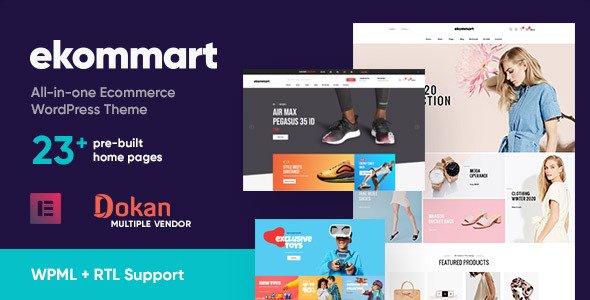
Stuck on your ekommart WordPress theme? Let's fix it.
No endless back-and-forth. Just send us the details and we'll get it done.
No obligation · Replies within 1 hour · Quote within 1 day
Setup · Customization · Bug fixes · WooCommerce integration
About ekommart WP Theme
Ekommart is a WooCommerce theme built by Opal_WP, designed specifically for multi-vendor and single-store eCommerce setups. It ships with WC Vendors and Dokan support out of the box, making it a practical choice for marketplace-style shops. The theme includes 10+ pre-built homepage demos covering electronics, fashion, furniture, and organic goods, all importable with one click.
Built on a custom framework with Elementor compatibility, ekommart gives store owners solid layout control without writing code. It supports AJAX cart, product quick view, sticky header, and a mega menu system. RTL languages are supported, and the theme is translation-ready. Page speed depends heavily on how it is configured, but the foundation is structured for WooCommerce performance. For stores that need marketplace functionality without a custom build, ekommart covers a lot of ground from the start.
Get matched with a ekommart developer in under one day
Tell us about your ekommart project. Small fixes, ekommart theme customization, or a full website build, whatever you need, we've got it covered.
We'll connect you to the right ekommart developers, define the scope, and get everything 100% clear.
You'll get one estimate, hire your preferred developer, and start collaborating.
Ekommart has enough moving parts that small configuration mistakes compound quickly. Vendor payout settings, tax rules, and shipping zones interact in ways that are hard to untangle without WooCommerce experience. A vetted ekommart developer on Codeable has already worked through these combinations. Codeable screens every developer before they take client projects, so you are not posting a job and hoping for the best. You describe the work, get an estimate, and decide whether to proceed with no obligation.
Pros
- Built-in Dokan and WC Vendors support makes multi-vendor setup faster than most WooCommerce themes
- 10+ one-click demo imports covering distinct niches like electronics, fashion, and organic food
- Elementor compatibility with custom widgets registered specifically for ekommart layouts
- AJAX cart, quick view, and product comparison work out of the box without extra plugins
- RTL language support and translation-ready structure makes it viable for international stores
Cons
- Demo import can overwrite existing settings and requires a clean WordPress install to work reliably
- Theme options panel is dense and poorly documented, making it hard to find specific controls
- Page speed on default demo setups is poor without manual optimization of scripts and images
- Mega menu configuration is not intuitive and breaks on mobile if not manually tested after changes
- Opal_WP support response times vary and complex issues often go unresolved through official channels
Who is ekommart for?
Multi-Vendor Marketplace
Ekommart was built with marketplace setups in mind. Dokan and WC Vendors integration means vendor registration, commission splits, and vendor dashboards are functional from day one. An ekommart specialist can configure vendor tiers, customize the vendor storefront pages, and connect payout methods so the marketplace runs without manual admin intervention for routine transactions.
Electronics Store
The electronics demo includes product comparison tables, specification tabs, and a filterable category structure suited to hardware and gadget stores. An ekommart developer can extend the comparison feature, add custom attribute filters for specs like RAM or screen size, and configure variation swatches so shoppers find the right product variant without confusion.
Fashion & Apparel Shop
Ekommart’s fashion demo supports lookbook-style product presentation, size guide popups, and color swatch variations. An ekommart expert can connect Instagram feeds, configure outfit bundling with product upsells, and set up size-based inventory rules through WooCommerce. The result is a store layout that works for both browsing and direct purchase intent.
Organic & Health Food Store
The organic store demo uses a clean, content-forward layout that works well for brands that lead with ingredients and sourcing. An ekommart developer can add subscription product support through WooCommerce Subscriptions, build a blog-to-shop content flow, and configure bundle pricing for meal kit or product pack setups common in the health food market.
Furniture & Home Decor Store
Furniture stores need large image support, room scene photography, and product dimension details handled clearly. Ekommart’s furniture demo covers the visual side, and an ekommart specialist can add a product customizer for finishes, build a request-a-quote flow for high-ticket items, and structure category navigation so customers browse by room type or material.

Customizing ekommart
Ekommart ships with a lot of pre-built options, but real store customization goes deeper than what the theme panel exposes. Adjusting vendor dashboard layouts, tweaking product card styles for specific categories, or integrating third-party payment gateways often requires direct intervention in template files or custom CSS.
An ekommart expert can restructure homepage sections using Elementor widgets the theme registers, modify WooCommerce templates without breaking upgrade paths, and wire up custom WC Vendors commission rules. If you need a checkout flow that matches your brand, a custom product filter sidebar, or vendor profile pages that stand out, working with an ekommart developer saves significant time over trial and error. Opal_WP themes follow consistent patterns, so an experienced developer moves quickly through the codebase.
Recommended plugins for ekommart
Ekommart works well with a focused set of plugins. WC Vendors Pro and Dokan Pro unlock the full marketplace feature set the theme is built around. Yith Wishlist, Smart Coupons, and Stripe for WooCommerce all integrate cleanly.
For store performance, a proper caching and image optimization setup matters more than most store owners expect. See the WordPress performance service for specifics on what moves the needle. On the visibility side, structured product data and sitemap configuration are worth getting right early. The WordPress SEO service covers WooCommerce-specific optimizations that apply directly to ekommart stores. Avoid stacking redundant page builder plugins alongside Elementor as it creates conflicts the theme was not built to handle.
Not sure which plugins to use? This WordPress plugins directory covers the most popular options with reviews and setup guides.
ekommart common issues
ekommart demo import failed or incomplete
Failed demo imports in ekommart are usually caused by server memory limits, execution timeouts, or an existing active theme that left behind conflicting options. Set memory_limit to at least 256MB and max_execution_time to 300 in your PHP config before attempting the import. Use a clean WordPress install with no existing content. If images fail to import, run the import a second time without overwriting posts. For persistent failures, a developer can run the import via WP-CLI to bypass server restrictions entirely.
ekommart mega menu not working on mobile
The ekommart mega menu uses a JavaScript initialization that sometimes fails on mobile due to touch event conflicts with the theme’s slider scripts. Check the browser console for JS errors on mobile viewport. The fix usually involves adjusting the menu breakpoint value in the theme options or patching the menu toggle function in the child theme. If the menu collapses but items are not clickable, a CSS z-index conflict with a sticky header element is the likely cause. WordPress bug fixing can isolate the conflict quickly.
ekommart AJAX cart not updating on product page
AJAX cart failures in ekommart are commonly caused by a nonce mismatch after a caching plugin stores a stale page. Exclude WooCommerce cart and checkout pages from full-page caching. Also check whether a security plugin is blocking AJAX POST requests to admin-ajax.php. If the issue only appears on specific product types, check whether the product has required fields that are not being validated before the AJAX call fires. Disabling conflicting plugins one at a time while testing is the fastest diagnostic path.
ekommart homepage sections not showing after update
After updating ekommart, Elementor-based homepage sections sometimes disappear because the theme registers custom widgets that need to be re-saved. Go to Elementor and click Regenerate CSS and Data under Tools. If sections are still missing, the update may have changed widget names or removed deprecated options. Check the Elementor editor for any widgets marked with a warning icon. Rebuilding affected sections using the current widget set is usually faster than trying to reverse-engineer the mapping from the old structure.
ekommart Dokan vendor dashboard showing blank page
A blank Dokan vendor dashboard in ekommart is almost always a permalink conflict. Go to Settings and flush permalinks by clicking Save. If that does not work, check whether your server has mod_rewrite enabled and that the WordPress .htaccess file is writable. Conflicts between Dokan and a caching plugin can also produce blank pages. Purge all caches and test in a private browser window. If the issue persists, the Dokan endpoint settings may conflict with a custom page slug in your WordPress setup. Get help diagnosing the issue here.
ekommart product quick view not opening
Product quick view failures in ekommart are usually tied to a JavaScript error triggered by a conflicting plugin, or a missing nonce on the AJAX request. Open the browser console and look for 400 or 403 errors when the quick view button is clicked. If a security plugin is active, whitelist the quick view AJAX action. Also confirm the quick view option is enabled in the ekommart theme panel under Shop settings. On some server configurations, output buffering issues can prevent the quick view modal from receiving a complete HTML response.
ekommart WooCommerce checkout page layout broken
Broken checkout layouts in ekommart typically result from a CSS conflict between the theme’s WooCommerce stylesheet and a plugin that injects its own checkout styles. Use browser DevTools to identify which rule is overriding the column structure. The ekommart checkout uses a two-column layout that requires the WooCommerce default markup to remain intact. Plugins that add custom fields to checkout can shift this layout if they inject wrapper elements incorrectly. A child theme with targeted CSS overrides is the clean fix without touching core theme files.
ekommart Elementor widgets not loading
If ekommart’s Elementor widgets are missing from the widget panel, the theme’s widget registration has likely failed due to a PHP error or a version mismatch between Elementor and the theme. Check the PHP error log for fatal errors on page load. Ekommart registers widgets on an Elementor hook that changed in newer Elementor versions. Updating both Elementor and the theme together is the safest path. If only some widgets are missing, a plugin conflict may be preventing the theme’s widget file from loading fully. A bug fix service can trace the exact failure point.
ekommart sticky header overlapping page content
The ekommart sticky header overlapping content is a CSS offset problem. The theme applies a top margin to the page body to compensate for the fixed header height, but this calculation can break when the header height changes due to a logo size change, a notification bar plugin, or a viewport width transition. Find the body padding-top value applied by the theme’s JS and adjust it using a child theme script or CSS variable override. On mobile, confirm the header height variable recalculates on orientation change.
ekommart shop page showing wrong number of products per row
The ekommart shop page columns are controlled by a combination of the WooCommerce columns setting and a theme-specific override in the shop archive template. If you changed the WooCommerce products per row setting but the layout did not update, the theme’s CSS grid is likely hardcoded to a fixed column count for that breakpoint. Find the relevant CSS class in the theme stylesheet and add an override in your child theme targeting the column count you need. The theme options panel also has a separate columns field under Shop that overrides the WooCommerce default.
ekommart FAQ
Yes, ekommart is one of the few WooCommerce themes with built-in compatibility for both Dokan and WC Vendors. Vendor registration, storefronts, and commission management work without significant custom development. For a full marketplace with custom payout rules or vendor tiers, you will need an ekommart specialist to configure the advanced plugin settings correctly.
Ekommart is built to work with Elementor and registers custom widgets for homepage sections and shop layouts. Most of the demo content is built with Elementor. However, some theme-specific widgets are version-sensitive and may require both Elementor and the theme to stay updated together to avoid widget registration failures.
Start by identifying which scripts are loading on every page. Ekommart loads slider and quick view scripts globally, even on pages that do not use them. A caching plugin, image compression, and conditional script loading will have the most impact. For a structured performance audit and optimization, see the WordPress performance service.
Technically yes, but you will lose the ability to edit most demo sections. The theme’s homepage layouts are built inside Elementor and cannot be modified through the standard WordPress editor. You can build new pages in the block editor, but you will be starting from scratch rather than customizing existing demos.
Opal_WP has released updates for ekommart, but the update frequency is inconsistent compared to larger theme shops. Compatibility with recent WooCommerce and Elementor versions is generally maintained, but it is worth checking the theme changelog and Envato reviews before committing to a new project on this theme.
Install the theme, activate required plugins when prompted, then go to the theme’s demo import panel and select your preferred demo. A clean WordPress installation works best. Set your server’s PHP memory limit to at least 256MB before starting. If the import times out, increase max_execution_time in your PHP configuration and retry.
Yes. Standard WordPress migration applies. Export the database, transfer files, update wp-config.php with new database credentials, and run a search-replace on URLs. Ekommart does not use non-standard file locations that would complicate migration. For a managed move, the WordPress migration service handles this end to end.
Ekommart does not include subscription product templates by default, but WooCommerce Subscriptions installs cleanly alongside it. You may need minor CSS adjustments to make subscription product pages match the rest of the store’s styling. An ekommart developer can handle the template and styling alignment quickly.
The core required plugins are WooCommerce and Elementor. Ekommart also prompts you to install Opal_WP companion plugins that register shortcodes and widgets the theme depends on. For marketplace functionality, Dokan or WC Vendors is needed. Skipping the companion plugins will break demo layouts and widget functionality.
Cost depends on the scope. A targeted fix or configuration task typically runs from a few hundred dollars. A full store build with vendor setup and custom design work is a larger engagement. The best way to get an accurate number is to post your project and get a scoped estimate. Get a free estimate here with no obligation to proceed.
Hire an ekommart Expert Developer
Whether you need a full ekommart store build, a marketplace configuration, or fixes to an existing setup, working with a specialist cuts the back-and-forth significantly. Post your project and get a scoped estimate from a vetted ekommart developer. No commitment required. Get a Free Estimate and describe what you need.
You'll need a free Codeable account so developers can ask questions and send their quotes.