Emall WordPress Theme
by skygroup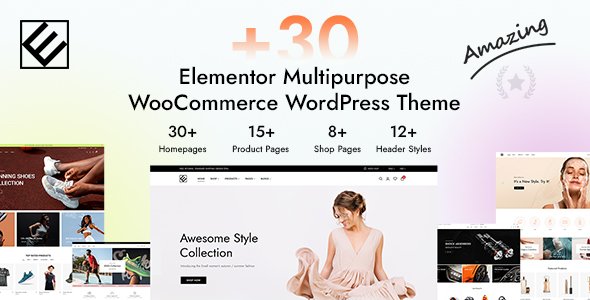
Stuck on your Emall WordPress theme? Let's fix it.
No endless back-and-forth. Just send us the details and we'll get it done.
No obligation · Replies within 1 hour · Quote within 1 day
Setup · Customization · Bug fixes · WooCommerce integration
About Emall WP Theme
Emall is a WooCommerce theme built by skygroup, designed specifically for online stores that need a clean, product-focused layout out of the box. It ships with multiple homepage demos, a mega menu, AJAX cart functionality, and product filtering built on WooCommerce’s layered navigation.
The theme targets electronics, fashion, and multi-category stores. It supports WooCommerce product variations, wishlist plugins, and quick-view modals without heavy configuration. Page builder compatibility is handled through Elementor, which keeps layout editing accessible.
Emall is a solid starting point for store owners who want a polished eCommerce front-end without building from scratch. That said, making it truly yours, whether that means custom product layouts, checkout tweaks, or performance tuning, usually requires developer input beyond the theme panel options.
Get matched with a Emall developer in under one day
Tell us about your Emall project. Small fixes, Emall theme customization, or a full website build, whatever you need, we've got it covered.
We'll connect you to the right Emall developers, define the scope, and get everything 100% clear.
You'll get one estimate, hire your preferred developer, and start collaborating.
Getting Emall to behave exactly like your store requires is not always a theme settings job. Template overrides, plugin conflicts, WooCommerce hooks, and checkout customizations all need developer-level access.
Through Codeable, you get matched with vetted WordPress and WooCommerce developers who have hands-on experience with themes like Emall. Post your project, get an estimate within 24 hours, and only move forward if it makes sense. No commitment until you decide to hire. Explore your options at FoxyConcept WordPress development services.
Pros
- Ships with multiple pre-built demo layouts for quick store setup
- Built-in mega menu with image and column support, no plugin needed
- AJAX add-to-cart and quick view work without additional configuration
- Elementor compatibility makes page-level layout editing accessible
- Supports WooCommerce layered navigation filtering for large product catalogs
Cons
- Theme update history from skygroup is inconsistent, creating compatibility risks with newer WooCommerce versions
- The theme options panel is large but poorly organized, making specific settings hard to locate
- Default page speed scores are below average due to unoptimized scripts loaded site-wide
- Limited documentation makes troubleshooting template issues time-consuming without developer help
- Mobile menu behavior on complex nested categories often requires custom CSS fixes
Who is Emall for?
Electronics and Gadget Stores
Emall’s product comparison features and specification-style product layouts make it a practical fit for electronics stores. Category filtering by specs, brand, and price range works well with WooCommerce layered navigation. The mega menu handles deep category trees common in tech retail without collapsing into an unusable mobile state with minor tweaks.
Fashion and Apparel Shops
Fashion stores benefit from Emall’s quick view modal, variation swatches support, and wishlist compatibility. Product grid layouts with hover effects keep browsing fast. A developer can wire in size guides, lookbook pages, or custom product badge labels to match brand style without rebuilding the theme structure from scratch.
Multi-Category Marketplaces
Stores selling across several unrelated categories use Emall’s homepage widget areas and featured category sections to surface products clearly. The mega menu with category images helps shoppers navigate without getting lost. Custom homepage sections built with Elementor can highlight deals, brands, or seasonal collections independently of the default layout.
Home and Furniture Retailers
Home and furniture retailers need large imagery and clean product detail pages. Emall’s wide layout options and gallery-style product images work well here. A developer can add room scene image galleries, custom dimension display fields, or delivery information tabs to the product page template without affecting the rest of the theme.
Sports and Outdoor Equipment
Sports equipment stores often deal with complex product variations like sizes, colors, and compatibility. Emall handles WooCommerce variable products cleanly. Category pages with filter sidebars make browsing by sport or activity type straightforward. Custom product badges for sale items or new arrivals can be added through template overrides.

Customizing Emall
Emall offers a theme options panel covering colors, typography, header styles, and layout widths. You can switch between demo layouts, configure mega menu columns, and set up the sticky header without touching code.
Deeper customization is a different story. Custom product card templates, modified checkout flows, or brand-specific CSS adjustments require PHP and WooCommerce template knowledge. An Emall expert can override templates correctly without breaking future updates, set up child theme structure properly, and wire in third-party plugins like YITH Wishlist or custom product builders without conflicts.
If your store needs a layout that the options panel cannot produce, working with someone who knows the Emall codebase directly saves time and avoids messy workarounds.
Recommended plugins for Emall
Emall works well with the standard WooCommerce plugin stack. Common additions include YITH WooCommerce Wishlist, WooCommerce Product Filter by WooBeWoo, and Slider Revolution for homepage banners. Elementor Pro extends the page building options significantly.
For store performance, caching plugins like WP Rocket and image optimization via ShortPixel make a measurable difference, especially on product category pages with large image grids. Check our WordPress performance service for details. If organic traffic matters, pairing Emall with a solid WordPress SEO setup is worth prioritizing early.
Not sure which plugins to use? This WordPress plugins directory covers the most popular options with reviews and setup guides.
Emall common issues
Emall theme not compatible with latest WooCommerce version
WooCommerce template changes between major versions often break themes that override core templates without keeping them updated. With Emall, check which WooCommerce template files the theme overrides by going to WooCommerce > Status > Tools > System Status. Outdated templates show as warnings. A developer can update those override files to match the current WooCommerce version. Visit our WordPress bug fixing service if you need fast help.
Emall mega menu not working on mobile
Emall’s mega menu relies on JavaScript that can conflict with caching plugins or script optimization tools. Start by disabling JS minification or deferral for the menu script in your cache plugin. If the issue persists, inspect the mobile breakpoint CSS and JavaScript toggle logic. The mobile menu sometimes needs a custom script adjustment when nested categories exceed three levels. A developer can isolate this quickly.
Emall product page layout broken after plugin update
Plugin updates, especially WooCommerce, Elementor, or YITH plugins, can shift template hooks or CSS class names that Emall’s product page templates depend on. Clear all caches first and test in a staging environment. If the layout stays broken, identify which template file is affected using browser dev tools. A developer can patch the override file or update the child theme template to restore the layout cleanly.
Emall theme slow loading on category pages
Category pages in Emall load slowly mainly due to unoptimized images and scripts loading regardless of page context. Start with image compression using ShortPixel or Imagify on product images. Then configure WP Rocket or LiteSpeed Cache to defer non-critical scripts. If the theme loads Slider Revolution assets on every page, disable that globally and load it only where needed. See our WordPress performance service for a full audit.
Emall FAQ
skygroup continues to sell and update Emall on ThemeForest, but update frequency is irregular. Before purchasing or building a production store on it, check the changelog dates on the ThemeForest listing and test it against your current WooCommerce version on a staging site. Themes with slow update cycles carry long-term maintenance risk as WooCommerce evolves.
Yes, Emall includes Elementor compatibility and some demos are built with it. You can use Elementor to build and edit inner pages and custom homepage sections. However, WooCommerce template pages like cart, checkout, and single product are controlled by theme template files, not Elementor, so those need PHP-level customization if you want layout changes.
Emall is a single-vendor WooCommerce theme and does not include multivendor functionality by default. You can pair it with a plugin like Dokan or WCFM Marketplace, but expect integration work. The theme’s frontend templates will likely need adjustments to display vendor-specific information cleanly. A developer familiar with both Emall and your chosen multivendor plugin is needed for a stable result.
Emall includes a one-click demo importer accessible from the theme panel after activation. You need to have required plugins installed first, including WooCommerce and any bundled plugins flagged by TGM Plugin Activation. Import on a clean WordPress install to avoid conflicts with existing content. Importing over an existing site can overwrite menus, widgets, and settings unexpectedly.
Migrating an existing WooCommerce store to Emall means moving products, orders, and customer data while rebuilding the front-end in the new theme. Products and orders transfer cleanly via export or plugins, but your current page layouts, custom templates, and shortcodes will not carry over automatically. A developer can handle the WordPress migration and rebuild the front-end without data loss.
Hire an Emall Expert Developer
Whether you need a custom product layout, a plugin conflict fixed, or a full store build on Emall, working with a specialist gets it done without guesswork. FoxyConcept connects you with vetted WooCommerce developers through Codeable. Post your project and get a free, no-obligation estimate within 24 hours. Get your free estimate here and only hire when you’re ready.
You'll need a free Codeable account so developers can ask questions and send their quotes.