EmallShop WordPress Theme
by PressLayouts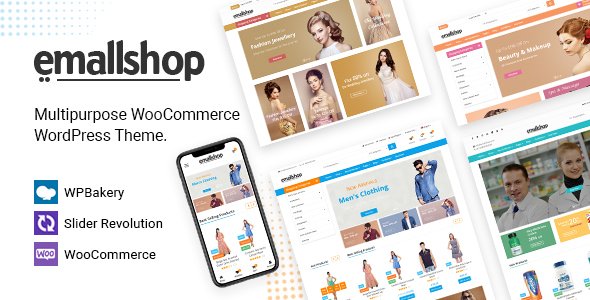
Stuck on your EmallShop WordPress theme? Let's fix it.
No endless back-and-forth. Just send us the details and we'll get it done.
No obligation · Replies within 1 hour · Quote within 1 day
Setup · Customization · Bug fixes · WooCommerce integration
About EmallShop WP Theme
EmallShop is a WooCommerce theme by PressLayouts built for multi-category online stores. It ships with a mega menu, Ajax-powered product filtering, a sticky header, and multiple homepage layouts aimed at replicating the look of large retail marketplaces. The theme is compatible with Elementor and WPBakery, giving store owners flexibility in how they arrange product sections, banners, and promotional blocks.
Under the hood, EmallShop leans on a custom framework from PressLayouts that controls layout switching, color schemes, and typography without requiring a child theme for basic changes. It supports WooCommerce product variations, quick-view modals, wishlist functionality, and compare features out of the box. For anyone building a general merchandise or electronics store on WordPress, EmallShop provides a structured starting point with enough built-in tooling to reduce initial setup time significantly.
Get matched with a EmallShop developer in under one day
Tell us about your EmallShop project. Small fixes, EmallShop theme customization, or a full website build, whatever you need, we've got it covered.
We'll connect you to the right EmallShop developers, define the scope, and get everything 100% clear.
You'll get one estimate, hire your preferred developer, and start collaborating.
EmallShop has enough moving parts that generic WordPress help often falls short. You need someone who has worked inside PressLayouts themes before and understands how the framework handles layout rendering and WooCommerce hooks. Codeable connects you with vetted WordPress developers who have hands-on experience with themes like EmallShop. Every developer on the platform is screened, and you get a real estimate before committing to anything. No guesswork, no hourly surprises.
Pros
- Ajax product filtering works out of the box without requiring a separate plugin
- Mega menu builder handles deep category structures well for large stores
- Multiple pre-built homepage layouts reduce initial design time for new stores
- Built-in quick view, wishlist, and compare features save plugin overhead
- Elementor and WPBakery compatibility gives layout flexibility for non-developers
Cons
- Theme options panel is dense and poorly documented, making advanced customization slow
- Mobile performance on product archive pages can drop without manual optimization
- Child theme support is not clearly documented, increasing update risk for custom code
- Ajax filter conflicts with some popular WooCommerce plugins require manual fixes
- PressLayouts support response times can be slow for complex or theme-specific issues
Who is EmallShop for?
General Merchandise Stores
EmallShop’s mega menu and multi-column category layouts make it a practical choice for general merchandise stores carrying dozens of product categories. An EmallShop developer can organize the navigation structure to handle a large SKU count without cluttering the header, and configure promotional banners to highlight seasonal sections or clearance items effectively.
Electronics and Gadgets Retailers
The theme’s product comparison and specification table support suit electronics retailers well. An EmallShop specialist can configure variation swatches for color and storage options, set up detailed product tabs for specs, and ensure the Ajax filter handles attributes like brand, price range, and compatibility accurately across catalog pages.
Fashion and Apparel Shops
EmallShop’s lookbook-style banner sections and size guide compatibility make it a workable foundation for fashion stores. A developer can customize the product card layout to show color swatches on hover, adjust the quick-view modal for apparel images, and configure the wishlist feature to encourage repeat visits and reduce cart abandonment.
Home and Garden Stores
Home and garden stores benefit from EmallShop’s flexible grid options and category-specific landing page templates. An EmallShop expert can build category pages that combine editorial content with product grids, configure bundle-style upsells for complementary items, and set up delivery or availability notices at the product level.
Multi-Vendor Marketplaces
With Dokan or WCFM Marketplace added, EmallShop can support a multi-vendor setup. A developer familiar with both the theme and marketplace plugins can integrate vendor storefronts into the existing header and category structure, configure commission rules, and ensure the Ajax filtering still functions correctly across vendor-specific product listings.

Customizing EmallShop
EmallShop gives you a solid base, but most serious stores need work beyond the default options. Customizing the mega menu to reflect your actual category structure, adjusting the Ajax filter behavior, and getting the homepage layouts to match your brand all take real configuration time. The theme’s panel has a lot of settings, and navigating them without prior experience with PressLayouts themes often leads to conflicts or broken layouts.
An EmallShop expert can handle the parts that slow most store owners down: building custom product card layouts, integrating third-party plugins without breaking the theme’s Ajax calls, and setting up accurate mobile breakpoints for product grids. If you need a header rebuilt, a custom category page template, or WooCommerce checkout restyled to match your brand, a developer who knows EmallShop’s structure will do it cleanly rather than patching with generic CSS overrides.
Recommended plugins for EmallShop
EmallShop works with the usual WooCommerce extension stack, but how you load them matters. Plugins like YITH WooCommerce Wishlist, WooCommerce Product Filter, and Stripe or PayPal payment gateways are all compatible, but adding too many without auditing script loading can hurt page speed noticeably on product archive pages.
For stores running EmallShop, pairing it with a proper WordPress performance setup is important, especially if you have large product catalogs. If organic traffic is a priority, a structured approach to WordPress SEO covering schema markup, breadcrumbs, and category page optimization will make a real difference in how product pages rank.
Not sure which plugins to use? This WordPress plugins directory covers the most popular options with reviews and setup guides.
EmallShop common issues
EmallShop mega menu not showing on mobile
The EmallShop mega menu uses a JavaScript toggle for mobile that can stop working if a caching plugin or CDN serves a stale version of the theme’s scripts. Start by clearing all caches and checking the browser console for JS errors. If the toggle script is missing or deferred incorrectly, adjust your caching plugin’s script exclusion list. Confirm the mobile breakpoint in the theme options matches your actual header settings.
EmallShop Ajax filter not working after plugin update
EmallShop’s Ajax filter passes parameters through a custom handler that can conflict with WooCommerce updates or plugins that modify query variables. Check whether the filter returns a 400 or 500 error in the network tab. A common cause is a plugin adding nonce verification to product queries. Temporarily deactivate recently updated plugins to isolate the conflict. If the issue persists, a WordPress bug fixing specialist can trace the exact hook collision.
EmallShop homepage layout broken after WordPress update
Homepage layout breaks after a WordPress update usually point to a WPBakery or Elementor version mismatch with EmallShop’s custom elements. Open the page builder editor and check for deprecated shortcodes or missing modules flagged in red. Re-saving the page sometimes resolves rendering issues caused by updated sanitization rules. If sections have disappeared entirely, check whether the theme’s custom post types are still registered correctly after the update.
EmallShop product quick view modal not loading
Quick view modals in EmallShop rely on Ajax calls and a specific modal script. If the modal opens blank or fails to load, open the browser console and look for 404 errors on the Ajax endpoint or missing nonce values. Conflicts with lazy-load plugins that intercept image loading inside modals are a frequent cause. Exclude the quick view container from lazy loading in your plugin’s settings and test again.
EmallShop WooCommerce add to cart button not working
If the add to cart button in EmallShop does nothing on click, the issue is almost always a JavaScript error blocking WooCommerce’s Ajax cart handler. Check the console for conflicts with scripts loaded by other plugins. A common culprit is a page builder or popup plugin overriding the click event. Also verify that the WooCommerce cart fragments script is not being dequeued by a performance plugin. Re-enqueue it and test. For persistent issues, use our WordPress bug fixing service.
EmallShop sticky header overlapping page content
EmallShop’s sticky header calculates its height dynamically, but this value can be wrong when custom fonts or large logo images load slowly. The result is content sitting behind the header. Add a CSS rule targeting the page’s body padding-top to manually account for the header height, or use the theme’s header offset option in the settings panel if available. Also check whether a page builder full-width section is ignoring the offset.
EmallShop wishlist button not saving products
The wishlist feature in EmallShop typically depends on session storage or a cookie. If products aren’t persisting, check whether a security plugin or browser privacy settings are blocking cookies for your domain. If you’re using a YITH Wishlist plugin alongside the theme’s built-in wishlist, there may be a conflict in how both hook into the add-to-wishlist button. Disable one and test whether the other saves correctly.
EmallShop Elementor sections not displaying correctly
Elementor sections in EmallShop can render incorrectly when the theme’s custom Elementor widgets conflict with a newer version of Elementor itself. Check the Elementor system info panel for compatibility warnings. Re-saving affected pages in Elementor often clears cached structure data. If a specific EmallShop widget is broken, check the PressLayouts changelog for known Elementor compatibility updates and apply any available patch.
EmallShop product images not showing in grid
Missing product images in EmallShop grids are usually a thumbnail regeneration issue. If you migrated the site or changed image sizes in WooCommerce settings, the stored thumbnails won’t match the new dimensions. Use the Regenerate Thumbnails plugin to rebuild all image sizes. Also confirm that your image upload directory has correct write permissions and that no CDN rewrite rule is returning 404s for the resized image paths.
EmallShop checkout page styling broken
Checkout page styling breaks in EmallShop when a plugin adds its own checkout styles that override the theme’s CSS, or when a caching plugin serves a minified CSS file that strips theme-specific rules. Check the browser inspector to identify which stylesheet is overriding the broken element. If minification is the cause, exclude the WooCommerce checkout stylesheet from minification in your caching plugin. For recurring issues, a WordPress bug fix can resolve the root conflict cleanly.
EmallShop FAQ
EmallShop handles large catalogs reasonably well thanks to Ajax filtering and paginated product grids. Performance depends heavily on your hosting and how you configure caching. Stores with thousands of SKUs should invest in server-level caching, a CDN, and image optimization. The theme itself doesn’t impose hard limits, but its feature set adds script weight that needs managing at scale.
Yes, EmallShop includes Elementor compatibility and ships with custom Elementor widgets for product sections, banners, and category blocks. Most standard Elementor features work without issues. Custom EmallShop widgets can occasionally fall behind major Elementor releases, so check the PressLayouts changelog when updating Elementor to catch compatibility notes before applying the update.
Any code added directly to EmallShop’s template files will be overwritten on update. The safest approach is using a child theme for template overrides and custom CSS. For logic changes, add code via a site-specific plugin rather than functions.php. Before updating, review the changelog and back up the site. If you haven’t set up a child theme yet, do that before the next update.
EmallShop is generally compatible with WPML for building multilingual WooCommerce stores. You’ll need to translate theme strings via WPML’s String Translation module and configure currency switching if selling in multiple regions. Some theme elements may need manual string registration. Testing the full checkout flow in each language before going live is essential to catch any untranslated strings.
EmallShop can work alongside Dokan or WCFM Marketplace, but multi-vendor integration isn’t built into the theme natively. Vendor dashboard pages, storefront headers, and product listing pages from these plugins will need styling adjustments to match the EmallShop design. An EmallShop developer familiar with marketplace plugins can handle the integration without breaking the theme’s core layout.
Create a child theme folder in wp-content/themes with a style.css file referencing EmallShop as the template, and a functions.php that enqueues the parent stylesheet. PressLayouts does not always provide an official child theme starter, so you’ll need to set this up manually. Once active, any template file you copy into the child theme folder will override the parent without being lost on updates.
EmallShop loads several scripts for Ajax filtering, quick view, and the mega menu that add noticeable weight on mobile connections. Common fixes include deferring non-critical scripts, enabling lazy loading for product images, and using a CDN for static assets. The theme’s built-in features can’t all be disabled from the panel, so a developer may need to conditionally dequeue scripts not used on mobile.
EmallShop runs on managed hosts like Kinsta and WP Engine without issues at the server level. The main consideration is that both hosts use their own caching systems, which can sometimes conflict with the theme’s Ajax features. You may need to exclude Ajax endpoints from page caching rules. Both hosts have documentation for WooCommerce-specific cache exclusions that applies directly to EmallShop setups.
Codeable is the most reliable option for finding a vetted EmallShop developer. You post your project, receive estimates from developers with relevant experience, and only pay when you’re ready to proceed. For ongoing work or a full store build, this is a lower-risk path than freelance marketplaces where WordPress expertise varies significantly.
Yes, EmallShop ships with demo content that you can import via the theme’s one-click demo importer. This sets up sample pages, menus, widgets, and WooCommerce product placeholders to match the theme preview. Importing demo content on a fresh WordPress install before customizing avoids conflicts with existing content and gives you a working reference for how each section is structured.
Hire an EmallShop Developer for Your Store
Whether you need a full store build on EmallShop, a layout that isn’t converting fixed, or a plugin conflict resolved, working with a specialist saves time. Our developers know the PressLayouts framework and WooCommerce inside out. Get a Free Estimate and describe what you need. There’s no obligation to hire, and you’ll have a clear picture of scope and cost before any work begins.
You'll need a free Codeable account so developers can ask questions and send their quotes.