Emarat WordPress Theme
by expert-Themes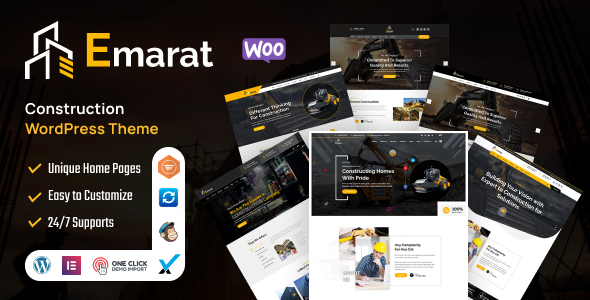
Stuck on your Emarat WordPress theme? Let's fix it.
No endless back-and-forth. Just send us the details and we'll get it done.
No obligation · Replies within 1 hour · Quote within 1 day
Setup · Customization · Bug fixes · WooCommerce integration
About Emarat WP Theme
Emarat is a WordPress theme by expert-Themes built for real estate websites. It ships with property listing templates, advanced search filters, and agent profile pages out of the box. The design leans toward a clean, professional look that works equally well for individual agents, small brokerages, and large property portals.
The theme integrates with popular real estate plugins like WP Residence and Essential Real Estate, giving you structured property data, map-based search, and mortgage calculators without heavy custom coding. It supports Elementor, which means most layout changes can be handled visually. Performance is reasonable on a clean install, though plugin-heavy setups can slow things down without proper optimization. If you need a solid starting point for a property website, Emarat covers the fundamentals well.
Get matched with a Emarat developer in under one day
Tell us about your Emarat project. Small fixes, Emarat theme customization, or a full website build, whatever you need, we've got it covered.
We'll connect you to the right Emarat developers, define the scope, and get everything 100% clear.
You'll get one estimate, hire your preferred developer, and start collaborating.
Emarat is not a difficult theme to use, but property websites have moving parts. Listings, agents, maps, lead forms, and user accounts all need to work together without slowing the site down. A developer who has worked inside Emarat before knows where the friction points are and avoids the trial-and-error that comes with learning a new theme on a live project.
FoxyConcept connects you with vetted Emarat developers through Codeable. You post your project, get a clear estimate within 24 hours, and only proceed if the scope and price make sense. No risk, no obligation.
Pros
- Built specifically for real estate with property listing templates included from the start
- Compatible with Elementor, so visual layout changes do not require touching code
- Integrates with WP Residence and Essential Real Estate for full property management features
- Includes map-based property search and advanced filter widgets without extra coding
- Clean, professional design that works for agents, brokerages, and property portals
Cons
- Structural customizations beyond preset layouts require Elementor skills or direct code edits
- Page load speed drops noticeably on listing pages when map scripts and plugin assets stack up
- Documentation from expert-Themes is limited, making troubleshooting harder for non-developers
- Some theme options only apply to the default templates and do not carry over to custom Elementor layouts
- Updates can occasionally conflict with real estate plugin versions, requiring manual review after each update
Who is Emarat for?
Independent Real Estate Agent Website
Emarat gives individual agents a professional listing page, agent bio, and contact form without needing a custom build. The property search and map view work well at small scale. A developer can configure the theme quickly, connect it to your MLS or manual listings, and have a working site live within a few days.
Property Management Company
Property managers handling multiple units benefit from Emarat’s front-end submission forms and structured property data. Tenants can browse available units with filters for price, size, and location. Adding a maintenance request form or tenant login area requires plugin support, but the base theme handles the listing side cleanly.
Real Estate Agency with Multiple Agents
Emarat supports multiple agent profiles with individual pages, listings tied to each agent, and contact routing. Larger teams need a developer to set up user roles correctly and make sure leads go to the right person. The theme structure supports this without heavy customization once the plugin integration is configured properly.
New Development and Pre-Sale Projects
New development projects often need a focused landing page with floor plans, availability tables, and a registration form rather than a full listings archive. Emarat’s Elementor compatibility makes it straightforward to build these pages. A developer can add a units-available table, gallery, and inquiry form without touching the core theme files.
Holiday and Short-Term Rental Listings
Short-term rental sites need availability calendars, nightly pricing, and booking forms alongside the standard listing details. Emarat provides the property display layer. Pairing it with a booking plugin like HBook or Lodgify handles the reservation side. A developer needs to connect both correctly to avoid conflicts with the theme’s own listing templates.

Customizing Emarat
Out of the box, Emarat covers the basics. Customizing it beyond the preset layouts is where most site owners hit a wall. The theme options panel controls colors, fonts, and header styles, but anything structural, such as changing the property card grid, adding custom fields to listing pages, or building a unique homepage section, requires either Elementor work or direct PHP and CSS edits.
Hiring an Emarat expert saves a significant amount of time here. A developer who knows the theme’s template hierarchy and hook system can modify archive pages, adjust the search widget behavior, or integrate a CRM without breaking the update path. FoxyConcept works with experienced Emarat developers through Codeable who handle these customizations cleanly and document what they change, so you are not left guessing later.
Recommended plugins for Emarat
Emarat pairs well with several plugins that extend what the theme does on its own. WP Residence or Essential Real Estate add full property management, saved searches, and front-end submission forms. For maps, Google Maps or Mapbox integrations work with both plugins. Contact Form 7 or WPForms handle lead capture on agent pages.
For site speed, adding a caching layer and optimizing images is important, especially with map scripts loading on listing pages. See our WordPress performance service for specifics. If search visibility matters, pairing Emarat with Yoast SEO and structured data markup helps listings appear in Google search. Our WordPress SEO service covers that setup.
Not sure which plugins to use? This WordPress plugins directory covers the most popular options with reviews and setup guides.
Emarat common issues
Emarat theme property search not working
Search filter issues in Emarat usually come from a conflict between the theme’s search widget and the active real estate plugin. First, check that the plugin’s property taxonomy settings match what the search widget is querying. If filters return no results or the wrong results, a mismatch in custom field keys is often the cause. Clearing any caching plugin after changes is also necessary. If the problem persists, a developer can inspect the query logic directly. Visit our WordPress bug fixing service for fast help.
Emarat theme slow loading on listing pages
Listing pages in Emarat load slowly when map scripts, plugin stylesheets, and unoptimized images all load at the same time. Start by testing with a tool like GTmetrix to identify the largest assets. Deferring non-critical JavaScript, serving images in WebP format, and using a caching plugin like WP Rocket resolves most of the issue. If map APIs are the bottleneck, loading them only on pages that need them helps significantly. Our WordPress performance service covers this in full.
Emarat map not showing on property pages
When the map does not appear on Emarat property pages, the most common causes are a missing or incorrect Google Maps API key, a JavaScript conflict with another plugin, or a Content Security Policy blocking the Maps script. Check the browser console for errors first. If you see an API key error, update the key in the theme or plugin settings and make sure the Maps JavaScript API is enabled in Google Cloud Console. A billing account linked to the project is also required for the API to function.
Emarat theme not compatible with latest WordPress update
After a WordPress core update, Emarat may show layout issues or broken functionality if the theme has not been updated to match. Check the expert-Themes changelog for a compatible version. If an update is not yet available, a developer can apply targeted CSS or PHP fixes to restore functionality without waiting. Always run updates on a staging site first. If your site is already broken, our WordPress bug fixing service can diagnose and patch the issue quickly.
Emarat FAQ
Yes. Emarat is built specifically for real estate use. It includes property listing templates, advanced search filters, agent profile pages, and map integration from the start. It works well for agents, brokerages, and property portals. For larger or more complex sites, pairing it with a dedicated real estate plugin like WP Residence gives you the full feature set you need.
Yes, Emarat supports Elementor. Most page layouts, including homepages and interior pages, can be edited using the Elementor page builder. Keep in mind that some theme-specific templates, such as single property pages and search results, use their own template files and may not be fully editable inside Elementor without additional developer work.
Emarat is built to work with WP Residence and Essential Real Estate. Both plugins add property management, front-end submission, saved searches, and mortgage calculators. WP All Import is also commonly used to bulk import property listings. Check the expert-Themes documentation for the specific plugin versions tested with the current theme release before installing.
Emarat can work for rental property sites. The listing templates handle rental properties well, and you can filter by rental type. For short-term rentals needing booking calendars and availability management, you will need a separate booking plugin. A developer can integrate that with the theme without conflicting with the existing listing functionality.
Costs vary depending on what needs doing. A basic setup with a configured real estate plugin, imported listings, and minor style adjustments typically falls in the range of a few hundred dollars. More complex work, such as custom search behavior, CRM integration, or bespoke page layouts, costs more. Get a free estimate to get a clear number for your specific project.
Hire an Emarat Developer
Whether you need a full Emarat setup, a specific customization, or help fixing something that broke, FoxyConcept matches you with a developer who knows the theme. Work is delivered through Codeable, so every developer is vetted and every project comes with a clear estimate before any work begins.
Get a free estimate and describe what you need. You will hear back within 24 hours with a straightforward quote and no obligation to hire.
You'll need a free Codeable account so developers can ask questions and send their quotes.