Eshkool WordPress Theme
by rs-theme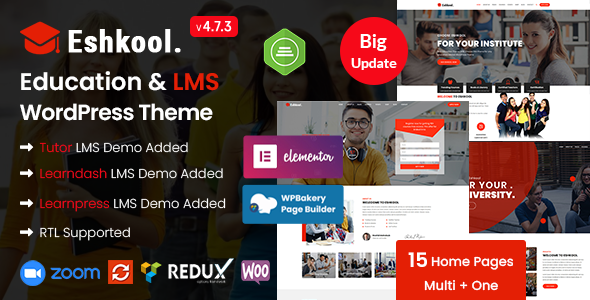
Stuck on your Eshkool WordPress theme? Let's fix it.
No endless back-and-forth. Just send us the details and we'll get it done.
No obligation · Replies within 1 hour · Quote within 1 day
Setup · Customization · Bug fixes · WooCommerce integration
About Eshkool WP Theme
Eshkool is a WordPress theme built by rs-theme, designed for educational institutions, online learning platforms, and course providers. It ships with layouts suited to schools, universities, tutoring services, and e-learning sites.
The theme integrates with LMS plugins, particularly LearnPress, making it a practical starting point for anyone building a course catalog or student portal. It includes pre-built page templates, course listing layouts, and event sections out of the box.
Eshkool is built on a customizer-driven setup, so most visual changes happen without touching code. It supports Elementor, which opens up drag-and-drop editing for users who want more layout control. If you need something beyond the defaults, a developer can extend it without major refactoring.
Get matched with a Eshkool developer in under one day
Tell us about your Eshkool project. Small fixes, Eshkool theme customization, or a full website build, whatever you need, we've got it covered.
We'll connect you to the right Eshkool developers, define the scope, and get everything 100% clear.
You'll get one estimate, hire your preferred developer, and start collaborating.
Eshkool works well as a starting point, but most educational sites need something the defaults cannot deliver — custom enrolment logic, branded course pages, or integration with third-party student management tools.
Getting that work done cleanly requires someone who knows WordPress themes inside out. Through Codeable, you are matched with vetted WordPress developers who have handled education and LMS projects before. No guesswork, no generalist freelancers — just developers who can actually deliver what your site needs.
Pros
- Native LearnPress integration makes course setup straightforward without extra plugins
- Elementor compatibility gives non-developers meaningful layout control
- Pre-built templates for school, university, and tutoring site layouts save setup time
- Customizer-based settings cover most visual changes without code
- Event and timetable sections are included, useful for class scheduling
Cons
- Relies heavily on LearnPress — switching LMS plugins requires significant rework
- Default page speed scores need improvement before going live
- Limited documentation makes troubleshooting harder for non-developers
- Some design sections feel dated and need CSS overrides to modernise
- WooCommerce styling conflicts can appear on checkout pages without additional fixes
Who is Eshkool for?
Private Tutoring Services
Eshkool suits private tutors and small tutoring businesses well. You can list subjects, display tutor profiles, and add a booking or contact form. Pair it with a scheduling plugin like Amelia and you have a functional booking site. A developer can wire up calendar availability and automated confirmation emails to complete the workflow.
Online Course Platforms
For creators selling video courses or downloadable content, Eshkool with LearnPress and WooCommerce handles the core setup. Course listings, lesson previews, and paid enrolment all work within the theme. A developer can add drip content, certificate generation, or student progress dashboards if you need more than the default feature set.
Language Schools
Language schools need class timetables, level descriptions, and teacher profiles. Eshkool includes sections for all of these. You can present course offerings by language and level, and add a contact or enquiry form for prospective students. Custom location and schedule pages can be built out by a developer for multi-branch schools.
K–12 School Websites
Primary and secondary schools need news sections, staff directories, event calendars, and parent contact forms. Eshkool covers most of this with its built-in templates. A developer can add role-based access for staff-only pages, integrate with Google Calendar, or build a custom news and announcements feed that the admin team can update without help.
Corporate Training Providers
Companies running internal or external training programs can use Eshkool to host a branded learning portal. Combined with LearnPress, you can deliver structured courses with assessments and completion tracking. A developer can integrate this with HR tools or add SSO login so employees authenticate through your existing company systems.

Customizing Eshkool
Out of the box, Eshkool gives you control over colors, fonts, header styles, and homepage sections through the WordPress Customizer. You can swap layouts, reorder content blocks, and configure the course display without writing any code.
For deeper changes, like custom instructor profile pages, branded checkout flows, or modified course filtering, you will need PHP and CSS work. An Eshkool expert can build child theme modifications that survive updates and keep your site consistent.
If you are using Elementor alongside Eshkool, a developer can create reusable templates and global style kits that align with your brand. Things like custom enrolment flows, restricted content sections, or conditional page logic also require developer input to get right.
Recommended plugins for Eshkool
Eshkool pairs well with LearnPress for course management, WooCommerce for paid enrolments, and WPForms or Gravity Forms for student enquiries and registration forms.
For site speed, optimising Eshkool means addressing render-blocking scripts, image compression, and caching. See our WordPress performance service if load times are a concern.
If you are targeting organic traffic from course searches, structured data and on-page optimisation matter. Our WordPress SEO service covers that. Booking and calendar plugins like Amelia also slot into Eshkool well for tutoring businesses that need appointment scheduling.
Not sure which plugins to use? This WordPress plugins directory covers the most popular options with reviews and setup guides.
Eshkool common issues
Eshkool theme course listings not displaying correctly
Course listing issues in Eshkool usually come from a LearnPress version mismatch or a missing theme setting. First, check that LearnPress is up to date and that the Eshkool course page template is assigned correctly under LearnPress settings. Clearing your cache often resolves display glitches after updates. If the layout is broken, a plugin conflict may be responsible — deactivate plugins one at a time to isolate it. Persistent issues are worth handing to a WordPress bug fixing specialist.
Eshkool homepage sections not loading after update
If homepage sections disappeared after updating Eshkool or Elementor, the most likely cause is a widget or template compatibility break. Check Elementor’s update log for deprecated widgets and look at the Customizer to see if homepage section settings were reset. Restoring a pre-update backup is the fastest fix if sections were wiped. Going forward, always test theme and plugin updates on a staging site before pushing to production. A developer can set that up for you.
Eshkool theme slow loading speed
Eshkool loads several scripts and stylesheets that are not always necessary on every page. Start by running a GTmetrix or PageSpeed Insights test to identify what is slowing things down. Common fixes include enabling caching via WP Rocket or LiteSpeed Cache, serving images in WebP format, and deferring non-critical JavaScript. Removing unused Elementor widgets also helps. For a full audit and fix, our WordPress performance service covers Eshkool sites specifically.
Eshkool contact form not sending emails
Contact form email failures in Eshkool are almost always an SMTP configuration problem, not a theme bug. WordPress’s default mail function is unreliable on most shared hosting. Install WP Mail SMTP and connect it to a transactional mail provider like Mailgun or SendGrid. Check your spam folder first to rule out a delivery issue. If the form is not submitting at all, look for JavaScript errors in the browser console that might point to a plugin conflict. Our WordPress maintenance service covers routine fixes like this.
Eshkool FAQ
Yes, Eshkool supports Elementor. You can use the page builder to edit and build pages using drag-and-drop. Some sections are controlled through the Customizer rather than Elementor, so you will work across both interfaces. A developer familiar with Eshkool can create custom Elementor templates that keep your design consistent across the whole site.
Eshkool works with WooCommerce when paired with LearnPress’s WooCommerce add-on. This lets you sell course access as products, handle payments, and manage enrolments. Styling conflicts on the cart and checkout pages are common and usually need a few CSS fixes. A developer can sort the integration and make sure the checkout experience matches your site design.
You can use Eshkool without LearnPress for a standard school or education brochure site. The course listing templates are tied to LearnPress post types, so those layouts will not function without it. For a site focused on information, events, staff profiles, and contact forms, LearnPress is not required. Most sites using Eshkool do pair it with LearnPress to get the most from the theme.
Always use a child theme before making any code changes to Eshkool. Customizer settings are stored in the database and survive theme updates, but any direct edits to theme files will be overwritten. A child theme keeps your modifications safe. If you have not set one up yet, a developer can migrate your current changes into a child theme before your next update.
Eshkool is a reasonable fit for school websites. It includes event sections, staff or teacher layouts, and page templates suited to educational content. For a primary or secondary school, you may need a developer to add a news feed, calendar integration, or role-based access for staff pages. The theme gives you a solid foundation but most school sites need some customisation beyond the defaults.
Hire an Eshkool Developer
Whether you need a quick layout fix or a fully customised education platform built on Eshkool, a specialist developer will get it done properly. Post your project and get a free estimate within 24 hours — no obligation to hire.
From LearnPress integration to custom course templates and performance work, our developers have handled it all. Get your free estimate and see exactly what your project will cost before you commit.
You'll need a free Codeable account so developers can ask questions and send their quotes.