eSmarts WordPress Theme
by Elated-Themes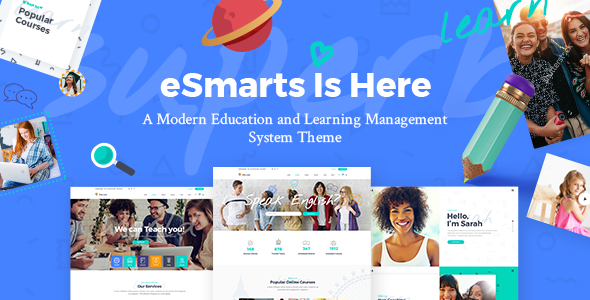
Stuck on your eSmarts WordPress theme? Let's fix it.
No endless back-and-forth. Just send us the details and we'll get it done.
No obligation · Replies within 1 hour · Quote within 1 day
Setup · Customization · Bug fixes · WooCommerce integration
About eSmarts WP Theme
eSmarts is a WordPress theme built by Elated-Themes, designed specifically for online courses, education platforms, and knowledge-based websites. It ships with a clean academic layout, pre-built demo content, and tight integration with LMS plugins like LearnPress. The theme covers the typical needs of schools, tutors, coaching businesses, and e-learning startups without requiring you to build from scratch.
Page templates are included for courses, instructors, events, and pricing. Typography is clear and readable, which matters on content-heavy education sites. The theme is built on Elated’s own framework, meaning options are handled through a dedicated admin panel rather than the Customizer. It supports WooCommerce for selling courses directly, and the demo content can be imported in one click to give you a working starting point quickly.
Get matched with a eSmarts developer in under one day
Tell us about your eSmarts project. Small fixes, eSmarts theme customization, or a full website build, whatever you need, we've got it covered.
We'll connect you to the right eSmarts developers, define the scope, and get everything 100% clear.
You'll get one estimate, hire your preferred developer, and start collaborating.
eSmarts is built on Elated’s proprietary framework, so general WordPress knowledge only gets you so far. A developer who has worked inside this theme knows how the shortcodes, page builder elements, and options panel interact. Codeable connects you with vetted WordPress professionals who have real experience with education themes like eSmarts. You post your project, get matched, and receive a clear estimate before any work starts. No guesswork, no wasted time.
Pros
- Includes dedicated course, instructor, and pricing page templates out of the box
- Native LearnPress integration means course features work without heavy configuration
- One-click demo import gives you a fully populated starting point quickly
- WooCommerce support allows direct course sales without a separate plugin stack
- Elated admin panel offers detailed control over fonts, colors, and layout without needing CSS
Cons
- Elated's proprietary framework creates a learning curve for developers unfamiliar with it
- Limited to LearnPress as the primary LMS — not ideal if you prefer LifterLMS or LearnDash
- The options panel is large and not always logically organized, making customization slower
- Updates can lag behind WordPress core changes, occasionally causing compatibility issues
- Heavy demo content and bundled scripts can slow page speed without optimization work
Who is eSmarts for?
Online Course Platform
eSmarts is built for selling and organizing online courses. The course grid templates, LearnPress integration, and WooCommerce payment support make it a practical choice for creators who want to publish and monetize a course catalog without building custom functionality from scratch.
Private Tutoring Business
Tutors offering one-on-one or small group sessions can use eSmarts to list subjects, display instructor credentials, and collect bookings. Pairing the theme with a scheduling plugin like Amelia covers the session booking flow that eSmarts does not handle natively.
School or Academy Website
The theme’s academic design language suits established schools and training academies well. Department or subject pages, event listings for classes, and a clean instructor directory all fit naturally within the eSmarts layout without requiring significant structural changes.
Corporate Training Portal
Companies running internal training programs can use eSmarts behind a login to deliver course content to employees. LearnPress supports progress tracking and quizzes, which covers the core requirements for a simple internal training portal without needing a dedicated LMS platform.
Coaching and Mentorship Site
Coaches and mentors who sell programs, group sessions, or self-paced content can present their offer clearly using eSmarts pricing pages and course templates. The WooCommerce integration handles payment, and the instructor profile layout works well for personal brand positioning.

Customizing eSmarts
eSmarts gives you a large options panel with controls for colors, fonts, header styles, and layout widths. Most visual changes can be made without touching code, but the panel takes time to learn. Sections like the course grid, instructor profiles, and homepage sliders have their own sets of options, which adds flexibility but also adds complexity.
For anything beyond the built-in controls — custom course layouts, adjusted LMS flows, unique homepage sections, or WooCommerce checkout changes — you will need developer help. An eSmarts expert understands the Elated framework structure, knows where child theme overrides belong, and can make targeted changes without breaking the existing design. Working with someone who knows this theme specifically saves significant time compared to a generalist figuring it out from scratch.
Recommended plugins for eSmarts
eSmarts pairs well with LearnPress for course management, WooCommerce for payments, and The Events Calendar for scheduling classes or workshops. Adding a booking plugin like Amelia works for one-on-one tutoring sessions.
If your course site needs to rank well in search, structured content and fast load times matter. A developer can help with WordPress SEO setup specific to course and instructor pages. As your catalog grows, WordPress performance tuning becomes important, especially with LearnPress adding database load on busy sites.
Not sure which plugins to use? This WordPress plugins directory covers the most popular options with reviews and setup guides.
eSmarts common issues
eSmarts theme not loading demo content correctly
Demo import failures in eSmarts are usually caused by server timeout limits or insufficient PHP memory. Check that your host allows at least 256MB of memory and a 300-second max execution time. If the import partially completes, reset and retry rather than patching a half-imported site. If problems continue, a developer can import demo content manually using WP-CLI or direct database methods. WordPress bug fixing support can also diagnose specific import errors.
LearnPress courses not displaying properly in eSmarts
When LearnPress course listings look broken inside eSmarts, the most common cause is a plugin version mismatch. Elated-Themes builds eSmarts against specific LearnPress versions, so an update to either can break the display. Check the theme changelog for the tested LearnPress version and match it. If the layout is still off, the course template files may need a targeted fix to restore compatibility without disrupting other pages.
eSmarts homepage slider not showing after update
eSmarts slider issues after updates are often caused by a JavaScript conflict introduced by a plugin or a change in how the Elated framework loads its scripts. Open the browser console and look for JS errors pointing to the slider library. Disabling recently updated plugins one at a time usually isolates the conflict. If the slider was customized, the update may have overwritten template files, requiring those changes to be moved into a child theme.
eSmarts WooCommerce checkout page layout broken
Broken WooCommerce checkout layouts in eSmarts usually mean the theme’s WooCommerce stylesheet is conflicting with a recent WooCommerce update. Elated-Themes uses custom WooCommerce template overrides, and these can fall out of sync with the plugin. Updating the theme often resolves it, but if a custom checkout design is in place, the override files need to be manually updated to match the current WooCommerce template structure. Get help fixing it here.
eSmarts FAQ
eSmarts is designed specifically around LearnPress. It does not include dedicated templates or styling for LearnDash or LifterLMS. You can technically run those plugins on the theme, but you will lose the tight visual integration that makes eSmarts useful for course sites. If LearnDash is a requirement, a different theme built for it would be a better starting point.
eSmarts uses Elated’s own page builder elements and shortcodes rather than Elementor. The theme is not officially built for Elementor compatibility, and mixing the two can create layout conflicts. Some sections can be built with Elementor, but you lose access to Elated’s course-specific elements. A developer can advise on the best approach for your specific build.
Yes, eSmarts works as a general education or professional services theme without LearnPress installed. The course-specific templates will not display meaningful content without the plugin, but the homepage, about, blog, and contact pages function independently. It is a reasonable option for schools or tutors who do not need online course delivery.
Always use a child theme before making any code-level changes to eSmarts. Changes made directly to parent theme files are overwritten on update. For options panel settings, those are stored in the database and survive updates. Before updating, back up your site and check the Elated-Themes changelog for any template changes that may affect customized files. A WordPress maintenance plan covers this process regularly.
Yes. eSmarts includes WooCommerce support and is set up to sell courses as products through LearnPress and WooCommerce together. Checkout, cart, and product pages are styled to match the theme. For more complex sales setups — bundles, subscriptions, or memberships — additional plugins are needed, and some configuration work may be required to keep the layout consistent.
Hire an eSmarts Developer
Need help setting up eSmarts, customizing your course layouts, or fixing something that broke after an update? A specialist gets it done faster and correctly the first time. Post your project and get a free estimate with no obligation to proceed. Get a free estimate and have a vetted eSmarts developer review your project within 24 hours.
You'll need a free Codeable account so developers can ask questions and send their quotes.