Estudiar WordPress Theme
by vamtam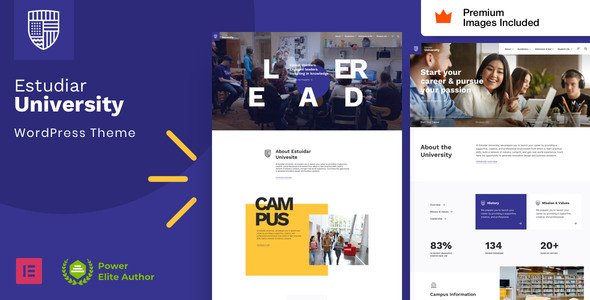
Stuck on your Estudiar WordPress theme? Let's fix it.
No endless back-and-forth. Just send us the details and we'll get it done.
No obligation · Replies within 1 hour · Quote within 1 day
Setup · Customization · Bug fixes · WooCommerce integration
About Estudiar WP Theme
Estudiar is a WordPress theme built by VamTam, a developer known for clean code and education-focused designs. It targets universities, online courses, schools, and training providers who need a structured, professional website without heavy custom development.
The theme ships with a drag-and-drop page builder, pre-built demo pages, and a layout system that works well with LearnDash and other LMS plugins. It handles course listings, faculty profiles, event calendars, and admission pages without requiring a separate plugin stack.
VamTam maintains Estudiar actively, with updates that track WordPress core changes and Elementor compatibility. Performance out of the box is reasonable, though larger institutions typically need additional optimisation work to hit strong Core Web Vitals scores on content-heavy pages.
Get matched with a Estudiar developer in under one day
Tell us about your Estudiar project. Small fixes, Estudiar theme customization, or a full website build, whatever you need, we've got it covered.
We'll connect you to the right Estudiar developers, define the scope, and get everything 100% clear.
You'll get one estimate, hire your preferred developer, and start collaborating.
Estudiar looks straightforward until you start building a real education site on it. Course filtering, member-only content, multi-campus structures, and third-party enrolment tools all create complexity fast.
Working through Codeable, FoxyConcept connects you with vetted WordPress developers who have direct experience with VamTam themes and LMS integrations. You get a free estimate within 24 hours and no obligation to proceed. No trial-and-error with generalist freelancers.
Pros
- Pre-built demo pages designed specifically for education and course-based sites
- Clean Elementor integration with theme-specific widgets for courses, faculty, and events
- Active maintenance from VamTam with regular updates and WordPress core compatibility
- Built-in support for LearnDash and LifterLMS without requiring heavy plugin configuration
- Typography and layout defaults are well-suited to academic content without heavy restyling
Cons
- Page builder dependency means removing Elementor later requires significant rebuilding
- Out-of-box performance scores drop noticeably on pages with multiple course listings or sliders
- Demo content import can be unreliable and often needs manual cleanup after installation
- Advanced course filtering beyond basic categories requires custom development
- Limited documentation for multi-site or multi-campus configurations
Who is Estudiar for?
Universities and Colleges
Estudiar handles the content structure universities need: department pages, faculty profiles, program listings, and event calendars. Combined with a proper LMS plugin and developer customisation, it supports complex course catalogues and admission workflows without building from scratch.
Online Course Creators
Course creators using LearnDash or LifterLMS get a clean front-end presentation layer with Estudiar. Custom sales pages, course grid layouts, and checkout flows can be built on top of the theme with relatively little friction compared to starting with a generic theme.
Vocational Training Providers
Vocational providers need clear course descriptions, certification details, and enrolment calls to action. Estudiar’s layout system handles this well. A developer can connect it to booking or payment tools relevant to short courses and professional development programs.
K-12 and Private Schools
Smaller schools benefit from Estudiar’s structured design without needing an enterprise CMS. Parent portals, news sections, staff directories, and event pages all fit naturally into the theme’s content model with moderate customisation work.
Corporate Training Platforms
Companies running internal or external training platforms can use Estudiar as the front-end layer over a LMS backend. Branded course pages, progress dashboards, and certificate delivery workflows can be configured with developer help and the right plugin stack.

Customizing Estudiar
Estudiar gives you a solid starting point, but most education sites need adjustments that go beyond what the theme panel offers. Custom course filtering, branded colour systems, conditional content for enrolled students, and integration with payment gateways or CRMs all require developer work.
An Estudiar expert can extend the theme without breaking update compatibility, keeping custom logic in a child theme or plugin layer. This matters when VamTam releases updates, since improperly placed customisations often cause layout regressions.
Common customisation requests include modifying the course grid layout, adding custom post types for faculty or programs, and connecting Estudiar to third-party tools like Mailchimp, HubSpot, or Stripe-based enrolment systems. These are straightforward for a developer who knows the theme architecture.
Recommended plugins for Estudiar
Estudiar works well with LearnDash, LifterLMS, and Tutor LMS for full course management. WooCommerce handles paid enrolment when configured correctly alongside the theme’s layout system.
For forms, WPForms and Gravity Forms both integrate cleanly. Events Manager or The Events Calendar covers academic calendars and open days.
If you want to push performance further, pairing Estudiar with a proper caching setup and image optimisation stack makes a real difference on course-heavy pages. See our WordPress performance service for that work. For institutions targeting search traffic on course keywords, structured SEO work on top of the theme setup helps significantly. Details at our WordPress SEO service.
Not sure which plugins to use? This WordPress plugins directory covers the most popular options with reviews and setup guides.
Estudiar common issues
Estudiar demo import not working
Demo import failures in Estudiar are usually caused by server timeout limits, missing required plugins, or conflicts with existing content. Increase your PHP execution time limit and max upload size before attempting import. Install all recommended plugins first. If the import still fails mid-way, try importing XML content manually via the WordPress importer tool rather than using the one-click option.
Persistent issues often need direct server and plugin diagnosis. Our WordPress bug fixing service covers this.
Estudiar theme slow loading on course pages
Performance drops on Estudiar course pages typically come from unoptimised images in the course grid, render-blocking Elementor assets, and unminified scripts loading site-wide. Start by enabling Elementor’s built-in asset optimisation settings. Add lazy loading for images. Use a caching plugin with page-level caching enabled for public course pages.
For sites with large course catalogues, query performance on filtered archives also needs attention. A developer can optimise both front-end delivery and database queries. See our WordPress performance service.
Estudiar layout broken after update
Layout breaks after a VamTam update almost always trace back to customisations made directly in the theme files rather than in a child theme. When the parent theme updates, those changes get overwritten. Check your header, footer, and any modified template files against the new version. Going forward, all customisations should live in a child theme or a site-specific plugin. A developer can audit what broke and restructure the customisation layer properly to survive future updates.
Estudiar not compatible with LearnDash course pages
Estudiar and LearnDash can conflict on single course page templates, particularly around the course content area and sidebar layout. The fix usually involves creating a custom page template in a child theme that overrides the default LearnDash template output while keeping Estudiar’s header, footer, and styling intact. Some styling conflicts also need CSS adjustments. This is a common pairing and a developer familiar with both tools can resolve it cleanly without a full rebuild.
Estudiar FAQ
Estudiar works with LearnDash, but the integration is not automatic. You will likely need to adjust template files so LearnDash course pages inherit Estudiar’s styling correctly. Single course pages, lesson pages, and the course grid sometimes need custom CSS or a child theme template override to look consistent with the rest of the site.
Yes. Estudiar is built around Elementor and ships with custom Elementor widgets for course listings, faculty profiles, and call-to-action sections. Most of the demo content is built with Elementor page templates. This means the theme relies on Elementor being active, which is worth factoring into long-term maintenance planning.
Yes. Pairing Estudiar with WooCommerce or a LMS plugin that handles payments like LearnDash with Stripe gives you a functional paid course setup. The theme handles the front-end presentation. Checkout flows, access restrictions, and enrolment logic are handled by the LMS or WooCommerce layer, not the theme itself.
Estudiar’s header and navigation are managed through the Elementor header builder and the WordPress Customizer. You can adjust logo placement, menu structure, and sticky behaviour through those interfaces. More significant changes, like adding a mega menu or a conditional header for enrolled users, require custom development work in a child theme.
Estudiar suits small to mid-sized institutions well. It handles the standard content types universities need and the layout defaults are professional without heavy styling work. Large universities with complex multi-campus structures, custom enrolment systems, or high traffic volumes will likely need significant custom development on top of the theme to meet their requirements.
Hire an Estudiar Developer
Whether you need a full Estudiar build, a specific feature added, or existing problems fixed, FoxyConcept delivers through a network of vetted WordPress specialists. Projects are scoped clearly, estimates are free, and there’s no obligation to hire.
From LMS integration to custom course layouts and third-party connections, our developers know the VamTam theme architecture and how to extend it properly. Get your free estimate today and have a developer matched to your project within 24 hours.
You'll need a free Codeable account so developers can ask questions and send their quotes.