Eva WordPress Theme
by temash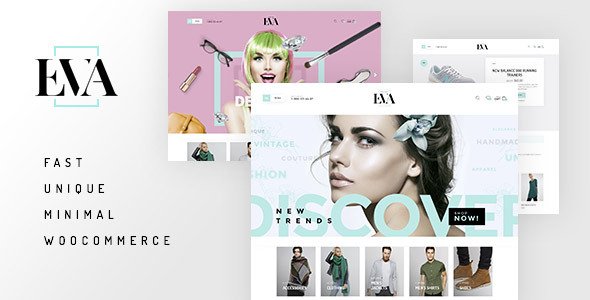
Stuck on your Eva WordPress theme? Let's fix it.
No endless back-and-forth. Just send us the details and we'll get it done.
No obligation · Replies within 1 hour · Quote within 1 day
Setup · Customization · Bug fixes · WooCommerce integration
About Eva WP Theme
Eva is a WordPress theme developed by temash, built for clean, minimal presentation with a focus on typography and whitespace. It suits service-based businesses, freelancers, and portfolio sites that want a polished look without visual clutter.
The theme follows modern WordPress standards, supporting the block editor out of the box. Page layouts are flexible, and the overall design stays out of the way of your content. Eva loads fast by default, avoiding the bloat that slows down many multipurpose themes.
If you want a theme that looks professional from day one, handles standard business pages well, and does not require a page builder to look good, Eva is worth a close look. It works best when paired with thoughtful content and a clear site structure.
Get matched with a Eva developer in under one day
Tell us about your Eva project. Small fixes, Eva theme customization, or a full website build, whatever you need, we've got it covered.
We'll connect you to the right Eva developers, define the scope, and get everything 100% clear.
You'll get one estimate, hire your preferred developer, and start collaborating.
Eva is a well-built theme, but getting it to match a specific design vision takes real WordPress knowledge. That is where working through Codeable makes sense. Every developer on the platform is vetted and has proven WordPress experience. FoxyConcept connects you with Eva developers who understand the theme’s structure, know where the limits are, and can extend it without creating maintenance problems down the line.
Pros
- Clean, minimal design that works well for service businesses and portfolios without extra configuration
- Full block editor support makes content editing straightforward for non-technical users
- Lightweight codebase keeps page load times fast compared to heavier multipurpose themes
- Well-structured PHP and CSS makes it predictable to customize with a child theme
- Typography-first layout keeps focus on content rather than decorative elements
Cons
- Limited built-in demo content, so setting up a polished site from scratch takes more effort
- WooCommerce styling requires additional work since Eva is not built as a dedicated shop theme
- Fewer layout variation options compared to multipurpose themes with multiple header and footer builders
- Customizer options are functional but not as extensive as premium themes with visual drag-and-drop controls
- Smaller community and fewer third-party tutorials compared to market-leading themes like Astra or GeneratePress
Who is Eva for?
Freelance Designer Portfolio
Eva’s whitespace-heavy layout lets portfolio images and case studies do the talking. A freelance designer can set up a clean homepage, a project gallery, and a contact page without fighting the theme’s design. The minimal structure keeps visitor attention on the work itself rather than the surrounding interface.
Consulting or Coaching Business
Service pages, a bio section, and a booking or contact form sit naturally within Eva’s layout. The typography-focused design communicates credibility without over-designing. For coaches and consultants who want to look professional quickly, Eva gives a solid starting point that can be refined with minimal custom work.
Boutique Agency Website
Small agencies with a defined visual identity can map their brand onto Eva cleanly. Custom colors, fonts, and a child theme built on Eva’s structure give enough flexibility for a distinctive result. The clean codebase also makes it easier for developers to maintain the site over time without unexpected conflicts.
Author or Writer Site
Eva’s strong typographic defaults suit writers and authors who want their content to feel considered. A book page, a blog archive, and an about section all fit the theme’s structure naturally. The minimal design keeps the reading experience clean and avoids distracting sidebar clutter common on more complex themes.
Minimal Service Business Homepage
A local business or solo professional needing a homepage, a services list, and a contact form can get operational quickly with Eva. The theme does not require a page builder, which reduces long-term maintenance overhead. Setup is straightforward, and the default design already looks polished enough for most professional service contexts.

Customizing Eva
Eva comes with a set of Customizer options that cover fonts, colors, layout widths, and header styles. For most small sites, these controls are enough to get a result that feels on-brand without touching any code.
Beyond the defaults, an Eva expert can push the theme further. Custom CSS, child theme development, and block patterns built specifically for your content type can make a significant difference. If you need a unique homepage layout, a custom post type integrated into the design, or a header that matches strict brand guidelines, working with a developer who knows Eva saves time and avoids guesswork.
temash themes tend to have clean, well-structured code, which makes customization predictable. A developer can modify Eva without fighting against the base theme.
Recommended plugins for Eva
Eva pairs well with standard WordPress plugins without conflicts. WooCommerce can be added for simple shops, though Eva is not a dedicated eCommerce theme, so some template adjustments may be needed.
For SEO, Eva’s clean markup gives plugins like Yoast or Rank Math a solid foundation to work with. Check our WordPress SEO service if you want that handled properly. Eva also loads efficiently by default, but further gains are possible with caching and image optimization. See our WordPress performance service for specifics.
Not sure which plugins to use? This WordPress plugins directory covers the most popular options with reviews and setup guides.
Eva common issues
Eva theme header not displaying correctly after WordPress update
Header display problems after a WordPress update usually point to a conflict between the theme’s template files and changes in WordPress core. Check whether you are running Eva as a parent theme with direct edits, as these break during updates. Switching to a child theme setup before future updates is the fix. If the header is still broken, deactivating plugins one by one identifies the conflict. Our WordPress bug fixing service handles this quickly.
Eva theme fonts not loading or changing in Customizer
Font issues in Eva are often caused by a caching plugin serving stale CSS, or by a Content Security Policy blocking Google Fonts requests. Clear all caches first. If the font change saves in the Customizer but does not appear on the front end, the issue is almost always caching. If fonts fail to load entirely, check the browser console for blocked requests and verify your site’s CSP headers allow external font sources.
Eva theme mobile menu not working on iOS or Android
Mobile menu failures in Eva typically come down to a JavaScript conflict with another plugin, or a jQuery version mismatch introduced by a plugin loading its own copy. Open the browser console on mobile and look for JS errors. Deactivating plugins in groups narrows it down fast. If the menu toggle fires but the menu does not open, the issue is usually a CSS z-index or overflow-hidden conflict on a parent element.
Eva theme WooCommerce pages unstyled or broken layout
Eva does not ship with full WooCommerce template overrides, so shop pages, cart, and checkout often inherit unstyled or misaligned elements. The solution is adding WooCommerce-specific CSS in a child theme, or overriding specific WooCommerce templates. This is a known gap for non-eCommerce themes. A developer can add the necessary styles and template files without modifying the parent theme. See our bug fixing service if this is blocking your store.
Eva FAQ
Yes, Eva supports the WordPress block editor. You can build pages using standard blocks without needing a separate page builder plugin. Some block patterns may need minor CSS adjustments to match your brand colors, but the core editing experience works as expected. For custom block layouts beyond what the Customizer supports, a developer can add block patterns specific to your site.
Eva works with WooCommerce but is not a dedicated shop theme. Basic product pages and checkout will function, but the styling is minimal and may not look polished without additional CSS work. For a simple product catalog alongside a service site, Eva is workable. For a full eCommerce experience, custom template overrides are recommended before going live.
Create a new folder in your themes directory, add a style.css file with the correct theme header referencing Eva as the parent template, and add a functions.php file that enqueues the parent stylesheet. Activate the child theme from the WordPress dashboard. Any custom CSS or template overrides go into the child theme, keeping your changes safe during Eva updates.
Eva’s Customizer includes font options that typically cover Google Fonts. You can change the font family and size for headings and body text from the Customizer panel. For custom-hosted fonts or typefaces outside the built-in options, you will need to enqueue the font files and apply them via CSS in a child theme. A developer can set this up cleanly.
Yes, migrating an existing site to Eva is possible. Content, posts, and media transfer without issues. The main work involves rebuilding page layouts to match Eva’s template structure and reconfiguring menus and widgets. If your current theme used a page builder, some pages may need to be rebuilt from scratch. Our WordPress migration service covers this end to end.
Hire an Eva WordPress Developer
Whether you need a full Eva setup, a specific layout customized, or a problem fixed, FoxyConcept delivers through Codeable’s vetted developer network. Post your project, get a free estimate within 24 hours, and only proceed if you want to. No pressure, no obligation.
Get your free estimate today and describe exactly what you need. An Eva developer will review it and come back with a clear plan and price.
You'll need a free Codeable account so developers can ask questions and send their quotes.