Evenex Event Conference WordPress Theme WordPress Theme
by XpeedStudio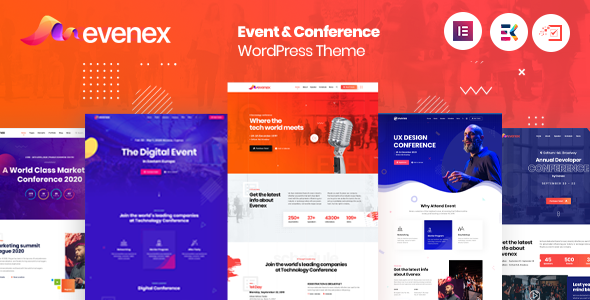
Stuck on your Evenex Event Conference WordPress Theme WordPress theme? Let's fix it.
No endless back-and-forth. Just send us the details and we'll get it done.
No obligation · Replies within 1 hour · Quote within 1 day
Setup · Customization · Bug fixes · WooCommerce integration
About Evenex Event Conference WordPress Theme WP Theme
Evenex is an event and conference WordPress theme built by XpeedStudio. It targets event organizers, conference managers, and seminar hosts who need a dedicated site up quickly without custom development from scratch.
The theme ships with pre-built demo content covering speaker profiles, schedule timelines, ticket sections, sponsor grids, and countdown timers. It integrates with Elementor, so page layout is handled visually. XpeedStudio built Evenex specifically for single or multi-day events, meaning the structure suits annual conferences, corporate summits, workshops, and community meetups alike.
Out of the box you get multiple homepage layouts, a built-in schedule/agenda system, speaker archive pages, and WooCommerce support for ticket sales. It is translation-ready and includes RTL support, which matters if your event draws an international audience.
Get matched with a Evenex Event Conference WordPress Theme developer in under one day
Tell us about your Evenex Event Conference WordPress Theme project. Small fixes, Evenex Event Conference WordPress Theme theme customization, or a full website build, whatever you need, we've got it covered.
We'll connect you to the right Evenex Event Conference WordPress Theme developers, define the scope, and get everything 100% clear.
You'll get one estimate, hire your preferred developer, and start collaborating.
Evenex covers the basics well, but most event sites need at least some configuration beyond the demo. An Evenex Event Conference WordPress Theme developer on our WordPress development team, working through Codeable, can handle setup, customization, plugin integration, and pre-launch checks. You get a vetted developer matched to your project within 24 hours, with a free estimate and no obligation to hire.
Pros
- Pre-built schedule and agenda system saves significant setup time for multi-session events
- Elementor-based layouts mean non-developers can manage content updates independently
- Built-in speaker archive with custom post types keeps speaker profiles organized
- WooCommerce compatibility allows direct ticket sales without a separate platform
- RTL and translation-ready support covers international and multilingual events
Cons
- Demo import can overwrite existing content if not handled carefully on an existing site
- The built-in schedule system lacks multi-track filtering without additional customization
- Some Elementor widgets are XpeedStudio-specific and may break if the companion plugin is deactivated
- Limited styling options for mobile schedule views without custom CSS
- No native integration with dedicated event ticketing platforms like Eventbrite or Ticket Tailor
Who is Evenex Event Conference WordPress Theme for?
Annual Tech Conferences
Evenex suits multi-day tech conferences well. Speaker profiles, session schedules, and sponsor tiers are all built into the theme structure. Pair it with WooCommerce for early-bird ticket pricing and a countdown timer on the homepage to drive registrations ahead of the event date.
Corporate Summits and Leadership Events
Corporate events need clean, professional design without clutter. Evenex’s minimal layout options and typography controls keep the site looking polished. Custom post types for speakers handle executive bios cleanly, and private agenda pages can be restricted to registered attendees using a membership plugin.
Academic and Research Symposiums
Research symposiums often have dense schedules with parallel sessions. Evenex provides the base schedule structure, and with custom development the agenda can display multi-track sessions, abstract submission links, and downloadable papers alongside each session entry.
Community Meetups and Unconferences
Community meetups need fast setup and low overhead. Evenex’s demo content imports quickly, and Elementor makes it easy for a volunteer organizer to update speaker or venue details without developer help between events.
Workshop and Training Day Sites
Workshop and training day sites benefit from Evenex’s countdown timer, ticketed registration via WooCommerce, and clear speaker or trainer profile pages. Single-day event layouts work cleanly here, and the theme’s simple schedule blocks are easy to update for recurring workshop dates.

Customizing Evenex Event Conference WordPress Theme
Evenex customization ranges from straightforward Elementor drag-and-drop edits to more involved work like custom post type modifications, ticket flow adjustments, and third-party plugin integration.
Using the WordPress Customizer you can swap color schemes, typography, and header layouts without touching code. For anything beyond that — custom speaker filtering, multi-track schedule views, or branded registration forms — you will want an Evenex Event Conference WordPress Theme expert who knows XpeedStudio’s codebase and Elementor’s API well.
Common customization requests include integrating Zoom or Teams links into session pages, replacing the default ticket system with a dedicated plugin, adding sponsor tier logic, and building mobile-first schedule layouts that hold up on small screens during the event itself.
Recommended plugins for Evenex Event Conference WordPress Theme
Evenex works well with several plugins that extend its core event features. WooCommerce handles paid ticket sales. The Events Calendar adds recurring event support. Zoom integration plugins connect virtual session links to individual speaker or schedule entries.
For forms, WPForms or Gravity Forms slot cleanly into registration sections. If site speed is a concern after loading speaker images and sponsor logos, targeted performance work keeps load times reasonable. For events that rely on search visibility, proper SEO configuration across schedule and speaker pages makes a real difference to organic traffic before the event date.
Not sure which plugins to use? This WordPress plugins directory covers the most popular options with reviews and setup guides.
Evenex Event Conference WordPress Theme common issues
Evenex Event Conference WordPress Theme demo import not working
Demo import failures in Evenex usually come down to three things: PHP memory limit set too low, max execution time timing out, or the required XpeedStudio companion plugin not being active before import. Set memory_limit to at least 256MB in your php.ini or wp-config.php, increase max_execution_time to 300, activate the companion plugin, then retry the import. If issues persist, a manual import of individual XML files is more reliable than the one-click method.
Evenex schedule plugin conflict with Elementor
If Evenex’s schedule widgets stop rendering correctly after an Elementor update, the most common cause is a version mismatch between Elementor core and the XpeedStudio elements plugin. Check the XpeedStudio changelog for a compatible plugin version and update accordingly. Clearing Elementor’s CSS cache after updating often resolves layout breaks. If the conflict persists, isolating the conflicting widget by disabling custom elements one at a time narrows the problem quickly. Our WordPress bug fixing service can handle this if needed.
Evenex speaker custom post type not displaying on front end
Speaker profiles not appearing on the front end is usually a permalink or template issue. Go to Settings > Permalinks and save without changes to flush rewrite rules. If that does not fix it, check that the Evenex companion plugin is active — speaker CPT registration depends on it. Also confirm the page template assigned to your speakers archive matches what the theme expects. A missing or renamed template file after a theme update is a common culprit.
Evenex countdown timer not showing correct date
The Evenex countdown timer pulls its target date from the theme options or Elementor widget settings depending on which version you’re using. If the timer shows the wrong date, check both locations. Time zone mismatches between your WordPress general settings and the date entered in the widget cause incorrect countdowns. Set your WordPress time zone under Settings > General to match your event location, then re-enter the event date in the widget to force a refresh.
Evenex Event Conference WordPress Theme FAQ
Yes. Evenex is built around Elementor and requires it for most layout editing. XpeedStudio ships a companion plugin that adds Evenex-specific Elementor widgets for schedules, speakers, countdowns, and sponsor grids. You will need both Elementor and the companion plugin active for the theme to function as intended.
Yes, through WooCommerce. Evenex includes WooCommerce compatibility, so you can create ticket products and link them from your registration or pricing sections. For more advanced ticketing needs — like seat selection, QR code generation, or Eventbrite sync — you will need a dedicated ticketing plugin or custom development on top of the theme.
Evenex was designed for in-person events but works for virtual and hybrid setups with some configuration. You can add Zoom or Teams links to session or speaker pages manually. There is no native virtual event feature built in, so integrating a dedicated virtual event plugin or embedding a streaming platform is the most reliable approach for hybrid formats.
Evenex’s default schedule system handles single-track agendas well. Multi-track filtering — where attendees can view sessions by room or topic — requires custom development. This typically involves extending the schedule CPT with taxonomy terms for tracks and adding filtered display logic, either through custom Elementor widget logic or a separate schedule plugin alongside the theme.
XpeedStudio has maintained Evenex through several versions and it receives periodic updates. Before purchasing or building on the theme, check the ThemeForest changelog for recent update dates and confirm it supports your current version of WordPress and Elementor. Themes that lag on updates can create compatibility issues as WordPress core and Elementor continue to release new versions.
Hire an Evenex Event Conference WordPress Theme Expert
Need help setting up or customizing Evenex? Whether you need a full demo import and configuration, a custom schedule layout, or WooCommerce ticket integration, our team can deliver it. Get a free estimate with no obligation. Projects are matched to a vetted Evenex Event Conference WordPress Theme developer through Codeable within 24 hours.
You'll need a free Codeable account so developers can ask questions and send their quotes.