Eventara WordPress Theme
by codexcoder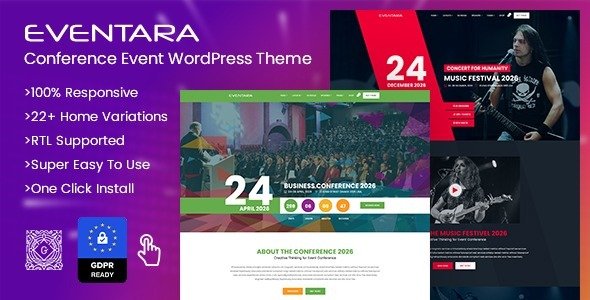
Stuck on your Eventara WordPress theme? Let's fix it.
No endless back-and-forth. Just send us the details and we'll get it done.
No obligation · Replies within 1 hour · Quote within 1 day
Setup · Customization · Bug fixes · WooCommerce integration
About Eventara WP Theme
Eventara is a WordPress theme built by codexcoder, designed specifically for event organizers, conference planners, and ticketing businesses. It ships with a clean layout focused on schedules, speakers, venues, and ticket sales — everything an event site needs without requiring a page builder.
The theme integrates well with The Events Calendar plugin and supports WooCommerce for ticket handling. Typography is modern, mobile performance is solid, and the demo content covers single events, multi-day conferences, and festival-style homepages. If you run recurring events or manage multiple venues, Eventara gives you a structured starting point without building from scratch. It suits organizers who want a professional-looking site quickly, though anything beyond the default setup will require some development work.
Get matched with a Eventara developer in under one day
Tell us about your Eventara project. Small fixes, Eventara theme customization, or a full website build, whatever you need, we've got it covered.
We'll connect you to the right Eventara developers, define the scope, and get everything 100% clear.
You'll get one estimate, hire your preferred developer, and start collaborating.
Most Eventara issues come down to plugin conflicts, layout breaks after updates, or customizations that need template overrides. These are solvable problems, but they take time if you’re not familiar with the theme structure.
Through Codeable, you get matched with vetted WordPress developers who have worked with event-focused themes and know exactly where Eventara’s defaults end and custom work begins. No guesswork, no generic fixes.
Pros
- Purpose-built for event sites with schedule, speaker, and venue templates included
- Native integration with The Events Calendar plugin out of the box
- WooCommerce support for direct ticket sales without third-party platforms
- Mobile-responsive layouts that hold up well on conference and festival pages
- Demo content covers multiple event types including single-day, multi-day, and festival formats
Cons
- Customizing multi-track schedule layouts requires template file edits
- Theme updates occasionally break custom CSS added through the Customizer
- Speaker archive pages lack sorting and filtering options by default
- Limited documentation for advanced configurations and plugin combinations
- No built-in recurring event logic — relies entirely on plugin support for that
Who is Eventara for?
Conference and Summit Organizers
Eventara handles multi-session conference layouts well. You can display speaker bios, session schedules by track, and venue maps without heavy customization. The theme’s agenda templates suit annual summits or industry conferences that need a credible, structured web presence for attendees and sponsors alike.
Music Festivals and Live Events
Festival homepages with lineup sections, stage schedules, and ticket CTAs fit the Eventara layout naturally. The theme’s bold header areas and media-friendly sections work for music, arts, and cultural festivals. WooCommerce handles early bird and tiered ticket pricing without needing a separate booking platform.
Corporate Training and Workshop Providers
Training providers running paid workshops or certification programs can use Eventara’s event structure to list course dates, instructors, and registration links. Combine it with WooCommerce for payment processing and The Events Calendar for date management across multiple locations or online sessions.
Community and Non-Profit Events
Non-profits running fundraisers, volunteer days, or public events benefit from Eventara’s clean layout and low overhead. The theme doesn’t require expensive plugins to get a working event page live. Free or low-cost extensions handle ticket registration and email confirmations at a reasonable cost for budget-conscious organizations.
Online Webinar and Virtual Event Hosts
Virtual events and webinars fit Eventara’s single-event templates well. You can embed video links, display speaker cards, and add countdown timers for launch timing. With the right plugin combination, registration forms and automated reminder emails integrate cleanly without custom development work.

Customizing Eventara
Out of the box, Eventara covers the basics: color schemes, fonts, homepage layout, and event archive styling. The WordPress Customizer handles most visual changes, and the theme options panel lets you configure headers, footers, and widget areas without touching code.
Beyond that, things get more specific. Custom speaker profile layouts, advanced ticket pricing tables, countdown timers tied to event dates, or multi-track schedule grids all require hands-on work. An Eventara expert can wire these up properly — adjusting template files, adding custom post types, or integrating third-party booking tools. If you need the theme to behave differently from its defaults, working with someone who knows the codebase directly saves a lot of back-and-forth.
Recommended plugins for Eventara
Eventara pairs well with The Events Calendar, Event Tickets Plus, and WooCommerce for end-to-end ticketing. For performance, image optimization and caching plugins make a real difference on event pages with heavy media. Check our WordPress performance services if load times are a concern.
For visibility, structured data markup for events is critical for Google search results. Our WordPress SEO service covers schema implementation and on-page optimization specific to event sites. Adding a multilingual plugin like WPML also works with Eventara for international events.
Not sure which plugins to use? This WordPress plugins directory covers the most popular options with reviews and setup guides.
Eventara common issues
Eventara event page layout broken after theme update
Layout breaks after an Eventara update usually happen when custom CSS or child theme overrides conflict with changed template files. Check your child theme’s template files against the updated parent versions. If you’ve added styles through the Customizer’s custom CSS field, audit those first. Our WordPress bug fixing service can pinpoint the conflict and restore the layout without losing your customizations.
Eventara not showing events from The Events Calendar plugin
If The Events Calendar events aren’t appearing on your Eventara site, start by checking whether the plugin’s template files are being overridden by the theme. Eventara includes its own event templates that may conflict with plugin defaults. Deactivating other plugins temporarily helps isolate the cause. A developer can identify whether the issue is a template conflict, a query filter, or a plugin version mismatch.
Eventara ticket section not displaying correctly on mobile
Ticket section display problems on mobile often come from table-based layouts that don’t reflow correctly on small screens. Eventara’s ticket area uses fixed-width containers in some versions. Adding responsive CSS overrides in a child theme usually fixes this. If the layout is completely broken, check for conflicting CSS from WooCommerce or a ticket plugin update. Our bug fixing team handles these regularly.
Eventara countdown timer not working on event single page
A non-functional countdown timer on the event single page is usually a JavaScript conflict with another plugin, or the timer script failing to read the event date meta field correctly. Open your browser console and check for JS errors first. If the event date is set correctly in the backend but the timer shows zero, the script likely isn’t pulling the date format it expects. A developer can fix the data binding in a few hours.
Eventara FAQ
Yes. Eventara is built to work with The Events Calendar by Modern Tribe. The theme includes template support for event listings, single event pages, and archive views that align with the plugin’s output. Some advanced plugin features like filtered views or map-based browsing may need additional styling to fit the theme properly.
Yes, through WooCommerce. Eventara supports WooCommerce for ticket sales, which means you can set up tiered pricing, early bird tickets, and checkout flows directly on your site. Event Tickets Plus from Modern Tribe also integrates and adds attendee management features that work alongside the theme’s event templates.
Eventara is not a dedicated page builder theme. It works with Elementor in basic configurations, but the theme’s event-specific templates are not Elementor blocks. Heavy customization with a page builder may override event templates and cause display issues. WPBakery support is limited. For structural changes, working with the theme’s native templates is more reliable.
Speaker layouts in Eventara use a custom post type. To create a custom layout, you’d add a new template file in your child theme targeting that post type. From there you control the bio, photo, and session link display. It’s a straightforward job for a developer but not something the theme options panel handles on its own.
Yes, migrating to Eventara is possible whether you’re coming from another WordPress theme or a different platform. Content migration, event data mapping, and theme setup can all be handled as part of the same project. Our WordPress migration service covers the full process so your event data and URL structure stay intact.
Hire an Eventara Expert Developer
Whether you need help setting up Eventara from scratch, fixing a layout issue, or building custom event functionality, we can match you with the right developer fast. Work is handled through Codeable — vetted developers, transparent pricing, and no obligation to hire after your estimate.
Get a free estimate and describe what you need. You’ll hear back within 24 hours.
You'll need a free Codeable account so developers can ask questions and send their quotes.