Exponent WordPress Theme
by brandexponents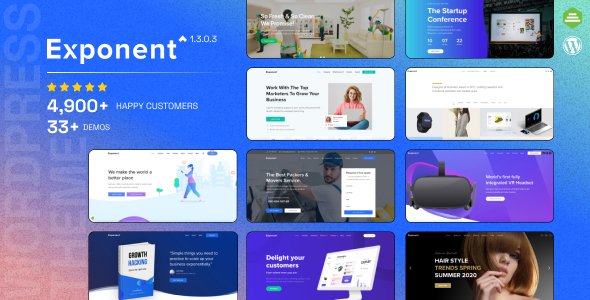
Stuck on your Exponent WordPress theme? Let's fix it.
No endless back-and-forth. Just send us the details and we'll get it done.
No obligation · Replies within 1 hour · Quote within 1 day
Setup · Customization · Bug fixes · WooCommerce integration
About Exponent WP Theme
Exponent is a multipurpose WordPress theme built by BrandExponents. It ships with a drag-and-drop page builder, a library of pre-built section templates, and a header/footer builder that gives you direct control over layout without touching code. The theme targets agencies, freelancers, and small businesses that want a polished site without hiring a designer for every tweak.
Performance is a consistent concern with themes this feature-heavy, but Exponent keeps its asset loading relatively lean compared to similar multipurpose options. It supports WooCommerce, integrates cleanly with popular plugins, and the options panel stays organised enough that new users can orient themselves quickly. For teams that want a flexible foundation and the ability to build custom layouts across multiple site types, Exponent covers the basics well and leaves room to extend.
Get matched with a Exponent developer in under one day
Tell us about your Exponent project. Small fixes, Exponent theme customization, or a full website build, whatever you need, we've got it covered.
We'll connect you to the right Exponent developers, define the scope, and get everything 100% clear.
You'll get one estimate, hire your preferred developer, and start collaborating.
Finding a developer who knows Exponent specifically saves time. Generic WordPress freelancers often spend the first few hours just learning the theme’s builder logic and options structure. On Codeable, vetted WordPress specialists with multipurpose theme experience get matched to your project within 24 hours. You get a free estimate before committing to anything. No hourly guesswork, no offshore bidding wars. If you need an Exponent specialist for a build, a fix, or a performance overhaul, posting a project is the quickest way to get someone qualified looking at it.
Pros
- Built-in header and footer builder with drag-and-drop control, no extra plugin required
- Large library of pre-built section templates that speed up initial page construction
- WooCommerce compatible out of the box with dedicated shop layout options
- Live Customizer previews changes in real time without publishing first
- Theme options panel is organised into logical sections, reducing the learning curve for new users
Cons
- Complex layouts built in the bundled page builder can create portability issues if you switch themes later
- Update frequency from BrandExponents has been inconsistent, leading to occasional compatibility gaps with newer WordPress versions
- Heavy use of shortcodes in older versions makes content harder to manage outside the builder
- Limited documentation for advanced customisation scenarios involving custom post types or conditional templates
- Some bundled demo content imports incompletely, requiring manual cleanup before a site is usable
Who is Exponent for?
Digital Agency
Exponent suits agencies that manage multiple client sites and need a flexible theme they can restyle quickly per project. The header builder and section templates let a developer produce distinct-looking sites from the same theme base. An Exponent expert can create a reusable child theme setup that cuts build time significantly across similar client briefs.
Freelance Portfolio
Freelancers in design, photography, or development use Exponent to build portfolio sites with minimal setup time. The grid-based layout options display project work cleanly, and the Customizer handles branding changes in one session. Bringing in an Exponent specialist for the initial build ensures the portfolio structure holds up when you add new work later.
Small Business Services
Service businesses like consultancies, local tradespeople, and health practices benefit from Exponent’s pre-built page structures for services, team members, and contact pages. The theme’s flexibility means a small business owner can manage most content updates themselves. An Exponent developer can add booking plugin integration or custom service page templates when the defaults are not enough.
WooCommerce Store
Exponent’s WooCommerce support covers product pages, cart, and checkout without requiring a separate shop theme. Colour scheme and layout controls apply to the store alongside the rest of the site. For custom product filtering, subscription billing, or complex checkout flows, working with an Exponent developer avoids compatibility issues with the theme’s builder.
Corporate Landing Pages
Companies running ad campaigns often need fast-loading, focused landing pages separate from their main site. Exponent’s section-based builder makes these quick to assemble. An Exponent specialist can strip back the template to a single-column layout, remove header navigation, and ensure the page loads in under two seconds, which directly affects paid campaign performance.

Customizing Exponent
Exponent gives you a front-end page builder, a Live Customizer, and a dedicated theme options panel. Most layout changes, typography choices, colour schemes, and header configurations are handled without writing a line of code. Section templates speed up the process if you are building a new page from scratch.
Where things get complicated is when you need custom post types, conditional layouts for specific pages, or anything outside the builder’s native blocks. That is when working with an Exponent expert pays off. A specialist can extend the theme using child theme techniques, add custom CSS without breaking updates, and wire up third-party integrations cleanly. If you want the site to behave in a way the builder does not natively support, bringing in an Exponent developer is the faster and safer route compared to trial and error in the options panel.
Recommended plugins for Exponent
Exponent works alongside most major WordPress plugins without conflicts. WooCommerce stores, membership plugins, and form builders all integrate at a basic level out of the box. For more demanding setups, pairing Exponent with a dedicated caching plugin and image optimisation tool makes a measurable difference to load times. See our WordPress performance service if speed is a priority for your project.
On the SEO side, Exponent’s markup is clean enough to work with Yoast or Rank Math without duplication issues. Schema, breadcrumbs, and meta control are handled through the SEO plugin rather than the theme. If you need a full technical SEO audit alongside your build, our WordPress SEO optimisation service covers that in detail.
Not sure which plugins to use? This WordPress plugins directory covers the most popular options with reviews and setup guides.
Exponent common issues
Exponent theme page builder not loading in WordPress editor
This usually comes down to a JavaScript conflict with another active plugin. Deactivate all plugins except Exponent’s required ones, then reload the editor. If the builder loads, reactivate plugins one at a time to identify the conflict. Also check that your WordPress version meets the theme’s minimum requirement. If the issue persists after isolating the conflict, a developer can trace the specific script collision. See our WordPress bug fixing service for faster resolution.
Exponent header not displaying correctly on mobile
Exponent’s mobile header behaviour is controlled through the header builder settings, which include a separate mobile menu panel. Check that the mobile breakpoint is set correctly under the theme’s header options and that your logo dimensions are not forcing overflow. If the header is a custom layout using the builder, some responsive rules need to be added manually via CSS. An Exponent developer can audit the header markup and add targeted media queries to fix alignment and stacking issues across screen sizes.
Exponent theme slowing down WordPress site
Multipurpose themes like Exponent load a broad set of scripts and styles regardless of what a specific page needs. Start by enabling a caching plugin, compressing images, and checking whether unused page builder assets are being enqueued on every page load. Disabling unused features in the theme options panel also helps. For a deeper fix, an Exponent specialist can conditionally load scripts only where needed and defer non-critical resources. Visit our WordPress bug fixing service if you need hands-on performance diagnosis.
Exponent demo content import failed or incomplete
Incomplete demo imports are most often caused by server-side limits, specifically PHP memory limit, max execution time, or upload size. Check your wp-config or php.ini settings and increase these values before retrying. The XML content file and the widget import file should be imported separately in the correct order. If required plugins were not active during import, some content will be missing. Re-running the import with all required plugins active usually resolves gaps in the page structure.
Exponent theme not compatible with latest WordPress update
Theme compatibility issues after a WordPress core update usually appear as visual breaks or builder errors. Check the BrandExponents changelog to see if a patch has been released for the current WordPress version. If the theme has not been updated, adding a child theme and targeted CSS fixes can stabilise the site while waiting for an official patch. Keeping a staging environment for update testing prevents these issues from reaching a live site. An Exponent developer can review update compatibility before you push changes live.
Exponent sticky header overlapping page content
A sticky header overlapping content is almost always a z-index or top-margin issue. The page content below the header needs a top padding or margin that matches the header’s fixed height. Exponent’s theme options may include a header offset setting, which should be your first stop. If the header height is dynamic, hardcoded values will not work reliably. A better fix involves using JavaScript to calculate the header height on load and inject the correct offset. An Exponent specialist can implement this cleanly across all page templates.
Exponent WooCommerce pages not matching theme style
Exponent applies its own WooCommerce templates, but style inheritance is not always consistent across cart, checkout, and account pages. First confirm that Exponent’s WooCommerce support is active, usually declared in the theme’s functions.php. Then compare which WooCommerce template files Exponent overrides against the current WooCommerce version. Outdated overrides cause styling to break after WooCommerce updates. A developer can update the overridden templates in a child theme to match the current WooCommerce markup without affecting the rest of the site.
Exponent custom CSS not applying after theme update
If you added custom CSS directly to the theme’s files rather than through the Additional CSS panel or a child theme, a theme update will overwrite those changes. Always use the WordPress Customizer’s Additional CSS section or a child theme’s style.css for custom rules. If the CSS was lost in an update, check your browser cache before assuming it is gone entirely. Going forward, a child theme prevents this from happening again. Our WordPress bug fixing service can recover lost customisations and set up a child theme properly.
Exponent theme white screen of death after update
A white screen after an Exponent update points to a PHP fatal error, usually a conflict with a plugin or a syntax issue in a customised template file. Enable WP_DEBUG in wp-config.php to see the actual error message. If the issue is in the theme’s own files, restoring the previous version via FTP and waiting for a bug-fix release is the safest route. If the error is in a customised child theme file, isolating the changed function and correcting it will restore the site without rolling back the update entirely.
Exponent footer widgets not showing on all pages
Footer widget visibility in Exponent is controlled by a combination of the footer builder settings and individual page templates. Check whether specific pages have a custom page template assigned that omits the footer widget area. Also verify that widgets are assigned to the correct footer widget region in Appearance > Widgets. If the footer builder is set to a layout with no widget columns on certain pages, widgets will not show. Switching to a consistent footer template across the site and reassigning widgets usually resolves this.
Exponent FAQ
Exponent is manageable for beginners once you get past the initial setup. The Live Customizer and pre-built templates reduce the amount of configuration needed. The steeper parts are the header builder and understanding how the page builder interacts with theme templates. If you run into issues early on, an Exponent specialist can do the initial setup and hand you a site that is straightforward to maintain.
Exponent has its own bundled page builder, so running Elementor alongside it creates redundancy and can cause conflicts. Most users choose one or the other. If your workflow is built around Elementor, a lighter or Elementor-native theme is a better fit. An Exponent developer can advise on whether the bundled builder meets your needs before you commit to a specific setup.
Always use a child theme for any code-level changes. Customizations made in the Customizer’s Additional CSS panel or through the theme options panel are stored in the database and survive updates. Before updating, take a full backup, check the BrandExponents changelog, and test on staging first. An Exponent expert can set up a proper child theme structure so future updates are safe.
Yes, Exponent declares WooCommerce support and includes styled templates for core shop pages. Basic store functionality works without extra configuration. More advanced WooCommerce features like subscriptions, variable product filtering, or custom checkout flows may need additional plugins and some developer adjustments. An Exponent developer can extend the WooCommerce integration beyond the defaults.
Create a new folder in wp-content/themes with a name like exponent-child. Add a style.css file with the correct Template header pointing to exponent, and a functions.php that enqueues the parent theme’s stylesheet. Activate the child theme from Appearance > Themes. All custom CSS and template overrides go into the child theme from that point forward.
Exponent includes basic RTL stylesheet support, which handles text direction for Arabic, Hebrew, and similar languages. The level of RTL support varies across the page builder sections. For a fully polished RTL site, some manual CSS adjustments are typically needed. An Exponent specialist familiar with RTL builds can handle edge cases in the builder layout that the default RTL stylesheet does not catch.
Install and activate all plugins listed as requirements by the theme before importing. Go to Appearance > Import Demo Data, select the demo closest to your target layout, and run the import. If the import stalls, increase PHP memory and execution time limits on your server. Widget data is often a separate import step. Importing on a clean WordPress install produces the most reliable result.
Exponent does not include built-in membership functionality, but it is compatible with plugins like MemberPress, Restrict Content Pro, and Paid Memberships Pro. The theme’s page builder can style membership-related pages. An Exponent developer can integrate the membership plugin cleanly into the existing theme layout and ensure restricted content pages match the rest of the site.
Codeable connects you with vetted WordPress developers who have experience with multipurpose themes like Exponent. Post a project, describe the customization work, and receive a free estimate within 24 hours. You only hire if the estimate works for you. Visit our WordPress development services page for more detail on what is covered.
This usually means the header builder output is not saved correctly, or the page is assigned a template that overrides the global header setting. Check the individual page’s meta options for a header override and set it back to default. Also confirm that the header layout in the builder was published, not just previewed. Clearing your cache after saving the header layout often resolves display discrepancies.
Hire an Exponent Developer
Whether you need an Exponent expert to build a site from scratch, fix a layout issue, or extend the theme with custom functionality, the right developer is available through Codeable. Projects are matched to vetted WordPress specialists within 24 hours. There is no obligation to hire after receiving your estimate. Get a free estimate and describe what you need. A qualified Exponent developer will review it and come back with a clear scope and price.
You'll need a free Codeable account so developers can ask questions and send their quotes.