Faded WordPress Theme
by DroitThemes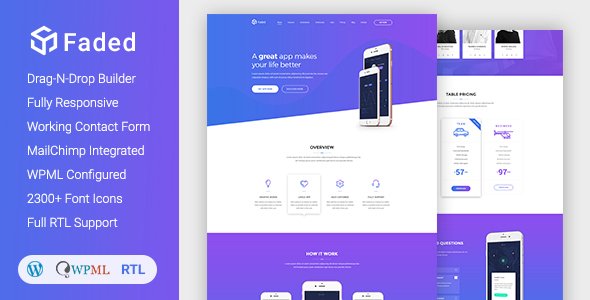
Stuck on your Faded WordPress theme? Let's fix it.
No endless back-and-forth. Just send us the details and we'll get it done.
No obligation · Replies within 1 hour · Quote within 1 day
Setup · Customization · Bug fixes · WooCommerce integration
About Faded WP Theme
Faded is a WordPress theme built by DroitThemes, designed primarily for photographers, creatives, and portfolio-driven websites. It leans heavily on visual presentation, offering a clean, minimal layout that lets images take center stage. The theme is built with Elementor compatibility in mind, making it accessible for users who prefer a drag-and-drop workflow without touching code.
Faded ships with demo content, pre-built page templates, and basic customization options through the WordPress Customizer. It suits anyone who needs a fast, attractive portfolio or agency site without building from scratch. That said, getting the most out of Faded often means going beyond the default settings, adjusting typography, layout spacing, and integrating third-party tools to match a specific brand or business requirement.
Get matched with a Faded developer in under one day
Tell us about your Faded project. Small fixes, Faded theme customization, or a full website build, whatever you need, we've got it covered.
We'll connect you to the right Faded developers, define the scope, and get everything 100% clear.
You'll get one estimate, hire your preferred developer, and start collaborating.
Most Faded issues are not theme bugs. They come from mismatched plugins, incorrect template overrides, or customizations applied without a child theme. Fixing them without understanding DroitThemes’ structure can create more problems. Through Codeable, you get matched with vetted WordPress developers who have worked with themes like Faded before. No generalist freelancers, no guesswork. Post your project, get an estimate within 24 hours, and only hire if it makes sense for you.
Pros
- Clean, minimal design that works well for photography and creative portfolios without heavy customization
- Full Elementor compatibility makes page building accessible without writing code
- Demo content imports are straightforward and give a realistic starting point
- Lightweight default build with fewer bloated scripts than many multipurpose themes
- DroitThemes provides regular updates and maintains compatibility with current WordPress versions
Cons
- Customization options in the Customizer are limited compared to more established theme frameworks
- WooCommerce styling is not polished out of the box and requires additional CSS work
- Documentation is sparse in places, making advanced modifications harder to self-manage
- No child theme is included by default, which creates risk when applying custom code directly
- Support response times from DroitThemes can be slow during high-volume periods
Who is Faded for?
Photography Portfolio
Faded is built for image-first layouts, making it a natural fit for photographers. The full-width gallery options and minimal UI keep the focus on the work itself. With some performance tuning and a proper image delivery setup, a photography portfolio on Faded can load fast and look sharp across all devices.
Creative Agency
Small creative agencies use Faded to present case studies, team profiles, and service pages without a heavy theme framework getting in the way. Elementor handles the layout flexibility, while Faded’s visual style keeps things looking intentional. A developer can extend this with custom post types for projects and clients.
Freelance Designer
Freelance designers need a portfolio that sells their work, not the theme. Faded stays out of the way visually while giving enough structure to build a credible, professional presence. Adding a contact form, testimonials section, and a simple blog rounds out what clients expect to see before reaching out.
Art Gallery or Exhibition
Art galleries and exhibition spaces need a site that presents visual work with care. Faded’s whitespace-heavy layouts suit this well. Custom gallery templates, lightbox functionality, and event or exhibition archive pages can be built on top of the theme to give visitors a clean browsing experience.
Personal Branding Site
A personal branding site built on Faded can cover a bio, selected work, speaking or press appearances, and a contact page without feeling overbuilt. The theme’s restraint is an asset here. Keep the design tight, the copy focused, and use Faded’s visual clarity to make a strong first impression.

Customizing Faded
Out of the box, Faded gives you a solid starting point. The Customizer handles basic options like colors, fonts, header layout, and logo placement. Elementor expands that further, letting you rework page sections visually. But there are limits. Custom post type layouts, WooCommerce styling, and anything outside the pre-built templates typically needs manual CSS or PHP work.
That is where a Faded expert makes a real difference. Rather than working around the theme’s constraints, an experienced developer can extend it properly, adding custom functionality, adjusting template files, and keeping everything maintainable for the long term. If your site needs to do more than the defaults allow, working with someone who knows Faded and DroitThemes’ codebase saves significant time and avoids common mistakes.
Recommended plugins for Faded
Faded pairs well with several tools that extend its core functionality. Elementor Pro unlocks advanced widgets and dynamic content. WooCommerce integration is possible with some styling work. For site speed, caching plugins and image optimization tools matter a lot given Faded’s image-heavy layouts. Check out our WordPress performance services if load times are a concern.
For search visibility, Faded needs proper schema setup and meta configuration. Yoast or Rank Math handle the basics, but a proper setup goes further. See our WordPress SEO services for more detail on getting Faded-based sites ranking well.
Not sure which plugins to use? This WordPress plugins directory covers the most popular options with reviews and setup guides.
Faded common issues
Faded theme header not displaying correctly after update
Header display issues after a Faded update are usually caused by a conflict between the updated theme files and cached styles. Clear your caching plugin and server-side cache first. If the problem persists, check whether you applied custom CSS directly to the parent theme rather than a child theme. Updates overwrite those changes. A developer can audit the header template and apply fixes correctly without breaking future updates. See our WordPress bug fixing service for faster resolution.
Faded WordPress theme slow loading on mobile
Faded sites with large, uncompressed images slow down significantly on mobile. Start with an image optimization plugin like ShortPixel and enable lazy loading. Check whether Elementor is loading unused scripts on pages where it is not active. A performance audit will often reveal render-blocking resources tied to DroitThemes’ bundled scripts. Disabling unused Elementor widgets and configuring a CDN makes a measurable difference. Visit our WordPress performance page for a full breakdown of what to fix.
Elementor layout broken after switching to Faded theme
When switching to Faded from another theme, Elementor layouts can break because the previous theme registered custom CSS or global styles that no longer load. Regenerate Elementor’s CSS files from the Elementor settings panel under Tools. If global fonts or colors are wrong, reset the global style settings and re-apply them inside Elementor’s site settings. Persistent layout breaks usually point to a missing Elementor Pro feature the old theme was providing, which needs rebuilding inside Faded’s structure.
Faded theme custom CSS not applying on front end
Custom CSS added through the WordPress Customizer under Additional CSS should apply site-wide on Faded. If it is not taking effect, browser caching is usually the first thing to rule out. Force-refresh with Ctrl+Shift+R or clear the cache. If you are using a caching plugin, purge it. If styles still do not show, check specificity. Faded’s own stylesheets may be overriding your rules. Increase selector specificity or use a child theme stylesheet instead of the Customizer for more reliable results.
Faded FAQ
Faded is available in both a free version on WordPress.org and a premium version from DroitThemes directly. The free version covers core layout and design features. The premium version adds more templates, extended Customizer options, and priority support. For most portfolio or creative sites, the free version is a workable starting point, though the premium adds useful flexibility.
Yes. Faded is built with Elementor compatibility as a core feature. You can use the free version of Elementor for basic drag-and-drop editing. Elementor Pro adds dynamic content, advanced widgets, and theme builder functionality. Most of Faded’s pre-built templates are designed to be edited within Elementor, so it is the recommended page builder for this theme.
Faded can work with WooCommerce, but it is not a dedicated WooCommerce theme. Default product pages and cart styling will need CSS adjustments to match the rest of the site. For a simple shop with a small product catalog, it is manageable. For a full ecommerce build with complex product filtering or custom checkout flows, a more commerce-focused theme would be a better foundation.
Always use a child theme before making any customizations to Faded. Changes made directly to the parent theme files are overwritten on update. If you are using only the Customizer and Elementor for changes, updates are generally safe. Custom PHP or CSS added to parent theme files will be lost. Set up a child theme first, and keep a backup before running any theme update.
Migrating an existing site to Faded is possible, but the process depends on your current setup. Content migrates cleanly. Design and layout will need to be rebuilt inside Faded’s structure. If you are coming from a different page builder, expect to redo most page layouts. Our WordPress migration service can handle the technical side and minimize disruption to your existing content.
Hire a Faded WordPress Expert
Whether you need a Faded developer to build out a custom layout, fix a visual bug, or extend the theme with new functionality, the process is straightforward. Post your project through FoxyConcept and get matched with a Codeable-vetted WordPress specialist who knows what they are doing. No upfront payment, no obligation. Get a free estimate and see exactly what your project will cost before you commit.
You'll need a free Codeable account so developers can ask questions and send their quotes.