Fast Food WordPress Theme WordPress Theme
by BoldThemes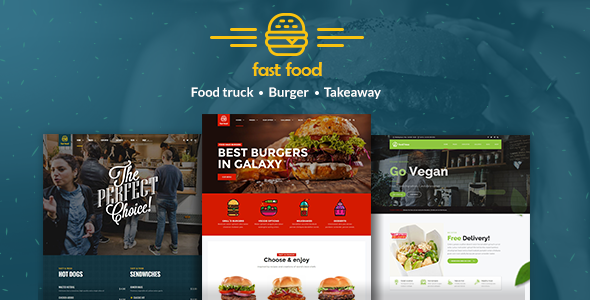
Stuck on your Fast Food WordPress Theme WordPress theme? Let's fix it.
No endless back-and-forth. Just send us the details and we'll get it done.
No obligation · Replies within 1 hour · Quote within 1 day
Setup · Customization · Bug fixes · WooCommerce integration
About Fast Food WordPress Theme WP Theme
Fast Food WordPress Theme by BoldThemes is built specifically for quick-service restaurants, burger joints, pizza places, and takeaway businesses. It ships with a clean layout, bold typography, and food-focused sections like menus, specials, and delivery call-to-actions.
The theme runs on BoldThemes’ proprietary Bold Page Builder, giving you drag-and-drop control without needing a third-party plugin. It includes WooCommerce compatibility for online ordering, pre-built demo content for fast setup, and responsive design that works across all screen sizes.
It is a solid starting point for any fast food or casual dining brand that wants to get online quickly without building from scratch. The demo import takes minutes, and the included shortcodes cover most standard restaurant page needs out of the box.
Get matched with a Fast Food WordPress Theme developer in under one day
Tell us about your Fast Food WordPress Theme project. Small fixes, Fast Food WordPress Theme theme customization, or a full website build, whatever you need, we've got it covered.
We'll connect you to the right Fast Food WordPress Theme developers, define the scope, and get everything 100% clear.
You'll get one estimate, hire your preferred developer, and start collaborating.
BoldThemes builds solid starter themes, but production-ready restaurant sites usually need custom work. A developer who knows Fast Food WordPress Theme will save you hours of guesswork with the Bold Page Builder, child theme setup, and WooCommerce configuration.
Through Codeable, you get matched with vetted WordPress specialists who have done this before. No generalist freelancers, no wasted back-and-forth. Just a developer who understands the theme structure and can deliver clean, maintainable work on time.
Pros
- Pre-built demo content specifically designed for fast food and takeaway businesses reduces setup time significantly
- Includes Bold Page Builder so you can edit layouts without writing code or buying a premium page builder separately
- WooCommerce ready, allowing you to add an online ordering or delivery menu without heavy custom development
- Strong mobile layout out of the box, which matters for the high volume of smartphone users ordering food online
- Food-specific sections like featured items, specials banners, and delivery CTAs are included in the base theme
Cons
- Bold Page Builder is proprietary, so switching to another theme later means rebuilding most of your page content
- Default styling is quite specific to the demo aesthetic and requires real CSS work to match a unique brand identity
- Documentation is limited, making it harder for non-developers to troubleshoot layout or plugin conflicts independently
- No built-in table reservation or real-time delivery tracking, meaning third-party plugins are needed for those features
- Theme updates from BoldThemes are infrequent, which can create compatibility issues with newer versions of WordPress and WooCommerce
Who is Fast Food WordPress Theme for?
Burger Restaurants
Burger joints get the most out of Fast Food WordPress Theme because the demo layout is designed around this format. Featured burgers, daily specials, and an online ordering section all slot in naturally. A developer can extend this with a custom burger builder using WooCommerce product variations, letting customers choose toppings and sides directly on the site.
Pizza Takeaways
Pizza takeaways need filterable menus by size and topping, plus a visible delivery radius. Fast Food WordPress Theme provides the visual foundation, and a WooCommerce setup handles the ordering side. Adding a postcode checker for delivery zones is a common extension that works well with this theme structure.
Fried Chicken Chains
Fried chicken brands can use the theme’s bold banner sections to push meal deals and combo offers. The menu shortcodes handle item listings cleanly. With some customization, you can add calorie information, allergen tables, and promotional countdown timers that work well for limited-time offers.
Food Trucks
Food trucks benefit from the theme’s simple, mobile-first layout. The key additions are a location tracker or weekly schedule section, and a simplified menu without complex categories. A developer can build a custom schedule block and connect a Google Maps embed to show today’s location clearly on the homepage.
Casual Dining Cafes
Casual dining cafes need a slightly softer take on the default fast food layout. The theme’s typography and color system can be adjusted to create a warmer feel without a full rebuild. Adding a table reservation plugin like OpenTable or a simple booking form rounds out the site for sit-down dining customers.

Customizing Fast Food WordPress Theme
Out of the box, Fast Food WordPress Theme covers the basics well. But most businesses need changes: custom color schemes to match branding, modified menu layouts, added delivery zone pages, or integration with third-party ordering systems like Uber Eats or Just Eat.
A Fast Food WordPress Theme expert can handle these changes without breaking the existing demo structure. That means editing child theme files properly, extending the Bold Page Builder with custom elements, and making the site perform well on mobile where most fast food traffic comes from.
Custom work might include building a filterable menu by category, adding allergen info tables, creating a loyalty sign-up section, or connecting a booking or pre-order plugin. Each of these tasks requires knowing how BoldThemes structures its templates and hooks.
Recommended plugins for Fast Food WordPress Theme
Fast Food WordPress Theme works well with several key plugins. WooCommerce handles online ordering and product menus. WPForms or Gravity Forms manages contact and catering enquiry forms. WPML adds multilingual support for multi-location brands.
For performance, caching plugins like WP Rocket pair well with image optimization tools to keep page load times fast, which matters for mobile users ordering on the go. See our WordPress performance service for more detail.
If you need better search visibility for local searches like “burger near me,” pairing the theme with a solid WordPress SEO setup makes a real difference for foot traffic and delivery orders.
Not sure which plugins to use? This WordPress plugins directory covers the most popular options with reviews and setup guides.
Fast Food WordPress Theme common issues
Fast Food WordPress Theme Bold Page Builder not loading in editor
This usually happens after a WordPress core update or when a plugin conflicts with the Bold Page Builder scripts. Start by deactivating all plugins except BoldThemes core plugins, then reload the editor. If it loads, reactivate plugins one at a time to find the conflict. Clearing your browser cache and checking for JavaScript errors in the browser console also helps narrow down the cause quickly. If the issue persists, a developer can audit your WordPress setup and fix the conflict properly.
Fast Food WordPress Theme WooCommerce menu layout broken
WooCommerce layout breaks in Fast Food WordPress Theme most often occur after a WooCommerce update changes template file structure. BoldThemes may not have updated its WooCommerce template overrides to match. Check which theme template files are outdated using WooCommerce’s system status page under Tools. Update or remove outdated template overrides in your child theme. If you are not using a child theme, this process is riskier. Get help from a WordPress bug fixing specialist before editing core files.
Fast Food WordPress Theme demo import failing or incomplete
Demo import failures are common with Fast Food WordPress Theme when server memory limits are too low or max execution time cuts the import short. Check your PHP settings and raise memory to at least 256MB and max execution time to 300 seconds. Some hosting control panels let you do this without developer access. If the import completes but images are missing, re-run the media import separately using the theme’s import tool. Persistent failures often need a developer to import demo data manually via WP-CLI.
Fast Food WordPress Theme slow on mobile after adding images
Large uncompressed food photography is the most common cause of slow mobile load times on Fast Food WordPress Theme sites. Use an image optimization plugin like ShortPixel or Imagify to compress existing uploads. Enable lazy loading for images below the fold. Check whether the theme is loading unused Bold Page Builder assets on pages that do not use the builder. A proper WordPress performance audit will identify the specific bottlenecks and fix them without affecting your visual layout.
Fast Food WordPress Theme FAQ
Fast Food WordPress Theme supports WooCommerce, which handles online ordering well. You can list food items as products with variations for size or extras. For more advanced features like real-time delivery tracking or kitchen display integration, you will need additional plugins. The theme provides the front-end layout, but the full ordering workflow depends on how WooCommerce is configured alongside it.
Basic setup using the demo content and Bold Page Builder is manageable without coding. You can change text, images, and colors through the customizer. However, anything beyond that, such as custom menu structures, layout changes, or plugin integrations, will require CSS or PHP knowledge. For business-critical sites, working with a developer from the start avoids problems that are harder to fix later.
Fast Food WordPress Theme is built around Bold Page Builder, not Elementor. You can technically install Elementor alongside it, but conflicts between the two builders are common and the theme templates are not designed for Elementor’s structure. If you prefer Elementor, you would be better served by a theme built specifically for that ecosystem rather than trying to force compatibility.
Fast Food WordPress Theme includes menu shortcodes and Bold Page Builder elements for displaying food items. You add items through a custom post type in the WordPress dashboard, then place them on pages using the provided shortcodes or builder blocks. For a WooCommerce-based ordering menu, items are set up as products instead. A developer can structure this to work as both a visual menu and an ordering system at once.
Yes, Fast Food WordPress Theme sites can be migrated to a new host like any standard WordPress installation. The process involves moving files, the database, and updating configuration settings. If your site uses Bold Page Builder with stored shortcode data, that carries over cleanly in the database export. For a safe, zero-downtime move, consider a professional WordPress migration service.
Hire a Fast Food WordPress Theme Expert
Need help setting up, customizing, or fixing Fast Food WordPress Theme? Whether it is a full build from the demo or targeted changes to specific sections, a specialist developer can get it done right the first time.
Get a free estimate through Codeable. No obligation, no upfront cost. Describe your project and get a clear quote from a vetted WordPress developer within 24 hours.
You'll need a free Codeable account so developers can ask questions and send their quotes.