Fionca WordPress Theme
by SmartDataSoft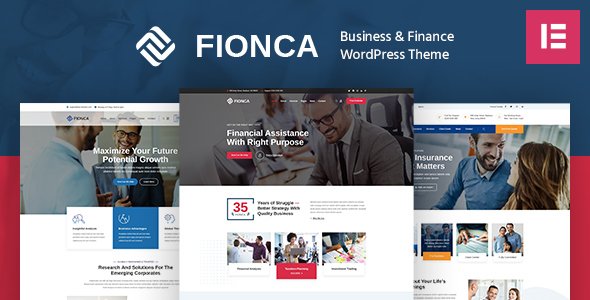
Stuck on your Fionca WordPress theme? Let's fix it.
No endless back-and-forth. Just send us the details and we'll get it done.
No obligation · Replies within 1 hour · Quote within 1 day
Setup · Customization · Bug fixes · WooCommerce integration
About Fionca WP Theme
Fionca is a multipurpose WordPress theme built by SmartDataSoft. It targets creative agencies, portfolios, and business websites that need a polished look without heavy custom development. The theme ships with multiple homepage layouts, WPBakery Page Builder support, and a collection of pre-built inner pages. Built on Bootstrap, it handles responsive behavior reasonably well across devices. SmartDataSoft has a track record of releasing regular theme updates, so Fionca has stayed compatible with newer versions of WordPress over time. The demo content import is relatively painless, which reduces setup time. That said, Fionca relies on bundled plugins and a page builder that add weight to the codebase. If you need a site that looks like the demo quickly, Fionca delivers. If you need something highly custom, expect to spend time in the code or work with a developer who knows the theme well.
Get matched with a Fionca developer in under one day
Tell us about your Fionca project. Small fixes, Fionca theme customization, or a full website build, whatever you need, we've got it covered.
We'll connect you to the right Fionca developers, define the scope, and get everything 100% clear.
You'll get one estimate, hire your preferred developer, and start collaborating.
SmartDataSoft themes follow consistent code patterns, but Fionca has enough moving parts, WPBakery, custom shortcodes, bundled plugins, that problems tend to stack up when you go off-script. Finding a developer who actually knows the theme saves hours of trial and error. Through Codeable, you get matched with vetted WordPress developers who have hands-on experience with themes like Fionca. No chasing freelancers on job boards. Post your project, get an estimate within 24 hours, and decide from there with zero obligation.
Pros
- Multiple homepage layouts included, reducing initial design decisions
- Demo content imports quickly with the one-click importer, giving a usable starting point fast
- SmartDataSoft updates the theme regularly, keeping it compatible with current WordPress versions
- WPBakery Page Builder bundled at no extra cost, which otherwise runs $64 standalone
- Bootstrap-based grid ensures consistent responsive behavior across screen sizes
Cons
- WPBakery shortcodes lock content to the theme, making future migrations messy
- Default page load includes several unoptimized scripts and stylesheets that hurt Core Web Vitals
- No native Gutenberg block support, so full-site editing workflows are not compatible
- Customizer options look extensive but many settings only apply to specific demo layouts
- Support response times from SmartDataSoft can be slow during high-volume periods
Who is Fionca for?
Creative Agency Website
Fionca suits agency sites that need to show off case studies, team pages, and services under one roof. The pre-built agency demo provides a working structure for this. Agencies running multiple service lines can use the inner page templates to build out content without starting from blank pages each time.
Freelance Portfolio
Freelancers who need a clean portfolio with project showcases and a contact section will find Fionca functional. The portfolio post type and filterable grid layouts are built in. Setup is fast if you stay close to the demo. Customizing the layout to match personal branding takes a bit more work.
Small Business Services Site
Local businesses offering a defined set of services benefit from Fionca’s service page templates, testimonials section, and Google Maps integration. The homepage layouts are structured around converting visitors, with call-to-action placement built into the design. Works well for consultants, contractors, and professional service providers.
Digital Marketing Agency
Digital marketing agencies can use Fionca to present their work, list service offerings, and publish case studies. The blog layout handles content marketing pages cleanly. Teams that produce a lot of written content should check that the typography settings meet readability standards before going live.
Startup Landing Page
Startups launching a product or service can use one of Fionca’s single-page demo layouts to get something live quickly. The theme supports sticky navigation, hero sections with video backgrounds, and pricing tables. For startups that expect to scale the site later, plan the content structure carefully from the start.

Customizing Fionca
Fionca exposes most visual settings through the WordPress Customizer, covering colors, fonts, header styles, and layout options. WPBakery Page Builder handles page structure, so editing sections means working inside its drag-and-drop interface rather than the block editor. That works fine for basic changes but gets complicated fast when you want something outside the demo layouts. Custom CSS can handle minor tweaks, but anything structural, like modifying header logic, adding custom post types, or integrating third-party tools, needs proper PHP and template work. A Fionca expert will know which child theme hooks to use, how to safely override template files, and how to avoid conflicts with the bundled plugins. Trying to figure that out without experience wastes time and can break live functionality. Getting a developer familiar with Fionca and SmartDataSoft’s code patterns is the cleaner path.
Recommended plugins for Fionca
Fionca works with a standard set of WordPress plugins without much friction. WooCommerce integration is possible for light e-commerce use. Contact Form 7 and WPForms both slot in without layout issues. For SEO, pairing Fionca with Yoast or Rank Math is straightforward, though you may want to review structured data output. If site speed is a concern, check out the WordPress performance service since Fionca loads several scripts by default that need trimming. For search visibility improvements beyond the basics, the WordPress SEO optimisation service covers technical and on-page work that Fionca alone will not handle.
Not sure which plugins to use? This WordPress plugins directory covers the most popular options with reviews and setup guides.
Fionca common issues
Fionca theme header not showing correctly after update
Header display issues after a Fionca update usually point to a CSS conflict between the updated theme files and customizations stored in the Customizer or a child theme. First, check if the issue appears with the parent theme active and no child theme. If it resolves, the conflict is in your child theme CSS. Clear any caching plugin and CDN cache before testing. If the header is broken in the parent theme itself, the update may have shifted class names. Review the changelog in your ThemeForest account and compare template files using a diff tool. For faster resolution, a WordPress bug fixing service can identify the conflict without risking further breakage.
WPBakery Page Builder not working with Fionca
WPBakery conflicts in Fionca typically happen when the bundled version of WPBakery is outdated compared to what a separately purchased license expects, or when a plugin triggers a JavaScript error that breaks the editor. Start by checking the browser console for JS errors. Deactivate plugins one at a time to isolate the conflict. Make sure you are using the bundled WPBakery version that ships with Fionca rather than running two copies. Updating both the theme and WPBakery together often resolves compatibility gaps. If the backend editor loads but frontend rendering breaks, a corrupted shortcode output is usually the cause.
Fionca demo import failed or missing content
Failed demo imports in Fionca most often result from server timeout limits, low PHP memory, or max upload size restrictions set too small. Check with your host that PHP memory is at least 256MB, max execution time is 300 seconds or more, and upload size allows files over 64MB. Run the import again after adjusting those settings. If specific content is missing after the import completes, the XML file may have been truncated. Re-download the demo files from your ThemeForest downloads page and retry. Some demo images also rely on external URLs that expire, so placeholder images replacing them is expected behavior.
Fionca theme slow loading speed
Fionca’s default install loads multiple CSS files, unminified scripts, and Google Fonts requests that add up quickly. Start by enabling CSS and JS minification and combining files through a caching plugin like WP Rocket or LiteSpeed Cache. Defer non-critical JavaScript and remove render-blocking resources. Google Fonts can be self-hosted to cut external DNS lookups. Disable WPBakery’s front-end editor scripts on pages that are not being edited. If speed is still below target after those steps, the WordPress performance service includes a full audit and technical implementation.
Fionca FAQ
SmartDataSoft has kept Fionca updated through recent WordPress releases. Check your ThemeForest account for the latest version and compare it against the WordPress compatibility notes. Running the most current version of Fionca on WordPress 6.x is generally stable, but always test updates on a staging site first before applying to production. Plugin conflicts, particularly with older WPBakery builds, are more likely to cause problems than the theme itself.
Fionca is built around WPBakery and its page structure assumes those shortcodes. You can technically install Elementor alongside it, but expect layout conflicts on pages that already use WPBakery elements. Running both builders on the same site creates bloat and unpredictable rendering. If you want to use Elementor exclusively, you would need to rebuild your pages and disable WPBakery entirely, which is practical on a new build but messy on an existing site.
Fionca includes basic WooCommerce compatibility. Standard product pages, cart, and checkout render without major layout breaks. The shop page uses the theme’s grid styling. For anything beyond a simple product catalog, like custom checkout flows, subscription products, or heavily branded product pages, additional development work is needed. Test WooCommerce templates on a staging site after any Fionca theme update.
Always use a child theme to store customizations. If your changes live in the parent theme files directly, a theme update will overwrite them. Before updating, back up the site and document any changes made outside the Customizer. After updating, compare your child theme files against the new parent theme templates to catch any structural changes that need mirroring. A WordPress maintenance plan can handle updates safely on your behalf.
Migrating away from Fionca is possible but involves real work. WPBakery shortcodes embedded in page content will not render correctly on a different theme. You would need to rebuild page content in the new theme’s editor or run a shortcode cleanup process first. Blog posts and custom post type data migrate cleanly, but designed pages do not. Plan a content audit before switching themes. A WordPress migration service can scope the work and reduce the risk of losing content.
Hire a Fionca Developer
Need changes made to your Fionca site, or starting a build from scratch? Working with a developer who knows the theme prevents the common mistakes that cost time and money to fix later. Post your project through FoxyConcept and get matched with a vetted Fionca expert via Codeable. Get a free estimate with no obligation to hire. The process takes minutes and you hear back within 24 hours.
You'll need a free Codeable account so developers can ask questions and send their quotes.