Fiorello WordPress Theme
by Mikado-Themes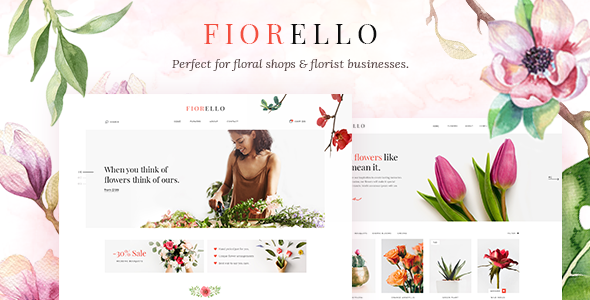
Stuck on your Fiorello WordPress theme? Let's fix it.
No endless back-and-forth. Just send us the details and we'll get it done.
No obligation · Replies within 1 hour · Quote within 1 day
Setup · Customization · Bug fixes · WooCommerce integration
About Fiorello WP Theme
Fiorello is a WordPress theme built by Mikado-Themes, designed specifically for beauty salons, spas, nail studios, and wellness businesses. It ships with a polished visual style, pre-built demo pages, and the Elementor page builder baked in. The theme includes appointment booking support, service listing layouts, staff profile sections, and a price list template out of the box.
Mikado-Themes has a strong track record on ThemeForest, and Fiorello reflects that experience. The demo content is realistic and ready to import, which cuts down setup time significantly. Built-in WooCommerce compatibility means you can sell products or gift vouchers alongside your services. If you run a beauty-focused business and want a site that looks professional without starting from scratch, Fiorello gives you a solid foundation to build on.
Get matched with a Fiorello developer in under one day
Tell us about your Fiorello project. Small fixes, Fiorello theme customization, or a full website build, whatever you need, we've got it covered.
We'll connect you to the right Fiorello developers, define the scope, and get everything 100% clear.
You'll get one estimate, hire your preferred developer, and start collaborating.
Fiorello has enough moving parts that small mistakes, wrong plugin combinations, a missed update, a broken demo import, compound quickly. Working with a vetted developer through Codeable means you get someone who has handled these exact scenarios before. No generalist freelancers, no guesswork. The developers matched to your project understand Mikado themes, Elementor, and WooCommerce as a combined stack, not in isolation. That matters when you need a result that actually holds up after launch.
Pros
- Pre-built demo pages designed specifically for beauty and wellness businesses save significant setup time
- Native Elementor support means layouts are editable visually without touching code
- WooCommerce compatibility allows product sales and gift voucher purchases alongside service bookings
- Mikado-Themes provides regular updates and dedicated support documentation for Fiorello
- Includes staff profiles, price list templates, and gallery layouts built for salon-style sites
Cons
- Theme panel has a large number of options that can overwhelm non-technical users during initial setup
- Demo import occasionally fails or produces blank sections depending on server configuration
- Page load times can be slower than average due to bundled scripts and Mikado's custom JS libraries
- Heavy reliance on Elementor means switching page builders later is practically a full rebuild
- Custom styling outside the theme panel often requires CSS overrides that can break on major theme updates
Who is Fiorello for?
Beauty Salons
Fiorello’s service listing pages, price tables, and staff profiles map directly to what a beauty salon needs. You can showcase treatments, introduce your team, and let clients book appointments without needing a bespoke theme. The WooCommerce integration also handles retail product sales or gift vouchers alongside bookings.
Nail Studios
For nail studios, the gallery layouts in Fiorello are particularly useful. Showcasing nail art visually is a big part of converting new clients. The grid and masonry gallery options display portfolio images well, and the booking integration means visitors can move from browsing to booking in one session.
Spas and Wellness Centres
Spas and wellness centres benefit from Fiorello’s clean, calming visual aesthetic and its ability to list multiple service categories. You can create separate pages for massage, skincare, and body treatments without them feeling disconnected, since the theme’s navigation and inner page templates keep the structure consistent.
Makeup Artists
Makeup artists need a portfolio-first site, and Fiorello delivers that. The full-width image sections and before-and-after layout options show work effectively. Contact and enquiry forms integrate cleanly, making it straightforward for potential clients to reach out after viewing the portfolio.
Hair Stylists and Barbershops
Hair stylists and barbershops can use Fiorello’s appointment-focused layouts to drive bookings directly from the homepage. The theme supports multiple staff members with individual profiles, which is useful if you run a multi-chair salon and clients book with a specific stylist.

Customizing Fiorello
Fiorello comes with a lot of options in its theme panel, but getting everything to match your exact brand still takes time and some technical confidence. Typography settings, colour palettes, header styles, and footer layouts all have controls, but the sheer number of options can feel disorienting at first.
If you want custom booking flows, unique section layouts, or behaviour that the default demos do not cover, you will likely hit limitations quickly. A Fiorello expert can handle those adjustments cleanly, whether that means modifying existing templates, creating new Elementor sections, or writing custom CSS that survives theme updates. Getting a developer involved early avoids the common trap of over-using the theme panel and ending up with a fragile setup that breaks when Mikado pushes an update.
Recommended plugins for Fiorello
Fiorello integrates with several popular plugins. For booking, it works alongside Amelia and WooCommerce Bookings. Contact Form 7 and WPForms handle enquiry forms. The theme supports WPML for multilingual sites and Yoast SEO for on-page optimisation.
If site speed is a concern, pairing Fiorello with a caching layer and image optimisation plugin helps, since Mikado themes tend to load multiple scripts by default. For a deeper look at speed improvements, see our WordPress performance service. If you want to improve organic visibility alongside the design work, our WordPress SEO service covers technical and on-page SEO for Fiorello-based sites.
Not sure which plugins to use? This WordPress plugins directory covers the most popular options with reviews and setup guides.
Fiorello common issues
Fiorello demo import not working or showing blank pages
A failed demo import in Fiorello is usually caused by PHP memory limits set too low, a max execution time that cuts off mid-import, or a conflict with a caching plugin active during the process. Start by setting memory_limit to at least 256MB and max_execution_time to 300 in your php.ini. Disable caching plugins entirely before importing. If blank pages persist, the XML import may have partially completed. Delete all imported content and retry on a clean install. If the problem continues, our WordPress bug fixing service can resolve it quickly.
Fiorello slider not displaying correctly on mobile
Mobile display issues with Fiorello’s slider are often tied to the slider height being set in fixed pixels rather than viewport-relative units. Open the slider settings in Elementor and switch height values to vh units, or enable the responsive height option if your version of the theme supports it. Also check whether a custom CSS rule targeting the slider container is overriding responsive breakpoints. Clear any caching after changes. If the slider uses Mikado’s bundled Revolution Slider, check that the plugin is fully updated since older versions have known mobile rendering bugs.
Fiorello booking form not sending emails
When the booking form in Fiorello stops sending emails, the most common cause is the server’s default PHP mail function being blocked by the hosting provider. Install an SMTP plugin such as WP Mail SMTP and connect it to a transactional email service like Mailgun, SendGrid, or even a Gmail account. Also check that the form’s recipient email address is correctly set and not going to spam. If you are using Amelia for bookings, verify that Amelia’s own email settings are configured separately from the contact form. Our bug fixing service handles this type of issue regularly.
Fiorello theme update broke my layout
Layout breaks after a Fiorello update are usually caused by CSS overrides in a child theme conflicting with changed class names, or custom Elementor templates that reference deprecated theme components. Before updating in future, always test on a staging site first. If the damage is already done, start by deactivating all plugins and switching briefly to a default theme to isolate the fault. Then reactivate one by one. If the issue sits in customised Elementor sections, you may need to rebuild those sections using the updated theme structure. Consider setting up ongoing WordPress maintenance to avoid this situation in future.
Fiorello FAQ
Yes. Fiorello is built specifically for beauty salons and similar businesses. It includes service listing pages, price tables, staff profiles, and gallery layouts that match what a salon site typically needs. The demo content is realistic and speeds up the build process compared to starting with a general-purpose theme.
Yes, Fiorello is built on Elementor as its primary page builder. All the pre-built demo pages are Elementor templates, so you can edit sections visually. Mikado also bundles some custom Elementor widgets specific to Fiorello for things like service boxes and price lists.
Fiorello does not include a booking system by default, but it is compatible with popular booking plugins such as Amelia and WooCommerce Bookings. These integrate with the theme’s design without significant styling conflicts. A developer can connect and configure the booking flow to match your specific services and availability rules.
Yes, Fiorello supports WooCommerce. You can sell physical products, digital downloads, or booking services through a shop section that uses the theme’s styling. It is a useful option if you want to sell retail products or gift vouchers alongside appointments from the same site.
Migrating an existing site to Fiorello requires moving your content into the new theme’s structure, which is not a simple one-click process. Your current pages will not automatically match Fiorello’s layouts. A developer typically rebuilds key pages using Elementor within Fiorello. Our WordPress migration service can handle this cleanly with minimal downtime.
Hire a Fiorello WordPress Developer
Whether you need a full Fiorello build from scratch, a demo import cleaned up and customised, or a specific feature added to an existing site, we can match you with the right developer fast. Work is scoped clearly before anything starts, so there are no surprises on cost or timeline. Get a free estimate and have a Fiorello developer ready to start within 24 hours. No obligation to hire, completely risk-free.
You'll need a free Codeable account so developers can ask questions and send their quotes.