Fitmeal WordPress Theme
by like-themes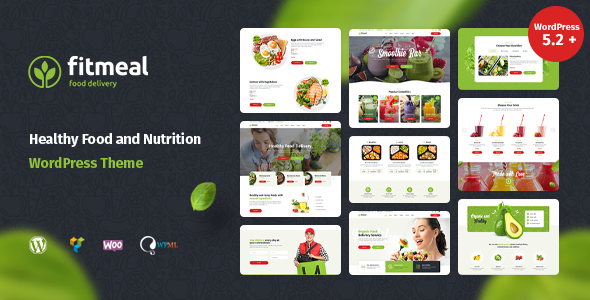
Stuck on your Fitmeal WordPress theme? Let's fix it.
No endless back-and-forth. Just send us the details and we'll get it done.
No obligation · Replies within 1 hour · Quote within 1 day
Setup · Customization · Bug fixes · WooCommerce integration
About Fitmeal WP Theme
Fitmeal is a WordPress theme by like-themes built specifically for meal prep services, nutrition coaches, diet plan websites, and food delivery businesses. It ships with a clean, appetite-driven design that puts food photography front and center. The layout is structured around conversion, with clear sections for menus, meal plans, pricing tables, and contact forms baked in from the start.
Built on a solid foundation, Fitmeal supports Elementor for drag-and-drop editing and WooCommerce for selling meal plans or products online. Page load is kept lean, which matters for mobile users browsing food services on the go. If you run a fitness meal delivery brand, a personal nutrition practice, or a recipe subscription box, Fitmeal gives you a focused starting point without having to strip back a bloated general-purpose theme.
Get matched with a Fitmeal developer in under one day
Tell us about your Fitmeal project. Small fixes, Fitmeal theme customization, or a full website build, whatever you need, we've got it covered.
We'll connect you to the right Fitmeal developers, define the scope, and get everything 100% clear.
You'll get one estimate, hire your preferred developer, and start collaborating.
Fitmeal is a focused theme, but focused themes still need configuration, customization, and ongoing care to perform well. If you want changes done right the first time, working with a vetted Fitmeal developer through Codeable is the practical route. Codeable only accepts the top tier of WordPress freelancers, which means no trial and error with inexperienced developers. You post your project, get a clear estimate, and decide whether to proceed. There is no obligation. For anything from a quick fix to a full build, our WordPress development services connect you with the right expertise.
Pros
- Purpose-built for food and nutrition businesses, so the default layout fits without heavy restructuring
- Elementor compatibility means non-developers can edit pages visually without writing code
- WooCommerce ready out of the box, useful for selling meal plans, packages, or physical products
- Clean design keeps focus on food photography and calls to action rather than cluttered sidebars
- Pricing table and meal plan sections are included in the default demo, reducing initial setup time
Cons
- Limited to food and nutrition niches, which makes it a poor fit if your brand expands beyond that scope
- Demo content import can be unreliable, sometimes requiring manual page rebuilding after a fresh install
- Theme options panel is basic, so more advanced customizations depend on Elementor or custom CSS
- Plugin compatibility outside the tested stack is not guaranteed, particularly with newer WooCommerce extensions
- Documentation from like-themes is sparse, which slows down troubleshooting without developer support
Who is Fitmeal for?
Meal Prep Delivery Services
Fitmeal’s default layout includes menu sections, pricing tables, and delivery information blocks that map directly onto a meal prep service’s structure. You can list weekly plans, show macros per meal, and route customers to a WooCommerce checkout without rebuilding the page from scratch. Add a recurring subscription plugin and you have the core of a delivery business site.
Nutrition Coaches and Dietitians
Nutrition coaches need a site that communicates credibility fast. Fitmeal supports a clean bio section, service packages, and a contact or booking form integration. A developer can extend this with a client portal, intake form, or calendar booking system. The visual design already leans professional without needing a full custom build to look the part.
Fitness Meal Subscription Boxes
Subscription box businesses need clear product presentation, recurring billing, and an easy checkout flow. Fitmeal with WooCommerce Subscriptions handles the billing side. The theme’s visual structure works well for showcasing box contents, weekly rotation menus, and customer reviews. A developer can tune the product pages to match specific subscription logic.
Recipe and Diet Plan Blogs
Recipe blogs and diet plan sites benefit from Fitmeal’s food-forward aesthetic. The theme supports blog layouts and category archives. With the right SEO setup and schema markup for recipes, these sites can rank for ingredient and diet-specific searches. Content-heavy builds work well here, especially when paired with a reliable hosting and caching configuration.
Gym Café and Health Food Brands
A gym café or health food retail brand needs to show a menu, opening hours, and an online shop in one place. Fitmeal handles all three without requiring separate templates. The WooCommerce integration covers product sales, and the visual sections adapt well to showcasing a physical location alongside an online presence.

Customizing Fitmeal
Out of the box, Fitmeal covers the basics: color schemes, typography, header layouts, and section visibility. Most adjustments happen inside the WordPress Customizer or through Elementor’s visual editor. You can swap logos, edit call-to-action text, and rearrange homepage blocks without touching code.
Beyond surface changes, real customization gets more involved. Custom meal plan builders, member login areas, subscription checkout flows, or integration with third-party delivery APIs require development work. A Fitmeal expert can handle that cleanly, building on the theme’s existing structure rather than fighting against it. Whether you need a bespoke pricing page, a filtered recipe archive, or a fully custom menu system, working with someone who knows Fitmeal’s template hierarchy saves significant time and avoids breaking existing styles in the process.
Recommended plugins for Fitmeal
Fitmeal pairs well with several plugin categories. WooCommerce handles meal plan sales and subscriptions. WooCommerce Subscriptions adds recurring billing for weekly or monthly plans. WPML or Polylang work if you serve multiple language markets. For booking nutrition consultations, WPForms or Amelia slot in without conflict.
Performance matters on food sites where image-heavy pages are standard. Caching, image optimization, and a CDN setup make a real difference. See our WordPress performance services for that. If organic search is a priority, pairing Fitmeal with a proper schema and technical setup through our WordPress SEO service helps meal-related content rank for local and recipe queries.
Not sure which plugins to use? This WordPress plugins directory covers the most popular options with reviews and setup guides.
Fitmeal common issues
Fitmeal theme homepage not loading correctly after update
Homepage display issues after a Fitmeal update are usually caused by a conflict between the updated theme files and cached page data or Elementor’s stored layout. Start by clearing all caches, including server-side, plugin-level, and browser cache. Then open the homepage in Elementor and check for any deprecated widgets flagged in red. Regenerate CSS from Elementor’s Tools panel. If the issue persists, a plugin conflict is likely. Our WordPress bug fixing service can diagnose and resolve this quickly.
Fitmeal WooCommerce product page layout broken
WooCommerce product page layout problems in Fitmeal usually come from a version mismatch between WooCommerce and the theme’s template files. Fitmeal may ship with outdated WooCommerce template overrides that break when WooCommerce updates. Check the WooCommerce system status page for outdated templates flagged under the theme. A developer needs to update those template files to match the current WooCommerce version. Avoid doing this manually without version control in place.
Fitmeal Elementor sections not saving changes
When Elementor changes do not save in Fitmeal, the most common cause is a PHP memory limit or a REST API conflict blocking the autosave request. Increase PHP memory to at least 256MB in your wp-config.php or hosting panel. Check that your WordPress REST API is not blocked by a security plugin or server firewall rule. Also verify that your user role has full editor permissions. If the problem continues, check the browser console for specific JavaScript errors pointing to the conflict source.
Fitmeal mobile menu not working on iOS
Mobile menu failures on iOS with Fitmeal are typically tied to a JavaScript event listener that does not register tap events correctly on Safari. This is a known issue with some older like-themes releases. The fix involves adding touch event support to the menu toggle script, either via a child theme or a small code snippet. Avoid modifying the parent theme files directly. A developer can patch this in under an hour. Check our WordPress bug fixing service if you need it handled fast.
Fitmeal FAQ
Yes, Fitmeal is built to work with WooCommerce. You can sell meal plans, subscription packages, or physical products through a standard WooCommerce setup. For recurring billing, you will need the WooCommerce Subscriptions plugin added separately. Some WooCommerce template files inside Fitmeal may fall behind after major WooCommerce updates, which is worth checking in your system status panel periodically.
The demo content and default homepage are designed with Elementor in mind. You can technically use the theme with the classic WordPress editor or other page builders, but you will lose the visual layout flexibility the demo is built around. Most users stick with Elementor. If you prefer a different builder, a developer can rebuild key pages to work with your preferred tool without breaking the theme’s styling.
Fitmeal includes a one-click demo import option accessible from the theme settings panel after activation. You will need the required plugins installed first, including Elementor and any bundled plugins. The import process can occasionally stall or miss certain elements. If that happens, clearing the import data and retrying usually resolves it. Manual page recreation is sometimes faster than troubleshooting a failed import.
Fitmeal’s code is reasonably clean and does not carry excessive bloat, which helps with Core Web Vitals. However, the theme does not include built-in schema markup for recipes or meal plans. You will need an SEO plugin like Rank Math or Yoast to handle structured data. Image optimization and caching are also required separately. The theme itself does not block SEO, but it does not automate it either.
Yes, you can migrate an existing site to Fitmeal, but it involves rebuilding your pages inside the new theme’s structure rather than a simple switch. Your content, products, and posts transfer fine, but layouts built in a different theme or builder will not carry over. A developer can handle the WordPress migration and rebuild key pages in Fitmeal without losing your existing content or SEO configuration.
Hire a Fitmeal Developer
Need a Fitmeal expert who knows the theme inside out? Whether you’re launching a new meal delivery site, adding a subscription system, or fixing a layout that broke after an update, we can help. Work gets done through Codeable, so you only deal with vetted WordPress professionals. Get a free estimate with no obligation to hire. Describe your project and receive a clear quote within 24 hours.
You'll need a free Codeable account so developers can ask questions and send their quotes.