Fitness Club WordPress Theme
by BoldThemes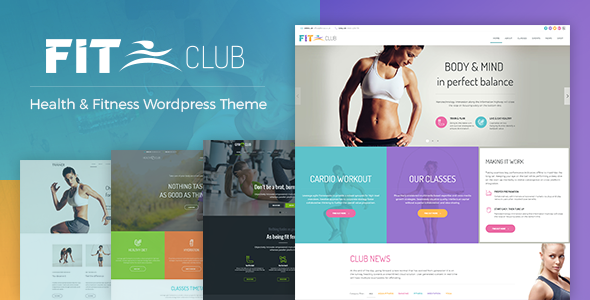
Stuck on your Fitness Club WordPress theme? Let's fix it.
No endless back-and-forth. Just send us the details and we'll get it done.
No obligation · Replies within 1 hour · Quote within 1 day
Setup · Customization · Bug fixes · WooCommerce integration
About Fitness Club WP Theme
Fitness Club is a WordPress theme by BoldThemes built specifically for gyms, personal trainers, yoga studios, and sports facilities. It ships with a visual drag-and-drop page builder, pre-built demo content, and a class schedule system that lets visitors browse and book sessions without a third-party plugin.
The theme includes dedicated templates for trainers, pricing tables, testimonials, and BMI calculators. It works with WooCommerce, so you can sell memberships or merchandise directly from your site. BoldThemes built Fitness Club on their own Bold Builder, which gives you layout control without touching code. Import the demo in one click and replace the placeholder content with your own. It is a practical starting point for any fitness business that needs a professional site fast.
Get matched with a Fitness Club developer in under one day
Tell us about your Fitness Club project. Small fixes, Fitness Club theme customization, or a full website build, whatever you need, we've got it covered.
We'll connect you to the right Fitness Club developers, define the scope, and get everything 100% clear.
You'll get one estimate, hire your preferred developer, and start collaborating.
BoldThemes updates Fitness Club regularly, which means customizations need to be done correctly or they break on the next release. A developer who knows the theme builds changes inside a child theme, uses the right hooks, and documents what was changed and why.
Through Codeable, you get access to vetted WordPress developers with real experience on fitness and gym sites. You post your project, get an estimate within 24 hours, and only pay if you decide to move forward. No risk, no wasted time on the wrong hire.
Pros
- Built-in class schedule system works without extra plugins
- One-click demo import gets a full site up in minutes
- WooCommerce compatible for membership and product sales
- Includes trainer profile templates and BMI calculator widget
- BoldThemes provides regular updates and dedicated support
Cons
- Bold Builder is proprietary, so switching themes later is not straightforward
- Default schedule lacks online booking — you need a plugin for that
- Some demo sections feel generic and need significant content work to stand out
- Customizing the schedule layout requires PHP knowledge or a developer
- Limited third-party tutorials compared to themes built on Elementor or WPBakery
Who is Fitness Club for?
Commercial Gym or Fitness Center
Fitness Club handles the core needs of a commercial gym well. You get class schedules, trainer profiles, pricing tables, and WooCommerce support for selling memberships. A developer can connect it to gym management software like Mindbody or Glofox if you need deeper integration.
Personal Trainer Website
Personal trainers need a site that shows credentials, packages, and social proof fast. Fitness Club’s trainer templates and testimonial sections cover this. Add a contact form and a Calendly embed for bookings, and you have a clean lead-generation site without overbuilding it.
Yoga or Pilates Studio
Yoga and pilates studios benefit from the schedule system and the calm, image-forward layouts Fitness Club supports. You can adjust colors and typography to match a softer brand identity. A developer can add a class booking plugin and integrate it with the existing schedule display.
CrossFit Box or Functional Fitness Gym
CrossFit boxes need energy, clear pricing, and a visible WOD or schedule. Fitness Club delivers on layout and structure. Pair it with a results-tracking plugin or a community forum to add member value beyond the public-facing pages.
Online Fitness Coaching
Online coaches can use Fitness Club to sell programs through WooCommerce, host video content, and build an email list. The theme’s membership-compatible structure works well when paired with a plugin like MemberPress to gate premium content for paying clients.

Customizing Fitness Club
Out of the box, Fitness Club covers the basics well. But most gym owners eventually want changes that go beyond swapping colors and fonts. Custom booking flows, member login areas, integration with gym management software, or a modified class schedule layout all require developer work.
A Fitness Club expert knows how BoldThemes structures its Bold Builder components, where child theme overrides belong, and how to extend the built-in schedule without breaking future updates. If you want to add a custom trainer profile layout, connect a payment gateway for memberships, or restructure the homepage for a specific campaign, hiring someone who already knows this theme saves significant time and avoids costly mistakes.
Recommended plugins for Fitness Club
Fitness Club pairs well with several plugins that expand what the theme does by default. WooCommerce handles membership sales and online shop functionality. The Events Calendar adds a bookable class schedule on top of the built-in one. WPForms or Gravity Forms handle contact and registration. For speed, image optimization and caching plugins make a real difference on pages heavy with trainer photos and videos.
If you want your gym site to rank locally, pairing Fitness Club with solid WordPress SEO work is worth the investment. You can also explore WordPress performance improvements to keep load times fast on mobile.
Not sure which plugins to use? This WordPress plugins directory covers the most popular options with reviews and setup guides.
Fitness Club common issues
Fitness Club theme class schedule not showing correctly
Schedule display issues in Fitness Club usually come from a conflict with a caching plugin or a JavaScript error from another plugin. Start by clearing your cache, then deactivate plugins one by one to isolate the conflict. If the schedule uses custom post types and the template was overridden incorrectly, the output breaks. A WordPress bug fix from a developer familiar with Bold Builder resolves this quickly.
Fitness Club WordPress theme slow loading on mobile
Fitness Club pages can get heavy with trainer photos, background videos, and slider scripts. Start with image compression using a plugin like ShortPixel, enable lazy loading, and check what scripts are loading on every page. If the theme is loading Bold Builder assets site-wide, a developer can conditionally enqueue them only where needed. See our WordPress performance service for a structured approach.
Fitness Club Bold Builder layout broken after update
Bold Builder layout breaks after a Fitness Club update are usually caused by customizations made directly to theme files instead of through a child theme. After an update, those file edits get overwritten. The fix is to audit what changed, restore the custom code, and move it into a proper child theme structure. This is a common issue and straightforward to fix if you have a recent backup. Check your WordPress maintenance setup to ensure backups run automatically.
Fitness Club theme WooCommerce membership pages not displaying right
WooCommerce template conflicts with Fitness Club happen when the theme’s WooCommerce template files are outdated relative to the current WooCommerce version. Go to WooCommerce > Status > System Status to see which templates need updating. Copy the outdated templates into your child theme and update them to match the current WooCommerce version. If membership plugin pages look off, check whether the plugin has its own template files that need customization.
Fitness Club FAQ
Yes. Fitness Club is a practical choice for small gyms. The one-click demo gives you a full site structure to work from, and the built-in schedule and pricing tables cover what most small gyms need. You do not need a large budget or a developer to launch. Customizing beyond the defaults is where professional help becomes useful.
Fitness Club is built on BoldThemes’ own Bold Builder, not Elementor. The two builders do not work together on the same pages. If you want to use Elementor, you would need a different base theme. Some sections of a Fitness Club site can coexist with Elementor, but mixing builders creates conflicts and is not recommended.
The built-in schedule shows class times but does not handle bookings. To add online booking, you need a plugin like Amelia, Bookly, or a Mindbody integration. A developer can connect the booking plugin output to match the Fitness Club schedule layout so the experience feels consistent to your visitors.
After installing and activating the Fitness Club theme, go to Appearance > Import Demo. Choose the demo that matches your preferred layout and click import. The process installs demo pages, widgets, and settings automatically. It takes a few minutes. You will need to have the required plugins installed before importing for everything to load correctly.
Migrating an existing site to Fitness Club means rebuilding your pages inside Bold Builder, not just switching themes. Your old content, images, and structure will not transfer automatically. A developer can handle this process cleanly and map your existing content to the new template. See our WordPress migration service for details on what that involves.
Hire a Fitness Club WordPress Developer
Whether you need a Fitness Club expert to set up your site from scratch, fix a specific issue, or build out a custom feature, we can match you with a developer who knows this theme. Post your project and get a free estimate within 24 hours through Codeable. No obligation to hire.
Get your free estimate and describe what you need. A Fitness Club developer will review your project and come back with a clear price before any work starts.
You'll need a free Codeable account so developers can ask questions and send their quotes.