FitPro WordPress Theme
by LiveMesh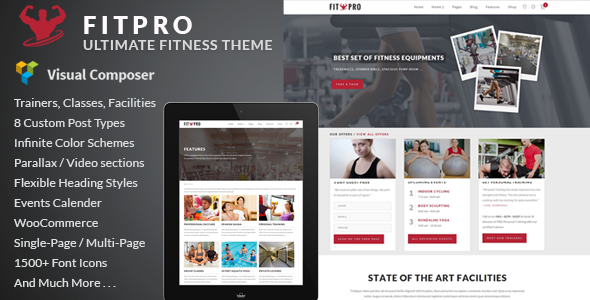
Stuck on your FitPro WordPress theme? Let's fix it.
No endless back-and-forth. Just send us the details and we'll get it done.
No obligation · Replies within 1 hour · Quote within 1 day
Setup · Customization · Bug fixes · WooCommerce integration
About FitPro WP Theme
FitPro is a WordPress theme built by LiveMesh, designed specifically for gyms, fitness studios, personal trainers, and health clubs. It comes with a clean, energetic layout that works well for businesses that need to showcase class schedules, trainer profiles, membership plans, and workout programs.
The theme is built on a solid foundation with Elementor compatibility, giving you drag-and-drop control over your pages. It includes pre-built demo content so you can get a site up quickly without starting from scratch. LiveMesh has a reputation for well-coded themes, and FitPro reflects that with attention to mobile responsiveness and page speed. It supports WooCommerce for selling memberships or merchandise, and integrates with popular booking plugins for class reservations.
Get matched with a FitPro developer in under one day
Tell us about your FitPro project. Small fixes, FitPro theme customization, or a full website build, whatever you need, we've got it covered.
We'll connect you to the right FitPro developers, define the scope, and get everything 100% clear.
You'll get one estimate, hire your preferred developer, and start collaborating.
FitPro is capable, but getting it to do exactly what your fitness business needs takes real WordPress knowledge. Whether you’re dealing with a stubborn layout, a booking integration that won’t cooperate, or a feature that simply doesn’t exist in the theme yet, a qualified developer makes the difference. FoxyConceptworks through Codeable, which means every developer is vetted and reviewed. You’re not taking a chance on a freelancer — you get someone who knows WordPress deeply and has a track record to prove it.
Pros
- Built specifically for fitness businesses with relevant demo content and section types out of the box
- Full Elementor compatibility makes visual customization accessible without touching code
- WooCommerce ready for selling memberships, supplements, or fitness merchandise
- LiveMesh provides regular theme updates and has a history of maintaining their products
- Mobile-responsive design that holds up well on phones, which is where most gym visitors browse
Cons
- No native class scheduling or timetable feature — you need a third-party plugin for that
- Demo import can be slow and occasionally incomplete, requiring manual cleanup
- Heavy use of Elementor widgets can create page bloat if not managed carefully
- Customizing the header and navigation beyond basic options requires CSS or developer help
- Support response times from LiveMesh can lag during busy periods
Who is FitPro for?
Local Gym or Fitness Club
FitPro suits local gyms well. You can display membership plans, showcase facilities with full-width images, and embed a class timetable using a booking plugin. The theme’s layout structure makes it easy to highlight opening hours, location, and staff without needing heavy customization.
Personal Trainer Website
Personal trainers need a site that builds trust quickly. FitPro’s trainer profile sections and testimonial layouts work well for that. Add a booking plugin for consultation calls, connect it to WooCommerce for online programs, and you have a functional solo trainer site with minimal setup.
Yoga or Pilates Studio
Yoga and Pilates studios benefit from FitPro’s clean, image-forward design. The theme handles class listings, instructor bios, and pricing tables clearly. Pair it with a scheduling plugin like Amelia to let students book sessions directly, and you reduce front desk workload significantly.
Online Fitness Coaching
For online coaches selling programs or memberships, FitPro connects naturally with WooCommerce and membership plugins like MemberPress. You can restrict content to paying members, deliver video programs, and build a checkout flow without needing a separate platform or custom theme work.
Sports and Athletic Academy
Sports academies with multiple coaches, programs, and age groups need clear structure. FitPro handles that with flexible page layouts and Elementor’s grid options. You can build separate sections for different sports or age categories, with registration forms and schedule pages that keep things organized.

Customizing FitPro
FitPro gives you a good starting point, but most fitness businesses need customization to stand out. The theme’s Elementor compatibility makes layout changes straightforward, but custom class schedule integrations, membership gating, or trainer booking flows often require developer input.
A FitPro expert can handle things like building a custom timetable layout, integrating a third-party booking system, setting up WooCommerce memberships with restricted content, or adjusting the theme’s styling to match your brand properly. LiveMesh themes are well-structured, which makes custom development cleaner and faster. If you need changes that go beyond what the Customizer offers, working with someone who knows FitPro saves a lot of trial and error.
Recommended plugins for FitPro
FitPro works well alongside plugins that add functionality the theme doesn’t include natively. For booking and scheduling, plugins like Amelia or BookingPress connect cleanly. WooCommerce handles memberships and product sales. For performance, image optimization and caching are worth setting up early, especially if you’re running video backgrounds or large photo galleries. Yoast or Rank Math handle SEO basics. If you want to grow your site’s visibility further, a WordPress SEO service can help. For speed improvements specific to your setup, see WordPress performance optimization.
Not sure which plugins to use? This WordPress plugins directory covers the most popular options with reviews and setup guides.
FitPro common issues
FitPro class timetable not showing correctly
FitPro doesn’t include a native timetable — what you see in the demo usually comes from a separate plugin like Timetable Responsive Schedule or Amelia. If your schedule isn’t displaying correctly, check whether the required plugin is active and that its shortcode is placed inside the right Elementor widget. Conflicts with caching plugins can also suppress shortcode output. Clear your cache and test in a staging environment first. If the problem persists, a WordPress bug fixing service can diagnose it quickly.
FitPro demo content not importing properly
Demo import failures in FitPro usually come down to server limits. PHP memory, max execution time, and upload size all need to be high enough to handle the import file. Ask your host to increase these limits temporarily, or use a child theme and import manually using the WordPress importer tool. If media files are missing after import, you may need to download them separately from the demo package and upload via the Media Library.
FitPro mobile menu not working
A broken mobile menu in FitPro is often caused by a JavaScript conflict with another plugin. Start by deactivating plugins one at a time to find the conflict. Also check that your Elementor version and FitPro theme version are both up to date — LiveMesh pushes compatibility updates regularly. If you’re using a custom header built in Elementor Pro, make sure the mobile breakpoint settings are configured inside the header template settings, not just the Customizer.
FitPro WooCommerce pages look broken or unstyled
WooCommerce styling issues in FitPro usually appear after a WooCommerce major update changes its template structure. Check if FitPro has a pending theme update that addresses the new WooCommerce templates. If not, you may need to copy the updated WooCommerce templates into your child theme’s woocommerce folder and restyle them. Avoid editing core theme files directly. If the styling gap is significant, a developer can patch it cleanly without breaking future updates.
FitPro FAQ
Yes. FitPro is built with Elementor compatibility in mind. Most of the demo layouts are built using Elementor, and the theme’s sections work as Elementor templates. You’ll need the free version of Elementor at minimum, though some advanced layout features may benefit from Elementor Pro.
FitPro supports WooCommerce. You can use it to sell memberships, fitness products, or online programs. The theme includes basic WooCommerce template styling. For more complex setups like membership-gated content or subscription billing, you’ll want to pair it with a plugin like MemberPress or WooCommerce Subscriptions.
Yes, FitPro works well for personal trainers. It includes sections for bio, services, testimonials, and pricing. You can add a booking plugin for client calls and connect WooCommerce to sell digital programs. The theme is flexible enough to work as a single-person business site without feeling oversized or generic.
FitPro doesn’t have a built-in class schedule. You need a third-party plugin to add one. Popular options include Amelia, Timetable Responsive Schedule, or BookingPress. Once installed, these plugins generate a shortcode or block that you embed into your FitPro page using Elementor’s shortcode widget or a standard block.
LiveMesh continues to update FitPro. As of recent checks, the theme receives compatibility updates for new versions of WordPress and WooCommerce. Before purchasing, verify the last update date on ThemeForest and check the support forum activity. LiveMesh has maintained their theme catalog consistently, which is a good sign for long-term use.
Hire a FitPro WordPress Developer
If your FitPro site needs custom work, a booking integration, layout changes, or anything beyond the default theme settings, we can help. FoxyConcept delivers WordPress development through Codeable, where every developer is vetted and rated by real clients. There’s no obligation after your estimate. Get a free estimate and describe what you need — you’ll hear back within 24 hours.
You'll need a free Codeable account so developers can ask questions and send their quotes.