Flamingo WordPress Theme
by VanKarWai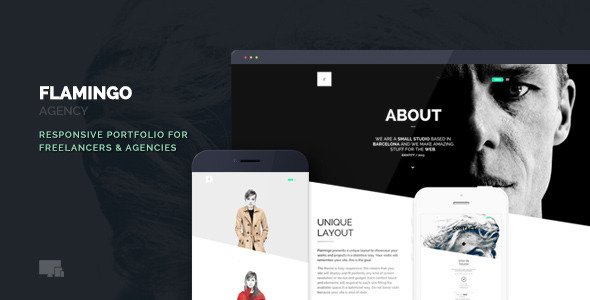
Stuck on your Flamingo WordPress theme? Let's fix it.
No endless back-and-forth. Just send us the details and we'll get it done.
No obligation · Replies within 1 hour · Quote within 1 day
Setup · Customization · Bug fixes · WooCommerce integration
About Flamingo WP Theme
Flamingo is a WordPress theme by VanKarWai built for creative agencies, photographers, and portfolio-focused sites. It leans on a minimal, image-forward layout that puts visual content first. The theme ships with pre-built demo pages, a clean typography system, and full compatibility with Elementor, making it a practical choice for designers who want control without writing custom code.
Out of the box, Flamingo handles full-width hero sections, smooth scroll animations, and a flexible grid system. WooCommerce support is included, so it also works for small shops selling digital products or prints. Performance is reasonable on a clean install, though plugin-heavy builds will need tuning. If you want a theme that looks polished without a lot of setup friction, Flamingo is a solid starting point for creative and visual brands.
Get matched with a Flamingo developer in under one day
Tell us about your Flamingo project. Small fixes, Flamingo theme customization, or a full website build, whatever you need, we've got it covered.
We'll connect you to the right Flamingo developers, define the scope, and get everything 100% clear.
You'll get one estimate, hire your preferred developer, and start collaborating.
Most Flamingo customization issues come down to one thing: knowing where VanKarWai’s code ends and your modifications begin. Getting that wrong means broken layouts after updates or CSS that fights itself. FoxyConcept works with vetted Flamingo developers through Codeable, a network where every developer is individually screened. You get a real expert on your project, not a generalist guessing at theme structure. Post a project, get a free estimate, and know exactly what the work involves before you commit to anything.
Pros
- Image-forward layout works well for visual brands and photographers without heavy customization
- Full Elementor compatibility makes page building accessible without custom code
- WooCommerce support is built in, covering basic shop needs out of the box
- Pre-built demo pages reduce setup time for standard creative site structures
- Clean, minimal design avoids the bloated look common in multipurpose themes
Cons
- Animation scripts add JavaScript overhead that can hurt performance on mobile
- Deep layout changes require PHP knowledge, the Customizer options only go so far
- Documentation from VanKarWai is limited, so troubleshooting takes more time than it should
- Not ideal for content-heavy sites like news or large blogs, the structure is built for portfolios
- Child theme is not included, requiring manual setup before making code-level changes safely
Who is Flamingo for?
Photography Portfolios
Flamingo’s full-width image sections and minimal chrome make it a strong fit for photographers. The grid layouts handle gallery-style portfolios cleanly, and the hero sections let single images do the heavy lifting. A Flamingo developer can extend this with custom gallery post types, filterable portfolio grids, or lightbox integrations that go beyond what the base theme provides.
Creative Agency Websites
Agencies need a site that communicates quality fast. Flamingo’s polished aesthetic and service page templates give a professional starting point. A Flamingo specialist can build out case study layouts, team sections, and lead capture flows that match the agency’s actual service structure rather than forcing content into demo page templates that don’t quite fit.
Freelance Designer Portfolios
Freelance designers often need a site that sells their work without overselling it. Flamingo’s restrained design keeps the focus on the portfolio rather than the theme. Adding a custom contact form, project inquiry workflow, or client testimonial section is straightforward for a Flamingo expert and keeps the site feeling personal rather than templated.
Digital Product Shops
Flamingo’s WooCommerce compatibility makes it usable for small shops selling prints, presets, or digital downloads. The minimal layout keeps product pages clean. A Flamingo developer can customize shop templates, add cart functionality, and configure payment gateways so the shop experience matches the visual quality of the rest of the site.
Art and Illustration Showcases
Artists and illustrators need a site that presents work without visual noise. Flamingo’s whitespace-heavy design and flexible grid make it easy to build a clean showcase. A Flamingo specialist can set up custom taxonomies for filtering work by medium or series, and configure image display so artwork is shown at full quality without layout interference.

Customizing Flamingo
Flamingo gives you a decent range of customization options through the WordPress Customizer and Elementor’s drag-and-drop editor. You can adjust color palettes, typography pairings, header layouts, and section spacing without touching code. Pre-built template sections speed up the build process for standard page types like portfolios, contact pages, and service listings.
That said, deeper changes, like modifying the theme’s animation logic, restructuring the grid for non-standard layouts, or adding custom post type integrations, require PHP and CSS knowledge. A Flamingo expert can handle these modifications cleanly without breaking update compatibility. Whether you need a child theme built from scratch or targeted style overrides, working with a Flamingo specialist means changes are done right the first time and won’t cause problems after the next theme update.
Recommended plugins for Flamingo
Flamingo pairs well with several WordPress tools that extend its core functionality. WooCommerce adds shop and product pages. Contact Form 7 or WPForms handle lead capture. For SEO, a properly configured Yoast or Rank Math setup alongside schema markup gives the theme’s clean structure a real advantage. If you want to go further, our WordPress SEO optimisation service covers technical and on-page SEO for Flamingo-based sites.
On the performance side, Flamingo’s animation scripts and image-heavy layouts need careful optimization. Caching, image compression, and script deferral can make a significant difference. Our WordPress performance service handles exactly that.
Not sure which plugins to use? This WordPress plugins directory covers the most popular options with reviews and setup guides.
Flamingo common issues
Flamingo theme header not showing on mobile
Mobile header issues in Flamingo usually trace back to a conflict between the theme’s built-in responsive CSS and a plugin or custom CSS rule that overrides it. Check for z-index conflicts hiding the navigation element, or a sticky header script that fails to initialize on smaller viewports. Disabling plugins one at a time isolates the conflict quickly. If the issue appeared after a theme update, compare the current header template against VanKarWai’s changelog. Persistent layout bugs across devices are worth handing to a WordPress bug fixing specialist rather than guessing at the cause.
Elementor sections breaking layout in Flamingo
Elementor and Flamingo can conflict when the theme’s own layout containers clash with Elementor’s section wrapper divs. This shows up as double padding, collapsed sections, or elements that render correctly in the editor but break on the front end. The fix is usually a targeted CSS rule that resets the theme’s section padding inside Elementor containers, or adjusting Elementor’s experiment settings for flexbox containers. If you’re seeing this across multiple pages, a WordPress bug fixing service can audit the full template structure and apply a clean fix.
Flamingo animations causing slow page load
Flamingo uses scroll-triggered animations that load JavaScript on every page, including ones where no animations are active. This adds render-blocking weight that slows initial load, especially on mobile. The fastest fix is deferring the animation script using a performance plugin or manually adding the defer attribute in a child theme. Replacing the default animation library with a lighter alternative like AOS can also reduce the overhead significantly. Test with and without animations disabled in browser DevTools to confirm the script is the primary bottleneck before making changes.
Flamingo WooCommerce product page layout broken
WooCommerce layout breaks in Flamingo typically happen because the theme’s product page template doesn’t account for WooCommerce’s default hook structure. Images may stack incorrectly, add-to-cart buttons may disappear, or the sidebar may collapse. The solution is usually a custom WooCommerce template override in a child theme that rewrites the product layout using Flamingo’s CSS grid rather than WooCommerce’s default markup. Avoid editing theme files directly since updates will overwrite any changes made outside of a child theme.
Flamingo FAQ
Yes, Flamingo is built with Elementor compatibility in mind. Most page sections can be edited or rebuilt using Elementor’s drag-and-drop interface. That said, some theme-specific layout features, like the hero animation or scroll effects, are handled outside Elementor in the theme’s own scripts. A Flamingo developer can bridge the gap where the two systems overlap or conflict.
Flamingo includes WooCommerce support for basic shop functionality. Product pages, cart, and checkout work on a standard install. However, the theme’s templates are minimal and may not match WooCommerce’s default layout expectations perfectly. Custom product page templates built in a child theme by a Flamingo specialist will give you a cleaner result than relying on the out-of-the-box integration.
Create a new folder in your wp-content/themes/ directory named something like flamingo-child. Add a style.css with the correct Template: flamingo header and a functions.php that enqueues the parent theme’s stylesheet. Activate the child theme from the WordPress dashboard. All code and style changes go in the child theme so updates to the parent don’t overwrite your work.
Flamingo is well suited for photography portfolios. The full-width image layouts, clean grid options, and minimal interface keep the focus on the photos rather than the site design. For advanced needs like filterable galleries, custom album structures, or client proofing, a Flamingo specialist can add functionality beyond what the base theme provides without breaking the visual style.
Slow mobile performance in Flamingo is most often caused by unoptimized images, the theme’s animation scripts loading on every page, or too many plugins adding their own scripts and styles. Start by running a PageSpeed Insights test to identify the specific bottlenecks. Image compression, script deferral, and a caching plugin handle the most common causes. Our WordPress performance service covers a full audit and fix.
Hire a Flamingo Developer for Your WordPress Project
Whether you need a Flamingo expert to build a site from a demo, customize layouts beyond what the Customizer allows, or fix something that stopped working, FoxyConcept can help. Projects are delivered through Codeable, so you’re working with a screened developer, not a freelancer marketplace gamble. Get a free estimate and describe what you need. No obligation, no upfront payment, just a clear scope and a developer who knows the theme.
You'll need a free Codeable account so developers can ask questions and send their quotes.