Flat Metro WordPress Theme
by Mymoun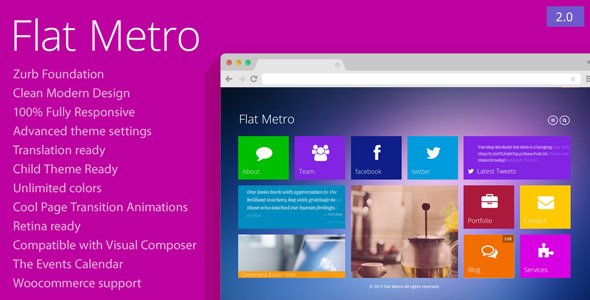
Stuck on your Flat Metro WordPress theme? Let's fix it.
No endless back-and-forth. Just send us the details and we'll get it done.
No obligation · Replies within 1 hour · Quote within 1 day
Setup · Customization · Bug fixes · WooCommerce integration
About Flat Metro WP Theme
Flat Metro is a free WordPress theme developed by Mymoun. It takes cues from Microsoft’s Metro design language, built around a clean grid layout with flat color blocks and minimal decoration. The theme suits content-heavy sites that need a structured, tile-based presentation without relying on heavy page builders or complex configurations.
The design is deliberately simple. Large colored sections, bold typography, and a responsive grid make it easy to scan on any device. It works out of the box with standard WordPress widgets and menus, so setup time is low. That said, Flat Metro is a lightweight base theme rather than a feature-packed premium product, which means customization often requires some PHP or CSS knowledge to push beyond its defaults.
Get matched with a Flat Metro developer in under one day
Tell us about your Flat Metro project. Small fixes, Flat Metro theme customization, or a full website build, whatever you need, we've got it covered.
We'll connect you to the right Flat Metro developers, define the scope, and get everything 100% clear.
You'll get one estimate, hire your preferred developer, and start collaborating.
Flat Metro looks simple, but getting it to behave exactly how you want takes real WordPress knowledge. Finding a developer who has worked with this specific theme is harder than finding a general WordPress freelancer. Through Codeable, you get matched with vetted developers who understand Flat Metro’s structure and can deliver clean, maintainable work. No junior developers, no outsourced fixes, no guesswork. Post your project, get a free estimate, and only hire if you’re confident. It’s a low-risk way to get the right person on the job.
Pros
- Clean tile-based grid layout that works well for news, blogs, and portfolio sites without any page builder
- Lightweight codebase with minimal bloat, which gives you a fast baseline page load time
- Free to download and use with no licensing costs or upsell prompts inside the theme
- Responsive by default, so the tile grid adjusts correctly on tablets and mobile devices
- Simple enough to customize via child theme without needing to understand a proprietary framework
Cons
- Limited built-in customization options in the Customizer compared to modern freemium themes
- No dedicated theme options panel, so many changes require direct code edits
- Infrequent updates from Mymoun, which raises compatibility concerns with newer WordPress versions
- No built-in WooCommerce styling, so shop pages need custom CSS to look consistent with the rest of the theme
- Small community and limited documentation, making troubleshooting slower without a developer
Who is Flat Metro for?
Digital News and Magazine Sites
Flat Metro’s tile grid is a natural fit for news and magazine layouts. Multiple post categories can each get a distinct color block, making it easy for readers to scan sections at a glance. The structured grid keeps high-volume content organized without needing a complex editorial plugin. A developer can configure custom post templates and category color assignments to match your publication’s visual style.
Personal or Niche Blogs
Bloggers who want a clean, readable layout without spending money on a premium theme find Flat Metro a practical choice. The minimal design keeps focus on written content. It handles standard post formats well and integrates with popular plugins like Jetpack or newsletter tools without conflict. Custom typography and a child theme can make it feel distinctly personal rather than generic.
Small Business Brochure Sites
Small businesses that need a simple online presence, a few pages, a contact form, and a clear call to action can use Flat Metro without overcomplicating things. The flat color blocks work well for highlighting services or key messages. With a custom homepage layout and properly configured widgets, it presents professionally without requiring an expensive theme or a full design system.
Portfolio and Creative Showcases
The tile-based layout translates naturally into a portfolio grid. Each project gets its own block with an image, title, and category color. Creative professionals including designers, photographers, and developers can use Flat Metro as a lightweight portfolio base. A developer can extend it with a custom post type for projects and lightbox functionality to improve how work is presented.
Local Community or Event Sites
Community groups and event organizers benefit from Flat Metro’s ability to clearly separate content types. Upcoming events, announcements, news, and resources can each occupy distinct tile sections. The theme handles this kind of structured, multi-topic content well. Combined with an events plugin and a clear color scheme, it gives local sites a clear, navigable layout that works for a wide audience.

Customizing Flat Metro
Flat Metro gives you a starting point, not a finished product. Out of the box, you can adjust colors, menus, and widget areas through the WordPress Customizer. But if you want a layout that actually reflects your brand, you’ll need to go deeper.
A Flat Metro expert can rework the tile grid to fit your content structure, replace the default color scheme with a consistent visual identity, and add custom post types or template files without breaking the theme’s flat aesthetic. Typography changes, custom header treatments, and WooCommerce integration are all common requests.
If you’re not confident editing functions.php or writing custom CSS, hiring someone who knows Flat Metro’s codebase will save you hours of trial and error and avoid layout issues that are hard to debug without context.
Recommended plugins for Flat Metro
Flat Metro is a lean theme, so plugins do most of the heavy lifting when you want extra functionality. Popular additions include WooCommerce for shop pages, Contact Form 7 for lead capture, and Yoast SEO or Rank Math to handle on-page optimization. If page speed matters, pairing Flat Metro with a caching plugin and image optimization tool helps significantly. For sites that outgrow the theme’s native layout options, Elementor can slot in, though it requires some CSS adjustments to match the flat Metro aesthetic. Need help choosing the right setup? Check our WordPress performance service or WordPress SEO optimization for guidance on building a faster, better-ranking site on top of Flat Metro.
Not sure which plugins to use? This WordPress plugins directory covers the most popular options with reviews and setup guides.
Flat Metro common issues
Flat Metro theme not displaying correctly after WordPress update
After a WordPress core update, display problems in Flat Metro are usually caused by deprecated PHP functions or CSS conflicts with updated block editor styles. Start by switching to a default theme temporarily to confirm the issue is theme-specific. Check your browser console for JavaScript errors and review the PHP error log. If you’re not comfortable debugging template files, our WordPress bug fixing service can identify and resolve the conflict without breaking your existing content.
How to change tile colors in Flat Metro WordPress theme
Flat Metro assigns tile colors through CSS classes tied to post categories. To change them, you’ll need to edit the theme’s stylesheet or, better, create a child theme and override the relevant color rules there. Find the category-specific CSS selectors in style.css and update the background-color values. If you’re running Flat Metro without a child theme, any direct edits will be overwritten on the next theme update, so setting up a child theme first is strongly recommended.
Flat Metro theme mobile menu not working
Mobile menu issues in Flat Metro are often caused by a JavaScript conflict with another plugin, or the theme’s menu toggle script failing to load correctly. Open your browser’s developer tools on mobile view and check the console for errors. Deactivate plugins one at a time to isolate the conflict. If the menu script itself is the problem, it may need to be patched in a child theme’s functions.php. A developer can fix this quickly without disrupting the rest of your site.
Flat Metro homepage layout broken or tiles overlapping
Broken tile layouts in Flat Metro usually trace back to missing or conflicting CSS, often introduced by a plugin that loads its own styles globally. It can also happen if the theme’s grid relies on floats and a plugin has injected a clearfix override. Use browser DevTools to inspect which CSS rules are affecting the tile containers. Removing conflicting styles or adding a targeted fix in a child theme’s stylesheet resolves most layout break issues without a full rebuild.
Flat Metro FAQ
Flat Metro receives infrequent updates from its developer Mymoun, which means compatibility with the latest WordPress versions is not guaranteed. It typically continues to function, but you may encounter block editor styling inconsistencies or deprecated PHP notices. Testing on a staging site before updating your live WordPress installation is strongly recommended if you’re running Flat Metro on a production site.
Flat Metro does not include native WooCommerce templates, so shop and product pages will use WooCommerce’s default styling, which often clashes with the theme’s flat tile aesthetic. You can bridge the gap with custom CSS or by adding WooCommerce template files to a child theme. It works, but it requires extra effort to make the shop pages feel consistent with the rest of your site design.
Create a new folder in your wp-content/themes directory, add a style.css file with the correct child theme header referencing Flat Metro as the template, then add a functions.php that enqueues the parent stylesheet. Activate the child theme from Appearance > Themes. Any customizations you make in the child theme will survive future Flat Metro updates and keep your changes safe.
Yes, switching your existing WordPress site to Flat Metro is straightforward in terms of theme activation, but your content layout may need adjustment to fit the tile-based grid. Page templates and widget areas differ from other themes, so some rebuilding of homepage sections and sidebars is expected. For a smooth transition, our WordPress migration service can handle the switch with minimal disruption.
Flat Metro’s lightweight codebase is a technical SEO advantage since it loads fast and avoids unnecessary scripts. However, the theme has no built-in SEO features. You’ll need a plugin like Yoast SEO or Rank Math to handle meta tags, sitemaps, and structured data. The theme itself doesn’t obstruct SEO, but it also won’t do the optimization work for you without the right plugin setup.
Hire a Flat Metro Expert Developer
Whether you need a small CSS fix or a full Flat Metro buildout, working with a developer who knows the theme saves time and avoids mistakes. Our team at FoxyConcept delivers WordPress projects through Codeable, a platform built for serious WordPress work. Get a free estimate with no obligation to hire. Tell us what you need and we’ll give you a clear, honest quote. Most clients hear back within 24 hours. No contracts, no surprises, 100% risk-free.
You'll need a free Codeable account so developers can ask questions and send their quotes.