Flatbase WordPress Theme
by NiceThemes_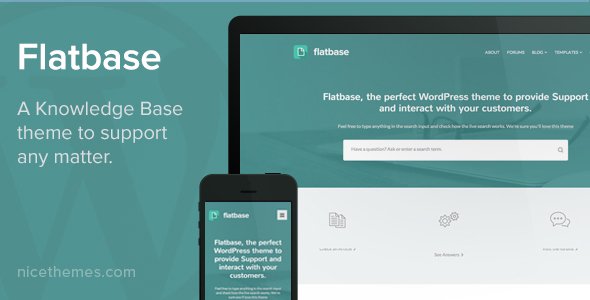
Stuck on your Flatbase WordPress theme? Let's fix it.
No endless back-and-forth. Just send us the details and we'll get it done.
No obligation · Replies within 1 hour · Quote within 1 day
Setup · Customization · Bug fixes · WooCommerce integration
About Flatbase WP Theme
Flatbase is a WordPress knowledge base and documentation theme built by NiceThemes. It is designed for software companies, SaaS products, and support teams that need a clean, searchable help center without building one from scratch.
The theme ships with a prominent Ajax-powered search bar, a structured article layout, and a category-based navigation system. Everything is oriented around helping users find answers quickly. It works with popular page builders and integrates with knowledge base plugins like BasePress and Heroic KB.
Flatbase suits teams that want a professional support portal that looks polished out of the box. The design is minimal and focused, which keeps readers on-task rather than distracted by unnecessary visual elements.
Get matched with a Flatbase developer in under one day
Tell us about your Flatbase project. Small fixes, Flatbase theme customization, or a full website build, whatever you need, we've got it covered.
We'll connect you to the right Flatbase developers, define the scope, and get everything 100% clear.
You'll get one estimate, hire your preferred developer, and start collaborating.
Flatbase looks simple, but production-ready documentation sites require more than a theme install. You need reliable search, proper content structure, plugin compatibility, and a setup that holds up when your content library grows.
Working with a vetted Flatbase developer through Codeable means you get someone who has handled these projects before. No guesswork, no back-and-forth on basics. Just a scoped project, a clear estimate, and work that gets done properly. That is what our WordPress development services are built around.
Pros
- Ajax search works well out of the box and requires no additional plugin for basic functionality
- Clean, distraction-free article layout that keeps readers focused on the content
- Compatible with major knowledge base plugins like Heroic KB and BasePress
- Category-based navigation is logical and easy for end users to browse
- Responsive design performs well on mobile without heavy customization
Cons
- Limited built-in article feedback or voting system without adding a plugin
- Customizer options are basic and advanced changes require custom CSS or PHP
- Not actively updated as frequently as larger commercial themes, which can cause plugin compatibility gaps
- No built-in ticketing or live chat integration, requires third-party tools
- Can feel generic without significant branding work applied by a developer
Who is Flatbase for?
SaaS Product Documentation
Flatbase is a natural fit for SaaS companies that need to document features, onboarding flows, and API references. The search-first design helps users find answers without opening a support ticket. A developer can connect it to your existing user authentication so customers only see docs relevant to their plan.
Internal Company Knowledge Base
Teams use Flatbase to centralize internal processes, HR policies, and technical runbooks. With restricted access configured for logged-in users only, it works as a private wiki. The category structure scales as content grows without becoming hard to navigate.
Software Support Portal
Software companies reduce support volume by publishing troubleshooting guides and FAQs in Flatbase. The Ajax search means users get results as they type. Pair it with a contact form or ticketing plugin and you have a complete first-line support experience without custom development from scratch.
WordPress Plugin or Theme Documentation
WordPress developers who sell plugins or themes use Flatbase to host their documentation separately from their marketing site. It handles changelogs, installation guides, and hook references well. The minimal layout keeps the focus on technical content without visual noise.
Agency Client Self-Service Hub
Agencies build Flatbase-powered portals for clients who need a branded resource center. Clients can access onboarding guides, deliverable templates, and process documentation in one place. With custom branding and restricted login access, it serves as a professional client-facing tool.

Customizing Flatbase
Flatbase gives you a solid starting point, but most teams need to push it further. That means matching brand colors, adjusting the homepage hero, restructuring category layouts, or wiring up a specific knowledge base plugin to fit an existing support workflow.
The theme supports the WordPress Customizer for basic changes, but anything beyond surface-level adjustments typically requires editing templates or adding custom CSS. A Flatbase expert can handle that without breaking core functionality or creating upgrade conflicts.
Common customization requests include custom article rating systems, sidebar modifications, restricted documentation for logged-in users only, and integration with tools like Intercom or Zendesk. These are well within scope for an experienced Flatbase developer.
Recommended plugins for Flatbase
Flatbase pairs well with plugins that extend its core documentation features. Heroic KB and BasePress add article voting, table of contents, and search analytics. For contact and support ticketing, Awesome Support or Help Scout integrations work cleanly alongside the theme.
If your documentation site also needs to rank well in search, structured content and fast load times matter. A developer can configure schema markup for FAQ and HowTo content directly within Flatbase templates. Improving WordPress performance and handling WordPress SEO properly will make a measurable difference in organic traffic to your help content.
Not sure which plugins to use? This WordPress plugins directory covers the most popular options with reviews and setup guides.
Flatbase common issues
Flatbase search not returning results
If the Ajax search returns no results, the first thing to check is whether your knowledge base plugin is correctly configured and that posts are assigned to the right post type. Flatbase’s search targets specific post types, so if articles are saved as standard posts or a different custom type, they will not appear. Clearing the object cache and checking permalink settings under Settings > Permalinks often resolves it. If not, a developer can inspect the search query and adjust the template accordingly. See our WordPress bug fixing service for this type of issue.
Flatbase not displaying categories correctly on homepage
Category display issues on the Flatbase homepage are usually caused by misconfigured category assignments or a conflict with a caching plugin. Check that each article is assigned to a category and that the homepage template is pulling from the correct taxonomy. If you recently added a new plugin, deactivate it temporarily to rule out a conflict. Rebuilding the permalink structure by saving it again under Settings > Permalinks fixes display problems in many cases without touching any theme files.
Flatbase theme broken after WordPress update
After a WordPress core update, theme display issues in Flatbase typically come from deprecated functions or plugin conflicts rather than the theme itself breaking. Start by switching to a default WordPress theme to confirm the issue is theme-specific. Then check for PHP notices in your error log. If a knowledge base plugin has not been updated recently, it may be triggering the conflict. A WordPress maintenance plan helps catch these issues before they hit a live site.
Flatbase article page layout not matching theme demo
If your Flatbase article pages do not match the demo, the most common cause is missing demo content or a knowledge base plugin that is not activated. Flatbase demos rely on specific plugins being active and configured. Install and activate the recommended plugin listed in the theme documentation, then import the demo content if available. If you built the site without the demo import, you may need to manually recreate the template structure, which a Flatbase developer can do quickly.
Flatbase FAQ
Flatbase works well with BasePress and Heroic KB. Both add structured post types, article voting, and search analytics that go beyond what the theme provides on its own. NiceThemes documentation recommends BasePress as the primary pairing. Your choice may depend on which plugin’s features better match your support workflow and budget.
You can use Flatbase with standard WordPress posts and pages, but you lose structured article management, search filtering by category, and features like article helpfulness ratings. For a basic FAQ or small documentation set, it works without a plugin. For anything larger or more structured, adding a dedicated knowledge base plugin makes a significant difference in usability.
Flatbase has limited official Elementor support. You can use Elementor on standard pages, but the knowledge base article templates are controlled by the theme’s own layout system. Trying to rebuild core documentation templates in Elementor often causes conflicts. Most developers work within the theme’s native template structure and use CSS for visual adjustments instead.
Yes. Combined with a membership plugin like MemberPress or a simple login restriction plugin, Flatbase can serve as a private knowledge base accessible only to logged-in users. This setup works well for internal teams or client portals. A developer can configure role-based access so different user groups only see content relevant to them.
Migrating to Flatbase involves moving your existing articles into the correct post type, reassigning categories, and rebuilding any custom layouts. If your current site uses a different knowledge base plugin, exporting and reimporting content can be done with the right tools. A developer handling a WordPress migration can map your old content structure to Flatbase’s format without losing articles or breaking internal links.
Hire a Flatbase Developer
Need help setting up, customizing, or fixing your Flatbase knowledge base? Whether you are starting fresh or untangling an existing build, a specialist can get it done faster and cleaner than trial and error.
Post your project and get matched with a vetted Flatbase expert within 24 hours. Free estimate, no obligation. Get your free estimate here and describe what you need.
You'll need a free Codeable account so developers can ask questions and send their quotes.