Fluid WordPress Theme
by Edge-Themes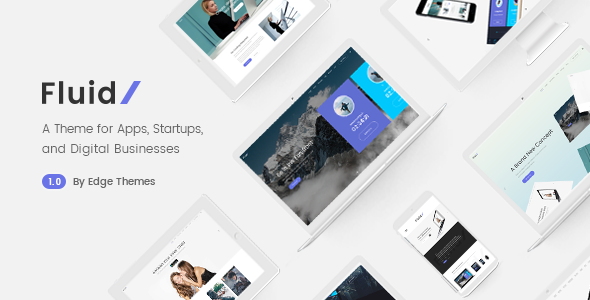
Stuck on your Fluid WordPress theme? Let's fix it.
No endless back-and-forth. Just send us the details and we'll get it done.
No obligation · Replies within 1 hour · Quote within 1 day
Setup · Customization · Bug fixes · WooCommerce integration
About Fluid WP Theme
Fluid is a WordPress theme built by Edge-Themes, designed around a clean grid layout with a strong focus on visual presentation. It suits creative agencies, photographers, and portfolio-driven businesses that need a polished look without heavy configuration.
The theme ships with multiple header styles, a drag-and-drop page builder, WooCommerce support, and a library of pre-built demo sites you can import in one click. Typography controls are solid, and the theme handles full-width imagery well out of the box.
Edge-Themes maintains Fluid actively, which means regular compatibility updates with new WordPress and WooCommerce releases. The codebase is relatively clean, though some users find the sheer number of theme options in the backend takes time to learn. It is a capable theme for anyone who wants design flexibility without starting from scratch.
Get matched with a Fluid developer in under one day
Tell us about your Fluid project. Small fixes, Fluid theme customization, or a full website build, whatever you need, we've got it covered.
We'll connect you to the right Fluid developers, define the scope, and get everything 100% clear.
You'll get one estimate, hire your preferred developer, and start collaborating.
Edge-Themes builds Fluid with its own conventions, and getting custom work done correctly means understanding those patterns. A developer who has only worked with generic themes will spend hours working out the structure before writing a single line of useful code.
Through Codeable, you get access to vetted WordPress developers who have worked with Fluid and similar Edge-Themes products. Estimates are free, there is no obligation to hire, and every project is backed by a satisfaction guarantee. It is a straightforward way to get the right person on your project without the usual freelancer risk.
Pros
- One-click demo import makes initial setup fast and gives a solid starting point for most project types
- Multiple header layouts built in, including sticky, transparent, and split options, without needing a plugin
- WooCommerce support is included and covers product pages, archives, and cart without extra configuration
- Edge-Themes releases regular updates, so Fluid stays compatible with current WordPress and PHP versions
- Typography controls are detailed enough to match most brand guidelines without custom CSS
Cons
- The theme options panel is large and can feel overwhelming for non-developers first setting it up
- The built-in page builder uses shortcodes, which creates lock-in and makes switching builders messy
- Demo content imports can bring in unnecessary plugins and assets that slow the site if not cleaned up
- JavaScript is loaded globally across the site by default, which hurts performance if not optimised
- Documentation covers basics but does not go deep enough for developers who need to customise theme templates
Who is Fluid for?
Creative Agency Portfolio
Fluid’s grid-based layouts and full-width image support make it a strong fit for creative agencies displaying case studies and project work. The multiple header styles let agencies present a professional front without heavy development. Adding a custom project post type and filtered portfolio gives clients a polished way to browse work by category.
Photography Studio Website
Photographers need clean presentation with minimal distraction. Fluid’s whitespace-friendly design and full-screen gallery options handle this well. Images render sharply, and the theme does not add unnecessary chrome around them. Pairing Fluid with a lightbox plugin and lazy loading gives a fast, professional photography site with minimal custom code needed.
WooCommerce Fashion Store
Fluid’s WooCommerce integration covers product listings, single pages, and checkout without a separate WooCommerce theme. For fashion or lifestyle brands, the visual emphasis suits product photography well. Custom product filters, size guides, and branded checkout pages are achievable with targeted development on top of what the theme already provides.
Interior Design Studio
Interior design firms need to lead with imagery and let projects speak. Fluid’s masonry and grid layouts handle project galleries cleanly. A developer can extend the theme with a custom project post type, filtering by room type or style, and a client enquiry form tied to specific projects, all without fighting the theme’s structure.
Freelancer or Consultant Site
Freelancers and consultants need a site that looks credible and converts visitors to enquiries. Fluid’s single-page demo options and contact-focused layouts work well for this. The theme is lightweight enough to load quickly, and a developer can tighten it further, removing unused demo content and adding a clear service and booking structure.

Customizing Fluid
Fluid gives you a large set of options through its own theme panel, covering layout widths, header behaviour, font pairings, and colour schemes. Most changes are straightforward, but getting a truly custom result often means going beyond the defaults.
Custom post types, advanced WooCommerce layouts, and bespoke landing pages are where many clients hit a wall. A Fluid expert who knows the Edge-Themes codebase can build on top of the theme properly, using child themes and clean PHP hooks rather than patching templates directly.
If you need custom functionality, specific animations, or a layout the theme panel cannot produce, working with a developer who has shipped projects on Fluid saves significant time. Edge-Themes has its own hook structure, and knowing where to intervene without breaking updates is not always obvious from documentation alone.
Recommended plugins for Fluid
Fluid works with most major WordPress plugins without issue. WooCommerce integration is built in, and the theme handles standard product layouts cleanly. The Visual Composer or Elementor page builders can be layered on top, though Fluid ships with its own shortcode-based content builder.
For performance, caching plugins like WP Rocket or LiteSpeed Cache work well with the theme. You may need some configuration to avoid conflicts with Fluid’s built-in scripts. WordPress performance optimisation is worth addressing early, especially on image-heavy portfolio builds.
SEO plugins such as Yoast or Rank Math slot in without issues. If you plan to grow organic traffic, pairing Fluid with a proper SEO strategy makes a measurable difference.
Not sure which plugins to use? This WordPress plugins directory covers the most popular options with reviews and setup guides.
Fluid common issues
Fluid theme slider not showing on mobile
This is usually caused by a JavaScript conflict between Fluid’s slider script and another plugin, or a CSS overflow rule hiding the slider on smaller screens. Check the browser console for script errors first. If no conflict shows, inspect the slider container in your browser dev tools and look for overflow: hidden or display: none on mobile breakpoints. In some cases, the slider settings inside the theme panel have a mobile visibility toggle that has been accidentally disabled. WordPress bug fixing can resolve this quickly if you are unsure where to look.
Fluid WordPress theme slow loading speed
Fluid loads several scripts and stylesheets globally, including animation libraries and font files that may not be needed on every page. Start by running a GTmetrix or PageSpeed Insights test to identify the largest offenders. Deferring non-critical JavaScript, enabling caching, and serving images in WebP format typically bring significant gains. If the theme’s built-in page builder is loading shortcode assets site-wide, a developer can restrict those to relevant pages only. See our WordPress performance service for a structured approach.
Fluid theme header layout broken after update
Header layout breaks after an update usually mean a template file was overridden in a child theme and is now out of sync with the parent theme’s updated version. Compare your child theme’s header template against the updated parent version and merge any structural changes. If you are not using a child theme and edited the parent directly, those changes will have been overwritten by the update. A developer can audit the diff and restore your customisations safely without losing the update benefits.
Fluid theme WooCommerce product page not displaying correctly
WooCommerce product page display issues in Fluid typically come from a version mismatch between WooCommerce and the theme’s bundled WooCommerce template files. Fluid includes its own overrides for product templates, and when WooCommerce updates its core templates, Fluid’s versions become outdated. Check WooCommerce’s status report under Tools for outdated template warnings. Updating those template files to match the current WooCommerce versions, while keeping Fluid’s styling intact, fixes the issue. This requires careful file-level editing.
Fluid FAQ
Yes, Fluid includes WooCommerce support out of the box. Product pages, shop archives, and cart and checkout pages all use Fluid’s styling without extra plugins. The theme handles single product images and galleries well, which suits visual product categories. For heavily customised stores with unique checkout flows or product configurators, a developer will need to extend beyond what the theme provides by default.
Fluid ships with its own shortcode-based content builder, but Elementor can be used alongside it. You would typically use Elementor on individual pages where you need more layout control. Running both builders on the same site adds page weight, so it is worth being deliberate about which one you use where. A developer can set Elementor as the default on specific pages while keeping Fluid’s native builder for others.
Fluid’s demo import is handled through the Edge-Themes Importer plugin, which is bundled with the theme. After activating the theme and its required plugins, go to Edge Options and look for the demo import section. Select the demo you want, click import, and wait for the process to complete. The import brings in pages, images, menus, and settings. Clean up any demo content you do not need after importing to keep the site tidy.
Migrating content to Fluid from another theme is possible. Posts and pages transfer automatically since they are stored in the WordPress database. The main work is rebuilding page layouts, because your old theme’s page builder data will not carry over to Fluid’s builder. Menus, widgets, and settings all need reconfiguring. A WordPress migration specialist can handle this efficiently and reduce the risk of losing content during the switch.
Create a new folder in wp-content/themes/ with a name like fluid-child. Inside it, add a style.css file with the standard child theme header referencing Fluid as the parent theme template. Add a functions.php file that enqueues the parent theme stylesheet. Activate the child theme from the WordPress admin. All your customisations go into the child theme so updates to Fluid do not overwrite your changes.
Hire a Fluid WordPress Developer
Whether you need a full Fluid build, a specific customisation, or a fix that has been sitting in your backlog, a specialist can turn it around faster than a generalist will. Post your project and get a free estimate within 24 hours through Codeable. No commitment required.
Get a free estimate and connect with a Fluid expert who knows the Edge-Themes codebase. Work is delivered on Codeable, 100% risk-free.
You'll need a free Codeable account so developers can ask questions and send their quotes.