Fluxus WordPress Theme
by intheme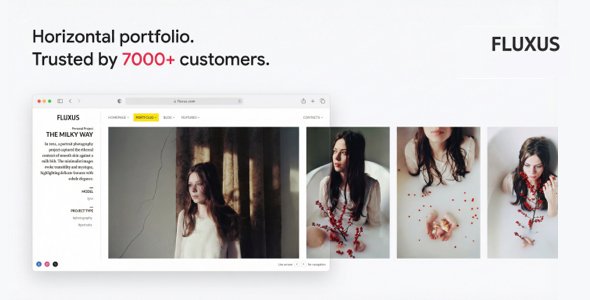
Stuck on your Fluxus WordPress theme? Let's fix it.
No endless back-and-forth. Just send us the details and we'll get it done.
No obligation · Replies within 1 hour · Quote within 1 day
Setup · Customization · Bug fixes · WooCommerce integration
About Fluxus WP Theme
Fluxus is a photography-focused WordPress theme by InTheme, built specifically for photographers, visual artists, and creative studios who need a clean, image-first portfolio. It strips away distractions and puts the work front and center using full-screen galleries, grid layouts, and minimal navigation.
The theme supports multiple portfolio styles, including masonry, horizontal scroll, and slideshow formats. It integrates with WooCommerce for print sales and includes AJAX-powered page transitions for a smooth browsing experience. Built on a lightweight codebase, Fluxus loads fast without heavy framework dependencies. It uses a custom options panel rather than the native WordPress Customizer, which keeps things focused but can feel unfamiliar to first-time users. Overall, it is a well-crafted theme for anyone whose primary goal is showcasing visual work without unnecessary clutter.
Get matched with a Fluxus developer in under one day
Tell us about your Fluxus project. Small fixes, Fluxus theme customization, or a full website build, whatever you need, we've got it covered.
We'll connect you to the right Fluxus developers, define the scope, and get everything 100% clear.
You'll get one estimate, hire your preferred developer, and start collaborating.
Fluxus has a specific structure that rewards those who know it well. If you need layout changes, custom gallery logic, WooCommerce integration, or anything that goes beyond the default options panel, working with a vetted Fluxus developer saves time and avoids broken updates. Through Codeable, you get matched with developers who have hands-on experience with photography themes like Fluxus. Every developer on the platform is vetted, and you get a free estimate before committing to anything.
Pros
- Image-first design with full-screen gallery layouts that require no customisation to look professional
- Multiple portfolio layout options including masonry, slideshow, and horizontal scroll per album
- AJAX page transitions create a fast, app-like browsing experience without extra plugins
- Lightweight codebase without heavy framework dependencies keeps page load times low
- WooCommerce compatible for selling prints or digital downloads directly from portfolio pages
Cons
- Theme options panel is custom-built and not integrated with the WordPress Customizer, which limits live preview
- Typography and colour customisation options are minimal without adding custom CSS
- Blog and content-heavy page layouts are basic and not a strong suit of this theme
- Limited third-party plugin compatibility compared to more popular multipurpose themes
- Documentation is sparse in places, making advanced modifications harder to self-manage
Who is Fluxus for?
Photography Portfolio
Fluxus was built for this. Photographers get full-screen image display, per-album layout control, and clean navigation that keeps the focus on the work. Whether you shoot landscapes, portraits, or documentary work, the theme handles large image sets without visual clutter. A Fluxus specialist can configure albums, set up categories, and optimise delivery for retina screens.
Wedding Photographer Website
Wedding photographers need galleries that feel editorial and load fast on mobile. Fluxus delivers that with minimal setup. You can separate galleries by couple or date, use slideshow layouts for emotional impact, and add a contact form or pricing page. A Fluxus developer can wire up enquiry forms, integrate a CRM, and make the site conversion-ready.
Fine Art Studio
Fine art studios need a site that looks like a gallery wall, not a blog. Fluxus handles this with its sparse UI and full-bleed image support. Works can be grouped by series or medium, and individual project pages give room for artist statements. Custom CSS from a Fluxus expert can refine typography and spacing to match a specific aesthetic.
Commercial Photographer with Print Sales
For photographers selling prints, Fluxus plus WooCommerce is a practical combination. Visitors browse portfolio albums and can purchase prints without leaving the site’s visual experience. A Fluxus developer can configure product variations by size and paper type, connect a print fulfillment service, and ensure the checkout matches the site’s minimal design.
Creative Agency Portfolio
Small creative agencies and design studios can use Fluxus to present project work in a curated, image-led format. The horizontal scroll and masonry layouts work well for showing multi-discipline projects. A Fluxus specialist can build out case study templates, add team pages, and integrate contact or brief submission forms for new business enquiries.

Customizing Fluxus
Out of the box, Fluxus gives you enough control to set up a professional portfolio quickly. You can configure layout styles per album, set featured images, control spacing, and manage navigation position through the theme options panel. Typography and color adjustments are limited by default, so anything beyond the preset options usually requires custom CSS or PHP modifications.
For more specific changes, like custom project templates, client gallery password protection, or a modified homepage structure, you will need a Fluxus expert who understands the theme’s architecture. InTheme built Fluxus with a specific workflow in mind, and working outside that pattern without breaking things takes experience. A developer familiar with the theme can extend it cleanly without hacking core files or creating update conflicts.
Recommended plugins for Fluxus
Fluxus works well as a standalone portfolio theme, but there are areas where targeted plugins add real value. WooCommerce unlocks print and digital download sales directly from portfolio pages. For client proofing workflows, plugins like Proofing Gallery or FooGallery can complement the built-in album system.
If you run a photography business with a blog or service pages, investing in proper WordPress SEO optimisation makes a measurable difference for local and niche search traffic. Fluxus pages also benefit from image optimisation plugins and caching, covered in detail in our WordPress performance guide, since high-resolution photography can slow down load times significantly.
Not sure which plugins to use? This WordPress plugins directory covers the most popular options with reviews and setup guides.
Fluxus common issues
Fluxus portfolio not displaying images correctly
This is usually caused by incorrect image sizes set in the theme options, or a missing image regeneration step after changing those settings. Go to Fluxus theme options and confirm the gallery type and image dimensions match your upload sizes. Then use the Regenerate Thumbnails plugin to reprocess existing images. If the problem persists after that, a template file conflict or a caching plugin may be interfering. Clear all caches and test in an incognito window.
Fluxus AJAX transitions broken after WordPress update
AJAX transitions in Fluxus rely on specific JavaScript hooks. After a WordPress core update, a plugin conflict or a jQuery version change can break the handoff between pages. Disable plugins one by one to isolate the conflict. If the issue appeared immediately after updating WordPress, check whether Fluxus has a compatible theme update available. If you need this resolved quickly without the trial and error, our WordPress bug fixing service can diagnose and patch it fast.
Fluxus WooCommerce layout not matching theme style
Fluxus has limited native WooCommerce template overrides. When the WooCommerce plugin updates its templates, visual mismatches appear. You need custom WooCommerce template files placed inside a /woocommerce/ folder in your child theme, styled to match the Fluxus aesthetic. This is not a quick fix without development knowledge. A Fluxus developer can build clean WooCommerce overrides that update safely and match the portfolio design.
Fluxus theme options not saving changes
If Fluxus theme options are not saving, the most common cause is a nonce verification failure or a permissions issue on the options table in the database. Check that your WordPress user role is Administrator. Deactivate security plugins temporarily and try saving again. If changes save but reset on page reload, a caching layer is likely serving stale data. Clear server-side cache, object cache, and browser cache, then test again.
Fluxus horizontal scroll not working on mobile
The horizontal scroll layout in Fluxus uses JavaScript to convert vertical mouse scroll into horizontal movement. On mobile, this relies on touch event handling that can conflict with certain mobile browsers or viewport meta settings. Check that your theme’s viewport meta tag is set correctly and that no plugin is overriding touch events. If the layout simply does not suit mobile use, switching to a vertical grid layout for mobile via CSS media queries is a cleaner solution.
Fluxus custom CSS not applying after update
If you added custom CSS directly to the theme files rather than a child theme or the Additional CSS section, a theme update will wipe those changes. Always add custom CSS through Appearance > Customize > Additional CSS, or better, through a child theme stylesheet. If you have lost custom CSS after an update and need to recover or reapply it properly, our WordPress bug fixing service can help restore your changes and set things up to survive future updates.
Fluxus images loading slowly on portfolio pages
Slow image loading on Fluxus portfolio pages is almost always an image file size issue. Fluxus displays images at large sizes but does not automatically compress uploads. Install an image optimisation plugin like ShortPixel or Imagify and run it on your media library. Also confirm that lazy loading is active, either natively through WordPress or via a performance plugin. A caching layer at the server or CDN level will also reduce repeat load times significantly.
Fluxus album cover not showing on homepage
Album covers on the Fluxus homepage pull from the featured image set on the portfolio post. If no featured image is set, the cover will appear blank or missing. Open the portfolio post in the WordPress editor, scroll to the featured image panel on the right, and assign an image. If the featured image is set but still not showing, flush your cache and check whether a page builder or custom template is overriding the standard post loop on the homepage.
Fluxus contact form not sending emails
Fluxus does not include a native contact form, so this depends on which plugin you are using. If you are using Contact Form 7 or WPForms, the most common cause of emails not sending is server-level mail delivery failure, not a Fluxus issue. Install an SMTP plugin like WP Mail SMTP and connect it to a transactional email service like SendGrid or Mailgun. Test delivery after setup. If forms submit but show errors, check for JavaScript conflicts with Fluxus scripts.
Fluxus child theme not inheriting styles
A Fluxus child theme needs to enqueue the parent theme stylesheet correctly. In your child theme’s functions.php, use wp_enqueue_style with a dependency on the parent handle rather than using @import in the stylesheet. Also confirm the child theme’s style.css header includes Template: fluxus matching the exact folder name of the parent theme. If styles are still missing, check that the child theme is active and that no caching plugin is serving the parent theme’s cached assets.
Fluxus FAQ
Yes, Fluxus is one of the more purpose-built photography portfolio themes available. It prioritises image display with full-screen layouts, per-album grid controls, and AJAX transitions. It is not a general-purpose theme, which is actually what makes it effective for photographers. If your site is primarily a visual portfolio, Fluxus handles it well without plugins or page builders.
Yes, Fluxus is WooCommerce compatible. You can sell prints, digital downloads, or photography packages. The default WooCommerce templates do not match the Fluxus aesthetic perfectly, so some CSS or custom template overrides are usually needed. A Fluxus developer can build those overrides so the shop pages feel consistent with the rest of the portfolio.
Fluxus supports embedded video in portfolio posts using standard WordPress video embeds or oEmbed from YouTube and Vimeo. Full-screen video covers on the homepage are possible with customisation. However, if video is your primary medium rather than photography, you may find Fluxus’s video support less polished than a dedicated video portfolio theme. It works, but with some limitations.
Fluxus includes a blog post type and basic archive and single post templates. You can activate it by creating a page and assigning the blog template. The blog design is functional but minimal. It does not offer the layout variety of a general blogging theme. If you want a content-heavy blog alongside your portfolio, additional CSS work or a custom template will improve the experience.
Fluxus is not built for Elementor or Gutenberg. It uses its own custom post types and options panel. Forcing a page builder onto Fluxus often breaks the theme’s layout logic and AJAX transitions. For portfolio pages especially, it is better to work within the theme’s own system. Gutenberg works for basic pages like contact or about, but the core portfolio functionality sits outside the block editor.
Fluxus does not have built-in multi-photographer or multi-user portfolio features. You can use WordPress user roles to allow contributors to add portfolio posts, but there is no front-end profile or photographer-specific filtering built into the theme. Adding that kind of functionality requires custom development from a Fluxus specialist.
Create a folder named fluxus-child in your wp-content/themes directory. Add a style.css with the correct theme header including Template: fluxus. Then add a functions.php that enqueues the parent stylesheet using wp_enqueue_style. Activate the child theme from Appearance > Themes. All custom CSS and PHP overrides go into the child theme to survive updates.
Fluxus migrations are straightforward since the theme stores settings in the WordPress database rather than flat files. A standard migration process, moving files and importing the database, will carry all theme options and portfolio content. Image paths need to match the new domain, which a search-and-replace on the database handles. See our WordPress migration service for full details.
Never modify core theme files directly. Use a child theme for all CSS and PHP changes. Before updating, back up your site and check the InTheme changelog for any breaking changes. After updating, clear all caches and test key pages. If you store custom CSS in Additional CSS under the Customizer, it survives theme updates. Template overrides in a child theme also survive as long as file names match.
Codeable is the best option for hiring a vetted Fluxus developer. Post your project, describe what you need, and receive a free estimate from a specialist within 24 hours. Every developer on Codeable is vetted and reviewed. There is no obligation to hire after receiving your estimate. You can also get a free estimate here directly.
Hire a Fluxus Developer
Whether you need a layout tweak, a WooCommerce print shop added, or a full Fluxus build from scratch, working with an experienced developer gets it done without guesswork. Post your project, get a free estimate, and only move forward when you are confident. No obligation, no risk.
Get a Free Estimate and describe what you need. A vetted Fluxus specialist will respond within 24 hours.
You'll need a free Codeable account so developers can ask questions and send their quotes.