Food & Cook WordPress Theme
by Dahz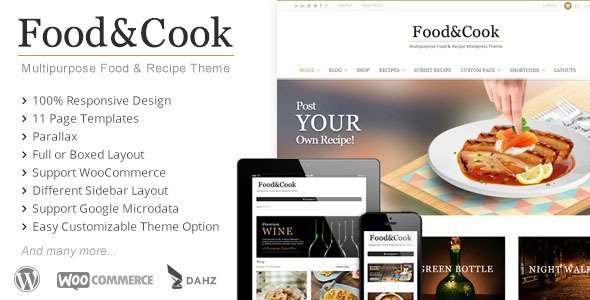
Stuck on your Food & Cook WordPress theme? Let's fix it.
No endless back-and-forth. Just send us the details and we'll get it done.
No obligation · Replies within 1 hour · Quote within 1 day
Setup · Customization · Bug fixes · WooCommerce integration
About Food & Cook WP Theme
Food & Cook is a WordPress theme built by Dahz, a developer known for polished, feature-rich themes. It targets food bloggers, recipe creators, and restaurant owners who want a visually appealing site without starting from scratch. The theme ships with multiple pre-built demos, a recipe index layout, and tight integration with popular recipe plugins. Typography is clean, food photography gets proper space to breathe, and the overall structure is built for content-heavy sites. It runs on the Elementor page builder, which means most layout changes happen visually. Performance out of the box is reasonable, though image-heavy food sites often need extra tuning. If you run a recipe blog, a cooking school, or a food-focused online shop, Food & Cook gives you a solid starting point without requiring heavy custom development from day one.
Get matched with a Food & Cook developer in under one day
Tell us about your Food & Cook project. Small fixes, Food & Cook theme customization, or a full website build, whatever you need, we've got it covered.
We'll connect you to the right Food & Cook developers, define the scope, and get everything 100% clear.
You'll get one estimate, hire your preferred developer, and start collaborating.
Food & Cook is not a difficult theme, but getting it to perform well, look exactly right, and scale with your content takes real WordPress experience. Dahz themes have their own logic, and working around limitations without breaking things requires someone who knows what they are doing. The developers on Codeable are vetted, reviewed, and matched to your specific project. You post your project, get estimates within 24 hours, and only pay if you decide to move forward. No risk, no commitment upfront.
Pros
- Multiple pre-built demos designed specifically for food and recipe niches, reducing setup time significantly
- Built on Elementor, so layout editing is visual and accessible without touching code
- Recipe index and archive layouts are included and styled out of the box
- Strong visual design with generous whitespace that suits food photography well
- Compatible with major recipe plugins like WP Recipe Maker and Tasty Recipes for schema output
Cons
- Theme updates from Dahz can occasionally break custom modifications made outside a child theme
- Elementor dependency means page load weight is higher than block-based or lightweight themes
- Some custom Dahz modules have limited documentation, making them harder to extend without developer help
- WooCommerce styling requires extra CSS work to match the food-focused design properly
- Support from Dahz can be slow for complex technical issues, especially outside business hours
Who is Food & Cook for?
Recipe Blogs
Food & Cook is a natural fit for recipe bloggers. The theme includes archive layouts built around recipe categories, ingredient filters, and card-style listings. Paired with WP Recipe Maker, you get structured schema data that helps recipes appear in Google rich results. A Food & Cook developer can configure the full recipe workflow so new posts publish cleanly every time.
Food Photography Portfolios
The theme’s wide image layouts and clean typography make it a solid base for food photographers who want a portfolio with a blog attached. Gallery sections display well without heavy customization. A Food & Cook specialist can strip out unnecessary template sections and build a lean, image-first layout that loads quickly and stays out of the way of the photography itself.
Online Cooking Schools
Cooking schools and online course creators can use Food & Cook alongside plugins like LearnDash or LifterLMS. The theme’s structured layout works for course listings, instructor bios, and class schedules. A Food & Cook expert can build out the course pages within the existing design so everything stays visually consistent without custom theme development from scratch.
Restaurant and Cafe Websites
Restaurants and cafes need menus, location details, booking links, and strong visual branding on a single site. Food & Cook covers all of that with its pre-built demos. A Food & Cook developer can configure the menu section, embed a reservation system, and optimize the mobile layout so customers on phones can find what they need without frustration.
Food Product and Cookbook Shops
Selling cookbooks, meal plans, or specialty food products works well when WooCommerce is integrated into Food & Cook. The product pages need styling that matches the overall theme design, and checkout flows need testing across devices. A Food & Cook specialist can set up WooCommerce properly, style the shop pages, and configure payment and shipping options correctly from the start.

Customizing Food & Cook
Food & Cook customization covers everything from color palettes and font pairings to header styles and recipe card layouts. Because it uses Elementor, most changes are drag-and-drop. But the real complexity shows up fast. Dahz builds extra shortcodes and custom modules into the theme, and getting those to behave exactly how you want often requires PHP edits or child theme work. A Food & Cook expert can set up a child theme properly, wire up a recipe plugin like WP Recipe Maker or Tasty Recipes, build a custom meal plan page, or integrate WooCommerce for selling cookbooks and digital downloads. Trying to do all of this without experience usually means broken layouts, duplicate code, or updates that wipe your changes. Hiring a Food & Cook specialist saves time and avoids those mistakes.
Recommended plugins for Food & Cook
Food & Cook pairs well with several WordPress plugins and services. WP Recipe Maker and Tasty Recipes add structured recipe schema, which directly helps search rankings. WooCommerce works well for selling products, meal plans, or digital recipe books. For site speed, a caching plugin like WP Rocket combined with a CDN makes a real difference on image-heavy food sites. You can read more about tuning your setup on our WordPress performance page. If you want recipe content to rank in Google search, pairing the theme with a solid SEO strategy is essential. Our WordPress SEO service covers that in detail.
Not sure which plugins to use? This WordPress plugins directory covers the most popular options with reviews and setup guides.
Food & Cook common issues
Food & Cook recipe layout broken after theme update
Recipe layout breaks after a theme update usually mean customizations were made directly in the theme files instead of a child theme. When Dahz pushes an update, those file changes get overwritten. The fix involves identifying which template files were modified, recreating those changes inside a child theme, and running the update again cleanly. If the break is more complex, a WordPress bug fixing specialist can audit the affected templates and restore the layout without losing your content or existing configuration.
Elementor widgets not loading correctly on Food & Cook pages
Elementor widgets failing to load on Food & Cook pages usually comes down to a plugin conflict, a failed Elementor update, or a CSS or JavaScript error thrown by one of the Dahz custom modules. Start by deactivating plugins one at a time to isolate the conflict. If the issue persists after plugin checks, clearing the Elementor cache and regenerating CSS files often resolves it. For persistent or unclear errors, a WordPress bug fixing service can trace the exact source and fix it without disrupting your other pages.
Food & Cook homepage demo content not importing properly
Demo content import failures in Food & Cook are common and usually caused by server limits on upload size or execution time. The demo import process pulls in images, pages, and settings simultaneously, which can time out on shared hosting. Raise the PHP memory limit, max execution time, and upload size in your server configuration or wp-config.php. If the import still fails partially, you may need to import XML content and settings separately, then manually reassign menus and widgets to match the demo layout.
Food & Cook slow loading on mobile with large food images
Slow mobile performance on Food & Cook almost always comes from unoptimized images. Food photography files are large, and the theme does not apply aggressive compression by default. Install a plugin like ShortPixel or Imagify to convert images to WebP and compress existing uploads. Enable lazy loading for images below the fold. Also consider disabling Elementor scripts on pages that do not use the builder, which reduces JavaScript payload. These steps together typically bring mobile load times down to an acceptable range.
Food & Cook FAQ
Yes. Food & Cook includes recipe archive layouts, category filters, and card-style listings designed for recipe-heavy content. When paired with a recipe plugin like WP Recipe Maker or Tasty Recipes, you also get structured schema data, which helps individual recipes appear in Google rich results. It is one of the more complete starting points available for food bloggers who want a styled site without building from scratch.
Yes, Food & Cook works with WP Recipe Maker. The theme provides the visual layout and design, while WP Recipe Maker handles recipe cards, ingredient lists, nutrition info, and schema output. You may need to apply some CSS to align the recipe card styling with your theme’s fonts and colors, but the core functionality works without conflicts. A Food & Cook developer can handle that styling quickly if needed.
Technically you can use Food & Cook without Elementor for pages that were not built with it, but the pre-built demos and most template layouts depend on Elementor. Removing it would break the demo pages. If you want to migrate your content to the block editor, that requires rebuilding pages manually. It is worth considering whether the switch is worth the effort for your specific site.
Always use a child theme for any code changes. If your customizations live in a child theme, updating the parent Food & Cook theme from Dahz will not overwrite them. Before any update, back up your site fully. After updating, check key pages visually and test recipe layouts and any custom Elementor templates. This process protects your work without requiring you to skip updates entirely.
Food & Cook is compatible with WooCommerce, but the WooCommerce shop and product pages do not automatically match the theme’s food-focused design. You will need to apply CSS or use Elementor templates to style the shop section consistently. For sites selling cookbooks, meal plans, or food products, a Food & Cook specialist can configure WooCommerce and style it to fit the existing design without starting from scratch.
Hire a Food & Cook Developer for Your WordPress Site
Whether you need a Food & Cook expert to set up your site from scratch, fix a layout issue, or integrate a recipe plugin, you can get matched with a vetted developer fast. Post your project and receive a free estimate with no obligation to hire. Work is scoped clearly before anything starts, so there are no surprises. Get a free estimate and describe what you need. A Food & Cook specialist will review it and get back to you within 24 hours.
You'll need a free Codeable account so developers can ask questions and send their quotes.