Food Store WordPress Theme
by ThemeFTC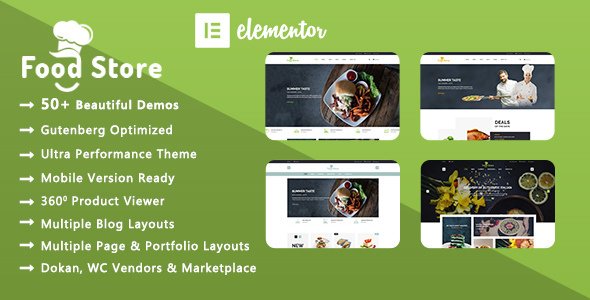
Stuck on your Food Store WordPress theme? Let's fix it.
No endless back-and-forth. Just send us the details and we'll get it done.
No obligation · Replies within 1 hour · Quote within 1 day
Setup · Customization · Bug fixes · WooCommerce integration
About Food Store WP Theme
Food Store is a WooCommerce theme by ThemeFTC built specifically for online grocery and food retail shops. It ships with a clean product grid layout, sticky cart, and category-focused navigation that makes it easy for customers to browse by product type.
The theme supports variable products, quantity selectors, and quick-view modals out of the box. It is translation-ready and works with WPML for multilingual stores. Built on a lightweight base, Food Store loads fast without needing heavy page builders. ThemeFTC provides regular updates and documentation, making it a practical starting point for anyone launching a food e-commerce site on WordPress without writing code from scratch.
Get matched with a Food Store developer in under one day
Tell us about your Food Store project. Small fixes, Food Store theme customization, or a full website build, whatever you need, we've got it covered.
We'll connect you to the right Food Store developers, define the scope, and get everything 100% clear.
You'll get one estimate, hire your preferred developer, and start collaborating.
Food Store covers the visual layer, but a working grocery store needs more than a theme. Delivery zones, tax rules, stock management, and checkout flows all need proper configuration. Finding a developer who knows both WooCommerce and Food Store specifically saves time and avoids costly mistakes.
Through Codeable, you get matched with vetted WordPress developers who have relevant e-commerce experience. Every project starts with a free estimate, and you only hire if the scope and price make sense. No risk, no obligation.
Pros
- Purpose-built for grocery and food retail with category navigation and sticky cart included
- Lightweight codebase that loads faster than theme builder alternatives without bloat
- Quick-view product modals and quantity selectors work out of the box with WooCommerce
- Translation-ready and tested with WPML for multilingual food store setups
- Regular updates from ThemeFTC with documentation that covers most standard configurations
Cons
- Customization beyond basic color and font changes requires PHP or child theme work
- No built-in delivery slot or postcode restriction feature, requires a third-party plugin
- Limited block editor support, most layout editing is done through theme options and shortcodes
- Homepage sections are not as flexible as page builder themes for non-standard layouts
- Support response times from ThemeFTC can be slow for complex WooCommerce configuration questions
Who is Food Store for?
Online Grocery Store
Food Store fits traditional grocery retail well. The category-first navigation lets customers find produce, dairy, or pantry staples quickly. Combined with WooCommerce inventory tracking and a delivery slots plugin, you can run a fully operational local grocery shop online with manageable overhead.
Farm Box and Subscription Delivery
Farm boxes and CSA subscriptions need recurring billing and flexible product bundles. Food Store’s WooCommerce base supports the WooCommerce Subscriptions plugin, allowing weekly or fortnightly box orders. A developer can configure box contents, pause options, and delivery frequency without custom plugin development.
Butcher or Deli Shop
Butcher and deli shops often sell products by weight with variable pricing. Food Store supports variable WooCommerce products, so cuts and portion sizes display clearly. A developer can add a measurement-based pricing plugin and configure conditional shipping rules for chilled delivery requirements.
Health Food and Organic Products
Health food retailers benefit from clean product presentation and detailed descriptions. Food Store’s product grid handles large catalogs without cluttering the layout. Adding filter plugins for dietary labels like vegan, gluten-free, or organic helps customers narrow down products and reduces time spent on customer support queries.
Local Convenience Store Online
A local convenience store going online needs simple checkout, fast load times, and clear stock availability. Food Store handles all three without heavy infrastructure. With a click-and-collect plugin added, customers can place orders for in-store pickup, making the transition from walk-in to online retail straightforward.

Customizing Food Store
Food Store gives you a functional grocery store layout by default, but most businesses will need adjustments before going live. That includes custom color schemes to match branding, tweaks to the header and announcement bar, custom category icons, and changes to how product cards display pricing or weight units.
Beyond visual changes, a Food Store expert can set up delivery slot plugins, minimum order rules, postcode-based shipping zones, and tiered pricing for bulk buyers. These are common requirements for grocery stores that the theme does not configure automatically. Working with a specialist means these features get implemented correctly the first time, without breaking existing WooCommerce functionality.
Recommended plugins for Food Store
Food Store works well with several WooCommerce extensions. Delivery and pickup plugins like Iconic WooCommerce Delivery Slots or Orderable add time-slot booking. For subscriptions, WooCommerce Subscriptions handles weekly or monthly box orders cleanly.
On the technical side, pairing the theme with a caching plugin and a CDN makes a real difference for stores with large product catalogs. You can read more on the WordPress performance page. For stores investing in organic search traffic, structured data for products is worth setting up properly. More on that on the WordPress SEO page.
Not sure which plugins to use? This WordPress plugins directory covers the most popular options with reviews and setup guides.
Food Store common issues
Food Store theme product images not displaying correctly
This usually comes down to image size settings in WooCommerce or a missing image regeneration step after theme activation. Go to WooCommerce > Settings > Products and check the thumbnail dimensions match what Food Store expects. Then run the Regenerate Thumbnails plugin to rebuild all product images at the correct sizes. If images are still cropped incorrectly, a developer can adjust the theme’s registered image sizes in the child theme.
Food Store WooCommerce cart not updating without page refresh
Food Store’s sticky cart relies on AJAX to update without reloading. If it stops working, the most common causes are a JavaScript conflict with another plugin or a caching plugin serving stale page content. Start by deactivating plugins one at a time to isolate the conflict. If you use a caching plugin, exclude the cart and checkout pages from caching. Persistent issues with AJAX cart behavior are worth handing to a WordPress bug fixing specialist.
Food Store theme slow loading on mobile
Slow mobile load times with Food Store often trace back to unoptimized product images, unminified scripts, or a lack of lazy loading. Use Google PageSpeed Insights to identify the specific bottlenecks. Start by enabling lazy loading for images in WordPress settings, then compress existing product photos. Unneeded plugins also add load time. A developer can audit and fix the underlying causes properly.
Food Store checkout page layout broken after plugin update
Checkout layout breaks after plugin updates are usually caused by CSS conflicts or a WooCommerce template override that has gone out of date. Check if the Food Store theme has overridden WooCommerce template files in its folder structure. If those files are outdated compared to the current WooCommerce version, they need to be updated manually. This is a recurring maintenance issue worth addressing as part of ongoing WordPress maintenance.
Food Store FAQ
ThemeFTC updates Food Store to maintain WooCommerce compatibility, but there is often a short lag after major WooCommerce releases. Before updating WooCommerce on a live store, check the theme changelog for a confirmed compatibility note. Testing updates on a staging site first avoids checkout or product page issues caused by template mismatches between the theme and the new WooCommerce version.
Food Store is not designed as an Elementor theme. Basic Elementor widgets will work on standard pages, but the theme’s core grocery layout, product archive, and cart features are controlled through its own theme options rather than Elementor modules. Trying to rebuild the grocery layout inside Elementor typically creates more problems than it solves. The theme works best used as intended.
Food Store does not include an advanced filter system by default. WooCommerce’s built-in layered navigation widget provides basic attribute filtering. For price range sliders, stock status filters, or dietary label filtering, a plugin like FiboFilters or WooCommerce Product Filters is needed. A developer can integrate these cleanly with the theme’s existing category navigation.
Food Store does not include delivery slot booking natively. The most widely used option is the Iconic WooCommerce Delivery Slots plugin, which adds time slot selection to the checkout page. Orderable is another option with a more visual interface. Either plugin requires some configuration to match your delivery days, cutoff times, and order limits per slot. A developer can set this up to match your logistics.
Migrating an existing WooCommerce store to Food Store is possible. Products, orders, and customer data transfer independently of the theme. The main work involved is rebuilding the homepage layout, reconfiguring widget areas, and ensuring any template customizations from the old theme are carried over. For complex stores, it is worth using a WordPress migration service to avoid data loss or checkout disruption.
Hire a Food Store Developer
If you need help setting up, customizing, or extending your Food Store theme, working with a specialist is the fastest way to get it right. From delivery slot configuration to checkout customization, a developer with WooCommerce and Food Store experience will handle it without guesswork.
Post your project through our free estimate form and get matched with a vetted developer within 24 hours. No commitment required until you approve the scope and price.
You'll need a free Codeable account so developers can ask questions and send their quotes.