Fooddy 24/7 WordPress Theme
by AncoraThemes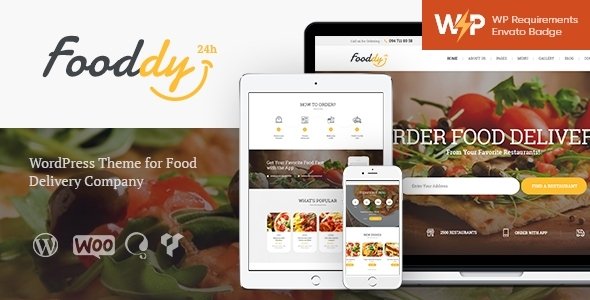
Stuck on your Fooddy 24/7 WordPress theme? Let's fix it.
No endless back-and-forth. Just send us the details and we'll get it done.
No obligation · Replies within 1 hour · Quote within 1 day
Setup · Customization · Bug fixes · WooCommerce integration
About Fooddy 24/7 WP Theme
Fooddy 24/7 is a WordPress restaurant theme built by AncoraThemes. It targets food businesses that need a clean, functional site without heavy development work. The theme ships with a pre-built homepage layout, an integrated food menu section, and a reservation widget that connects directly to booking plugins.
Built on a lightweight base, Fooddy 24/7 supports WooCommerce for online ordering and includes Elementor compatibility for drag-and-drop editing. It is translation-ready and tested against current WordPress core versions. The mobile layout handles well out of the box, which matters for restaurant visitors checking menus on their phones. AncoraThemes provides documentation and support through ThemeForest, where the theme is actively sold and updated.
Get matched with a Fooddy 24/7 developer in under one day
Tell us about your Fooddy 24/7 project. Small fixes, Fooddy 24/7 theme customization, or a full website build, whatever you need, we've got it covered.
We'll connect you to the right Fooddy 24/7 developers, define the scope, and get everything 100% clear.
You'll get one estimate, hire your preferred developer, and start collaborating.
Fooddy 24/7 looks straightforward until you try to build something specific. Custom menu filters, online ordering flows, and booking integrations all require proper configuration. A developer who knows WordPress and has worked with restaurant themes will save you time and avoid the common mistakes that break layouts or slow down page load.
Through Codeable, FoxyConcept matches you with vetted WordPress developers who can handle Fooddy 24/7 work properly. Post your project, get an estimate, and decide from there. No commitment required.
Pros
- Pre-built restaurant layout reduces setup time significantly
- WooCommerce compatible for online ordering without extra configuration
- Elementor support allows visual editing without touching code
- Mobile layout handles menu pages well without custom CSS
- AncoraThemes provides regular updates and ThemeForest support
Cons
- Header and footer options are limited compared to newer restaurant themes
- Food menu section lacks built-in filtering by dietary preference or category
- Reservation widget depends on third-party plugins with no native booking system
- Page builder dependency means performance can drop on image-heavy menu pages
- Limited demo variety makes it harder to preview alternate layout directions
Who is Fooddy 24/7 for?
Independent Restaurants
Fooddy 24/7 suits independent restaurants that want a professional site without a large budget. The pre-built layout covers the key pages: menu, hours, location, and reservations. A developer can wire up a booking plugin and connect Google Maps quickly. Most single-location restaurants can go live within a few days of customization work.
Cafes and Coffee Shops
Cafes benefit from Fooddy 24/7’s clean design and simple menu display. The theme handles daily specials and seasonal drinks well when set up with a custom post type. Online ordering through WooCommerce works for click-and-collect setups. The layout stays readable on mobile, where most cafe visitors search for menus and hours.
Food Delivery Services
Food delivery businesses need fast loading times and a clear ordering flow. Fooddy 24/7 connects to WooCommerce for product-based ordering. A developer can add delivery zone logic and integrate payment gateways like Stripe. The theme structure supports category filtering once custom taxonomy is added, which helps customers navigate large menus.
Catering Companies
Catering companies use Fooddy 24/7 to present packages, pricing, and inquiry forms. The theme’s section layout works well for event catering pages. A developer can build a quote request form using Gravity Forms and tie it to a CRM. Portfolio-style gallery sections show past events without needing a separate plugin.
Ghost Kitchens and Dark Kitchens
Ghost kitchens operate multiple brands from one location. Fooddy 24/7 can be adapted to support this with separate menu sections or even a WordPress multisite setup. Each brand can have its own ordering flow within one installation. A developer familiar with the theme can structure this without bloating the site with unnecessary plugins.

Customizing Fooddy 24/7
Out of the box, Fooddy 24/7 covers the basics. But most food businesses need adjustments that go beyond what the theme panel offers. A Fooddy 24/7 expert can rework the menu layout, add custom post types for specials or seasonal items, and integrate third-party booking or delivery systems like OpenTable or Uber Eats.
Common customization requests include changing the color scheme to match brand guidelines, adjusting typography for readability, rebuilding the homepage structure in Elementor, and adding custom checkout flows for online orders. If you are running multiple locations, a Fooddy 24/7 expert can also set up location-specific pages and filter menus by branch. These are not complex jobs, but they need someone who knows the theme structure well to avoid breaking existing functionality.
Recommended plugins for Fooddy 24/7
Fooddy 24/7 pairs well with several plugin categories. WooCommerce handles online ordering. WPForms or Gravity Forms work for reservation requests and contact. WPML or Polylang cover multilingual menus for restaurants serving international audiences.
For site speed, caching plugins like WP Rocket and image optimization tools make a real difference, especially on menu-heavy pages with large food photography. If you want better search visibility for local queries, structured data plugins help Google surface your hours, location, and menu items. See our WordPress performance service and WordPress SEO service for professional setup.
Not sure which plugins to use? This WordPress plugins directory covers the most popular options with reviews and setup guides.
Fooddy 24/7 common issues
Fooddy 24/7 menu section not displaying correctly
Menu display issues in Fooddy 24/7 usually come from a conflict between the theme’s custom post type and a page builder override. Check whether the menu section is pulling from a widget area or a shortcode. If a recent plugin update broke the layout, disable plugins one by one to isolate the conflict. Clearing your cache after each test is essential. If the issue persists, a developer can inspect the template files directly. Visit our WordPress bug fixing service for hands-on help.
Fooddy 24/7 WooCommerce checkout not working
WooCommerce checkout failures in Fooddy 24/7 often trace back to a JavaScript conflict or an outdated payment gateway plugin. Start by switching to a default WordPress theme temporarily to confirm whether the theme is causing the issue. Check the browser console for JS errors. Make sure WooCommerce and all payment plugins are on their latest versions. If the problem only appears on specific pages, a template override in the theme’s WooCommerce folder may need editing.
Fooddy 24/7 Elementor page builder slow or crashing
Elementor slowdowns in Fooddy 24/7 are usually caused by too many widgets loading on a single page or large uncompressed images. Go to Elementor settings and disable features you are not using, like Font Awesome and Google Fonts loading on every page. Run images through a compression tool before uploading. If the editor crashes entirely, check PHP memory limits in your hosting panel. Increasing memory to 256MB resolves most editor crashes.
Fooddy 24/7 reservation form not sending emails
When reservation form emails are not arriving, the most common cause is the WordPress default mail function being blocked by your hosting provider. Install an SMTP plugin like WP Mail SMTP and configure it with your email provider’s credentials. Also check the spam folder before assuming emails are failing. If you are using a contact form plugin for reservations, verify the notification email address is correct and test with a different address to rule out filtering issues.
Fooddy 24/7 FAQ
AncoraThemes maintains Fooddy 24/7 with regular updates on ThemeForest. The theme is tested against current WordPress releases. That said, major WordPress core updates can occasionally break theme functionality. Keeping the theme updated and testing after WordPress upgrades is recommended. If something breaks after an update, a developer can usually fix it quickly.
Yes. Fooddy 24/7 is WooCommerce compatible. You can set up food items as products and use WooCommerce checkout for online orders. You will need to configure a payment gateway separately. The default theme styling covers basic WooCommerce pages, though some visual adjustments are often needed to match the overall restaurant design.
Fooddy 24/7 supports Elementor. Most page sections can be rebuilt or extended using Elementor’s drag-and-drop editor. Some theme-specific sections like the food menu widget work better through the native theme panel rather than Elementor. A developer can clarify which parts of the site are best managed through which tool.
Fooddy 24/7 does not include a native reservation system. Most users add one through a plugin like Booking for Restaurants, OpenTable embed, or a form plugin like Gravity Forms connected to email. The theme has a contact section that can be repurposed for bookings. A developer can set this up properly so requests route to the right inbox.
Out of the box, Fooddy 24/7 is designed for a single location. Running multiple locations requires custom development: separate location pages, location-specific menus, and possibly a WordPress multisite setup. This is doable but needs a developer who understands both the theme structure and WordPress multisite configuration.
Hire a Fooddy 24/7 Developer
Need help setting up, customizing, or fixing your Fooddy 24/7 site? FoxyConcept works through Codeable to connect you with experienced WordPress developers who know restaurant themes inside out. Whether you need a full build or a quick fix, you can get a free estimate with no obligation to hire. Work is scoped clearly before anything starts, so you know exactly what you are paying for.
You'll need a free Codeable account so developers can ask questions and send their quotes.