Fotomag WordPress Theme
by codetipi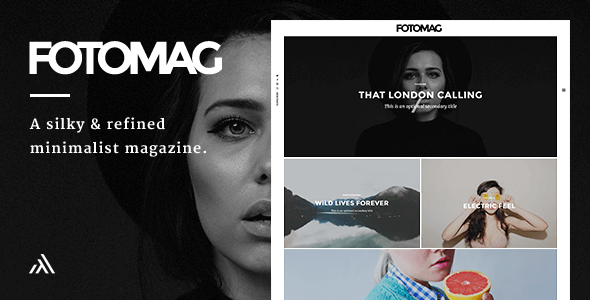
Stuck on your Fotomag WordPress theme? Let's fix it.
No endless back-and-forth. Just send us the details and we'll get it done.
No obligation · Replies within 1 hour · Quote within 1 day
Setup · Customization · Bug fixes · WooCommerce integration
About Fotomag WP Theme
Fotomag is a WordPress theme built by Codetipi, designed specifically for photography magazines, photo blogs, and visual storytelling sites. It ships with a grid-based layout system that puts images front and center, multiple homepage templates, and a clean reading experience for editorial content.
The theme is built on a custom framework from Codetipi, which means it operates independently from page builders like Elementor or WPBakery. Layout control happens through a dedicated options panel. It supports WooCommerce for selling prints or digital downloads, and integrates with popular plugins for galleries and portfolios. If your site lives or dies by visual impact, Fotomag is worth a serious look.
Get matched with a Fotomag developer in under one day
Tell us about your Fotomag project. Small fixes, Fotomag theme customization, or a full website build, whatever you need, we've got it covered.
We'll connect you to the right Fotomag developers, define the scope, and get everything 100% clear.
You'll get one estimate, hire your preferred developer, and start collaborating.
Fotomag’s custom Codetipi framework is not something most generalist developers know well. Small mistakes in template overrides or options panel conflicts can break layouts quickly. Working with a developer who has handled Codetipi themes before means fewer surprises and faster results.
Through Codeable, you get matched with vetted WordPress specialists who have real experience with photography and magazine themes. No guesswork, no junior developers learning on your project. Just focused work from someone who knows what they are doing.
Pros
- Purpose-built for photography and visual content, with grid layouts optimized for image-heavy sites
- Multiple homepage templates included, giving different editorial styles without extra plugins
- Built-in WooCommerce support for selling prints, downloads, or subscriptions directly from the site
- Clean, minimal code structure from Codetipi keeps the theme relatively fast compared to bloated multipurpose themes
- Strong typography controls that suit long-form editorial content alongside photo galleries
Cons
- Codetipi's proprietary framework makes it harder to find developers familiar with the theme's internals
- Not compatible with Elementor or Gutenberg block-based layouts without workarounds
- Limited third-party documentation and community support compared to themes like Divi or Avada
- Some layout customizations require direct PHP template edits, which risks issues during theme updates
- The options panel can feel dated compared to modern live customizer-based themes
Who is Fotomag for?
Photography Magazine
Fotomag’s grid-based homepage templates were built for this exact use case. Category-based sections, featured image layouts, and clean article pages make it straightforward to publish photo essays, gear reviews, and visual news content. The editorial structure holds up well under high post volume.
Travel Blog with Photo Journals
Travel blogs that rely on strong photography benefit from Fotomag’s full-width image headers and flexible grid options. Posts can be structured to lead with visuals and support long captions or narrative text. It handles mixed content, photos paired with written itineraries, better than most photography-specific themes.
Photography Portfolio with Print Sales
The built-in WooCommerce integration makes Fotomag a practical choice for photographers who want to sell directly from their site. Print listings, digital downloads, and licensing products all work within the existing layout. A developer can style product pages to match the editorial feel of the rest of the site.
Food and Lifestyle Editorial Blog
Food and lifestyle sites live on visual quality and readable editorial layouts. Fotomag handles both. Recipe posts, editorial photo spreads, and interview-style content all sit comfortably within the theme’s structure. Category pages and featured post sections make content discovery straightforward for regular readers.
Wedding Photography Studio Site
Wedding photographers need a site that leads with images and builds trust quickly. Fotomag’s full-width layouts and clean portfolio-style pages work well for showcasing wedding galleries. Combined with WooCommerce, you can offer packages or prints. A custom Fotomag build can make the site feel less like a theme and more like a brand.

Customizing Fotomag
Fotomag gives you a solid starting point, but most sites need adjustments before they feel truly custom. The built-in options panel covers typography, colors, homepage layout, and widget areas. Beyond that, you will likely need custom CSS or PHP work to match a specific brand or editorial style.
Common customization requests include custom category layouts, modified post grid structures, unique header configurations, and WooCommerce styling. A Fotomag expert can also help extend the theme’s native grid system without breaking updates or creating conflicts. If you want changes that go beyond what the options panel offers, working with a developer who knows Codetipi’s framework saves significant time and avoids messy workarounds.
Recommended plugins for Fotomag
Fotomag pairs well with several plugins that expand what it does out of the box. Envira Gallery and Modula both work cleanly with its visual-first layouts. For selling photography, WooCommerce integration is built in. Yoast SEO and Rank Math are both compatible for on-page optimization.
If site speed matters to you, and it should, look at pairing Fotomag with a caching plugin and a CDN. A full performance audit can make a significant difference on image-heavy sites. You can also explore SEO optimization and performance improvements as dedicated services.
Not sure which plugins to use? This WordPress plugins directory covers the most popular options with reviews and setup guides.
Fotomag common issues
Fotomag homepage layout not displaying correctly after update
Layout breaks after a Fotomag update usually trace back to conflicts between the theme’s options panel settings and template changes introduced in the new version. Start by clearing your cache and checking if any child theme overrides are outdated. If you are not running a child theme, direct edits to core templates are likely lost. A WordPress bug fixing service can audit the conflict and restore the layout without rebuilding from scratch.
Fotomag grid images appearing stretched or cropped wrong
Image cropping issues in Fotomag typically happen when thumbnails have not been regenerated after a layout change or media settings update. Use a plugin like Regenerate Thumbnails to rebuild image sizes. If the problem persists, the grid template may be pulling incorrect image dimensions. Check the theme’s image size settings in the options panel and confirm they match what your media library is generating.
Fotomag WooCommerce pages not matching theme style
Fotomag includes WooCommerce support, but the integration does not always extend to every template. Cart pages, checkout, and single product pages often inherit default WooCommerce styling rather than the theme’s visual style. Fixing this requires custom CSS or WooCommerce template overrides placed in a child theme. A developer familiar with Codetipi’s framework can handle this without touching core theme files.
Fotomag custom CSS not applying after theme update
If custom CSS stops working after a Fotomag update, the most likely cause is that your CSS was added directly to the theme’s stylesheet rather than through the WordPress Customizer or a child theme. Theme updates overwrite those files. Move all custom CSS to the Customizer’s Additional CSS field or, better, into a child theme stylesheet. That way updates will not wipe your changes. Ongoing WordPress maintenance can help prevent this pattern from recurring.
Fotomag FAQ
Codetipi has maintained Fotomag through several WordPress core updates, but the theme has a smaller update cadence than large commercial themes. Always check the ThemeForest changelog before purchasing to confirm recent activity. If you are already using Fotomag and updates have stalled, a developer can assess compatibility with your current WordPress version and patch issues where needed.
Fotomag is built on Codetipi’s own framework and is not designed to work with Elementor or the Gutenberg block editor in the way purpose-built block themes are. Basic Gutenberg blocks will function inside post content, but full layout control through those editors is not supported. If you need a theme with deep Elementor or Gutenberg integration, Fotomag may not be the right fit.
Yes. Fotomag includes WooCommerce compatibility, which makes it usable for selling prints, digital downloads, or photography packages. The default integration covers core shop pages, but product and checkout pages may need styling work to match the rest of your site. A developer can build those out to feel consistent with your editorial layout rather than generic WooCommerce defaults.
Creating a Fotomag child theme follows standard WordPress child theme conventions. Create a new folder in your themes directory, add a stylesheet referencing Fotomag as the parent, and enqueue it via a functions.php file. All custom CSS and template overrides should live in the child theme. This protects your changes when the parent theme updates and is strongly recommended before making any customizations.
Fotomag itself migrates cleanly since it is a standard WordPress theme. Your settings, content, and media all move with the site through a standard WordPress migration process. The main thing to verify post-migration is that image thumbnails regenerate correctly and that the theme options panel settings carried over through the database export. A test on a staging environment before going live is always worth the time.
Hire a Fotomag Developer
Whether you need a layout built from scratch, a customization that the options panel cannot handle, or a bug traced down and fixed, a dedicated Fotomag developer gets it done right. Post your project through Codetipi’s preferred network and get a free estimate within 24 hours. No obligation to hire, no upfront cost. Get your free estimate today and see exactly what your project will take.
You'll need a free Codeable account so developers can ask questions and send their quotes.