Freshio WordPress Theme
by pavothemes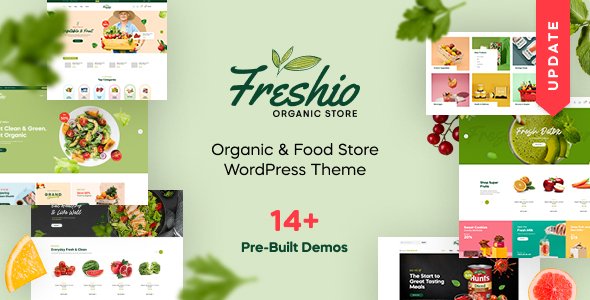
Stuck on your Freshio WordPress theme? Let's fix it.
No endless back-and-forth. Just send us the details and we'll get it done.
No obligation · Replies within 1 hour · Quote within 1 day
Setup · Customization · Bug fixes · WooCommerce integration
About Freshio WP Theme
Freshio is a WooCommerce theme by PavoThemes built specifically for organic food, grocery, and fresh produce stores. It ships with multiple homepage layouts, a clean product grid, and built-in AJAX filtering that keeps category browsing fast. The theme uses Elementor as its page builder, so layout editing stays visual without touching code.
Freshio supports variable products, product quick views, and a sticky add-to-cart bar. PavoThemes packages it with their own Pavo Page Builder plugin and several companion widgets. Out of the box, it handles multi-currency and multi-language setups reasonably well when paired with the right plugins. It targets store owners who want a polished grocery look without hiring a designer from day one.
Get matched with a Freshio developer in under one day
Tell us about your Freshio project. Small fixes, Freshio theme customization, or a full website build, whatever you need, we've got it covered.
We'll connect you to the right Freshio developers, define the scope, and get everything 100% clear.
You'll get one estimate, hire your preferred developer, and start collaborating.
Freshio looks straightforward until you need something specific. Custom layouts, plugin conflicts, checkout tweaks, and performance issues all take longer without experience with the theme. Codeable connects you with vetted WordPress developers who have worked with WooCommerce grocery and food themes before. You post a project, get a fixed estimate, and only pay if you hire. No cold outreach, no guessing on hourly rates.
Pros
- Multiple pre-built homepage demos designed specifically for organic food and grocery niches
- Built-in AJAX product filtering and quick view without requiring a separate plugin
- Elementor compatibility means visual layout editing is straightforward for most page types
- Sticky add-to-cart bar and product image zoom work well on mobile without extra configuration
- PavoThemes provides regular WooCommerce compatibility updates and documentation
Cons
- Heavy reliance on PavoThemes' own plugin bundle creates a lock-in that complicates theme switches
- Page load times suffer on large catalogues without dedicated performance optimisation
- Some Elementor widgets conflict with the Pavo Page Builder elements, requiring manual cleanup
- Limited documentation for advanced WooCommerce configurations like composite products or bundles
- Support response times from PavoThemes can be slow during high-demand periods
Who is Freshio for?
Organic Food & Grocery Stores
Freshio was designed with grocery in mind. The category grid, product card layout, and filtering sidebar all suit stores selling fruit, vegetables, dairy, and pantry staples. A Freshio developer can configure department-style navigation and featured product sections to mirror a physical store layout online.
Farm Box & Subscription Delivery
Subscription box stores need recurring billing, flexible delivery scheduling, and a clear product selection flow. Freshio pairs with WooCommerce Subscriptions to handle this. A Freshio specialist can build a custom box-builder page and connect it to delivery slot logic without bloating the theme.
Health Food & Supplement Shops
Supplement and health food stores rely on product credibility, certifications, and ingredient transparency. Freshio’s product page layout supports custom tabs for nutritional info and sourcing details. A Freshio expert can extend these sections to match specific brand requirements and regulatory copy needs.
Zero-Waste & Bulk Food Retail
Zero-waste stores often sell by weight or unit with custom pricing logic. Freshio’s WooCommerce base supports variable products and unit-based pricing with some configuration. A Freshio developer can wire up the right plugin stack and make the product page communicate quantity options clearly.
Local Farmers Market Online Stores
Farmers market vendors moving online need simple, fast storefronts. Freshio’s lightweight demo layouts work well for smaller catalogues. A Freshio specialist can strip back the default template to a clean, fast store page with local pickup or delivery area options configured properly.

Customizing Freshio
Freshio gives you a decent starting point, but most stores will need custom work before going live. Colour schemes, typography, header layouts, and footer columns are all adjustable through the WordPress Customizer. The Elementor integration means page layouts can be rebuilt without CSS knowledge, though the PavoThemes widgets add a dependency layer that can complicate things.
A Freshio expert can handle the trickier parts: custom product card designs, homepage section reordering, mobile navigation fixes, and WooCommerce checkout styling. If your store needs a custom mega menu, a filtered shop page, or category landing pages that match a specific brand identity, working with a Freshio developer saves significant time over trial and error with the theme options panel.
Recommended plugins for Freshio
Freshio works well with several key plugins. WPML and Polylang handle translation. WooCommerce Subscriptions adds recurring orders for box schemes. YITH Wishlist and YITH Compare integrate cleanly with the product grid. For speed, image lazy loading and a caching layer matter on grocery stores with large catalogues. A WordPress performance audit is worth running before launch if you carry more than 500 products.
On the SEO side, Rank Math and Yoast both work with Freshio’s schema output. If you want structured product data and category page optimisation done properly, a WordPress SEO specialist can close the gaps the theme leaves open.
Not sure which plugins to use? This WordPress plugins directory covers the most popular options with reviews and setup guides.
Freshio common issues
Freshio homepage not loading correctly after update
Homepage breakage after an update usually points to a version mismatch between Freshio and the Pavo plugin bundle. Check that the PavoThemes companion plugins were updated at the same time as the theme. If layouts rely on Elementor, regenerate the CSS cache under Elementor > Tools. If the issue persists after both steps, reverting to a backup and updating incrementally is the safest path.
Freshio AJAX filter not working on shop page
When AJAX filtering stops working, the most common causes are a JavaScript conflict with another plugin or a permalinks structure issue. Go to Settings > Permalinks and re-save without changing anything. Then disable plugins one by one to identify a conflict. If the filter widget itself is misconfigured, WordPress bug fixing can resolve it faster than manual elimination.
Freshio Elementor widgets missing after plugin update
Missing Elementor widgets after an update usually mean the Pavo Core plugin is outdated or deactivated. Check Plugins > Installed Plugins and confirm Pavo Core is active and current. If widgets still don’t appear, clear the Elementor editor cache and reload. A full plugin and theme version audit is worth running if this happens repeatedly after routine updates.
Freshio WooCommerce add-to-cart button not working
Add-to-cart failures in Freshio are often caused by WooCommerce AJAX being blocked. Open browser developer tools and check the console for 400 or 403 errors on the wc-ajax endpoint. A caching plugin or WAF rule is usually the cause. Exclude the cart and checkout URLs from caching and whitelist the wc-ajax parameter in any security plugin rules.
Freshio product images not displaying on category page
Missing category page images typically come from a thumbnail size mismatch after a theme switch or update. Run the Regenerate Thumbnails plugin to rebuild all image sizes to Freshio’s registered dimensions. If images are still missing, check that the featured image is actually set on the product, not just added to the product gallery. They are stored separately in WooCommerce.
Freshio sticky header overlapping page content
A sticky header overlapping content is usually a CSS z-index or top-offset issue. Freshio calculates the page offset based on the header height, but custom header layouts or admin bar visibility can throw this off. Inspect the affected page in browser dev tools, identify the offset value, and add a small CSS override to the page body padding-top. A bug fix can resolve this cleanly without theme file edits.
Freshio mobile menu not opening on iPhone
Mobile menu failures on iOS are frequently caused by a JavaScript error that prevents the toggle event from firing. Check for console errors in Safari’s developer tools. The most common culprits are a JavaScript file loading out of order or a conflict with a sticky header script. Disabling plugins temporarily helps isolate it. Ensure jQuery is loading correctly and that no script is blocking the mobile nav initialisation.
Freshio checkout page layout broken
A broken checkout layout in Freshio is usually caused by a plugin adding inline styles that override WooCommerce’s checkout columns or a caching layer serving a stale CSS file. Clear all caches first. If the layout issue only appears when specific plugins are active, check their checkout hooks. WooCommerce checkout relies on a specific column structure that some form plugins disrupt.
Freshio demo import not working
Demo import failures in Freshio typically happen when server limits block large XML or JSON file uploads. Increase max_execution_time, upload_max_filesize, and memory_limit in your php.ini or wp-config.php. If the importer times out midway, run it again as most importers skip already-imported content. If images fail to import, the external server hosting the demo media may be rate-limiting requests. Try importing content only, then uploading images manually.
Freshio theme slow loading with many products
Freshio can get slow on large catalogues because the default setup loads several render-blocking scripts and large hero images. Start by enabling lazy loading on product images, minifying CSS and JS through a caching plugin, and serving images in WebP format. If load time is still above three seconds, a full performance and code audit will identify whether the bottleneck is database queries, plugin overhead, or unoptimised theme assets.
Freshio FAQ
Yes, Freshio is purpose-built for WooCommerce grocery and organic food stores. It includes category filtering, product quick view, a sticky cart bar, and homepage layouts designed for fresh produce retail. It handles most standard WooCommerce features well, though large catalogues need performance work before launch.
Freshio has Elementor compatibility built in. You can use Elementor to build and edit pages visually. The theme also ships with Pavo Page Builder widgets that extend Elementor’s default set. Running both simultaneously can cause occasional conflicts, so keeping all components updated to matching versions matters.
Freshio includes a one-click demo importer accessible under Appearance > Import Demo. Before running it, increase your server’s PHP memory limit and max execution time to avoid timeouts. Import content and widgets separately if the full import fails. Image imports can be slow depending on server speed and the demo size.
Most of Freshio’s custom homepage sections and widgets depend on the Pavo Core plugin. Deactivating it will break those sections. You can build pages entirely in Elementor using standard widgets, but that requires rebuilding layouts from scratch. A Freshio developer can help you reduce plugin dependency if needed.
Freshio is compatible with WPML. You can translate product pages, category names, and static page content through WPML’s interface. Some Pavo widget strings may need manual string translation setup in WPML. Polylang also works but requires more manual configuration for WooCommerce-specific content.
Always back up your site before updating Freshio. Update the Pavo Core plugin at the same time as the theme, since version mismatches cause layout issues. Test on a staging site first if you’ve made custom modifications. After updating, regenerate Elementor’s CSS cache and check all key pages visually.
Freshio is responsive across mobile, tablet, and desktop. The mobile menu, product grid, and checkout all adapt to smaller screens. That said, heavily customised layouts or third-party widgets sometimes break the mobile view and need CSS fixes. A Freshio specialist can audit and fix mobile layout issues quickly.
Yes. A Freshio developer can handle customisation, bug fixes, performance work, or full store builds. Through Codeable, you can post your project, get a fixed estimate from a vetted developer, and only pay if you decide to proceed. Visit Get a Free Estimate to start.
Freshio works with WooCommerce Subscriptions since it’s built on standard WooCommerce templates. Subscription product pages, my account areas, and checkout all function normally. Some styling adjustments may be needed to match subscription-specific UI elements to the Freshio design, which a Freshio developer can handle.
After a WooCommerce update breaks Freshio layouts, first check if PavoThemes has released a compatibility update. If not, identify which template files are affected by comparing against WooCommerce’s updated template versions. Overriding templates in a child theme is the safest fix. If the issue is widespread, a developer can audit and patch the affected files faster than manual debugging.
Hire a Freshio Developer
Whether you need a Freshio expert to build out a custom homepage, fix a layout issue, or extend your WooCommerce store, the right developer makes the difference between a project that drags on and one that ships. Get a Free Estimate and describe what you need. There’s no obligation to hire and no upfront payment.
You'll need a free Codeable account so developers can ask questions and send their quotes.