Frisk WordPress Theme
by ThemeGenix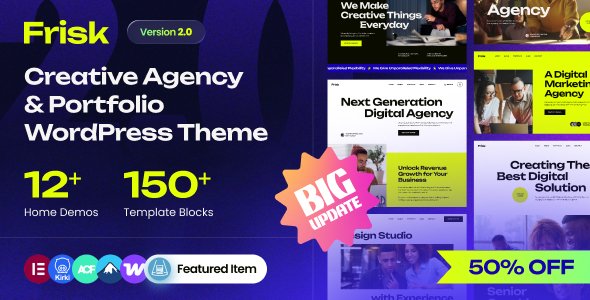
Stuck on your Frisk WordPress theme? Let's fix it.
No endless back-and-forth. Just send us the details and we'll get it done.
No obligation · Replies within 1 hour · Quote within 1 day
Setup · Customization · Bug fixes · WooCommerce integration
About Frisk WP Theme
Frisk is a WordPress theme developed by ThemeGenix. It targets small businesses, freelancers, and agencies that need a clean, professional site without spending weeks on setup. The design is minimal by default, which keeps pages fast and easy to read.
Frisk works with the WordPress block editor, so you can build layouts without touching code. It ships with starter templates you can import and customise. Typography is clear, spacing is generous, and the default colour palette is neutral enough to fit most brands without a fight.
ThemeGenix has built a reputation for themes that stay lightweight and avoid loading unnecessary scripts. Frisk follows that pattern. It scores well on page speed tests out of the box and does not rely on a heavy page builder to function.
Get matched with a Frisk developer in under one day
Tell us about your Frisk project. Small fixes, Frisk theme customization, or a full website build, whatever you need, we've got it covered.
We'll connect you to the right Frisk developers, define the scope, and get everything 100% clear.
You'll get one estimate, hire your preferred developer, and start collaborating.
Most WordPress theme issues are not really theme issues. They are configuration, plugin conflict, or custom code problems. A vetted Frisk developer on Codeable has seen these patterns before and can fix or build what you need without guesswork.
Codeable only works with pre-screened WordPress developers. You post your project, get a clear estimate, and decide whether to proceed. No commitment required upfront. If you need ongoing changes to your Frisk site, working with a specialist is faster and cheaper than trial and error.
Pros
- Lightweight codebase with good default performance scores
- Native block editor support, no third-party page builder required
- Clean, minimal design that adapts easily to different brand identities
- Starter templates reduce initial setup time significantly
- ThemeGenix maintains the theme with regular updates and security patches
Cons
- Limited built-in layout variations compared to multipurpose themes
- Advanced header or mega menu setups require custom code or a plugin
- WooCommerce styling needs manual work to match the default Frisk design
- Fewer third-party tutorials and community resources than major themes like Astra or GeneratePress
- Some block patterns feel generic and need meaningful edits before they look custom
Who is Frisk for?
Freelancer Portfolio
Frisk suits freelancers who want a portfolio that loads fast and looks professional. The minimal design keeps attention on the work. You can set up a projects archive using custom post types and display case studies cleanly without cluttering the layout with unnecessary elements.
Small Business Website
Local businesses and service providers benefit from Frisk’s clean layout and readable typography. A homepage with a clear headline, service blocks, and a contact form covers most requirements. The theme does not impose a rigid structure, so it adapts to different service niches without major rework.
Agency Landing Page
Agencies can use Frisk as a base for client sites because of its low overhead and clean output. The lack of a bloated page builder means faster delivery and fewer plugin conflicts. A developer can build out a polished agency site on Frisk without fighting the theme’s structure.
Blog or Content Site
Writers and publishers who prioritise readability will find Frisk’s typography choices sensible. Long-form content stays readable on mobile without extra tweaks. The archive and single post templates are clean and do not distract from the text with heavy sidebars or aggressive ad placements.
Simple WooCommerce Store
Frisk works with WooCommerce for small product catalogues. It handles basic shop, product, and cart pages without breaking the layout. For stores with more than a few dozen products or custom checkout requirements, some additional styling work from a developer keeps everything consistent with the brand.

Customizing Frisk
Frisk gives you a solid starting point, but most real projects need adjustments that go beyond what the Customizer offers. That is where a Frisk expert makes a difference.
Common customisation work includes building custom block patterns, adjusting the header layout, adding a sticky navigation, creating a custom post type for services or portfolio items, and fine-tuning the mobile breakpoints. Child themes are the right way to handle most of these changes so your edits survive theme updates.
If you need a specific font pairing, a non-standard homepage layout, or WooCommerce styling that matches your brand, a developer who knows Frisk can deliver that without breaking the existing structure. Changes made directly to the parent theme get wiped on every update, so proper setup matters from the start.
Recommended plugins for Frisk
Frisk works well with several plugins that extend its default feature set. WooCommerce adds a full shop. Contact Form 7 or WPForms handle lead capture. Yoast SEO or Rank Math cover on-page optimisation without conflicting with the theme.
For performance, pairing Frisk with a caching plugin and a CDN keeps load times short. If your site is growing, a WordPress performance audit can identify what is slowing things down before it becomes a problem.
Need better search visibility? A structured WordPress SEO setup on top of Frisk gives you a technical foundation that supports long-term organic growth.
Not sure which plugins to use? This WordPress plugins directory covers the most popular options with reviews and setup guides.
Frisk common issues
Frisk theme header not showing on mobile
Mobile header display issues on Frisk are usually caused by a CSS conflict with another plugin or a custom style that overrides the theme’s responsive rules. Open your browser’s developer tools and check which rule is hiding or collapsing the header element. If a caching plugin is involved, clear the cache first. A WordPress bug fix specialist can trace the conflict and resolve it without breaking other parts of the layout.
Frisk theme fonts not loading correctly
Font loading problems in Frisk typically come from a blocked Google Fonts request, a conflict with a performance plugin that is deferring or blocking font files, or a child theme that has not enqueued fonts correctly. Check your browser console for 404 errors or blocked requests. If you are using a performance optimisation plugin, whitelist the font URLs. For persistent issues, a developer can audit the enqueue setup in the theme files.
Frisk WordPress theme slow after plugin install
A slowdown after installing a plugin on a Frisk site is often caused by the plugin loading scripts and styles on every page, including pages where they are not needed. Use a tool like Query Monitor to identify which plugin is adding the load. Plugins that add their own page builder assets or tracking scripts are common offenders. Targeted script loading and a performance review can recover your original speed scores.
Frisk theme layout broken after WordPress update
If the Frisk layout breaks after a WordPress core update, the most likely cause is a block editor API change or a deprecated function in the theme or a plugin. Check the site health tool in your WordPress dashboard for errors. Deactivate plugins one by one to isolate the conflict. If the theme itself has a pending update from ThemeGenix, apply it. For persistent layout breaks, a developer can identify and patch the incompatibility quickly.
Frisk FAQ
Frisk is a premium theme developed by ThemeGenix. It is available as a paid product. Pricing and licence details are listed on the ThemeGenix website. The licence typically covers a set number of sites, and renewal gives you continued access to updates and support from the developer.
Yes, Frisk is compatible with WooCommerce. The theme handles standard shop pages, product pages, cart, and checkout without breaking the layout. For stores with specific branding requirements or custom checkout flows, some additional CSS or template work from a developer keeps everything consistent with the rest of the site design.
Frisk is built around the native WordPress block editor and does not require Elementor to function. You can install Elementor on a Frisk site, but mixing a block theme with a separate page builder often creates layout conflicts and adds unnecessary page weight. Using the block editor natively keeps the site faster and more maintainable.
To create a child theme for Frisk, create a new folder in your themes directory, add a style.css file with a Template header pointing to the Frisk parent theme, and create a functions.php file to enqueue the parent and child stylesheets. Activate the child theme in your dashboard. All custom CSS and template overrides go into the child theme so updates to Frisk do not wipe your changes.
Frisk produces clean HTML output and loads minimal scripts by default, which gives it a solid technical SEO foundation. For full SEO coverage, pair it with a plugin like Rank Math or Yoast to manage meta tags, schema, and sitemaps. A structured WordPress SEO setup on top of Frisk handles both on-page and technical requirements effectively.
Hire a Frisk WordPress Developer
Whether you need a full Frisk build, a specific feature added, or a bug fixed, a specialist developer can handle it cleanly. Work is delivered through Codeable, where every developer is vetted and rated by real clients.
Post your project and get a free estimate with no obligation to hire. Get a free estimate today and have a developer matched to your project within 24 hours.
You'll need a free Codeable account so developers can ask questions and send their quotes.