Galleria Metropolia WordPress Theme
by cmsmasters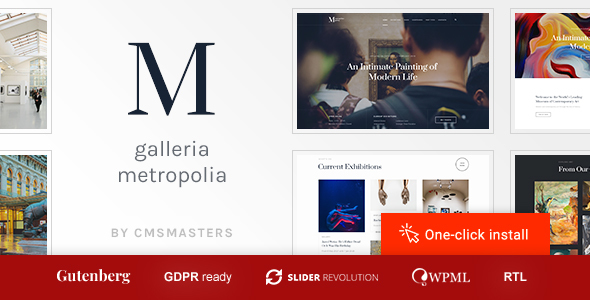
Stuck on your Galleria Metropolia WordPress theme? Let's fix it.
No endless back-and-forth. Just send us the details and we'll get it done.
No obligation · Replies within 1 hour · Quote within 1 day
Setup · Customization · Bug fixes · WooCommerce integration
About Galleria Metropolia WP Theme
Galleria Metropolia is a WordPress theme built by cmsmasters, designed primarily for art galleries, photography studios, and creative portfolios. It ships with a visual drag-and-drop builder, multiple homepage layouts, and a strong focus on image presentation. The theme is built on the cmsmasters framework, which gives it access to a wide range of shortcodes, custom post types, and layout options out of the box.
Galleria Metropolia supports full-width sliders, masonry grids, and filterable portfolio galleries. It includes WooCommerce compatibility for selling prints or digital work, WPML support for multilingual sites, and a built-in theme options panel for controlling fonts, colors, and header styles. It suits creative professionals who want visual impact without writing code from scratch.
Get matched with a Galleria Metropolia developer in under one day
Tell us about your Galleria Metropolia project. Small fixes, Galleria Metropolia theme customization, or a full website build, whatever you need, we've got it covered.
We'll connect you to the right Galleria Metropolia developers, define the scope, and get everything 100% clear.
You'll get one estimate, hire your preferred developer, and start collaborating.
Galleria Metropolia is built on a proprietary framework that behaves differently from standard themes. Customizing it without breaking updates or introducing layout conflicts takes hands-on experience. Through Codeable, you get access to vetted WordPress developers who have worked with cmsmasters themes directly. Post your project, get a free estimate within 24 hours, and only hire if you are satisfied. No risk, no obligation. Straightforward process, experienced developers.
Pros
- Strong visual presentation with full-width sliders and masonry grid layouts built specifically for image-heavy sites
- Built-in cmsmasters options panel covers fonts, colors, headers, and layout without needing a separate page builder plugin
- WooCommerce compatibility allows photographers and artists to sell prints or digital work directly from the portfolio
- WPML support makes it a practical choice for creative agencies running multilingual client portfolios
- Multiple pre-built homepage demos reduce initial setup time for gallery and photography-focused sites
Cons
- The cmsmasters framework is proprietary, making it harder to find developers familiar with its specific shortcode and options structure
- Theme updates can conflict with heavy customizations made outside a child theme, requiring manual fixes after each release
- Page load times can suffer on gallery-heavy pages without additional optimization, especially on shared hosting
- The bundled page builder feels dated compared to Elementor or Gutenberg, limiting flexibility for complex layouts
- Documentation is limited and community support resources are sparse compared to mainstream themes like Divi or Avada
Who is Galleria Metropolia for?
Photography Portfolio
Galleria Metropolia suits photographers who need full-width image displays, filterable portfolio grids, and fast gallery loading. The masonry layout handles varied image ratios cleanly. Combined with lazy loading and image compression, it delivers a strong visual experience for client-facing photography portfolios without requiring a custom-built theme from scratch.
Art Gallery Website
Physical and online art galleries benefit from Galleria Metropolia’s clean exhibition-style layouts. The theme supports custom post types for artworks, making it possible to build a searchable catalog with artist credits, dimensions, and medium details. A developer can extend this further with custom taxonomies and filterable archive pages suited to permanent and rotating collections.
Creative Agency
Creative agencies managing multiple client case studies can use Galleria Metropolia’s portfolio system to organize work by industry, service type, or year. The filterable grid makes it easy for visitors to browse relevant projects. With custom CSS and a child theme, agencies can strip the design back to match a minimal brand identity without the default gallery-heavy aesthetic.
Print Sales Store
Artists and photographers selling physical prints or digital downloads can pair Galleria Metropolia with WooCommerce. Product pages sit alongside portfolio entries, and the visual theme keeps the shopping experience consistent with the gallery presentation. A developer can configure variable products for print sizes, paper types, and framing options within the existing theme structure.
Architecture Firm Portfolio
Architecture firms need to showcase projects with multiple high-resolution images per entry. Galleria Metropolia handles this well through its project post type and slideshow functionality. Filterable categories allow visitors to browse by project type, residential versus commercial for example, while the full-width layout gives architectural photography the space it needs to communicate scale and detail.

Customizing Galleria Metropolia
Galleria Metropolia gives you a solid starting point, but getting it to match a specific brand takes more than adjusting colors in the options panel. The cmsmasters framework has its own logic, and working within it efficiently requires experience with its shortcode system, custom CSS overrides, and how child themes interact with the parent framework.
A Galleria Metropolia expert can rebuild portfolio layouts, reconfigure the gallery filtering system, adjust typography beyond the preset options, and restructure homepage sections without breaking the theme on updates. If you need custom post type integrations, WooCommerce modifications for print sales, or a fully bespoke layout that goes beyond the bundled demo content, hiring someone who knows this theme saves significant time and avoids common breakage points.
Recommended plugins for Galleria Metropolia
Galleria Metropolia works with several key plugins that extend its functionality. WooCommerce adds an online store for selling prints, licenses, or digital downloads. WPML enables multilingual portfolios for agencies working across markets. Contact Form 7 handles inquiry forms, and Revolution Slider or the bundled cmsmasters slider can power the homepage hero.
For performance tuning on image-heavy gallery pages, specialist support is available through our WordPress performance service. If you need better search visibility for your portfolio or gallery site, our WordPress SEO service covers structured data, image alt optimization, and page speed improvements.
Not sure which plugins to use? This WordPress plugins directory covers the most popular options with reviews and setup guides.
Galleria Metropolia common issues
Galleria Metropolia slider not working after WordPress update
Slider breakage after a WordPress update usually points to a JavaScript conflict introduced by the update or a plugin loaded after the theme scripts. Open the browser console and check for JS errors. The cmsmasters slider relies on specific script dependencies that can be dequeued by caching or optimization plugins. Temporarily disable performance plugins to isolate the cause. If the issue persists, a developer can audit script loading order and patch conflicts. See our WordPress bug fixing service for targeted help.
Galleria Metropolia portfolio filter broken or not displaying correctly
Portfolio filter issues in Galleria Metropolia typically stem from missing or incorrectly assigned category terms, a JavaScript conflict with the isotope filtering library, or CSS display problems caused by a plugin adding conflicting styles. First, check that each portfolio item has at least one category assigned. Then disable plugins one by one to find conflicts. If the grid is loading but items are misaligned or invisible, the issue is likely CSS. A developer can fix this quickly through targeted overrides in a child theme.
Galleria Metropolia theme options not saving changes
When the Galleria Metropolia options panel does not save, the most common cause is a PHP memory limit that cuts off the save request before it completes. Check your server’s PHP memory limit and increase it to at least 256MB in wp-config.php. Security plugins that block certain POST requests can also prevent options from saving. Try disabling your security plugin temporarily to test. If neither resolves it, the theme’s options serialization may have been corrupted, which requires database-level repair through a developer.
Galleria Metropolia slow loading on image gallery pages
Gallery pages are image-heavy by nature, and Galleria Metropolia does not apply aggressive lazy loading or next-gen image formats by default. Install a plugin like Imagify or ShortPixel to convert images to WebP and compress without visible quality loss. Enable native lazy loading through a performance plugin. Avoid loading full-resolution images in thumbnail contexts by regenerating thumbnails at correct sizes using Regenerate Thumbnails. For deeper optimization, our WordPress performance service covers server-level and theme-level fixes.
Galleria Metropolia FAQ
Galleria Metropolia was last updated by cmsmasters some time ago, and compatibility with the latest WordPress versions is not guaranteed without testing. Core functionality typically works, but the proprietary page builder and certain shortcodes may behave unexpectedly on newer PHP versions. Before updating WordPress on a live site using this theme, test on a staging environment first. A developer can patch any compatibility issues that arise.
Galleria Metropolia uses the cmsmasters page builder, not Gutenberg or Elementor. You can install Elementor separately, but it may conflict with the theme’s own builder or layout system. Gutenberg works for basic content editing in post and page areas. For a fully Elementor-based workflow, significant customization or a theme switch may be more practical than trying to force compatibility.
Go to your WordPress dashboard, find the Portfolio section in the left menu (added by the cmsmasters framework), and look for Portfolio Categories. Add your category there, then assign it to individual portfolio items when creating or editing them. The filterable grid on the portfolio page will automatically include the new category once at least one item is assigned to it.
Yes, Galleria Metropolia includes WooCommerce compatibility. You can sell prints, digital downloads, or other products directly from the site. The theme applies basic WooCommerce styling to keep shop pages consistent with the overall design. More advanced store customizations, such as custom product page layouts or checkout modifications, require additional development work beyond the default setup.
Yes, migrating a Galleria Metropolia site is straightforward with the right process. You need to move the database, all theme files, and the uploads folder to the new host, then update the site URL in the database. The cmsmasters theme options are stored in the database, so they migrate with it. For a smooth migration without downtime or broken links, our WordPress migration service handles the full process.
Hire a Galleria Metropolia Developer
Whether you need layout customization, plugin integration, a speed overhaul, or fixes after an update broke something, our developers know the cmsmasters framework and how Galleria Metropolia works under the hood. Work is matched through Codeable, so you get a vetted developer, not a random hire. Get a free estimate and describe what you need. No commitment required.
You'll need a free Codeable account so developers can ask questions and send their quotes.