Gameplan WordPress Theme
by CactusThemes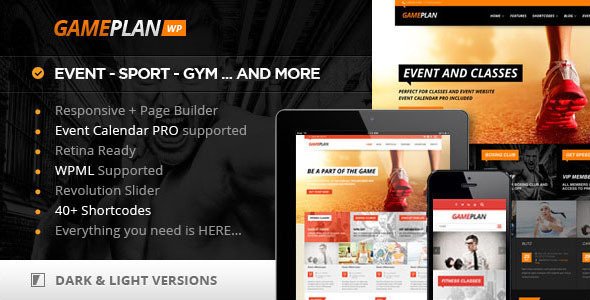
Stuck on your Gameplan WordPress theme? Let's fix it.
No endless back-and-forth. Just send us the details and we'll get it done.
No obligation · Replies within 1 hour · Quote within 1 day
Setup · Customization · Bug fixes · WooCommerce integration
About Gameplan WP Theme
Gameplan is a sports and events WordPress theme built by CactusThemes. It’s designed for sports clubs, fitness gyms, leagues, and event-based organisations that need structured scheduling, team management, and event listings out of the box.
The theme ships with a dedicated match and event calendar, player profiles, league tables, and flexible homepage layouts. It integrates with the SP (SportsPress) plugin ecosystem, which handles the heavy lifting for sports data management.
Gameplan is a solid choice if your site needs to display fixtures, results, standings, and team rosters without custom development from scratch. It works with Elementor and WPBakery for page layout control, and supports WooCommerce for selling tickets or merchandise directly from your site.
Get matched with a Gameplan developer in under one day
Tell us about your Gameplan project. Small fixes, Gameplan theme customization, or a full website build, whatever you need, we've got it covered.
We'll connect you to the right Gameplan developers, define the scope, and get everything 100% clear.
You'll get one estimate, hire your preferred developer, and start collaborating.
Gameplan has enough moving parts, SportsPress integration, custom post types, league data, and event scheduling, that configuration mistakes are easy to make and time-consuming to fix. Codeable connects you with vetted WordPress developers who have hands-on experience with sports themes like Gameplan. You post your project, get a clear estimate, and only move forward when you’re confident in the scope and cost. No guesswork, no wasted time.
Pros
- Built specifically for sports clubs and leagues with SportsPress integration baked in
- Includes match schedules, standings tables, player profiles, and event listings as core features
- Compatible with Elementor and WPBakery for flexible page layout control
- WooCommerce support allows ticket sales and merchandise directly on the site
- Multiple homepage demo layouts covering different sports and event formats
Cons
- Heavily reliant on SportsPress plugin, which adds dependency risk if the plugin is not maintained
- Demo content import can be unreliable and often requires manual cleanup
- Template files for match and player pages are complex to customise without PHP knowledge
- Mobile performance can suffer on data-heavy fixture or standings pages without optimisation
- Theme updates from CactusThemes have historically been infrequent, raising long-term support concerns
Who is Gameplan for?
Amateur and Semi-Pro Sports Clubs
Gameplan handles team rosters, fixture lists, and match results cleanly. A sports club can publish squad profiles, track head-to-head records, and display a live standings table, all without custom plugin development. It suits football clubs, basketball teams, and similar organisations managing a full season schedule online.
Fitness Gyms and Training Centres
Gyms and training centres can use Gameplan’s event and scheduling features to display class timetables, trainer profiles, and upcoming sessions. WooCommerce integration allows membership sales or class bookings. The visual layouts work well for presenting training programmes and facility information without needing a separate booking platform.
Sports Leagues and Competitions
For league administrators managing multiple teams, Gameplan and SportsPress together handle standings, results, and fixture tracking across divisions. A Gameplan developer can configure custom league structures, automate points calculations, and present tables in a format that works for officials, players, and supporters alike.
Esports Teams and Gaming Organisations
Esports teams need squad pages, tournament results, and match schedules just like traditional sports organisations. Gameplan’s flexible post types support this use case well. Player profiles can be adapted for gaming handles and statistics, and the dark layout options suit the visual style typical in esports branding.
Sporting Events and Tournaments
One-off or annual tournaments can use Gameplan to build an event hub with schedules, venue details, registration information, and live results during the competition. Combined with WooCommerce for ticket sales, it covers most of what a tournament organiser needs from a single WordPress installation.

Customizing Gameplan
Gameplan gives you a decent set of theme options out of the box, but deeper customisation usually requires someone who knows the theme’s structure well. Color schemes, typography, and layout settings are manageable through the WordPress Customizer, but customising the match templates, player profile pages, or league table designs often means editing template files directly.
A Gameplan expert can help you configure SportsPress data correctly, build custom layouts for fixtures and results, and integrate third-party plugins without breaking the front end. If you need custom post type styling, conditional sidebars, or a unique homepage structure that goes beyond the demo content, working with a Gameplan specialist saves significant time and avoids common pitfalls with the theme’s template hierarchy.
Recommended plugins for Gameplan
Gameplan works well with SportsPress Pro for advanced statistics, standings, and widget controls. WooCommerce handles ticket sales and team merchandise. For speed, caching plugins like WP Rocket or LiteSpeed Cache pair cleanly with the theme, and a WordPress performance audit can identify bottlenecks specific to sports data queries.
If you’re building public-facing club or league pages, structured data and proper meta setup matter. A dedicated WordPress SEO service can ensure your fixture pages, team profiles, and event listings rank properly in search.
Not sure which plugins to use? This WordPress plugins directory covers the most popular options with reviews and setup guides.
Gameplan common issues
Gameplan theme SportsPress data not displaying correctly
This usually comes down to misconfigured SportsPress settings, missing data relationships between players, teams, and events, or a plugin conflict. Start by checking that each player is properly assigned to a team and that events are linked to both teams. If the tables still won’t render, deactivate other plugins one by one to isolate the conflict. Persistent data display issues often require a closer look at the database. A WordPress bug fixing service can diagnose and resolve SportsPress integration problems efficiently.
Gameplan WordPress theme slow loading on fixtures page
Fixture and standings pages load a significant amount of relational data from the database. Without caching, each page request triggers multiple queries. Enable a caching plugin like WP Rocket or LiteSpeed Cache, and consider using a CDN for static assets. Check whether SportsPress widgets are loading on pages where they are not needed, as this adds unnecessary overhead. A WordPress performance fix can identify the specific queries causing slowdowns.
Gameplan theme layout broken after WordPress update
WordPress core or WooCommerce updates can conflict with older Gameplan template files. If the layout has broken, first check whether a child theme is in use. Without a child theme, theme updates overwrite custom changes. Temporarily switch to a default theme and re-enable Gameplan to see if the issue is theme-specific. Check the browser console for JavaScript errors and review the PHP error log for template conflicts. Revert to a staging backup if the issue is severe.
Gameplan player profiles showing blank or missing stats
Blank player stats usually mean the statistics columns in SportsPress are not assigned to the correct sport or season, or the player post is missing the required custom field data. Go into SportsPress settings, check that the configured stat columns match the sport type, and verify that each player has data entered for the current season. Also confirm that the player is assigned to at least one event where statistics are tracked.
Gameplan FAQ
CactusThemes has released updates for Gameplan, but the update cadence is slow. Always test compatibility on a staging site before updating WordPress core on a live Gameplan installation. If you are running a recent WordPress version and notice template or block editor issues, a developer familiar with the theme can patch incompatibilities without waiting for an official update.
Gameplan includes Elementor compatibility for standard page layouts. However, the SportsPress-specific templates, match pages, player profiles, and standings tables, are controlled by theme PHP templates, not Elementor. You can use Elementor for your homepage and static pages, but sport-specific content areas require direct template editing or custom shortcode placement.
SportsPress is central to Gameplan’s core functionality. The match fixtures, standings tables, player stats, and team management features all depend on it. You can use Gameplan without SportsPress for a general sports or events site, but you would lose most of the features that make the theme worth choosing over a generic option.
Technically yes, but it is not a good fit. The theme’s demo layouts, post types, and default structure are built around sports and events content. Using it for a standard business or portfolio site would require stripping out significant functionality and fighting against the theme’s default assumptions. A general-purpose theme would be a better starting point.
Cost depends on the scope of work. A basic Gameplan setup with demo content and SportsPress configuration typically starts from a few hundred dollars. Custom template work, advanced SportsPress data structures, or WooCommerce integration for tickets will increase the cost. Post your project on Codeable to get a specific estimate from a vetted Gameplan specialist before committing.
Hire a Gameplan WordPress Developer
Whether you need a full Gameplan setup, custom template modifications, SportsPress configuration, or ongoing changes to your sports site, a specialist gets it done faster and with fewer problems. Describe your project and get a clear, obligation-free estimate from a vetted Gameplan developer. Get a Free Estimate and see exactly what your project will cost before committing to anything.
You'll need a free Codeable account so developers can ask questions and send their quotes.